https://github.com/izhangzhihao/intellij-rainbow-brackets
🌈Rainbow Brackets for IntelliJ based IDEs/Android Studio/HUAWEI DevEco Studio/Fleet
https://github.com/izhangzhihao/intellij-rainbow-brackets
android-studio clojure fleet intellij intellij-plugin java kotlin rainbow rainbow-brackets rainbow-parentheses rainbowify scala
Last synced: about 1 month ago
JSON representation
🌈Rainbow Brackets for IntelliJ based IDEs/Android Studio/HUAWEI DevEco Studio/Fleet
- Host: GitHub
- URL: https://github.com/izhangzhihao/intellij-rainbow-brackets
- Owner: izhangzhihao
- License: other
- Created: 2017-10-04T01:51:17.000Z (about 9 years ago)
- Default Branch: 2022.3
- Last Pushed: 2026-06-01T06:23:18.000Z (6 months ago)
- Last Synced: 2026-10-15T04:39:55.164Z (about 1 month ago)
- Topics: android-studio, clojure, fleet, intellij, intellij-plugin, java, kotlin, rainbow, rainbow-brackets, rainbow-parentheses, rainbowify, scala
- Language: Kotlin
- Homepage: https://plugins.jetbrains.com/plugin/10080-rainbow-brackets
- Size: 4.03 MB
- Stars: 4,667
- Watchers: 43
- Forks: 225
- Open Issues: 4
-
Metadata Files:
- Readme: README.md
- Changelog: CHANGELOG.md
- Funding: .github/FUNDING.yml
- License: LICENSE
- Code of conduct: .github/CODE_OF_CONDUCT.md
Awesome Lists containing this project
- awesome-phpstorm - Rainbow Brackets - Colored matching brackets. (Plugins / Utilities)
- my-awesome - izhangzhihao/intellij-rainbow-brackets - studio,clojure,fleet,intellij,intellij-plugin,java,kotlin,rainbow,rainbow-brackets,rainbow-parentheses,rainbowify,scala pushed_at:2026-06 star:4.7k fork:0.2k 🌈Rainbow Brackets for IntelliJ based IDEs/Android Studio/HUAWEI DevEco Studio/Fleet (Kotlin)
- awesome-kotlin - intellij-rainbow-brackets - 🌈Rainbow Brackets / Rainbow Parentheses for IntelliJ based IDEs/Android Studio (Libraries)
README

Intellij Rainbow Brackets
🌈Rainbow Brackets for IntelliJ-based IDEs/Android Studio/HUAWEI DevEco Studio And Fleet



# Table of contents
- [Change log](https://github.com/izhangzhihao/intellij-rainbow-brackets/blob/2022.3/CHANGELOG.md#change-log)
- [Features Matrix](#features-matrix)
- [Compatibility](#compatibility)
- [Install](#install)
- [Screenshots](#screenshots)
- [Config file path](#config-file-path)
- [Fleet Support](https://github.com/izhangzhihao/intellij-rainbow-brackets/blob/2022.3/Fleet.md)
- [Rainbow Brackets Lite](#rainbow-brackets-lite)
## Features Matrix
Language
Rainbowify Brackets
Indent Guidelines Highlighting(Free + Premium options)
Scope Highlighting(Free + Premium options)
Rainbowify Variables
Language-Specific Features
Java
✅
✅
✅
✅
Scala
✅
✅ ✨Premium for braceless style
✅
✅
Kotlin
✅
✅
✅
✅
Function literal braces and arrow highlighting
Python
✅
✨ Premium
✨ Premium
✅
Keyword highlighting
JavaScript/TypeScript
✅
✅
✅
✅
JSX support
HTML/XML
✅
✅
✨ Premium
✅ Tag name highlighting
✨ Svelte control flows
Vue.js
✅
✅
✨ Premium
-
C#
✨ Premium
✅
✨ Premium
✨ Premium
✨ Support .shader .cginc .hlsl .cshtml GDScript etc.
F#
✨ Premium
✨ Premium
-
✨ Premium
C++ (CLion Classic/
Android Studio)
✅
✅
✅
✅
✨Premium: #if/#ifdef macros
C++ (CLion Nova/
Rider/
IntelliJ 2025.3+)
✨ Premium in Rider
✨Premium
✨Premium
✨Premium
✨Premium: #if/#ifdef macros
YAML
✅
✨ Premium
✅
✅ Tag name highlighting
Jinja2
✨ Premium
✨ Premium
-
-
Pug/Jade
✅
✨ Premium
-
-
Dart
✅
✅
✅
✨ Premium
Rust
✅
✅
✅
✅
Go
✅
✅
✅
✅
Other Premium features:
- Color generator advanced options
- Color generator for rainbow variables
- Show and save generated colors
- Config up to 10 colors in config panel
Other supported languages: Haskell, Agda, Erlang, Groovy, Ruby, Elixir, Objective-C, PHP, SQL, Apex language, Bash, C# Razor Pages, GLSL (the OpenGL Shading Language), Go Template, Solidity, MDX, FreeMarker, GDScript, Svelte, plantuml/PUML and more.
## Compatibility
IntelliJ IDEA(Ultimate/Community/Educational), PhpStorm, WebStorm, PyCharm(Professional/Community/Educational), RubyMine, AppCode, CLion, CLion(Nova), Gogland, DataGrip, Rider, MPS, Android Studio, HUAWEI DevEco Studio, DataSpell, Code With Me(Host), RustRover, Aqua, Fleet, WriterSide
## Install

### Install it inside your IDE:
For Windows & Linux - File > Settings > Plugins > Marketplace > Search for "Rainbow Brackets" > Install Plugin > Restart IntelliJ IDEA
For Mac - IntelliJ IDEA > Preferences > Plugins > Marketplace > Search for "Rainbow Brackets" > Install Plugin > Restart IntelliJ IDEA
## Screenshots
### Java

### Scala

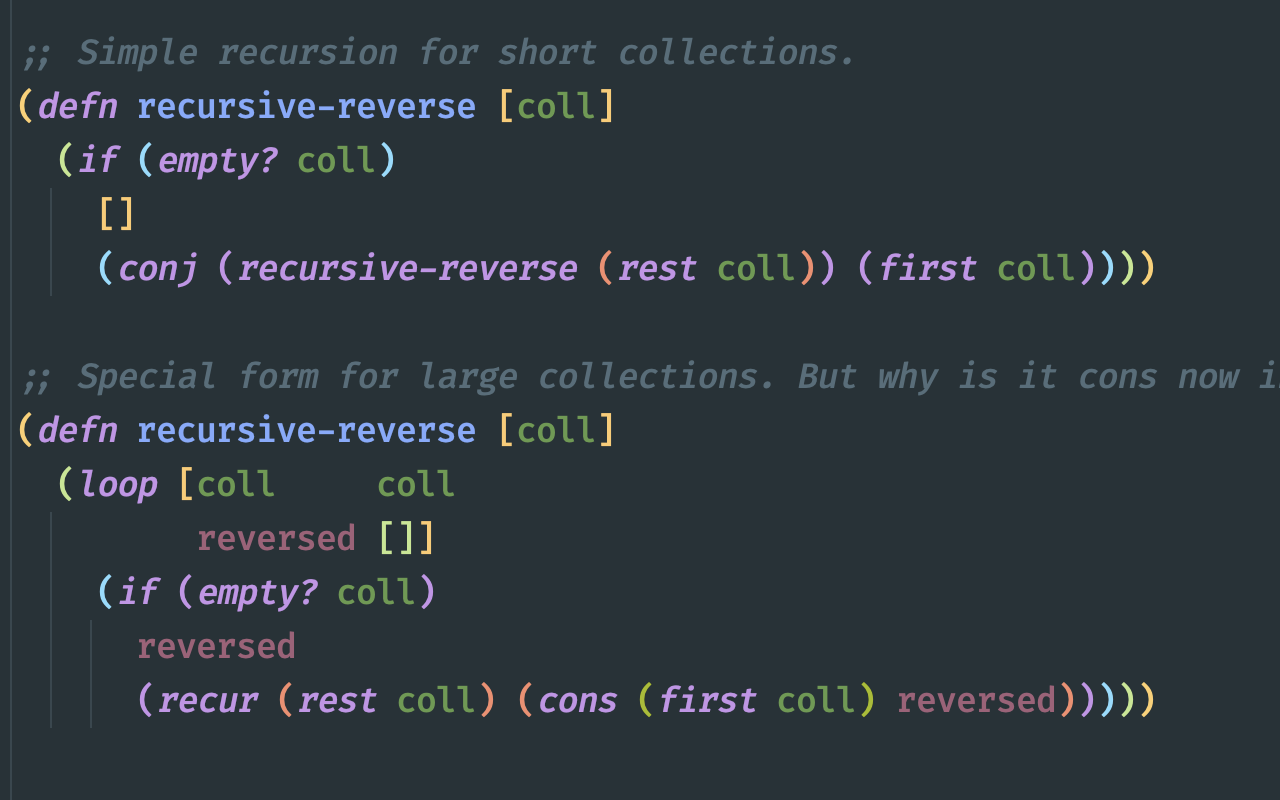
### Clojure
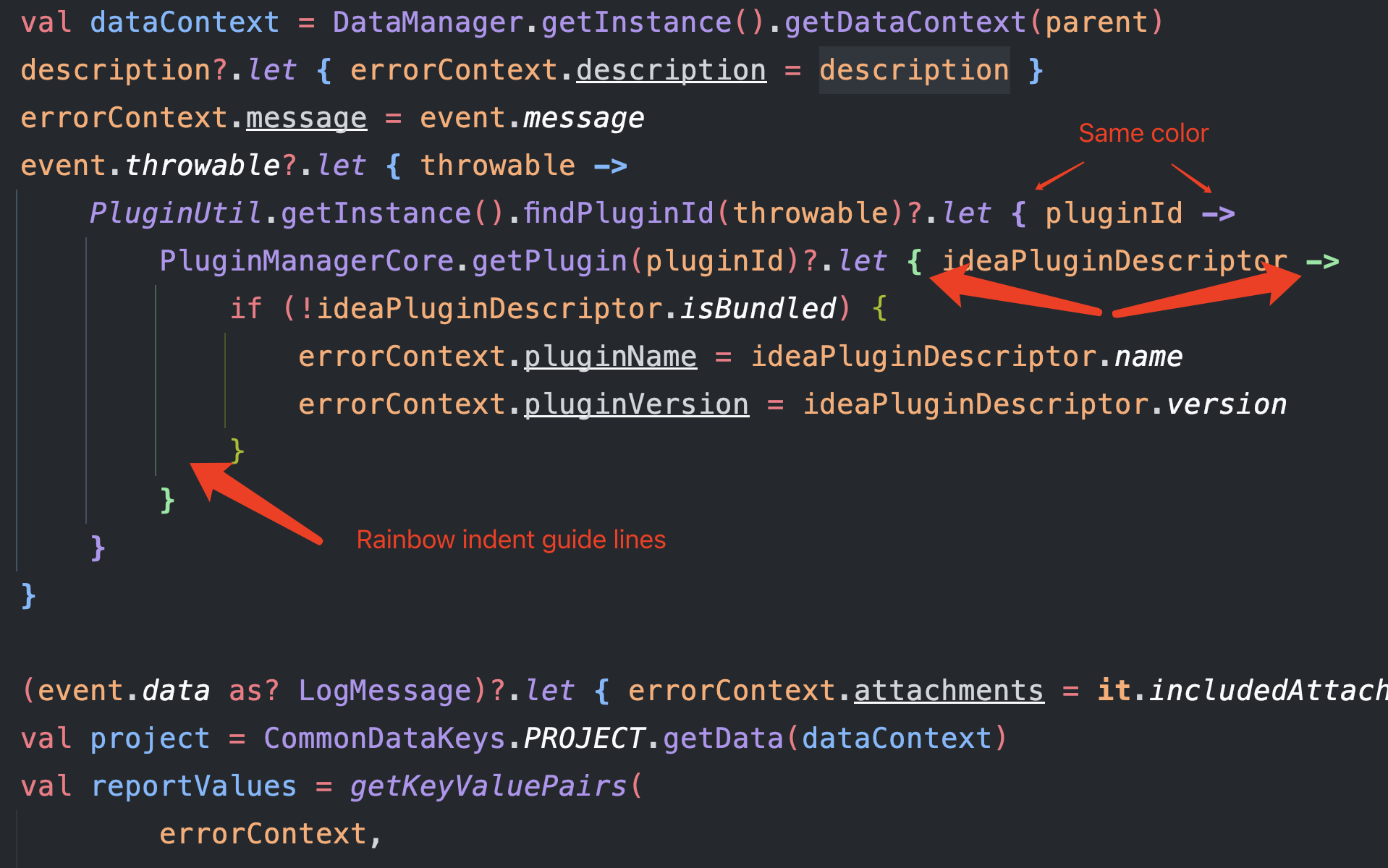
### Kotlin
### HTML/XML
**NOTE: need to turn on the 'Rainbowify tag name' option**

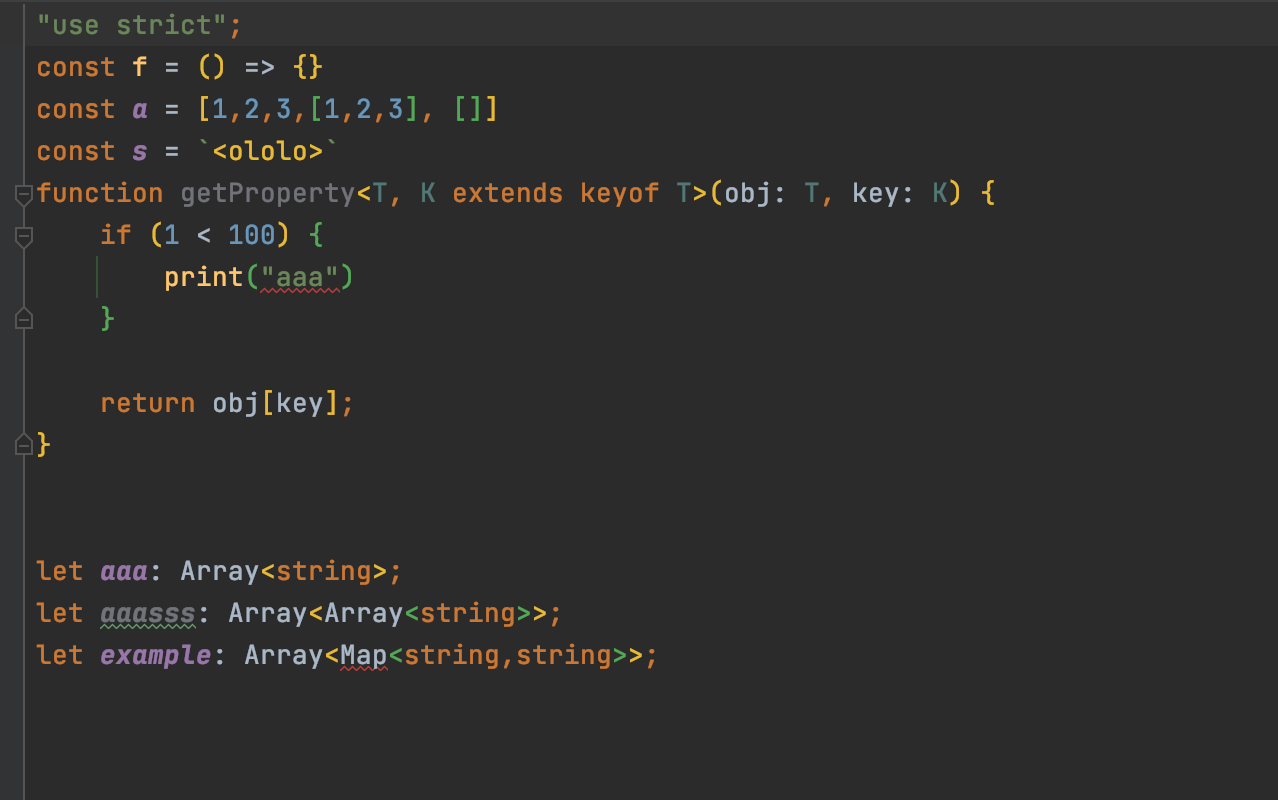
### Javascript & Typescript
**NOTE: need to turn on the 'Rainbowify tag name' option**

### C#

### Dart

### Python


### Pug/Jade

### YAML
To disable rainbowify tags for yaml, please follow: https://github.com/izhangzhihao/intellij-rainbow-brackets/discussions/2639#discussioncomment-6106439
### Indent highlighting
options:
* Focus mode(premium)
* Only selected indent guide(free)
highlighting indent guideline only when you select this indent line

* Only current indent guide(premium)
highlighting indent guide lines for current lines
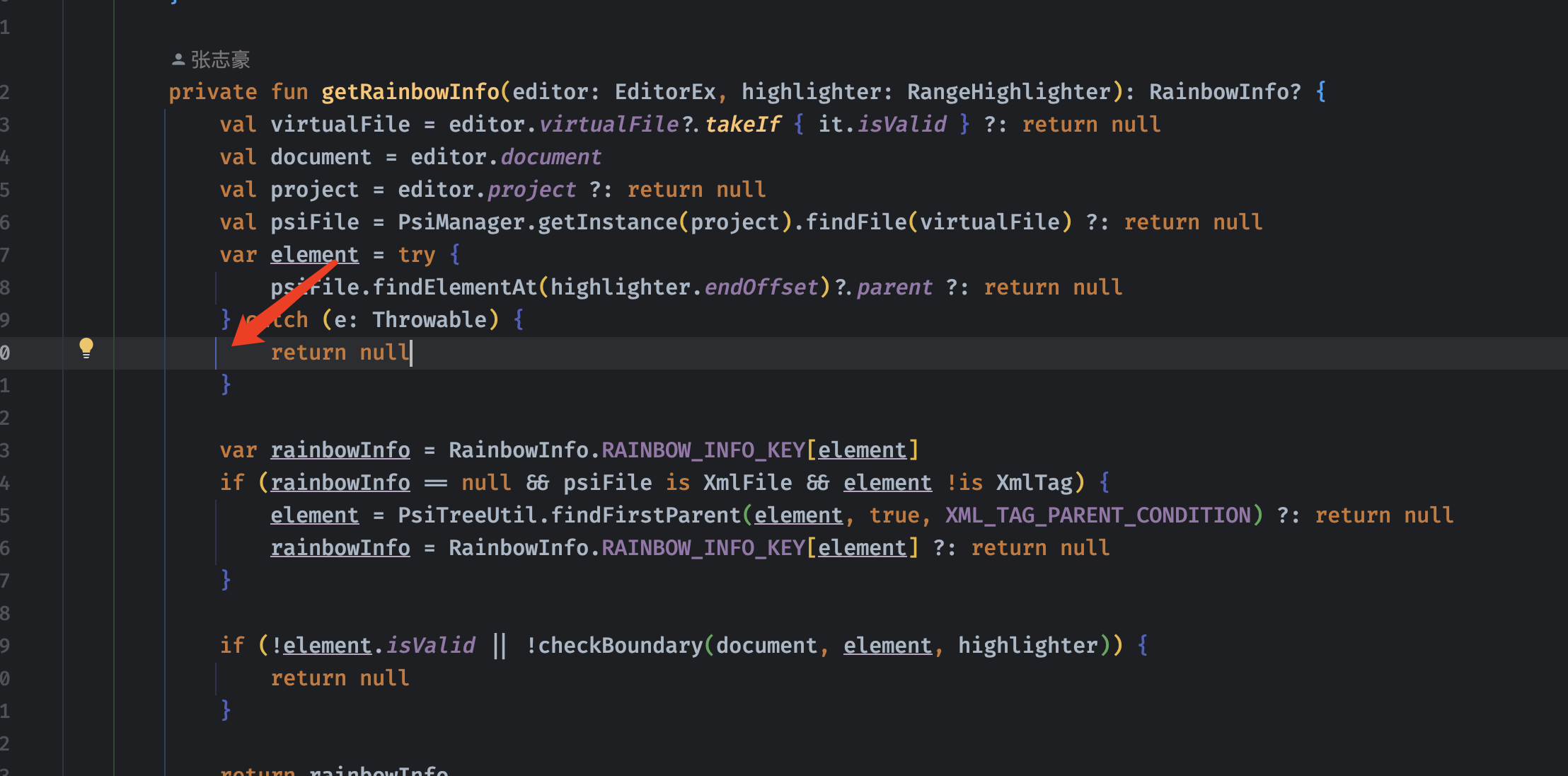
* All indent guide related(premium)
highlighting **all** indent guide lines for current lines

### Scope highlighting
**The highlight effects will not remove after releasing the shortcuts, but press the `ESC` key can do this. You could also config `Press any key to remove the highlighting effect` on the setting page.**
Ctrl + Button3(Windows & Linux) or Meta + Button3(Mac):
NOTE: Button3 means "Secondary Click (click or tap with two fingers)" on Mac os, "Right click" for Windows or Linux.
NOTE: Meta means command on Mac os.


Alt + Button3(Windows & Linux) or option + Button3(Mac):
NOTE: Button3 means "Secondary Click (click or tap with two fingers)" on Mac os, "Right click" for Windows or Linux.


## Customize colors
Settings/Preferences > Editor > Color Scheme > Rainbow Brackets:

## Config the number of colors?
Settings/Preferences > Other Settings > Rainbow Brackets > Color > `Number of colors`: 5 or more
And you can use the color generator and configure your number of colors at the same time.
NOTE: For the default and Darcula color scheme(`Editor -> Color Scheme -> Rainbow Brackets -> Scheme`) the color number is 10, for the other scheme the number is 5, if your number is bigger than the number, you can config them in the config file.
If the color does not exist, we will use the color generator to generate it for you.
## Use the color generator
If you didn't like the built-in colors or want some new colors but don't want to try out and pick colors. Please use the color generator.
Settings/Preferences > Rainbow Brackets > Color > Use color generator
If you turn on this option, we will auto-generate some colors for you.
### Advanced options for color generator

```hue``` – Controls the hue of the generated color. You can pass a string representing a color name: ```red```, ```orange```, ```yellow```, ```green```, ```blue```, ```purple```, ```pink``` and ```monochrome``` are currently supported. If you pass a hexidecimal color string such as ```#00FFFF```, the color generator will extract its hue value and use that to generate colors.
```luminosity``` – Controls the luminosity of the generated color. You can specify a string containing ```bright```, ```light``` or ```dark```.
## Config file path
If you want to customize the advanced configuration, you could edit the config file and then restart your IDE.
The config file path is in `APP_CONFIG/rainbow_brackets.xml`.
In MAC OS env maybe like `~/Library/Preferences/IntelliJIdea2020.2/options/rainbow_brackets.xml`.
If you are using the ToolBox, then it will be like `~/Library/ApplicationSupport/JetBrains/IntelliJIdea2020.2/options/rainbow_brackets.xml`
In Linux env maybe like `~/.IntelliJIdea/config/options/rainbow_brackets.xml`.
In Windows env maybe like `C:\Users\izhangzhihao\.IntelliJIdea2020.2\config\options\rainbow_brackets.xml`.
## JSX support
To enable rainbow brackets for JSX like this:
```javascript
var html = '
```
This plugin will automatically override color scheme property "HTML_CODE" [cause our rainbow color been covered by intellij built-in functionality](https://intellij-support.jetbrains.com/hc/en-us/community/posts/360000117450-My-HighlightVisitor-been-covered-by-intellij-built-in-functionality).
You still could set Settings/Preferences > Other Settings > Rainbow Brackets > Language Specific > Rainbowify JSX in the config file to disable.
## Kotlin function literal braces and arrow
To enable rainbow brackets for multiple-level lambda Kotlin code like this:
```kotlin
event.throwable?.let { throwable ->
IdeErrorsDialog.findPluginId(throwable)?.let { pluginId ->
PluginManager.getPlugin(pluginId)?.let { ideaPluginDescriptor ->
if (!ideaPluginDescriptor.isBundled) {
bean.pluginName = ideaPluginDescriptor.name
bean.pluginVersion = ideaPluginDescriptor.version
}
}
}
}
```
This plugin will automatically override the color scheme property "KOTLIN_FUNCTION_LITERAL_BRACES_AND_ARROW" cause our rainbow color is being covered by the Kotlin plugin's built-in functionality.
You still could set Settings/Preferences > Other Settings > Rainbow Brackets > Language Specific > Rainbowify Kotlin function literal braces and arrow in the config page to disable.
## Disable rainbow brackets for specific languages
Settings/Preferences > Other Settings > Rainbow Brackets > `Do NOT rainbowify these languages (name or extension, comma separated)`:
NOTE: You can use **name** of language or **extension** of file name(The names should be **lowercase**).
## Support Us
You can support us by the following actions:
* [Buy a license](https://plugins.jetbrains.com/plugin/10080-rainbow-brackets/pricing#tabs)
* Star this project
* Share this plugin with your friends
* Rate this plugin on [JetBrains plugin repository](https://plugins.jetbrains.com/plugin/10080-rainbow-brackets)
* Report bugs
* Tell us your ideas
* [Buy Me a Coffee](https://buymeacoffee.com/rainbowbrackets)
## Rainbow Brackets Lite
This repo is used to compile a fully free version of our product for the community to use. This is because some users do not need the paid features and do not want to constantly update their software. An open-source, entirely free, and stable version is a good option for these users.
I believe this will benefit both the community and our team. The community will have access to a free version of our software, and our team will continue to receive support from those who appreciate and value the paid features.
Please download the Lite version [here](https://plugins.jetbrains.com/plugin/20710).
**NOTE: If you need C# or C++ support in Rider IDE, these features are only available in the paid version. The Lite version does not include them. Upgrade to the paid version for full functionality**
## Acknowledgements
Intellij-rainbow-brackets is heavily inspired by [Rainbow Brackets for Visual Studio Code](https://marketplace.visualstudio.com/items?itemName=2gua.rainbow-brackets)