https://github.com/izzypt/interview_exercise_django
Repo to store exercise solution
https://github.com/izzypt/interview_exercise_django
Last synced: 19 days ago
JSON representation
Repo to store exercise solution
- Host: GitHub
- URL: https://github.com/izzypt/interview_exercise_django
- Owner: izzypt
- Created: 2023-02-07T22:46:15.000Z (over 3 years ago)
- Default Branch: main
- Last Pushed: 2023-03-15T11:55:41.000Z (over 3 years ago)
- Last Synced: 2025-03-04T15:48:01.871Z (over 1 year ago)
- Language: Python
- Homepage:
- Size: 253 KB
- Stars: 0
- Watchers: 1
- Forks: 0
- Open Issues: 0
-
Metadata Files:
- Readme: README.md
Awesome Lists containing this project
README
# Índice
Índice das tarefas com o processo de resolução passo a passo
- [Task 1](#Task1) - _Start a new Django project using a sqlite database._
- [Task 2](#Task2) - _Create a app and add a Finding model to store the objects described_
- [Task 3](#Task3) - _Create a Django command that retrieves all the findings for a given id and stores them in the database._
- [Task 4](#Task4) - _Create a Django view to list and filter findings._
# Task 1
1 - Criar uma nova directoria para o projecto.
```
>>> mkdir intv_exercise
```
2 - Criar um ambiente virtual para o projecto de forma a manter as dependências isoladas.
```
>>> python -m venv venv
```
3 - Activar ambiente virtual
```
>>> .\venv\Scripts\activate
```
4 - Instalar Django e Django Rest Framework
```
>>> pip install Django
>>> pip install djangorestframework
```
5 - Registar as dependencias instaladas até ao momento num ficheiro chamado "requirements.txt".
```
>>> pip freeze > requirements.txt
```
6 - Iniciar o projecto Django
```
>>> django-admin startproject backend
````
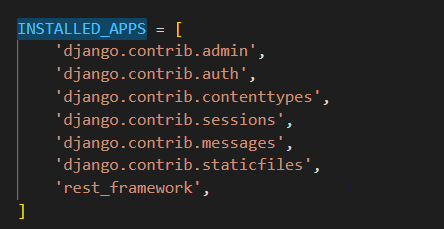
7 - Adicionar 'rest_framework' às ```INSTALLED_APPS``` no ficheiro ```settings.py```
8 - Django vem por padrão com uma BD SQlite nas settings , vamos criar as migrações necessárias para criar as nossa tabelas base
```
>>> python manage.py makemigrations
>>> python manage.py migrate
```
# Task 2
1 - Vamos criar uma nova app dentro do nosso projecto chamada "findings"
```
python .\manage.py startapp findings
```
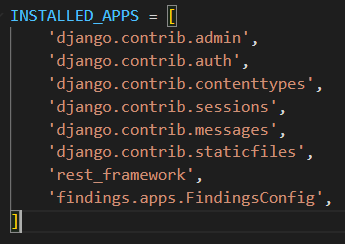
2 - Adicionamos a nova app às ```INSTALLED_APPS```
3 - Dentro da nossa nova app no ficheiro ```models.py``` vamos criar um novo modelo chamado ```FindingsModel```.
Findings são problemas de segurança encontrados durante o scan da app/api.
Cada finding vem com os dados recolhidos durante o scan, uma descrição da vulnerabilidade e uma sugestão de como corrigi-la.
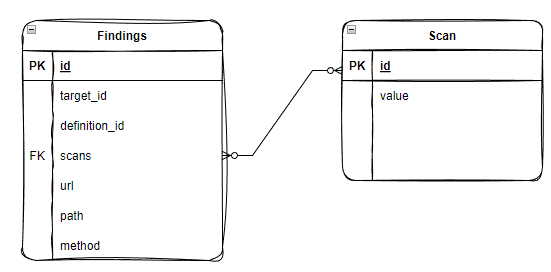
O nosso modelo deve conter :
● id -> The finding id
● target_id -> String (unique Base58 value)
● definition_id -> String (unique Base58 value)
● scans -> Array of strings (unique Base58 value)
● url -> String
● path -> String
● method -> string
O nosso diagrama de UML para o presente modelo, fica assim :
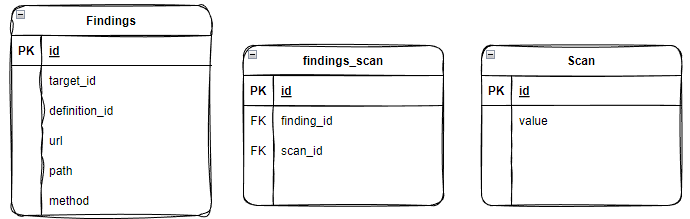
Em alternativa, se o campo "scans" não fosse obrigatório no nosso ```findingsModel```, poderíamos ter criado algo como :
O nosso modelo fica assim:
```
class ScanModel(models.Model):
id = models.AutoField(primary_key=True)
value = models.CharField(max_length=100)
def __str__(self):
return self.value
class FindingsModel(models.Model):
HTTP_METHODS = (
('GET', 'GET'),
('POST', 'POST'),
('PUT', 'PUT'),
('PATCH', 'PATCH'),
('DELETE', 'DELETE'),
)
id = models.AutoField(primary_key=True)
target_id = models.CharField(max_length=100)
definition_id = models.CharField(max_length=100)
scans = models.ManyToManyField(ScanModel)
url = models.URLField()
path = models.CharField(max_length=200)
method = models.CharField(max_length=10, choices=HTTP_METHODS)
def __str__(self):
return self.target_id
```
4 - Fazer as migrações e migrar os nossos novos modelos.
```
>>> python manage.py makemigrations
>>> python manage.py migrate
```
# Task 3
1 - Vamos criar uma nova directoria na nossa app ```findings``` : management/commands.
2 - Criar um novo ficheiro chamado ```get_findings.py``` que servirá como comando para acedermos através do ```manage.py```
3 - Iremos fazer a chamada a API e guardar a resposta na nossa BD:
```
from django.core.management.base import BaseCommand, CommandError
from django.conf import settings
from findings.models import FindingsModel, ScanModel
import requests
import json
class Command(BaseCommand):
help = 'Fetch the API findings from the "List Findings" endpoint'
def add_arguments(self, parser):
parser.add_argument('target_id', type=str, help='The target ID of the scan', default="Tt2f8EyPSTwq")
def handle(self, *args, **kwargs):
target_id = kwargs['target_id']
results = self.make_api_call(target_id)
self.save_to_db(results)
def make_api_call(self, target_id : str) -> dict:
url = f"https://api.probely.com/targets/{target_id}/findings/"
headers = {
"Content-Type": "application/json",
"Authorization": f"JWT {settings.PROBELY_API_KEY}"
}
#Make the request and get the response
response = requests.get(url, headers=headers)
if response.status_code != 200:
raise CommandError(f"Was expecting 200 status code from API, instead got {response.status_code}")
results = response.json().get("results")
return results
def save_to_db(self, results : dict) -> None:
for finding in results:
try:
finding_id = finding.get("id")
target_id = finding["target"].get("id")
definition_id = finding["definition"].get("id")
scans = finding.get("scans", [])
url = finding.get("url")
path = finding.get("path")
method = finding.get("method")
except Exception as e:
raise CommandError(f"Something went wrong while extracting the data from the API response", e)
try:
# Create or retrieve the Scan instances
scan_instances = [ScanModel.objects.get_or_create(value=scan_value)[0] for scan_value in scans]
# Create or retrieve the Finding instance
# get_or_create method returns a tuple of two values:
# (1 - The instance that matches the query, 2 - True/False. A boolean indicating whether the instance was created or not.)
finding, created = FindingsModel.objects.get_or_create(
id=finding_id,
target_id=target_id,
definition_id=definition_id,
url=url,
path=path,
method=method
)
if created:
self.stdout.write(self.style.SUCCESS(f"Successfully created finding {finding.id}"))
else:
self.stdout.write(self.style.WARNING(f"Finding ID {finding.id} already in the database"))
# Update the scans field for the finding
finding.scans.add(*scan_instances)
except Exception as e:
raise CommandError(f"Something went wrong while creating or fetching the finding in the database:", e)
```
# Task 4
1 - Vamos criar os urls, as views e os serializers necessários para servir os dados que guardámos na BD.
2 - No nossa directoria mãe , importamos os url que vamos definir na nossa ```findings``` app.
```
from django.urls import path, include
urlpatterns = [
path('admin/', admin.site.urls),
path('findings/', include('findings.urls')),
]
```
3 - Vamos definir os URLS que acabámos de importar no ficheiro ```urls.py``` da nossa app.
```
from django.urls import path, include
from .views import FindingsList
urlpatterns = [
path('list/', FindingsList.as_view(), name='findings_list'),
]
```
4 - Vamos criar os serializers responsáveis por fazerem parse dos nossos dados no ficheiro ```serializers.py``` dentro da nossa app.
```
from rest_framework import serializers
from findings.models import FindingsModel, ScanModel
class ScanSerializer(serializers.ModelSerializer):
class Meta:
model = ScanModel
fields = ('value',)
def to_representation(self, instance):
# ModelSerializer serializes a model instance to a dictionary-like object, we need to override that behavior because we want to return a string for each scan.
# to_representation allows to define how the object should be serialized and what data should be included in the serialized representation.
return instance.value
class FindingsSerializer(serializers.ModelSerializer):
scans = ScanSerializer(many=True)
class Meta:
model = FindingsModel
fields = ('id', 'definition_id', 'target_id', 'url', 'path', 'method', 'scans')
```
5- Por fim , necessitamos da nossa view que é responsável por lidar com o pedido que for enviado para o caminho especificado:
```
from rest_framework import status
from rest_framework.response import Response
from rest_framework.views import APIView
from findings.models import FindingsModel, ScanModel
from .serializers import FindingsSerializer
# Create your views here.
class FindingsList(APIView):
def get(self, request, format=None):
# Get query parameters if any
definition_id = request.GET.get('definition_id')
scan_value = request.GET.get('scan_value')
# Get all findings
findings = FindingsModel.objects.all()
if definition_id:
findings = findings.filter(definition_id=definition_id)
if scan_value:
findings = findings.filter(scans__value=scan_value)
# Serialize findings and respond
serializer = FindingsSerializer(findings, many=True)
if len(serializer.data) == 0:
return Response({'Message' : 'No content found'},status=status.HTTP_404_NOT_FOUND)
else:
return Response(serializer.data, status=status.HTTP_200_OK)
```