https://github.com/j-mendez/apigen
code generate your cloud functions built for Vercel
https://github.com/j-mendez/apigen
api-generator codegenerator deno vercel-serverless-functions
Last synced: about 1 year ago
JSON representation
code generate your cloud functions built for Vercel
- Host: GitHub
- URL: https://github.com/j-mendez/apigen
- Owner: j-mendez
- License: mit
- Created: 2021-11-04T22:43:36.000Z (over 4 years ago)
- Default Branch: main
- Last Pushed: 2021-11-09T23:52:15.000Z (over 4 years ago)
- Last Synced: 2025-02-23T07:22:56.583Z (about 1 year ago)
- Topics: api-generator, codegenerator, deno, vercel-serverless-functions
- Language: TypeScript
- Homepage: https://deno.land/x/apigen
- Size: 22.5 KB
- Stars: 1
- Watchers: 2
- Forks: 0
- Open Issues: 0
-
Metadata Files:
- Readme: README.md
- License: LICENSE
Awesome Lists containing this project
README
# apigen
Auto generate api routes for development and production. Use mocks to build api routes for local envs. Works perfect for next.js and deno. The fastest way to build your API and test with confidence. Generate over 10k different lambdas in seconds.
## Getting Started
Make sure to create a mocks and a schemas directory. Check out the schema section to learn how to build your api. The idea is that the api routes are always checked in `.gitignore` and set at the build level for systems. Its better to setup the module to be used via script to run with pre-install scripts or pre-build scripts, checkout [build.sh](build.sh) for an example. Make sure to add a environmental(.env) variable named `API_HOST` with the url of your api endpoint. If you want to build a mock api set `API_HOST=localhost` to make all endpoints return mock data. If you need to change the route generation paths use the `API_BUILD_PATH` env variable targeting your location.
```typescript
import { codegen } from "https://deno.land/x/apigen/mod.ts";
// optional param
await codegen({
apiBuildPath: "./src/pages/api",
schemasPath: "./schemas",
mocksPath: "./mocks/",
});
```
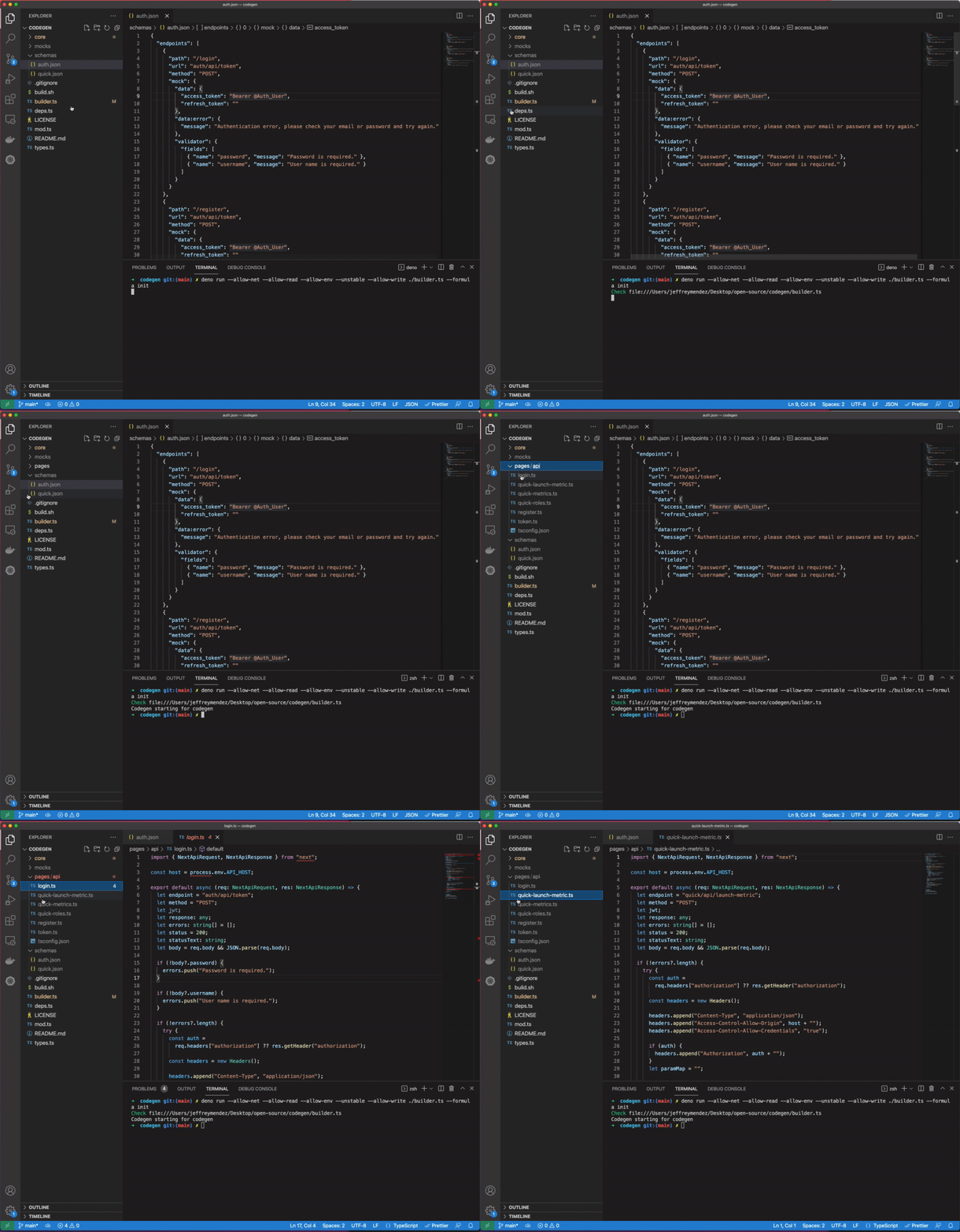
### Configuration
Json files named of the lambda functions that you are going to create in the `schemasPath` location.
#### Schema
The formats you can use to generate your api are json, csv, and xml.
If you use xml you need to start deno using `--allow-net='api.factmaven.com`.
Your best option is to use json.
```json
{
"endpoints": [
{
"path": "/login",
"url": "auth/api/token",
"method": "POST",
"mock": {
"data": {
"access_token": "Bearer @Something",
"refresh_token": ""
},
"data:error": {
"message": "Authentication error, please check your email or password and try again."
},
"validator": {
"fields": [
{ "name": "password", "message": "Password is required." },
{ "name": "username", "message": "User name is required." }
]
}
}
}
]
}
```
#### Mocks
In order to import a mock add `@import filename` under the `mock.data` key and replace filename with the mock path in the mocks folder. Mocks at the moment are only supported in json format for file type.
```json
[
{
"id": "0",
"name": "John",
"email": "something@email.com"
}
]
```
## CLI
command line args
`--apiBuildPath`
path to create lambda routes
`--apiSchemasPath`
path of schemas to read
`--apiMocksPath`
path of mocks to read
`--formula` :options (init)
## Env Variables
set `DENO_RUNTIME` to true in order to output deno runtime lambdas.
1. API_HOST
1. API_BUILD_PATH
1. API_SCHEMAS_PATH
1. API_MOCKS_PATH
1. DENO_RUNTIME
## Languages/Support
1. Deno
1. Node
1. Vercel/Next.js
1. Rust - Todo
## Vercel Building Example
If you want to pre-build your routes easily copy the `build.sh` script and add the following to your `package.json`
```json
{
"prebuild": "sh ./build.sh $NODE_ENV"
}
```