https://github.com/jackett/jackett
API Support for your favorite torrent trackers
https://github.com/jackett/jackett
api couchpotato duckietv hacktoberfest indexer jackett lidarr medusa mylar3 nefarious newznab proxy radarr rss rss-proxy sickrage sonarr torrent torznab trackers
Last synced: about 1 month ago
JSON representation
API Support for your favorite torrent trackers
- Host: GitHub
- URL: https://github.com/jackett/jackett
- Owner: Jackett
- License: gpl-2.0
- Created: 2015-10-29T16:23:19.000Z (over 10 years ago)
- Default Branch: master
- Last Pushed: 2026-04-25T06:26:17.000Z (3 months ago)
- Last Synced: 2026-04-25T08:39:34.503Z (3 months ago)
- Topics: api, couchpotato, duckietv, hacktoberfest, indexer, jackett, lidarr, medusa, mylar3, nefarious, newznab, proxy, radarr, rss, rss-proxy, sickrage, sonarr, torrent, torznab, trackers
- Language: C#
- Homepage:
- Size: 42.1 MB
- Stars: 15,241
- Watchers: 184
- Forks: 1,497
- Open Issues: 222
-
Metadata Files:
- Readme: README.md
- Contributing: CONTRIBUTING.md
- License: LICENSE
Awesome Lists containing this project
README
# Jackett
[](https://github.com/Jackett/Jackett/issues)
[](https://github.com/Jackett/Jackett/pulls)
[](https://dev.azure.com/jackett/jackett/_build/latest?definitionId=1&branchName=master)
[](https://github.com/Jackett/Jackett/releases/latest)
[](https://hub.docker.com/r/linuxserver/jackett/)
## Table of Contents
1. [Introduction](#introduction)
2. [Supported Systems](#supported-systems)
3. [Supported Trackers](#supported-trackers)
4. [Installation](#installation)
- [Windows Installation](#windows-installation)
- [Linux Installation (AMD x64)](#linux-installation-amd-x64)
- [Linux Installation (ARMv7 or above)](#linux-installation-armv7-or-above)
- [Linux Installation (ARMv6 or below)](#linux-installation-armv6-or-below)
- [macOS Installation](#macos-installation)
- [Docker Installation](#docker-installation)
- [Other Installation Methods](#other-installation-methods)
5. [Uninstallation](#uninstallation)
6. [Configuration](#configuration)
- [Running Behind Reverse Proxy](#running-behind-reverse-proxy)
- [Search Cache](#search-cache)
- [Torznab Cache](#torznab-cache)
- [FlareSolverr Configuration](#configuring-flaresolverr)
- [OMDb Configuration](#configuring-omdb)
7. [API Usage](#api-usage)
- [Torznab Query Syntax](#jackett-torznab-query-syntax)
- [Search Modes and Parameters](#search-modes-and-parameters)
- [Filter Indexers](#filter-indexers)
- [Aggregate Indexers](#aggregate-indexers)
8. [Command Line Options](#command-line-switches)
9. [Building from Source](#building-from-source)
10. [Troubleshooting](#troubleshooting)
11. [Contributing](#contributing)
---
## Introduction
Jackett works as a proxy server that translates queries from applications ([Sonarr](https://github.com/Sonarr/Sonarr), [Radarr](https://github.com/Radarr/Radarr), [SickRage](https://sickrage.github.io/), [CouchPotato](https://couchpota.to/), [Mylar3](https://github.com/mylar3/mylar3), [Lidarr](https://github.com/lidarr/lidarr), [DuckieTV](https://github.com/SchizoDuckie/DuckieTV), [qBittorrent](https://www.qbittorrent.org/), [Nefarious](https://github.com/lardbit/nefarious), [NZBHydra2](https://github.com/theotherp/nzbhydra2), etc.) into tracker-site-specific HTTP queries, parses the HTML or JSON response, and sends results back to the requesting software.
**What Jackett does:**
- Acts as a bridge between your apps and torrent trackers
- Provides recent uploads (similar to RSS feeds)
- Performs searches across multiple trackers
- Returns results in a standardized format (Torznab/TorrentPotato)
**Key Features:**
- Single repository of maintained indexer scraping and translation logic
- Removes the burden of tracker integration from other applications
- Supports public, semi-private and private trackers
- Implements the [Torznab](https://torznab.github.io/spec-1.3-draft/index.html) and [TorrentPotato](https://github.com/RuudBurger/CouchPotatoServer/wiki/Couchpotato-torrent-provider) APIs
### Developer Information
This project is recruiting development help. If you can help out please [contact us](https://github.com/Jackett/Jackett/issues/8180).
For detailed troubleshooting and contributing guidelines, please see [CONTRIBUTING.md](https://github.com/Jackett/Jackett/blob/master/CONTRIBUTING.md)
A third-party Golang SDK for Jackett is available from [webtor-io/go-jackett](https://github.com/webtor-io/go-jackett)
**Note:** The Discord server is no longer maintained. If you have a problem, request, or question, please open a new issue on [GitHub](https://github.com/Jackett/Jackett/issues).
---
## Supported Systems
The currently supported version of Jackett is **0.24.+**, which is compatible with:
- **Windows:** Windows 10 Version 1607 or greater ([full list](https://github.com/dotnet/core/blob/main/release-notes/9.0/supported-os.md#windows))
- **Linux:** Various distributions ([full list](https://github.com/dotnet/core/blob/main/release-notes/9.0/supported-os.md#linux))
- **macOS:** macOS 13.0+ (Ventura) or greater ([full list](https://github.com/dotnet/core/blob/main/release-notes/9.0/supported-os.md#apple))
Prior versions of Jackett are no longer supported.
#### Supported Trackers
Supported Public Trackers
* ØMagnet
* 1337x
* 52BT
* ACG.RIP
* AniLibria
* AniRena
* AniSource
* ApacheTorrent
* arab-torrents.com
* AudioBook Bay (ABB)
* Bangumi Moe
* BigFANGroup
* BlueRoms
* BT.etree
* BTdirectory (BT目录)
* btstate
* Byrutor
* Catorrent
* CrackingPatching
* DaMagNet
* dmhy
* DonTorrent
* E-Hentai
* EBook Bay (EBB)
* Elitetorrent.wf
* EpubLibre
* ExtraTorrent.st
* EZTV
* FileMood
* FilmesHdTorrent
* Free JAV Torrent
* GamesTorrents
* HDRTorrent
* Internet Archive (archive.org)
* kickasstorrents.to
* kickasstorrents.ws
* Knaben
* LimeTorrents
* LinuxTracker
* Mac Torrents Download
* Magnet Cat
* MagnetDownload
* Magnetz
* MegaPeer
* MejorTorrent
* Mikan
* MixTapeTorrent
* MyPornClub
* nekoBT
* NewStudio
* Nipponsei
* NoNaMe Club (NNM-Club)
* Nyaa.si
* OneJAV
* OpenSharing
* PC-torrent
* PandaCD
* plugintorrent
* PornoTorrent
* PornRips
* Postman
* RedeTorrent
* RinTorNeT
* RuTor
* RuTracker.RU
* Sexy-Pics
* Shana Project
* ShowRSS
* SkidrowRepack
* sosulki
* SubsPlease
* sukebei.Nyaa.si
* The Pirate Bay (TPB)
* TheRARBG
* Tokyo Tosho
* Torrent Downloads
* Torrent Oyun indir
* Torrent[CORE]
* torrent.by
* torrent-pirat
* Torrent9
* TorrentDownload
* TorrentGalaxyClone
* TorrentKitty
* TorrentProject2
* TorrentQQ (토렌트큐큐)
* Torrents.csv
* Torrentsome (토렌트썸)
* Torrenttip (토렌트팁)
* U2P
* U3C3
* Uindex
* UzTracker
* VSTHouse
* VST Torrentz
* VSTorrent
* Wolfmax4K
* World-torrent
* XXXClub
* xxxtor
* YTS.ag
* Zamunda RIP
Supported Semi-Private Trackers
* AniDUB
* Anime by Belka (Аниме от Белки)
* Anime Tosho
* AnimeLayer
* Best-Torrents [PAY2DL]
* BitMagnet (Local DHT) [[site](https://github.com/bitmagnet-io/bitmagnet)]
* BookTracker
* BootyTape
* comicat
* Deildu
* Devil-Torrents
* DreamingTree
* DXP (Deaf Experts)
* Electro-Torrent
* Erai-Raws
* Ex-torrenty
* ExKinoRay
* EZTV (login)
* Fenyarnyek-Tracker
* File-Tracker
* Gay-Torrents.net
* HD-CzTorrent [PAY2DL]
* HDGalaKtik
* HellTorrents [PAY2DL]
* HunTorrent
* Hydracker
* Il CorSaRo Blu
* ilDraGoNeRo
* Kinorun
* Kinozal
* LostFilm.tv
* Magnetico (Local DHT) [[site](https://github.com/boramalper/magnetico)]
* Marine Tracker
* Mazepa
* Metal Tracker
* MioBT
* MuseBootlegs (MB)
* MVGroup Forum
* MVGroup Main
* NetHD (VietTorrent)
* New-Team
* NewStudio (login)
* NoNaMe Club (NNM-Club) (login)
* Polskie-Torrenty
* PornoLab
* Postman (login)
* ProPorno
* PussyTorrents
* Rainbow Tracker
* RGFootball
* RinTor
* RiperAM
* RockBox
* RUDUB (ex-BaibaKoTV)
* Rustorka
* RuTracker.org
* seleZen
* Sk-CzTorrent
* SkTorrent-org
* themixingbowl (TMB)
* Toloka
* TorrentMasters
* TrahT
* TribalMixes
* Union Fansub
* UniOtaku
* Ztracker
Supported Private Trackers
* 0day.kiev
* 13City
* 1ptbar
* 3ChangTrai (3CT) [![(invite needed)][inviteneeded]](#)
* 3D Torrents (3DT)
* 4thD (4th Dimension) [![(invite needed)][inviteneeded]](#)
* 52PT
* 720pier
* Abnormal (ABN)
* ABtorrents (ABT + RNS)
* AcrossTheTasman [![(invite needed)][inviteneeded]](#)
* Aftershock
* AGSVPT (Arctic Global Seed Vault)
* Aidoru!Online
* Aither
* alingPT
* AlphaRatio (AR)
* AmigosShareClub (ASC)
* AnimeBytes (AB)
* AnimeTorrents.ro (Anime Torrents Romania)
* AnimeZ (AnimeTorrents)
* AnimeWorld (AW)
* Anthelion (ANT)
* Araba Fenice (Phoenix) [![(invite needed)][inviteneeded]](#)
* ArabicSource
* ArabP2P
* ArabScene [![(invite needed)][inviteneeded]](#)
* ArabTorrents [![(invite needed)][inviteneeded]](#)
* AsianCinema
* AsianDVDClub (ADC)
* Audiences
* AudioNews (AN)
* AURA4K
* Aussierul.es [![(invite needed)][inviteneeded]](#)
* AvistaZ (AsiaTorrents)
* Azusa (梓喵) [![(invite needed)][inviteneeded]](#)
* Back-ups
* BakaBT
* baoziPT
* Beload
* Best-Core
* BeyondHD (BHD)
* Bibliotik [![(invite needed)][inviteneeded]](#)
* BigBBS
* BigCore
* Bit-Bázis
* BIT-HDTV
* Bitded
* bitGAMER
* BitHUmen
* Bitpalace
* BitPorn
* BitTorrentFiles
* BiTTuRK
* BJ-Share (BJ) [![(invite needed)][inviteneeded]](#)
* BlueBird
* BlueTorrents
* BlurayTracker
* Blutopia (BLU)
* Borgzelle [![(invite needed)][inviteneeded]](#)
* Boxing Torrents
* Brasil Tracker
* BroadcasTheNet (BTN) [![(invite needed)][inviteneeded]](#)
* BrokenStones [![(invite needed)][inviteneeded]](#)
* BTArg
* BTNext (BTNT) [![(invite needed)][inviteneeded]](#)
* BTSCHOOL
* BWTorrents
* BYRBT
* C411
* cangbaoge (CBG)
* CapybaraBR
* Carpathians
* CarPT
* Cathode-Ray.Tube (CRT)
* CeskeForum
* CGPeers [![(invite needed)][inviteneeded]](#)
* CHDBits [![(invite needed)][inviteneeded]](#)
* ChileBT
* Cinemageddon [![(invite needed)][inviteneeded]](#)
* CinemaMovieS_ZT
* Cinematik
* CinemaZ (EuTorrents)
* ClearJAV
* Coastal-Music-Crew (C-M-C)
* ConCen (Conspiracy Central) [![(invite needed)][inviteneeded]](#)
* Concertos
* CrabPT (蟹黄堡)
* CrazySpirits
* CrnaBerza
* cspt (财神)
* cyanbug (大青虫)
* CyclingArchiveClub [![(invite needed)][inviteneeded]](#)
* CZTeam
* Darkpeers
* Das Unerwartete (D-U)
* DataScene (DS)
* DesiGaane (DG) [![(invite needed)][inviteneeded]](#)
* DesiTorrents
* Diablo Torrent
* DICMusic [![(invite needed)][inviteneeded]](#)
* DigitalCore (DC)
* DimeADozen (EzTorrent)
* DiscFan [![(invite needed)][inviteneeded]](#)
* DocsPedia
* Drugari
* DS-Reloaded
* dubhe (天枢) [![(invite needed)][inviteneeded]](#)
* Ebooks-Shares [![(invite needed)][inviteneeded]](#)
* Empornium (EMP) [![(invite needed)][inviteneeded]](#)
* eMuwarez
* eStone (BigTorrent)
* Exitorrent.org [![(invite needed)][inviteneeded]](#)
* ExoticaZ (YourExotic)
* Explosiv-World (E-W)
* ExtremeBits
* F1Carreras
* F1GP
* FANO.IN [![(invite needed)][inviteneeded]](#)
* Fappaizuri
* FearNoPeer
* Femdomcult
* FileList (FL)
* FinElite (FE) [![(invite needed)][inviteneeded]](#)
* Flood (FLD)
* Free Farm (自由农场)
* FunFile (FF)
* FunkyTorrents (FT) [![(invite needed)][inviteneeded]](#)
* funZone
* FutureTorrent [PAY2DL]
* Fuzer (FZ)
* G3MINI TR4CK3R
* GAYtorrent.ru
* GazelleGames (GGn)
* Generation-Free
* GGPT
* GigaTorrents
* GimmePeers (formerly ILT) [PAY2DL]
* GiroTorrent
* GreatPosterWall (GPW)
* HaiDan
* Hǎitáng (海棠PT)
* HappyFappy (HF)
* Hawke-uno (HUNO)
* HD Dolby [![(invite needed)][inviteneeded]](#)
* HD Zero
* HD-Club
* HD-Forever (HDF)
* HD-Olimpo [![(invite needed)][inviteneeded]](#)
* HD-Only (HDO)
* HD-Space (HDS)
* HD-Torrents (HDT)
* HD-UNiT3D
* HDArea (HDA)
* HDBao
* HDBits [![(invite needed)][inviteneeded]](#)
* HDCiTY (HDC)
* HDClone
* HDFans
* HDHome [![(invite needed)][inviteneeded]](#)
* HDKylin (麒麟)
* HDRoute [![(invite needed)][inviteneeded]](#)
* HDSky [![(invite needed)][inviteneeded]](#)
* HDtime
* HDTorrents.it [PAY2DL]
* HDTurk
* HDU
* HDVideo
* Hebits (HB)
* HellasHut
* HELLENIC-HD
* HeroBit
* HHanClub
* HHD
* House of Devil
* HQMusic
* HUDBT (蝴蝶) [![(invite needed)][inviteneeded]](#)
* HxPT (好学) [![(invite needed)][inviteneeded]](#)
* ImmortalSeed (iS)
* Immortuos
* Indietorrents [![(invite needed)][inviteneeded]](#)
* INFINITY [PAY2DL] [![(invite needed)][inviteneeded]](#)
* InfinityHD
* Infire
* Insane Tracker
* IPTorrents (IPT)
* ItaTorrents
* JME-REUNIT3D
* JPopsuki
* JPTV4us
* KamePT [![(invite needed)][inviteneeded]](#)
* Karagarga [![(invite needed)][inviteneeded]](#)
* Keep Friends (FRDS-PT) [![(invite needed)][inviteneeded]](#)
* Kelu [![(invite needed)][inviteneeded]](#)
* Korsar [![(invite needed)][inviteneeded]](#)
* KrazyZone
* Kufei (库非)
* Kufirc
* Kunlun (昆仑)
* lajidui
* Last Digital Underground (LDU)
* LastFiles (LF)
* Lat-Team
* Le Saloon [![(invite needed)][inviteneeded]](#)
* LearnFlakes
* Leech24
* LemonHD.net
* LetSeed
* Libble
* LibraNet (LN)
* LinkoManija
* Locadora
* LongPT
* LosslessClub [![(invite needed)][inviteneeded]](#)
* LP-Bits 2.0
* LST
* LuckPT [![(invite needed)][inviteneeded]](#)
* Luminarr
* M-Team - TP (MTTP) [![(invite needed)][inviteneeded]](#)
* MaDs Revolution
* Majomparádé (TurkDepo)
* Making Off
* Malayabits
* Mansão dos Animes (MDAN)
* March [![(invite needed)][inviteneeded]](#)
* Matrix
* MeseVilág (Fairytale World)
* MetalGuru [![(invite needed)][inviteneeded]](#)
* MidnightScene
* Milkie (ME)
* Milnueve
* MMA-Torrents [![(invite needed)][inviteneeded]](#)
* MNV (Max-New-Vision)
* MOJBLiNK
* MomentPT [![(invite needed)][inviteneeded]](#)
* MonikaDesign (MDU)
* MoreThanTV (MTV) [![(invite needed)][inviteneeded]](#)
* MouseBits
* Musopia (音乐乌托邦)
* Muxuege [![(invite needed)][inviteneeded]](#)
* MyAnonamouse (MAM)
* MySpleen [![(invite needed)][inviteneeded]](#)
* NanyangPT (南洋) [![(invite needed)][inviteneeded]](#)
* NCore
* Nebulance (NBL) (TransmiTheNet)
* NewHeaven (TorrentHeavenResurrection) [![(invite needed)][inviteneeded]](#)
* Nexum
* NicePT
* Nirvana
* njtupt (浦园)) [![(invite needed)][inviteneeded]](#)
* NOBS (NUCLEAR ORDER BIT SYNDICATE)
* NorBits
* NordicBytes
* NORDiCHD
* NordicQuality
* Nostradamus
* NovaHD
* OKPT
* Old Greek Tracker (OGT)
* Old Toons World (OTW)
* OpenCD [![(invite needed)][inviteneeded]](#)
* Orpheus
* OnlyEncodes+
* OshenPT
* OurBits (HDPter)
* P2PBG [PAY2DL]
* Panda
* Party-Tracker
* PassThePopcorn (PTP) [![(invite needed)][inviteneeded]](#)
* Peeratiko
* Peers.FM
* Phoenix Project
* PigNetwork (猪猪网)
* PixelCove (Ultimate Gamer)
* PiXELHD (PxHD) [![(invite needed)][inviteneeded]](#)
* PlayletPT [![(invite needed)][inviteneeded]](#)
* Podzemlje
* Polish Torrent (PTT)
* PolishTracker [![(invite needed)][inviteneeded]](#)
* Pornbay [![(invite needed)][inviteneeded]](#)
* PornBytes
* Portugas
* Pretome
* PrivateHD (PHD)
* ProAudioTorrents (PAT)
* PT GTK
* PT分享站 (itzmx)
* PTCafe (咖啡)
* PTCC (我的PT)
* PTerClub (PT之友俱乐部)
* PTFans
* PTFiles (PTF)
* PThome [![(invite needed)][inviteneeded]](#)
* PTLAO
* PTLGS [![(invite needed)][inviteneeded]](#)
* PTSBAO (烧包) [![(invite needed)][inviteneeded]](#)
* PTSKIT
* PTTey [![(invite needed)][inviteneeded]](#)
* PTtime
* PTYING (樱花)
* PTzone
* Punk's Horror Tracker
* PuntoTorrent [![(invite needed)][inviteneeded]](#)
* PuTao (葡萄)
* PWTorrents (PWT)
* Qingwa (青蛙)
* R3V WTF! [![(invite needed)][inviteneeded]](#)
* Racing4Everyone (R4E)
* RacingForMe (RFM)
* RailgunPT
* Rain (雨)
* Rastastugan
* Red Star Torrent (RST) [![(invite needed)][inviteneeded]](#)
* Redacted (PassTheHeadphones)
* ReelFlix (HD4Free,LegacyHD)
* RetroFlix
* RetroMoviesClub (RMC)
* RetroToon
* RevolutionTT [![(invite needed)][inviteneeded]](#)
* RocketHD
* Romanian Metal Torrents (RMT)
* RoTorrent (ROT)
* Rousi.pro
* RunTheFrames
* SAMARITANO
* SBPT
* SceneHD [![(invite needed)][inviteneeded]](#)
* SceneRush [![(invite needed)][inviteneeded]](#)
* SceneTime
* Secret Cinema
* SeedFile (SF)
* seedpool
* SewerPT (下水道) [![(invite needed)][inviteneeded]](#)
* SexTorrent
* Shadowbit
* ShaKaw [![(invite needed)][inviteneeded]](#)
* Shareisland
* Shazbat
* SiamBIT [PAY2DL]
* Siqi
* SkipTheCommercials
* SnowPT (SSPT)
* SoulVoice (聆音Club) [![(invite needed)][inviteneeded]](#)
* SpeedApp (SceneFZ, XtreMeZone / MYXZ, ICE Torrent)
* SpeedCD
* Speedmaster HD [![(invite needed)][inviteneeded]](#)
* Spirit of Revolution [![(invite needed)][inviteneeded]](#)
* SportsCora
* SportsCult
* SpringSunday (SSD) [![(invite needed)][inviteneeded]](#)
* SugoiMusic
* SunnyPT [![(invite needed)][inviteneeded]](#)
* Superbits (SBS)
* Swarmazon
* TangPT (躺平)
* Tapochek
* Tasmanit
* Team CT Game (TCTG)
* TeamFlix
* TeamHD
* TeamOS
* TEKNO3D [![(invite needed)][inviteneeded]](#)
* The Brothers
* The Crazy Ones
* The Empire (TE)
* The Falling Angels (TFA)
* The Geeks
* The Kitchen (TK)
* The New Retro
* The Occult (TO)
* The Old School (TOS)
* The Paradiese
* The Place (TP)
* The Show (TSBZ)
* The Vault (TVBZ)
* The-New-Fun
* TheLeachZone (TLZ)
* TJUPT (北洋园PT)
* TLFBits [![(invite needed)][inviteneeded]](#)
* TmGHuB (TH) [![(invite needed)][inviteneeded]](#)
* Toca Share
* Tormac
* Tornado
* Torr9
* Torrent Heaven (Dutch)
* Torrent Network (TN)
* Torrent Trader [![(invite needed)][inviteneeded]](#)
* Torrent-Syndikat [![(invite needed)][inviteneeded]](#)
* TOrrent-tuRK (TORK)
* Torrent.LT
* TorrentBD
* TorrentBytes (TBy) [![(invite needed)][inviteneeded]](#)
* TorrentCCF (TCCF)
* TorrentClaw [![(invite needed)][inviteneeded]](#)
* TorrentDay (TD)
* TorrentDD (TodayBit)
* Torrenteros (TTR)
* TorrentHR
* Torrenting (TT)
* TorrentLeech (TL)
* TorrentLeech.pl [![(invite needed)][inviteneeded]](#)
* ToTheGlory (TTG) [![(invite needed)][inviteneeded]](#)
* TrackerMK
* TrackerZero [PAY2DL]
* TranceTraffic
* Trellas (Magico) [![(invite needed)][inviteneeded]](#)
* TreZzoR
* TurkSeed (Aturk)
* TurkTorrent (TT) [PAY2DL]
* TVstore
* U2 (U2分享園@動漫花園) [![(invite needed)][inviteneeded]](#)
* UBits
* UltraHD
* Ultrabits
* UnlimitZ
* upload.cx (ULCX)
* Upscale Vault
* UTOPIA
* Vault network
* VietMediaF
* White Angel
* WinterSakura [![(invite needed)][inviteneeded]](#)
* World-In-HD [![(invite needed)][inviteneeded]](#)
* World-of-Tomorrow [![(invite needed)][inviteneeded]](#)
* Xingtan (杏坛) [![(invite needed)][inviteneeded]](#)
* Xingwan (星湾) [![(invite needed)][inviteneeded]](#)
* Xingyung (星陨阁) [![(invite needed)][inviteneeded]](#)
* xloli (ilolicon PT)
* XSpeeds (XS)
* xTorrenty [![(invite needed)][inviteneeded]](#)
* XtremeBytes (TorrentSurf)
* XWT-Classics
* XWTorrents (XWT)
* YUSCENE
* Zappateers
* Zenith [![(invite needed)][inviteneeded]](#)
* ZmPT (织梦)
* ZRPT (自然) [![(invite needed)][inviteneeded]](#)
**Note:** Trackers marked with [![(invite needed)][inviteneeded]](#) have no active maintainer and may be broken or missing features. If you have an invite, please send it to `jacketttest [at] gmail [dot] com` or `garfieldsixtynine [at] gmail [dot] com` to help improve these indexers.
---
## Installation
### Windows Installation
#### Method 1: Using the Installer (Recommended)
**Prerequisites:**
- Windows 10 Version 1607 or newer
- Administrator privileges
- .NET prerequisites ([check here](https://learn.microsoft.com/en-us/dotnet/core/install/windows#net-installer))
**Installation Steps:**
1. Download the latest version of the [Windows installer](https://github.com/Jackett/Jackett/releases/latest/download/Jackett.Installer.Windows.exe)
2. Run the `Jackett.Installer.Windows.exe` program
3. When prompted for permission to make changes to your computer, click "Yes"
4. During installation:
- Check "Install as Windows Service" if you want Jackett to start automatically with Windows
- Check "Launch Jackett" to open Jackett after installation completes
5. Click "Install" and wait for the installation to finish
6. Double-click the Jackett tray icon, or navigate your web browser to `http://127.0.0.1:9117`
7. You are now ready to begin adding trackers
**Service Management:**
- When installed as a service, the tray icon acts as a way to open, start, or stop Jackett
- If not installed as a service, Jackett will run its web server from the tray tool
#### Method 2: Manual Installation
1. Download the [zipped version](https://github.com/Jackett/Jackett/releases/latest/download/Jackett.Binaries.Windows.zip)
2. Extract to your preferred location (e.g., `C:\ProgramData\Jackett`)
3. Run `JackettConsole.exe` to start Jackett
4. Navigate your web browser to `http://127.0.0.1:9117`
**Running from Command Line:**
You can run Jackett from the command line to see log messages. Use `JackettConsole.exe` (for Command Prompt), found in the Jackett data folder: e.g. `%ProgramData%\Jackett`. Ensure the server is not already running from the tray or service.
---
### Linux Installation (AMD x64)
This section covers installation on most common Linux distributions including Ubuntu, Linux Mint, Debian, Fedora, and others.
**Prerequisites:**
- Most operating systems include all required dependencies
- If dependencies are missing, refer to [.NET Required Packages](https://github.com/dotnet/core/blob/main/release-notes/9.0/os-packages.md)
#### Method 1: One-Command Installation (Easiest)
Copy and paste this command into your terminal:
```bash
cd /opt && wget -O - -o /dev/stderr https://github.com/Jackett/Jackett/releases/latest/download/Jackett.Binaries.LinuxAMDx64.tar.gz | sudo tar -xz && cd Jackett* && sudo chown $(whoami):$(id -g) -R "/opt/Jackett" && sudo ./install_service_systemd.sh && systemctl status jackett.service && cd - && echo -e "\nVisit http://127.0.0.1:9117"
```
#### Method 2: Step-by-Step Installation
1. Download and extract the latest release:
```bash
cd /opt
wget -O - -o /dev/stderr https://github.com/Jackett/Jackett/releases/latest/download/Jackett.Binaries.LinuxAMDx64.tar.gz | sudo tar -xz
```
2. Set proper ownership:
```bash
sudo chown -R $(whoami):$(id -g) /opt/Jackett
```
3. Install as a service:
```bash
cd /opt/Jackett
sudo ./install_service_systemd.sh
```
4. Check service status:
```bash
systemctl status jackett.service
```
5. Navigate your web browser to `http://127.0.0.1:9117`
#### Running Without Installing as a Service
1. Download and extract the latest `Jackett.Binaries.LinuxAMDx64.tar.gz` release from the [releases](https://github.com/Jackett/Jackett/releases/latest) page
2. Open a Terminal and `cd` to the `Jackett` folder
3. Run Jackett with the command `./jackett`
#### Service Management Commands
```bash
# Start Jackett
systemctl start jackett.service
# Stop Jackett
systemctl stop jackett.service
# Restart Jackett
systemctl restart jackett.service
# Check status
systemctl status jackett.service
```
**Logs Location:** `~/.config/Jackett/log.txt`
**View Logs:** `journalctl -u jackett.service`
#### Home Directory Configuration
If you want to run Jackett with a user without a `/home` directory, add this line to your systemd file:
```text
Environment=XDG_CONFIG_HOME=/path/to/folder
```
This folder will be used to store configuration files.
---
### Linux Installation (ARMv7 or above)
For modern ARM-based systems (Raspberry Pi, etc.)
**Prerequisites:**
- Most operating systems include all required dependencies
- If dependencies are missing, refer to [.NET Required Packages](https://github.com/dotnet/core/blob/main/release-notes/9.0/os-packages.md)
#### Installing as a Service
1. Download the appropriate release:
- For 32-bit ARM (most common): `Jackett.Binaries.LinuxARM32.tar.gz`
- For 64-bit ARM: `Jackett.Binaries.LinuxARM64.tar.gz`
```bash
cd /opt
wget -O - -o /dev/stderr https://github.com/Jackett/Jackett/releases/latest/download/Jackett.Binaries.LinuxARM32.tar.gz | sudo tar -xz
```
2. Install as a service:
```bash
cd /opt/Jackett
sudo ./install_service_systemd.sh
```
3. The service will start on each login. Manage it using:
```bash
# Start Jackett
systemctl start jackett.service
# Stop Jackett
systemctl stop jackett.service
# Restart Jackett
systemctl restart jackett.service
# Check status
systemctl status jackett.service
```
1. Download and extract the latest `Jackett.Binaries.LinuxARM32.tar.gz` or `Jackett.Binaries.LinuxARM64.tar.gz` release from the [releases](https://github.com/Jackett/Jackett/releases/latest) page
2. Open a Terminal and `cd` to the `Jackett` folder
3. Run Jackett with the command `./jackett`
---
### Linux Installation (ARMv6 or below)
For legacy ARM systems.
**Prerequisites:**
1. Install Mono 5.10 or newer (latest stable release recommended):
- Follow instructions on the [Mono website](http://www.mono-project.com/download/#download-lin)
- Install `mono-devel` and `ca-certificates-mono` packages
- On Red Hat/CentOS/openSUSE/Fedora, also install `mono-locale-extras`
2. Install libcurl:
- Debian/Ubuntu: `apt-get install libcurl4-openssl-dev`
- Redhat/Fedora: `yum install libcurl-devel`
- For other distributions, see the [Curl documentation](http://curl.haxx.se/dlwiz/?type=devel)
3. Download and extract the latest `Jackett.Binaries.Mono.tar.gz` from the [releases page](https://github.com/Jackett/Jackett/releases/latest)
4. Run Jackett using Mono:
```bash
mono --debug JackettConsole.exe
```
5. (Optional) To install as a service:
```bash
sudo ./install_service_systemd_mono.sh
```
**Important Notes:**
- Mono must be compiled with the Roslyn compiler (default)
- Using MCS will cause "An error has occurred" errors (see [issue #2704](https://github.com/Jackett/Jackett/issues/2704))
- For users without a `/home` directory, add `Environment=XDG_CONFIG_HOME=/path/to/folder` to your systemd file
---
### macOS Installation
**Prerequisites:**
- macOS 13.0+ (Ventura) or greater
#### Installing as a Service
1. Download the appropriate release:
- Intel (x86): `Jackett.Binaries.macOS.tar.gz`
- Apple silicon (ARM): `Jackett.Binaries.macOSARM64.tar.gz`
Get the latest release from the [releases page](https://github.com/Jackett/Jackett/releases/latest)
2. Extract the downloaded file
3. Open the extracted folder and double-click on `install_service_macos`
4. If installation is successful, close the Terminal window
5. Navigate your web browser to `http://127.0.0.1:9117`
**Service Management:**
The service will start on each login. You can control it using:
```bash
# Stop Jackett
launchctl unload ~/Library/LaunchAgents/org.user.Jackett.plist
# Start Jackett
launchctl load ~/Library/LaunchAgents/org.user.Jackett.plist
```
**Logs Location:**
- `~/.config/Jackett/log.txt`
- `/Users/your-user-name/Library/Application Support/Jackett/log.txt`
#### Running Without Installing as a Service
1. Download and extract the latest `Jackett.Binaries.macOS.tar.gz` or `Jackett.Binaries.macOSARM64.tar.gz` release from the [releases](https://github.com/Jackett/Jackett/releases/latest) page
2. Open Terminal and navigate to the Jackett folder
3. Run Jackett with the command `./jackett`
---
### Docker Installation
Docker installation is highly recommended, especially if you are experiencing Mono stability issues or having trouble running Mono on your system (e.g., QNAP, Synology).
Detailed instructions are available at [LinuxServer.io Jackett Docker](https://hub.docker.com/r/linuxserver/jackett/)
Thanks to [LinuxServer.io](https://linuxserver.io) for maintaining the Docker image.
---
### Other Installation Methods
#### Linux via Ansible
- CentOS/RedHat 7: [jewflix.jackett](https://galaxy.ansible.com/jewflix/jackett)
- Ubuntu 16: [chrisjohnson00.jackett](https://galaxy.ansible.com/chrisjohnson00/jackett)
#### Homebrew (macOS/Linux)
Install via Homebrew: [Homebrew Formulae - Jackett](https://formulae.brew.sh/formula/jackett)
#### Synology
Jackett is available as a beta package from [SynoCommunity](https://synocommunity.com/package/jackett)
#### Alpine Linux
Detailed instructions available at [Jackett's Wiki - Alpine Linux](https://github.com/Jackett/Jackett/wiki/Installation-on-Alpine-Linux)
#### OpenWrt
Detailed instructions available at [Jackett's Wiki - OpenWrt](https://github.com/Jackett/Jackett/wiki/Installation-on-OpenWrt)
---
## Uninstallation
### Windows
- Use "Add or Remove Programs" in Windows Settings
- Or run the installer again and choose "Uninstall"
### Linux
Run this command:
```bash
wget https://raw.githubusercontent.com/Jackett/Jackett/master/uninstall_service_systemd.sh --quiet -O - | sudo bash
```
### macOS
Run this command:
```bash
curl -sSL https://raw.githubusercontent.com/Jackett/Jackett/master/uninstall_jackett_macos | bash
```
---
## Configuration
### Running Behind Reverse Proxy
When running Jackett behind a reverse proxy, ensure that the original hostname of the request is passed to Jackett. If HTTPS is used, also set the `X-Forwarded-Proto` header to "https".
**Important:** Adjust the "Base path override" in Jackett settings accordingly.
#### Apache Configuration Example
```apache
ProxyPreserveHost On
RequestHeader set X-Forwarded-Proto expr=%{REQUEST_SCHEME}
ProxyPass http://127.0.0.1:9117
ProxyPassReverse http://127.0.0.1:9117
```
#### Nginx Configuration Example
```nginx
location /jackett {
proxy_pass http://127.0.0.1:9117;
proxy_set_header X-Real-IP $remote_addr;
proxy_set_header X-Forwarded-For $proxy_add_x_forwarded_for;
proxy_set_header X-Forwarded-Proto $scheme;
proxy_set_header X-Forwarded-Host $http_host;
proxy_redirect off;
}
```
### Search Cache
Jackett has an internal cache to increase search speed and reduce the number of requests to torrent sites. The default values should be suitable for most users.
**Configuration Options:**
- **Cache TTL (seconds):** Default is 2100 (35 minutes). This indicates how long results can remain in the cache.
- **Cache max results per indexer:** Default is 1000. This limits how many results are kept in cache for each indexer to control RAM usage.
**Note:** If you make many requests and have sufficient memory, you can increase the maximum results. If you experience problems, you can reduce the TTL value or disable the cache. Be aware that making too many requests can result in being banned by tracker sites.
### Torznab Cache
If you have enabled the Jackett internal cache but want to fetch fresh results for a specific query (ignoring the cache), add the `&cache=false` parameter to your Torznab query.
Example:
```text
http://127.0.0.1:9117/api/v2.0/indexers/all/results/torznab/api?apikey=YOUR_API_KEY&t=search&q=query&cache=false
```
### Configuring FlareSolverr
Some indexers are protected by Cloudflare or similar services, and Jackett cannot solve the challenges on its own. For these cases, [FlareSolverr](https://github.com/FlareSolverr/FlareSolverr) has been integrated into Jackett.
**What is FlareSolverr:**
FlareSolverr is a proxy server that solves Cloudflare and other anti-bot challenges, then provides Jackett with the necessary cookies.
**Setup Instructions:**
1. Install FlareSolverr service following their [installation instructions](https://github.com/FlareSolverr/FlareSolverr)
2. Configure FlareSolverr in Jackett:
- Open Jackett settings
- Set **FlareSolverr API URL** (e.g., `http://172.17.0.2:8191`)
- It is recommended to keep the default value in **FlareSolverr Max Timeout (ms)**
**Note:** Setting up this service is optional. Most indexers do not require it.
### Configuring OMDb
This feature is used as a fallback when using the aggregate indexer to get the movie or series title if only the IMDB ID is provided in the request.
**Setup Instructions:**
1. Request a free API key from [OMDb](https://omdbapi.com/apikey.aspx)
- Free tier allows 1,000 daily requests
2. Paste the API key in Jackett settings
---
## API Usage
### Jackett Torznab Query Syntax
Jackett accepts Torznab queries following the specifications described in the [Torznab specification document](https://torznab.github.io/spec-1.3-draft/index.html).
**Basic Query Structure:**
```text
http://127.0.0.1:9117/api/v2.0/indexers//results/torznab/api?apikey=&t=&
```
**Examples:**
Get indexer capabilities:
```text
http://127.0.0.1:9117/api/v2.0/indexers/1337x/results/torznab/api?apikey=YOUR_API_KEY&t=caps
```
Perform a free text search:
```text
http://127.0.0.1:9117/api/v2.0/indexers/1337x/results/torznab/api?apikey=YOUR_API_KEY&t=search&q=ubuntu
```
### Search Modes and Parameters
Jackett supports the following search modes:
#### t=search (General Search)
**Parameters:** `q` (query string)
**Example:**
```text
.../api?apikey=YOUR_API_KEY&t=search&cat=100002,100003&q=Show+Title+S01E02
```
#### t=tvsearch (TV Search)
**Parameters:** `q`, `season`, `ep`, `imdbid`, `tvdbid`, `rid`, `tmdbid`, `tvmazeid`, `traktid`, `doubanid`, `year`, `genre`
**Examples:**
```text
.../api?apikey=YOUR_API_KEY&t=tvsearch&cat=5000&q=Show+Title&season=1&ep=2
.../api?apikey=YOUR_API_KEY&t=tvsearch&cat=5040,5045&genre=comedy&season=2023&ep=02/13
```
#### t=movie (Movie Search)
**Parameters:** `q`, `imdbid`, `tmdbid`, `traktid`, `doubanid`, `year`, `genre`
**Examples:**
```text
.../api?apikey=YOUR_API_KEY&t=movie&cat=100001&q=Movie+Title&year=2023
.../api?apikey=YOUR_API_KEY&t=movie&cat=2000&imdbid=tt1234567
```
#### t=music (Music Search)
**Parameters:** `q`, `album`, `artist`, `label`, `track`, `year`, `genre`
**Example:**
```text
.../api?apikey=YOUR_API_KEY&t=music&cat=100004&album=Title&artist=Name
```
#### t=book (Book Search)
**Parameters:** `q`, `title`, `author`, `publisher`, `year`, `genre`
**Example:**
```text
.../api?apikey=YOUR_API_KEY&t=book&cat=100005,100006&genre=horror&publisher=Stuff
```
**Note:** Most indexers will only support a subset of these search modes and parameters. Use `t=caps` to get a list of the actual modes and parameters supported by a specific indexer.
### Filter Indexers
A special "filter" indexer is available at:
```text
http://127.0.0.1:9117/api/v2.0/indexers//results/torznab
```
It will query the configured indexers that match the filter expression criteria and return combined results as "all".
#### Supported Filters
| Filter | Condition |
|--------|-----------|
| `type:` | Indexer type equals `` |
| `tag:` | Indexer tags contain `` |
| `lang:` | Indexer language starts with `` |
| `test:passed` | Last indexer test passed |
| `test:failed` | Last indexer test failed |
| `status:healthy` | Indexer successfully operated in recent minutes |
| `status:failing` | Indexer generated errors in recent calls |
| `status:unknown` | Indexer unused for a while |
#### Supported Operators
| Operator | Condition |
|----------|-----------|
| `!` | NOT `` |
| `+` | `` AND `` |
| `,` | `` OR `` |
#### Filter Examples
**Example 1:**
Query indexers tagged with "group1" OR all non-private indexers with English language:
```text
.../api/v2.0/indexers/tag:group1,!type:private+lang:en/results/torznab
```
**Example 2:**
Query indexers that are not failing OR that passed their last test:
```text
.../api/v2.0/indexers/!status:failing,test:passed/results/torznab
```
### Aggregate Indexers
A special "all" indexer is available at:
```text
http://127.0.0.1:9117/api/v2.0/indexers/all/results/torznab
```
It will query all configured indexers and return combined results.
#### Important Considerations
**When to use the "all" indexer:**
- Quick setup with fewer configuration steps
- Testing multiple indexers at once
**Limitations of the "all" indexer:**
- You lose control over indexer-specific settings (categories, search modes, etc.)
- Mixing search modes (IMDB, query, etc.) might cause low-quality results
- Indexer-specific categories (>= 100000) cannot be used
- Slow indexers will slow down overall results
- Total results are limited to 1000
**Recommendation:** If your client supports multiple feeds, add each indexer directly instead of using the "all" indexer for better control and performance.
#### Getting Indexer Information
To get all Jackett indexers including their capabilities:
```text
.../api/v2.0/indexers/all/results/torznab/api?apikey=YOUR_API_KEY&t=indexers
```
To filter by configuration status:
```text
.../api/v2.0/indexers/all/results/torznab/api?apikey=YOUR_API_KEY&t=indexers&configured=true
.../api/v2.0/indexers/all/results/torznab/api?apikey=YOUR_API_KEY&t=indexers&configured=false
```
---
## Command Line Switches
You can pass various options when running Jackett via the command line:
### Windows Service Management
- `-i, --Install` - Install Jackett Windows service (requires administrator)
- `-s, --Start` - Start the Jackett Windows service (requires administrator)
- `-k, --Stop` - Stop the Jackett Windows service (requires administrator)
- `-u, --Uninstall` - Uninstall Jackett Windows service (requires administrator)
- `-r, --ReserveUrls` - Register Windows port reservations (required for listening on all interfaces)
### Configuration Options
- `-l, --Logging` - Log all requests/responses to Jackett
- `-t, --Tracing` - Enable tracing
- `-c, --UseClient` - Override web client selection: `automatic` (default), `httpclient`, `httpclient2`
- `-x, --ListenPublic` - Listen publicly (accessible from other devices)
- `-z, --ListenPrivate` - Only allow local access (default)
- `-p, --Port` - Specify web server port (default: 9117)
- `-n, --IgnoreSslErrors` - Ignore invalid SSL certificates: `true` or `false`
- `-d, --DataFolder` - Specify the location of the data folder (requires administrator on Windows)
- Example: `--DataFolder="D:\Your Data\Jackett\"`
- Note: Do not use this on Unix (Mono) systems. Adjust the HOME directory or set XDG_CONFIG_HOME environment variable instead
- `--NoRestart` - Don't restart after update
- `--PIDFile` - Specify the location of the PID file
- `--NoUpdates` - Disable automatic updates
- `--help` - Display help screen
- `--version` - Display version information
### Example Usage
```bash
# Start Jackett on a custom port
./jackett --Port 9118
# Start with public access enabled
./jackett --ListenPublic
# Start with custom data folder (Windows)
JackettConsole.exe --DataFolder="D:\Jackett Data"
# Enable detailed logging
./jackett --Logging --Tracing
```
---
## Building from Source
### Windows
See the [contributing guide](https://github.com/Jackett/Jackett/blob/master/CONTRIBUTING.md#contributing-code) for detailed instructions.
### macOS
**Prerequisites:**
Install .NET SDK manually from [dotnet.microsoft.com](https://dotnet.microsoft.com/download?initial-os=macos)
**Build Steps:**
```bash
# Clone the repository
git clone https://github.com/Jackett/Jackett.git
cd Jackett/src
# Build for .NET Core
dotnet publish Jackett.Server -f net9.0 --self-contained -r osx-x64 -c Debug
# Run Jackett
./Jackett.Server/bin/Debug/net9.0/osx-x64/jackett
```
### Linux
**Prerequisites:**
```bash
# Install build tools (Debian/Ubuntu)
sudo apt install nuget msbuild dotnet-sdk-9.0
# For other distributions, install equivalent packages
```
**Build Steps:**
```bash
# Clone the repository
git clone https://github.com/Jackett/Jackett.git
cd Jackett/src
# Build for .NET Core
dotnet publish Jackett.Server -f net9.0 --self-contained -r linux-x64 -c Debug
# Run Jackett
./Jackett.Server/bin/Debug/net9.0/linux-x64/jackett
```
---
## Troubleshooting
### Common Issues
#### Cannot Connect to Jackett
**Check if Jackett is running:**
```bash
# Linux
systemctl status jackett.service
# Windows
- Check the system tray for Jackett icon
- Check Services (services.msc) for "Jackett" service
```
**Try alternative URL:**
- Instead of `http://127.0.0.1:9117`, try `http://localhost:9117`
**Check firewall:**
- Ensure port 9117 is not blocked by your firewall
- On Linux: `sudo ufw allow 9117`
- On Windows: Check Windows Defender Firewall settings
#### No Search Results
**Test the indexer directly:**
1. Go to Jackett dashboard
2. Click "Manual Search" on the indexer
3. Enter a test query
4. Check if results appear
**Verify tracker status:**
- Check if the tracker website is accessible in your browser
- Some trackers may be down or blocking your IP
**Check indexer configuration:**
- For private trackers, ensure your credentials are correct
- Try re-adding the indexer
#### Permission Denied Errors (Linux)
```bash
# Fix ownership of Jackett files
sudo chown -R $USER:$USER /opt/Jackett
sudo chown -R $USER:$USER ~/.config/Jackett
```
#### Service Won't Start (Linux)
```bash
# View recent error logs
journalctl -u jackett.service -n 50
# Reload systemd and restart
sudo systemctl daemon-reload
sudo systemctl restart jackett.service
# Check for errors
systemctl status jackett.service
```
#### Cloudflare Protection
If an indexer shows "Cloudflare protected" errors:
1. Install and configure FlareSolverr (see [Configuring FlareSolverr](#configuring-flaresolverr))
2. Make sure FlareSolverr is running and accessible
3. Test the indexer again
#### Updates Failing
**Manual update:**
1. Download the latest release for your platform
2. Stop Jackett service
3. Extract new files over existing installation
4. Start Jackett service
**Disable automatic updates:**
```bash
./jackett --NoUpdates
```
#### Other Common Issues
See https://github.com/Jackett/Jackett/wiki/Troubleshooting
### Getting Help
1. Check the [GitHub Issues](https://github.com/Jackett/Jackett/issues) for similar problems
2. Read the [Troubleshooting Guide](https://github.com/Jackett/Jackett/blob/master/CONTRIBUTING.md)
3. Open a new issue with:
- Your operating system and version
- Jackett version
- Error messages from logs
- Steps to reproduce the problem
### Log Locations
**Linux:**
- `~/.config/Jackett/log.txt`
- `journalctl -u jackett.service`
**Windows:**
- `%ProgramData%\Jackett\log.txt`
**macOS:**
- `~/.config/Jackett/log.txt`
- `/Users/your-user-name/Library/Application Support/Jackett/log.txt`
---
## Contributing
This project is actively recruiting development help. If you can contribute code, please see:
- [Contributing Guidelines](https://github.com/Jackett/Jackett/blob/master/CONTRIBUTING.md)
- [Open Issues](https://github.com/Jackett/Jackett/issues)
- [Contact the Team](https://github.com/Jackett/Jackett/issues/8180)
**Ways to Contribute:**
- Report bugs and issues
- Suggest new features
- Add or fix indexer definitions
- Improve documentation
- Submit code contributions
---
## Screenshots
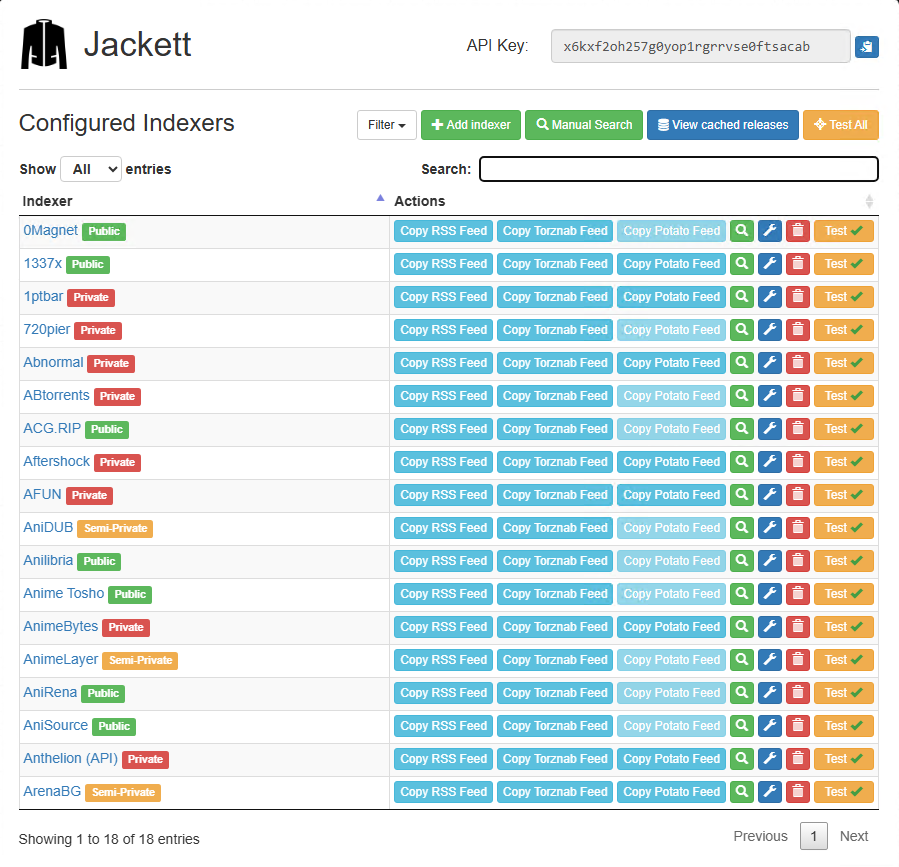
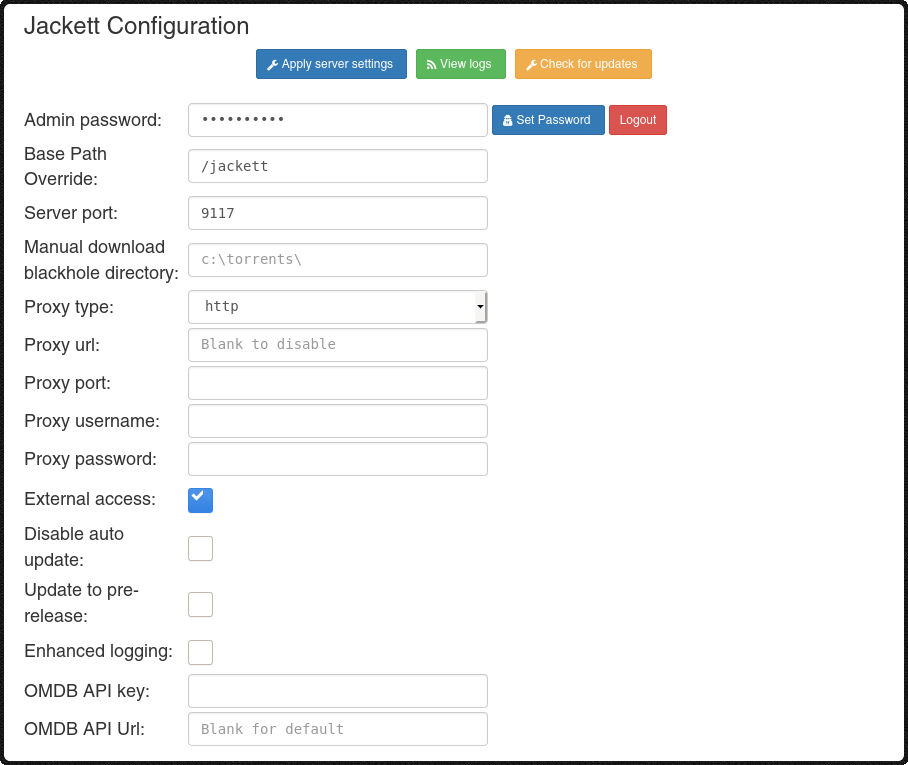
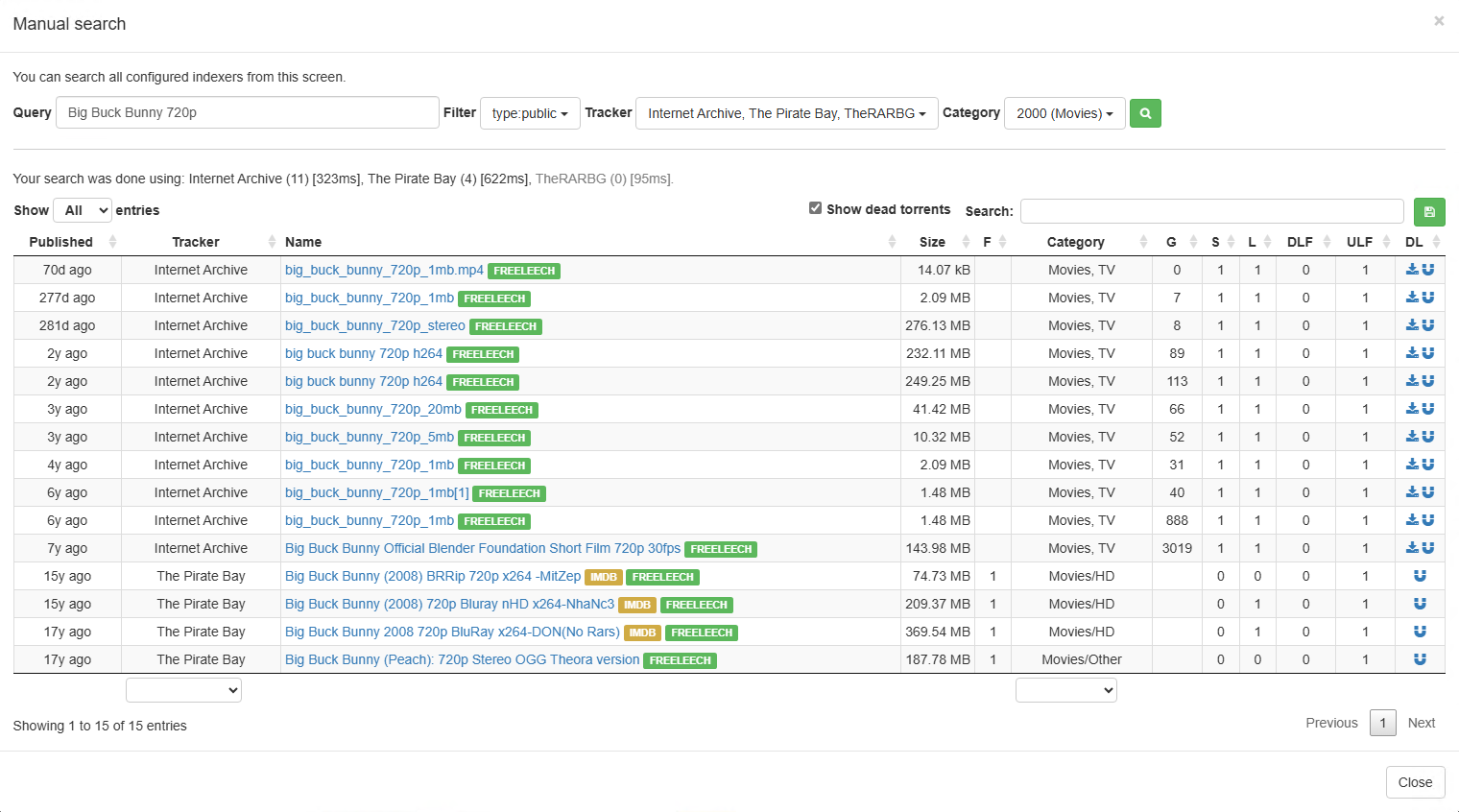
---
## Quick Reference
| Item | Value/Location |
|------|----------------|
| Default URL | `http://127.0.0.1:9117` |
| Default Port | 9117 |
| Config (Linux) | `~/.config/Jackett/` |
| Config (Windows) | `%ProgramData%\Jackett\` |
| Config (macOS) | `~/.config/Jackett/` or `~/Library/Application Support/Jackett/` |
| Logs (Linux) | `~/.config/Jackett/log.txt` |
| Logs (Windows) | `%ProgramData%\Jackett\log.txt` |
| Latest Release | [GitHub Releases](https://github.com/Jackett/Jackett/releases/latest) |
| Documentation | [GitHub Wiki](https://github.com/Jackett/Jackett/wiki) |
| Issues | [GitHub Issues](https://github.com/Jackett/Jackett/issues) |
---
## License and Credits
Jackett is an open-source project maintained by the community.
**Links:**
- [GitHub Repository](https://github.com/Jackett/Jackett)
- [Issue Tracker](https://github.com/Jackett/Jackett/issues)
- [Release Notes](https://github.com/Jackett/Jackett/releases)
[inviteneeded]: https://raw.githubusercontent.com/Jackett/Jackett/master/.github/label-inviteneeded.png