https://github.com/jacky-xbb/ai-assistant
A Chatbot Using Your Documents with LangChain and Vector Database
https://github.com/jacky-xbb/ai-assistant
chatbot langchain-js
Last synced: 9 months ago
JSON representation
A Chatbot Using Your Documents with LangChain and Vector Database
- Host: GitHub
- URL: https://github.com/jacky-xbb/ai-assistant
- Owner: jacky-xbb
- License: mit
- Created: 2024-06-24T11:23:41.000Z (about 2 years ago)
- Default Branch: main
- Last Pushed: 2024-06-24T13:55:22.000Z (about 2 years ago)
- Last Synced: 2025-01-09T15:14:58.057Z (over 1 year ago)
- Topics: chatbot, langchain-js
- Language: JavaScript
- Homepage:
- Size: 291 KB
- Stars: 1
- Watchers: 1
- Forks: 0
- Open Issues: 0
-
Metadata Files:
- Readme: README.md
- License: LICENSE
Awesome Lists containing this project
README
# AI Assistant
## Introduction
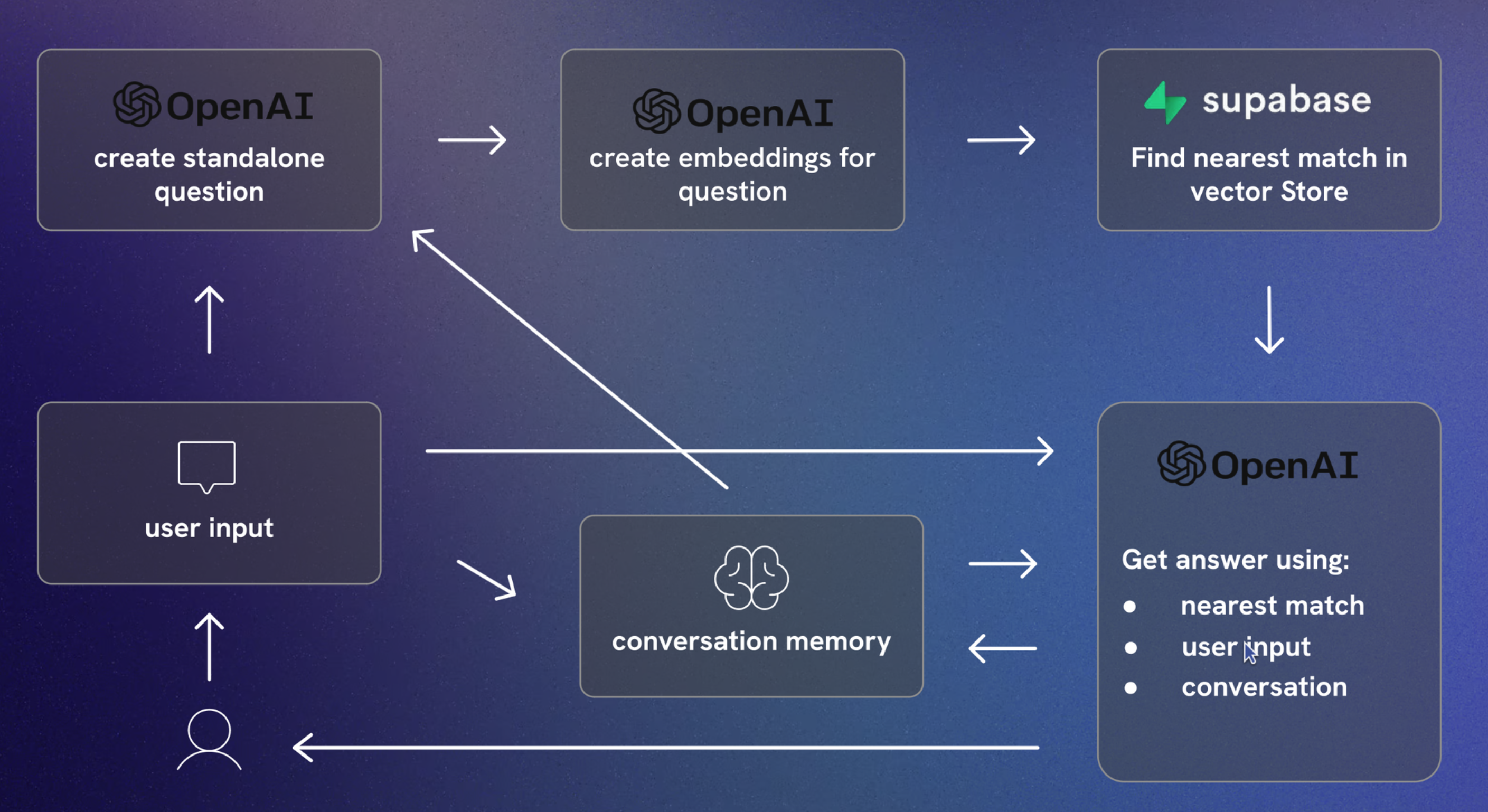
This project provides a chatbot that interacts with users based on the contents of provided documents. It integrates AI capabilities to understand and respond to user queries using the context of the documents stored in a vector database.
## Features
- Natural Language Processing with LangChain and OpenAI
- Efficient document storage and retrieval with Supabase
- React-based front-end with TailwindCSS for styling
- Persistent chat history using local storage
## Technologies Used
- [Vite](https://vitejs.dev/)
- [React](https://reactjs.org/)
- [TailwindCSS](https://tailwindcss.com/)
- [LangChain](https://langchain.com/)
- [OpenAI](https://openai.com/)
- [Supabase](https://supabase.io/)
## Setup
Follow these steps to set up the project locally:
1. **Clone the repository:**
```bash
git clone https://github.com/jacky-xbb/ai-assistant
cd chatbot-docs
```
2. **Install dependencies:**
```bash
npm install
```
3. **Set up environment variables:**
Create a `.env` file in the root of your project and add your API keys:
```plaintext
VITE_SUPABASE_BASE_URL=your-supabase-url
VITE_SUPABASE_API_KEY=your-supabase-api-key
VITE_OPENAI_API_KEY=your-openai-api-key
VITE_OPENAI_BASE_URL=https://api.openai.com/v1
```
4. **Start the development server:**
```bash
npm run dev
```
## Project Structure
```
src/
├── components/
│ ├── Avatar.jsx
│ ├── Chat.jsx
│ ├── ChatBox.jsx
│ ├── Header.jsx
│ └── Message.jsx
├── utils/
│ ├── chain.js
│ ├── combineDocuments.js
│ ├── formatConvHistory.js
│ └── retriever.js
├── App.jsx
├── main.jsx
├── index.css
└── custom.css
```
## Usage
1. **Open your browser:**
Navigate to `http://localhost:5173`.
2. **Interact with the chatbot:**
Type your queries in the chatbox and receive responses based on the context of your documents.
## Contributing
Contributions are welcome! Please open an issue or submit a pull request for any improvements or bug fixes.
## License
This project is licensed under the MIT License. See the [LICENSE](LICENSE) file for details.