https://github.com/jacobbudin/portable-wisdom
Generate EPUB files from unread Instapaper articles 📚
https://github.com/jacobbudin/portable-wisdom
cli command-line-tool ebook ebook-generator epub instapaper python python3 read-it-later reading
Last synced: 9 months ago
JSON representation
Generate EPUB files from unread Instapaper articles 📚
- Host: GitHub
- URL: https://github.com/jacobbudin/portable-wisdom
- Owner: jacobbudin
- License: mit
- Created: 2019-04-30T02:07:59.000Z (about 7 years ago)
- Default Branch: master
- Last Pushed: 2024-02-14T12:00:56.000Z (over 2 years ago)
- Last Synced: 2025-04-24T22:14:20.338Z (about 1 year ago)
- Topics: cli, command-line-tool, ebook, ebook-generator, epub, instapaper, python, python3, read-it-later, reading
- Language: Python
- Homepage:
- Size: 129 KB
- Stars: 22
- Watchers: 1
- Forks: 4
- Open Issues: 4
-
Metadata Files:
- Readme: README.md
- License: LICENSE
Awesome Lists containing this project
README
# Portable Wisdom
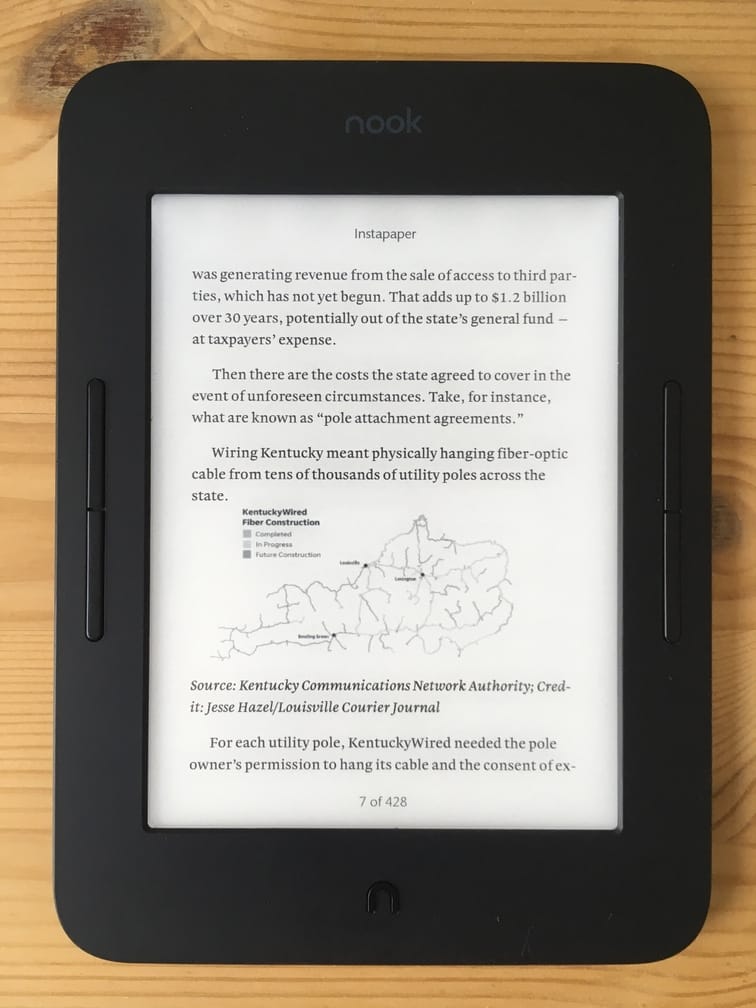
Portable Wisdom is a command-line tool to generate an EPUB file from your unread articles in [Instapaper](https://www.instapaper.com/). You can then copy this file to your ereader.
## Technologies
- Python 3
## Features
- Retrieves unread articles from Instapaper
- Finds and downloads articles' images from the web, downsizes them, converts them to greyscale, and embeds them into the file
- Caches articles and images, runs fast for frequent users
- Creates well-formatted EPUB files tailored for your ereader
## Quick Start
Before you begin, you'll need to [request an Instapaper API key](https://www.instapaper.com/main/request_oauth_consumer_token) or copy one from a friend.
### Python
1. Download and install Portable Wisdom [from PyPI](https://pypi.org/project/portable-wisdom/):
$ pip install portable-wisdom
2. Run Portable Wisdom from the command line:
$ portable-wisdom \
--instapaper-api-key KEY \
--instapaper-api-secret SECRET \
--instapaper-login USER \
--instapaper-password PASS
On success, the script will print the output filename. To view all of the options, run `$ portable-wisdom -h`.
### Docker
Alternatively, using [Docker](https://www.docker.com/get-started/), to download and execute Portable Wisdom [from Docker Hub](https://hub.docker.com/repository/docker/jacobbudin/portable-wisdom/general), run:
$ docker pull jacobbudin/portable-wisdom:latest
$ docker run jacobbudin/portable-wisdom:latest \
--instapaper-api-key KEY \
--instapaper-api-secret SECRET \
--instapaper-login USER \
--instapaper-password PASS
## Environment
Alternatively, you can supply the Instapaper credentials via environment variables: `INSTAPAPER_API_KEY`, `INSTAPAPER_API_SECRET`, `INSTAPAPER_LOGIN`, and `INSTAPAPER_PASSWORD`.
## Transformers
Transformers are functions that modify the EPUB before writing the file to disk. There are many built-in transformers including:
- `beautify_hr` — converts lines of asterisks to horizontal rules
- `remove_duplicative_blockquotes` — removes magazine-style "pull quotes"
- `strip_emojis` — replaces emojis with shortcodes
- `strip_links` — removes `a` elements
- `embed_images` — embeds remote web images
## Compatibility
Portable Wisdom uses [`EbookLib`](https://pypi.org/project/EbookLib/) to create EPUB files. These files are compatible with most ereaders—including Nook, Kobo, and Sony—as well as most ebook software. Kindle owners can use [Pandoc](https://pandoc.org/) or a similar tool to convert from EPUB to MOBI.
### Styles
Portable Wisdom supports styles (`--style`) to create EPUB files optimized for your ereader's rendering engine. These styles are regular CSS files. They specify header sizes, image layout, quote formatting, etc. Use the default style or create your own.
## Contributing
To report a bug or request a feaure, [create an issue on GitHub](https://github.com/jacobbudin/portable-wisdom/issues/new). Developers are welcome and encouraged to submit pull requests, but contributors should strongly consider creating an issue and requesting comments before starting work.
### Source
You can run Portable Wisdom from its source like so:
$ python3 -m portable_wisdom.wisdom
### Guidelines
- Comply with [PEP 8](https://www.python.org/dev/peps/pep-0008/) (use [Flake8](https://pypi.org/project/flake8/) to confirm, [autopep8](https://github.com/hhatto/autopep8) can help)
- Run and pass all tests
- Create new tests or refine existing ones, if necessary
## License
MIT License