https://github.com/jacobpetersen/streetarttab
A Google Chrome extension to turn your new tab page into a street mural.
https://github.com/jacobpetersen/streetarttab
art aws-lambda google-chrome-extension unsplash-api
Last synced: about 2 months ago
JSON representation
A Google Chrome extension to turn your new tab page into a street mural.
- Host: GitHub
- URL: https://github.com/jacobpetersen/streetarttab
- Owner: jacobpetersen
- License: mit
- Created: 2018-08-17T03:18:15.000Z (almost 8 years ago)
- Default Branch: master
- Last Pushed: 2020-10-26T22:15:07.000Z (over 5 years ago)
- Last Synced: 2025-03-08T22:27:14.584Z (over 1 year ago)
- Topics: art, aws-lambda, google-chrome-extension, unsplash-api
- Language: JavaScript
- Homepage: https://streetarttab.com/
- Size: 1.12 MB
- Stars: 3
- Watchers: 1
- Forks: 0
- Open Issues: 0
-
Metadata Files:
- Readme: README.md
- License: LICENSE
Awesome Lists containing this project
README
# StreetArtTab
I like street art, always have, probably always will.
As it is, Google Chrome's default new tab screen is more likely to convince me to click on a link to [Twitter](https://twitter.com/PeteTalksWeb/) than
it is to help me be productive.
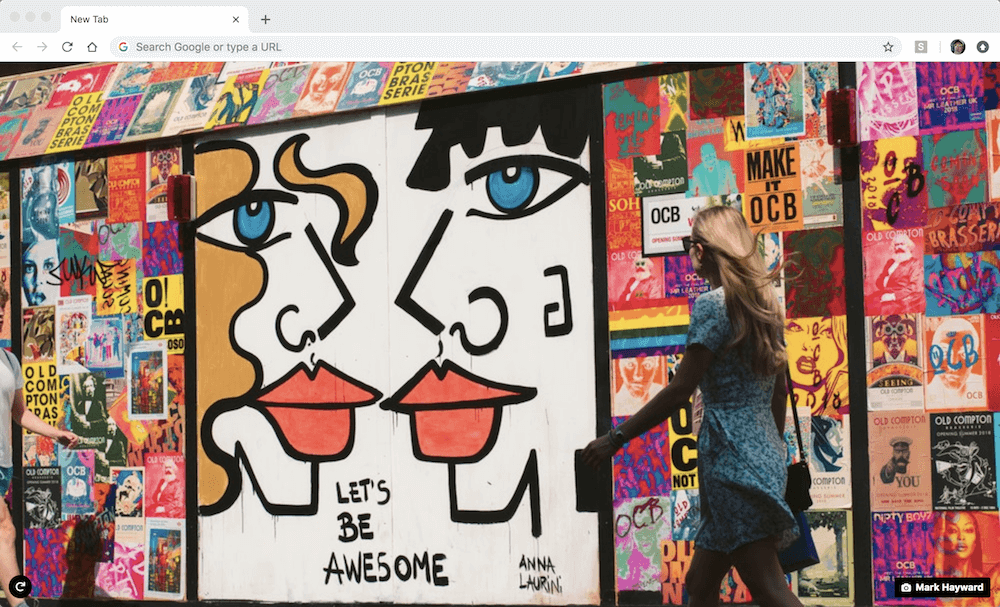
Ergo: Street Art Tab, a Google Chrome extension that replaces Chrome's default new tab with a ~~in my opinion~~ beautiful
street art image.
## Where can I find it?
[Here](https://chrome.google.com/webstore/detail/street-art-tab/ebjknfneccjdmkjccpoddhmpciomphok?utm_source=chrome-ntp-icon), in the Chrome Webstore.
## What if I don't use Google Chrome?
You clearly have bigger issues than what shows up on your new tab page... but for now just go ahead and set [streetarttab.com](https://streetarttab.com/) as your homepage.
## How are images selected?
The images displayed are hand-picked by me and saved into this [Unsplash collection](https://unsplash.com/collections/3274043/street-art).
If there is an image you would like displayed, please upload it to Unsplash and email the Unsplash link to [streetarttab@gmail.com](mailto:streetarttab@gmail.com).
## How does it work?
[Unsplash](https://unsplash.com/) is an amazing site, that provides:
> Beautiful, free photos. Gifted by the world’s most generous community of photographers.
And fortunately for us, they have an [API](https://unsplash.com/developers).
Now, this free API, does have rate limits, and since I do not want to risk having my rate limit used up fetching images for the
extension (or more maliciously by someone stealing my API key and using it for their applications), I had to set it up so that
the Unsplash API was only called a certain number of times.
Enter [AWS Lambda](https://aws.amazon.com/lambda/?nc2=h_m1).
Using Python and AWS Lambda, I easily made a script that will call the Unsplash API and get 30 random landscape oriented,
and 30 random portrait oriented images from my street art images collection. Then, I set up an [Amazon CloudWatch](https://docs.aws.amazon.com/lambda/latest/dg/tutorial-scheduled-events-schedule-expressions.html)
trigger to run the function once per day, ensuring that I always stay in [AWS Lambda's free tier](https://aws.amazon.com/lambda/pricing/).
Now that I am pulling my image information for free, where do I host this information for my extension to pull for free?
[GitHub Pages](https://pages.github.com/).
Just add a couple lines to my AWS Lambda function that use [PyGitHub](https://github.com/PyGithub/PyGithub)
to commit the new image data as a JSON file on my gh-pages branch (if only [GitHub still tracked streaks](https://github.com/dear-github/dear-github/issues/163), amirite?), and vualá, I have a [free, constantly updating, JSON file](https://streetarttab.com/unsplashLinks.json)
of hand picked street art images for my extension to pull.
## Attributions
All images are hosted on [Unsplash](https://unsplash.com/), and credit for each individual image is given to the photographer
whenever their image is displayed on the extension and website.
The extension uses [Font Awesome](https://fontawesome.com/)'s redo icon. Check out their license [here](https://fontawesome.com/license).
The image displayed in the screenshot taken for this readme, and used as the thumbnail for [Open Graph tags](http://ogp.me/), was taken by Mark Hayward. Check out his Unsplash portfolio [here](https://unsplash.com/@mhayward).