https://github.com/jaffar-hussein/password_generator
A simple python application that runs on the terminal that allows the user to create an account and login with their credentials.This app allows the storage of existing account information and also auto generate passwords and create new account credentials
https://github.com/jaffar-hussein/password_generator
python-3 unit-testing
Last synced: 8 months ago
JSON representation
A simple python application that runs on the terminal that allows the user to create an account and login with their credentials.This app allows the storage of existing account information and also auto generate passwords and create new account credentials
- Host: GitHub
- URL: https://github.com/jaffar-hussein/password_generator
- Owner: Jaffar-Hussein
- License: mit
- Created: 2022-04-23T08:57:46.000Z (about 4 years ago)
- Default Branch: master
- Last Pushed: 2022-04-25T20:09:56.000Z (about 4 years ago)
- Last Synced: 2025-03-17T12:14:43.033Z (over 1 year ago)
- Topics: python-3, unit-testing
- Language: Python
- Homepage:
- Size: 33.2 KB
- Stars: 0
- Watchers: 1
- Forks: 0
- Open Issues: 0
-
Metadata Files:
- Readme: README.md
- License: LICENSE
Awesome Lists containing this project
README
# Password Generator
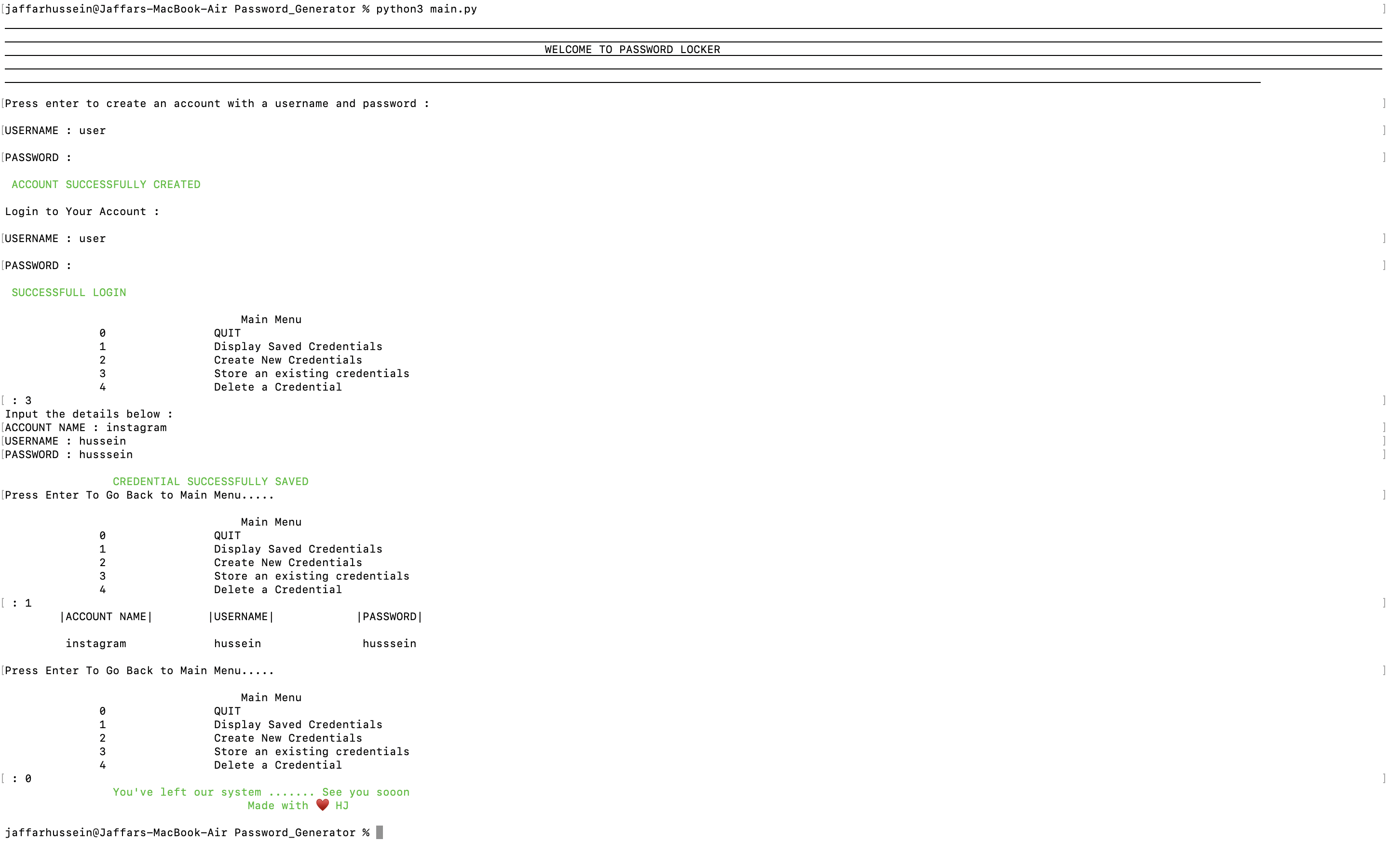
A simple password storage and generating app that runs on the terminal.
## Technologies Used
- Python 3.10.1
- unittest (Python test framework)
## Setup Instructions and Installation
- Clone this repository to a location in your file system. `git clone https://github.com/Jaffar-Hussein/Password_Generator.git`
- Open terminal command line then navigate to the root folder of the application. `cd Passsword_Generator`
- Run `./app.py`
## Behaviour Driven Development
0. Password Locker Account Creation
- OUTPUT : Create UserName and Password
- INPUT : New User Name and Password
1. User Login
- OUTPUT : Login to Password Locker
- INPUT : User Password and Username
2. Displays Saved Password the User
- OUTPUT: "Display Saved Credentials"
- INPUT: "1"
- OUTPUT: List of the saved credentials
3. Create New Credentials
- OUTPUT: "Create a New Credential"
- INPUT: "2"
- OUTPUT: Options for the credentials
4. Password Choice
- INPUT: "y"
- OUTPUT: Auto generates password of a given length
- INPUT: "n"
- OUTPUT: Gives the user a choice of a custom password
5. Store an Existing Credential
- INPUT: "3"
- INPUT: Input account name and password
- OUTPUT: Success message
6. Delete a Credential
- INPUT: "4"
- INPUT: Input account name of the account
- OUTPUT: Success message
7. Quit
- INPUT : 0
- OUTPUT : Bye Bye Message and exit of the application
## License
MIT License
Copyright (c) 2022 Jaffar Hussein
Permission is hereby granted, free of charge, to any person obtaining a copy
of this software and associated documentation files (the "Software"), to deal
in the Software without restriction, including without limitation the rights
to use, copy, modify, merge, publish, distribute, sublicense, and/or sell
copies of the Software, and to permit persons to whom the Software is
furnished to do so, subject to the following conditions:
The above copyright notice and this permission notice shall be included in all
copies or substantial portions of the Software.
THE SOFTWARE IS PROVIDED "AS IS", WITHOUT WARRANTY OF ANY KIND, EXPRESS OR
IMPLIED, INCLUDING BUT NOT LIMITED TO THE WARRANTIES OF MERCHANTABILITY,
FITNESS FOR A PARTICULAR PURPOSE AND NONINFRINGEMENT. IN NO EVENT SHALL THE
AUTHORS OR COPYRIGHT HOLDERS BE LIABLE FOR ANY CLAIM, DAMAGES OR OTHER
LIABILITY, WHETHER IN AN ACTION OF CONTRACT, TORT OR OTHERWISE, ARISING FROM,
OUT OF OR IN CONNECTION WITH THE SOFTWARE OR THE USE OR OTHER DEALINGS IN THE
SOFTWARE.