https://github.com/jaimeteb/chatto
Chatto is a minimal chatbot framework in Go.
https://github.com/jaimeteb/chatto
bot bot-framework chatbot classifier finite-state-machines fsm go golang naive-bayes-classifier
Last synced: 6 months ago
JSON representation
Chatto is a minimal chatbot framework in Go.
- Host: GitHub
- URL: https://github.com/jaimeteb/chatto
- Owner: jaimeteb
- License: mit
- Created: 2020-06-17T21:25:50.000Z (about 6 years ago)
- Default Branch: master
- Last Pushed: 2023-05-26T12:05:43.000Z (about 3 years ago)
- Last Synced: 2024-06-19T01:26:38.980Z (about 2 years ago)
- Topics: bot, bot-framework, chatbot, classifier, finite-state-machines, fsm, go, golang, naive-bayes-classifier
- Language: Go
- Homepage: https://chatto.jaimeteb.com
- Size: 54.8 MB
- Stars: 113
- Watchers: 5
- Forks: 9
- Open Issues: 7
-
Metadata Files:
- Readme: README.md
- Funding: .github/FUNDING.yml
- License: LICENSE
- Security: docs/security.md
Awesome Lists containing this project
README
[](https://chatto.jaimeteb.com)
[](https://codecov.io/gh/jaimeteb/chatto)
[](https://goreportcard.com/report/github.com/jaimeteb/chatto)
[](https://godoc.org/github.com/jaimeteb/chatto)
[](https://hub.docker.com/repository/docker/jaimeteb/chatto)
---
# chatto

Simple chatbot framework written in Go, with configurations in YAML. The aim of this project is to create very simple text-based chatbots using a few configuration files.
The inspiration for this project originally came from [Flottbot](https://github.com/target/flottbot) and my experience using [Rasa](https://github.com/RasaHQ/rasa).
## Contents
* [Installation](#install)
* [Documentation](#docs)
* [Your first bot](#yourfirstbot)
* [The **clf.yml** file](#yourfirstbotclf)
* [The **fsm.yml** file](#yourfirstbotfsm)
* [Run your bot](#yourfirstbotrun)
* [Interact with your bot](#yourfirstbotinteract)
* [Usage](#usage)
* [CLI](#usagecli)
* [Docker Compose](#usagecompose)
* [Kubernetes](#usagekubernetes)
* [Import](#usageimport)
* [Examples](#examples)
```
go get -u github.com/jaimeteb/chatto
```
Via Docker:
```
docker pull jaimeteb/chatto:latest
```
See the [**Documentation**](https://chatto.jaimeteb.com) for **examples**, **configuration guides** and **reference**.

Chatto combines the consistency of a finite-state-machine with the flexibility of machine learning. It has three main components: the classifier, the finite-state-machine and the extensions.
A very basic directory structure for Chatto would be the following:
```
.
└──data
├── clf.yml
└── fsm.yml
```
Start by creating the `data` directory as well as the YAML files.
```console
mkdir data
touch data/clf.yml data/fsm.yml
```
The **clf.yml** file defines how the user messages will be classified into *commands* (intents). Start with this very simple configuration:
```yaml
classification:
- command: "turn_on"
texts:
- "turn on"
- "on"
- command: "turn_off"
texts:
- "turn off"
- "off"
```
The **fsm.yml** file defines the transitions between states, the commands that make these transitions, and the answers to be sent in them. Start with this file contents:
```yaml
transitions:
- from:
- "initial"
into: "on"
command: "turn_on"
answers:
- text: "Turning on."
- from:
- "on"
into: "initial"
command: "turn_off"
answers:
- text: "Turning off."
- text: "❌"
defaults:
unknown: "Can't do that."
```
To start your bot, run:
```bash
chatto --path data/
```
If you're using Docker, run:
```bash
docker run \
-it \
-e CHATTO_DATA=./data \
-v $PWD/data:/data \
jaimeteb/chatto:latest \
chatto --path data
```
### Interact with your first bot
To interact with your bot, run:
```
chatto cli
```
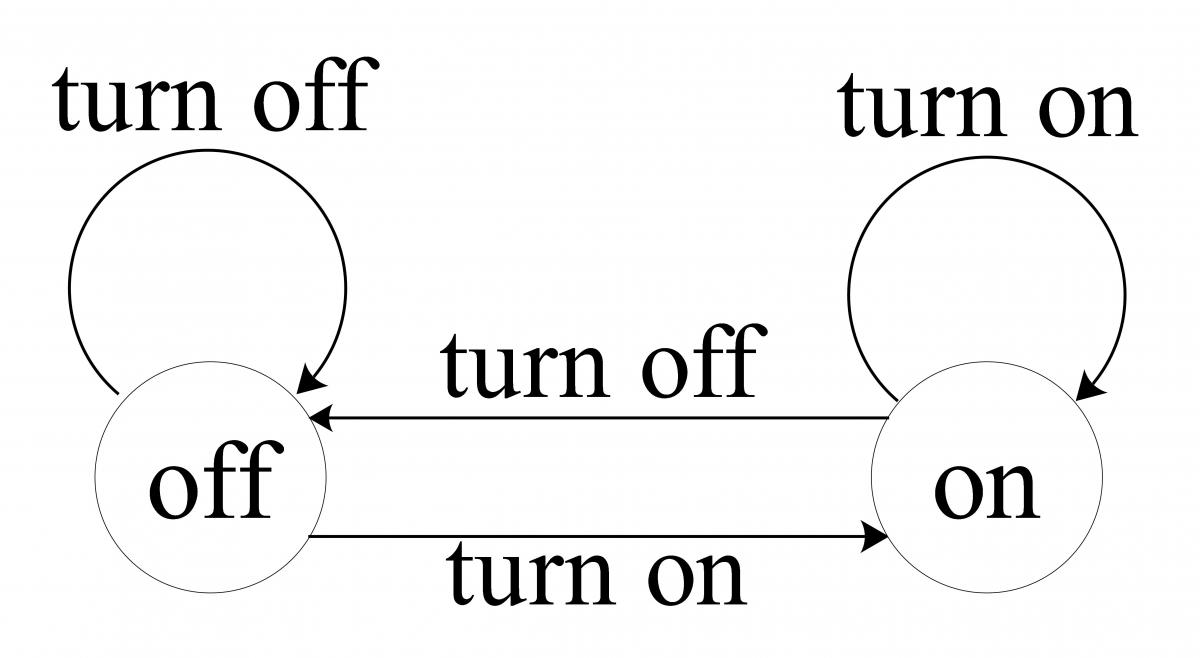
That's it! Now you can say *turn on* or *on* to go into the **on** state, and *turn off* or *off* to go back into **initial**. However, you cannot go from **on** into **on**, or from **initial** into **initial** either.
Here is a diagram for this simple Finite State Machine:
> You can integrate your bot with [**Telegram, Twilio, Slack**](https://chatto.jaimeteb.com/channels/) and [**anything you like**](https://chatto.jaimeteb.com/endpoints/)
Run `chatto` in the directory where your YAML files are located, or specify a path to them with the `--path` flag:
```bash
chatto --path ./your/data
```
To run on Docker, use:
```bash
docker run \
-p 4770:4770 \
-e CHATTO_DATA=./your/data \
-v $PWD/your/data:/data \
jaimeteb/chatto
```
You can use the Chatto CLI tool by downloading the `chatto cli` tool. The CLI makes it easy to test your bot interactions.
```bash
chatto cli --url 'http://mybot.com' -port 4770
```
You can use Chatto on Docker Compose as well. A `docker-compose.yml` would look like this:
```yaml
version: "3"
services:
chatto:
image: jaimeteb/chatto:${CHATTO_VERSION}
env_file: .env
ports:
- "4770:4770"
volumes:
- ${CHATTO_DATA}:/data
depends_on:
- ext
- redis
ext:
image: odise/busybox-curl # Busy box with certificates
command: ext/ext
expose:
- 8770
volumes:
- ${CHATTO_DATA}/ext:/ext
redis:
image: bitnami/redis:6.0
environment:
- REDIS_PASSWORD=${STORE_PASSWORD}
expose:
- 6379
```
This requires a `.env` file to contain the necessary environment variables:
```
# Chatto configuration
CHATTO_VERSION=latest
CHATTO_DATA=./your/data
# Extension configuration
CHATTO_BOT_EXTENSIONS_EXTENSION_NAME_URL=http://ext:8770
# Redis
CHATTO_BOT_STORE_HOST=redis
CHATTO_BOT_STORE_PASSWORD=pass
# Logs
CHATTO_BOT_DEBUG=true
```
The directory structure with all the files would look like this:
```
.
├── data
│ ├── ext
│ │ ├── ext
│ │ └── ext.go
│ ├── bot.yml
│ ├── chn.yml
│ ├── clf.yml
| └── fsm.yml
├── docker-compose.yml
└── .env
```
Finally, run:
```bash
docker-compose up -d redis ext
docker-compose up -d chatto
```
> The [extensions](/extensions) server has to be executed according to its language.
For this `docker-compose.yml` file, you'd have to build the Go extension first:
```go build -o data/ext/ext data/ext/ext.go```
> The [extensions](/extensions) server has to be running before Chatto initializes.
Under the `deploy/kubernetes` directory you can find an example deployment:
| Kind | Name | Description |
|------------|-------------------------|---------------------------------------------------------------|
| Secret | `chatto-config-secrets` | Contains the tokens that Chatto will use for authorization |
| ConfigMap | `chatto-config-envs` | Contains the environment variables for the **bot.yml** file |
| ConfigMap | `chatto-config-files` | Contains the **clf.yml** and **fsm.yml** file |
| Deployment | `chatto` | Chatto deployment based on the `jaimeteb/chatto` Docker image |
| Service | `chatto-service` | Service for the `chatto` deployment |
| Ingress | `chatto-ingress` | Ingress for the `chatto-service` service |
Run the following command to deploy on Kubernetes:
```bash
kubectl apply -f ./deploy/kubernetes/
```
An importable bot server and client package is provided to allow embedding into your own application.
To embed the server:
```go
package main
import (
"flag"
"github.com/jaimeteb/chatto/bot"
)
func main() {
port := flag.Int("port", 4770, "Specify port to use.")
path := flag.String("path", ".", "Path to YAML files.")
flag.Parse()
server := bot.NewServer(*path, *port)
server.Run()
}
```
To embed the client:
```go
package myservice
import (
"log"
"github.com/jaimeteb/chatto/bot"
)
type MyService struct {
chatto bot.Client
}
func NewMyService(url string, port int) *MyService {
return &MyService{chatto: bot.NewClient(url, port)}
}
func (s *MyService) Submit(question *query.Question) error {
answers, err := s.chatto.Submit(question)
if err != nil {
return err
}
// Print answers to stdout
for _, answer := range answers {
fmt.Println(answer.Text)
}
return nil
}
```
I have provided some config files under *examples*. Clone the repository and run `chatto` with the `-path` of your desired example to test them out (for the ones that use extensions, run their respective extensions first).
More about these examples in the [**Documentation**](https://chatto.jaimeteb.com/examples/moodbot)
1. [**Mood Bot**](/examples/01_moodbot) - A chatto version of [Rasa's Mood Bot](https://github.com/RasaHQ/rasa/tree/master/examples/moodbot) Greet the bot to start the conversation.
2. [**Pokemon Search**](/examples/02_pokemon) - Search for Pokémon by name or number.
3. [**Trivia Quiz**](/examples/03_trivia) - Type *start* to take a quick trivia quiz.