https://github.com/jairajjangle/react-native-tree-multi-select
Super-fast tree view with multi-selection capabilities, using checkboxes and search filtering.
https://github.com/jairajjangle/react-native-tree-multi-select
checkbox-treeview expo react-checkbox-tree react-native react-native-checkbox react-native-checkbox-list react-native-tree react-native-tree-checkbox react-native-tree-select react-native-tree-view react-tree-view tree-checkbox tree-select tree-view treeview
Last synced: 4 months ago
JSON representation
Super-fast tree view with multi-selection capabilities, using checkboxes and search filtering.
- Host: GitHub
- URL: https://github.com/jairajjangle/react-native-tree-multi-select
- Owner: JairajJangle
- License: mit
- Created: 2023-07-05T17:55:30.000Z (about 3 years ago)
- Default Branch: main
- Last Pushed: 2026-03-29T18:48:40.000Z (4 months ago)
- Last Synced: 2026-03-29T20:31:59.292Z (4 months ago)
- Topics: checkbox-treeview, expo, react-checkbox-tree, react-native, react-native-checkbox, react-native-checkbox-list, react-native-tree, react-native-tree-checkbox, react-native-tree-select, react-native-tree-view, react-tree-view, tree-checkbox, tree-select, tree-view, treeview
- Language: TypeScript
- Homepage:
- Size: 5.12 MB
- Stars: 107
- Watchers: 2
- Forks: 6
- Open Issues: 1
-
Metadata Files:
- Readme: README.md
- Changelog: CHANGELOG.md
- Contributing: CONTRIBUTING.md
- Funding: .github/FUNDING.yml
- License: LICENSE
- Code of conduct: CODE_OF_CONDUCT.md
Awesome Lists containing this project
README
# react-native-tree-multi-select
⚡️Super-fast Tree view with multi-selection capabilities, using checkboxes and search filtering.
[](https://badge.fury.io/js/react-native-tree-multi-select) [](https://github.com/JairajJangle/react-native-tree-multi-select/blob/main/LICENSE) [](https://github.com/JairajJangle/react-native-tree-multi-select/actions/workflows/ci.yml) [](https://github.com/JairajJangle/react-native-tree-multi-select/actions/workflows/ci.yml)    [](https://github.com/JairajJangle/react-native-tree-multi-select/issues?q=is%3Aopen+is%3Aissue)  [](https://snyk.io/test/github/jairajjangle/react-native-tree-multi-select) [](https://snack.expo.dev/@futurejj/react-native-tree-multi-select-example)  [](https://github.com/sponsors/JairajJangle)
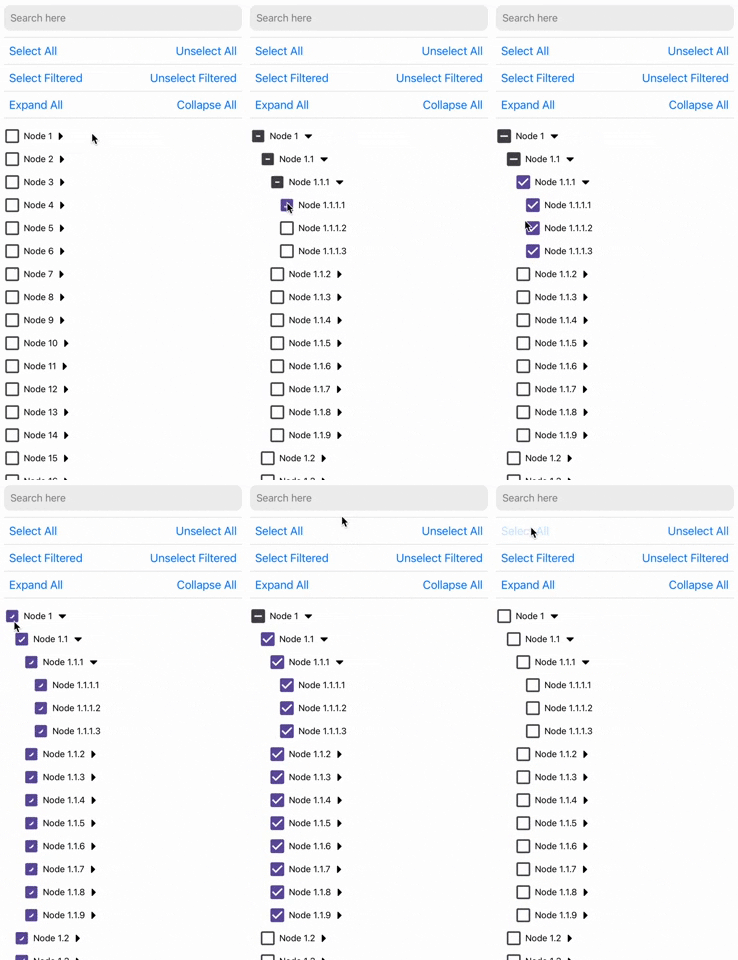
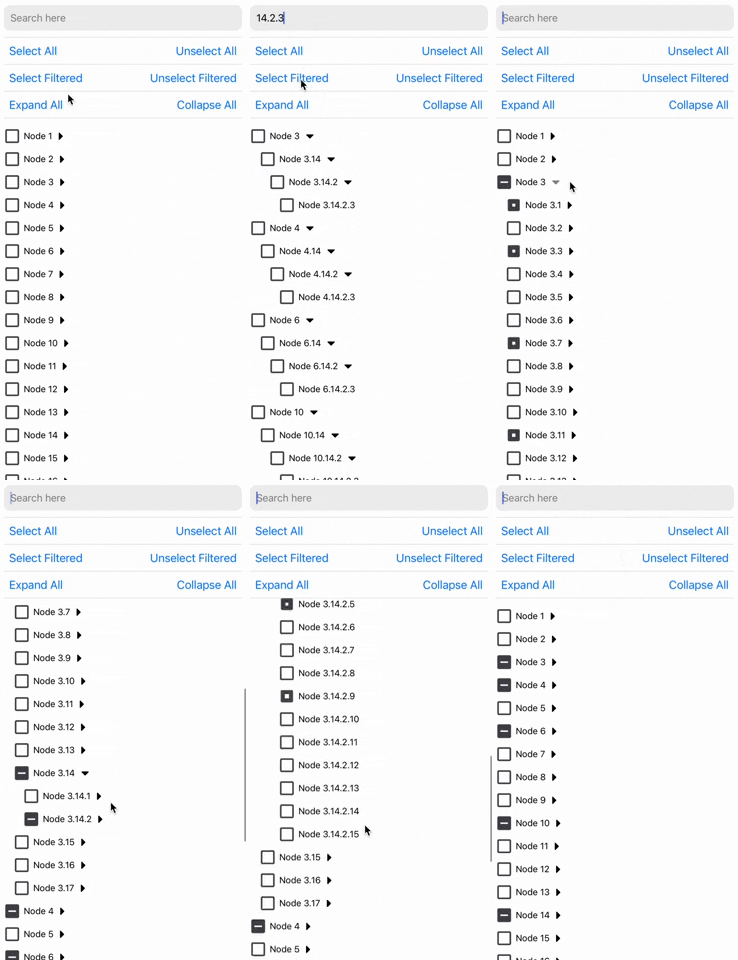
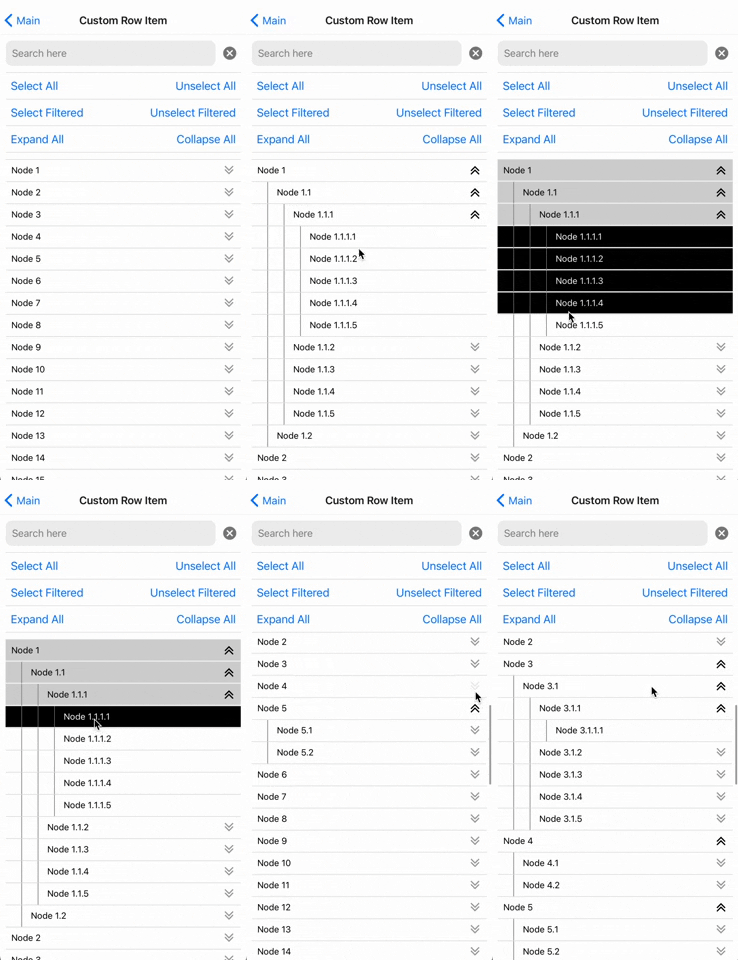
## Installation
Using yarn:
```sh
yarn add react-native-tree-multi-select
```
using npm:
```sh
npm install react-native-tree-multi-select
```
Dependencies that need to be installed for this library to work:
1. [@shopify/flash-list](https://github.com/Shopify/flash-list)
3. **Icon Library** (One of the following):
- **For Expo Apps (including Expo Go)**: No additional setup is needed. This library automatically uses `@expo/vector-icons`, which is included in the Expo SDK.
- **For Non-Expo React Native Apps**: Install [react-native-vector-icons](https://github.com/oblador/react-native-vector-icons) (`>=7.1.0`) to enable icon support.
Make sure to follow the native-related installation instructions for these dependencies if you are using bare workflow.
## **Highlighted Features**
- ⚡ **Fast**: Designed with performance in mind for smooth scrolling and quick selections.
- 🛠️ **Highly Customizable**: Modify styles, behavior, and use your custom list component to suit your application's needs.
- 🔍 **Filterable**: Quickly filter through tree nodes and option to select and un-select only the filtered tree nodes.
- ✅ **Well Tested**: Comprehensive test coverage to ensure reliability and stability.
- 📚 **Well Documented**: Detailed documentation to get you started and an example app to demo all the features.
- 🌳 **Multi-Level Selection**: Select individual nodes or entire branches with ease.
- 📦 **Supports Large Datasets**: Efficiently handles large trees without much performance degradation.
- 🔒 **TypeScript Support**: Full TypeScript support for better developer experience.
- 💻 **Cross-Platform**: Works seamlessly across iOS, Android, and web (with React Native Web).
## Usage
```tsx
import {
TreeView,
type TreeNode,
type TreeViewRef
} from 'react-native-tree-multi-select';
// Refer to the Properties table below or the example app for the TreeNode type
const myData: TreeNode[] = [...];
export function TreeViewUsageExample(){
const treeViewRef = React.useRef(null);
// It's recommended to use debounce for the search function (refer to the example app)
function triggerSearch(text: string){
// Pass search text to the tree along with the keys on which search is to be done(optional)
treeViewRef.current?.setSearchText(text, ["name"]);
}
// Callback functions for check and expand state changes:
const handleSelectionChange = (
_checkedIds: string[],
_indeterminateIds: string[]
) => {
// NOTE: Handle _checkedIds and _indeterminateIds here
};
const handleExpanded = (expandedIds: string[]) => {
// NOTE: Do something with updated expandedIds here
};
// Expand collapse calls using ref
const expandAllPress = () => treeViewRef.current?.expandAll?.();
const collapseAllPress = () => treeViewRef.current?.collapseAll?.();
const expandNodes = (idsToExpand: string[]) => treeViewRef.current?.expandNodes?.(
idsToExpand
);
const collapseNodes = (idsToCollapse: string[]) => treeViewRef.current?.collapseNodes?.(
idsToCollapse
);
// Multi-selection function calls using ref
const onSelectAllPress = () => treeViewRef.current?.selectAll?.();
const onUnselectAllPress = () => treeViewRef.current?.unselectAll?.();
const onSelectAllFilteredPress = () => treeViewRef.current?.selectAllFiltered?.();
const onUnselectAllFilteredPress = () => treeViewRef.current?.unselectAllFiltered?.();
const selectNodes = (idsToExpand: string[]) => treeViewRef.current?.selectNodes?.(
idsToSelect
);
const unselectNodes = (idsToCollapse: string[]) => treeViewRef.current?.unselectNodes?.(
idsToUnselect
);
return(
// ... Remember to keep a fixed height for the parent. Read Flash List docs to know why
);
}
```
### Properties
#### TreeViewProps``
*The `TreeViewProps` interface defines the properties for the tree view component.*
| Property | Type | Required | Description |
| ---------------------------------- | ------------------------------------------------------------ | -------- | ------------------------------------------------------------ |
| `data` | [TreeNode](#treenodeid--string)`[]` | Yes | An array of `TreeNode` objects |
| `onCheck` | `(checkedIds: ID[], indeterminateIds: ID[]) => void` | No | Callback when a checkbox state changes |
| `onExpand` | `(expandedIds: ID[]) => void` | No | Callback when a node is expanded |
| `preselectedIds` | `ID[]` | No | An array of `id`s that should be pre-selected |
| `preExpandedIds` | `ID[]` | No | An array of `id`s that should be pre-expanded |
| `selectionPropagation` | [SelectionPropagation](#selectionpropagation) | No | Control Selection Propagation Behavior. Choose whether you want to auto-select children or parents. |
| `initialScrollNodeID` | `ID` | No | Set node ID to scroll to intiially on tree view render. |
| `indentationMultiplier` | `number` | No | Indentation (`marginStart`) per level (defaults to 15) |
| `treeFlashListProps` | [TreeFlatListProps](#treeflatlistprops) | No | Props for the flash list |
| `checkBoxViewStyleProps` | [BuiltInCheckBoxViewStyleProps](#builtincheckboxviewstyleprops) | No | Props for the checkbox view |
| `CheckboxComponent` | `ComponentType<`[CheckBoxViewProps](#checkboxviewprops)`>` | No | A custom checkbox component. |
| `ExpandCollapseIconComponent` | `ComponentType<`[ExpandIconProps](#expandiconprops)`>` | No | A custom expand/collapse icon component |
| `ExpandCollapseTouchableComponent` | `ComponentType<`[TouchableOpacityProps](https://reactnative.dev/docs/touchableopacity#props)`>` | No | A custom expand/collapse touchable component |
| `CustomNodeRowComponent` | `React.ComponentType<`[NodeRowProps](#noderowpropsid--string)`>` | No | Custom row item component |
##### Notes
- The `ID` type parameter allows flexibility in specifying the type of node identifiers (e.g., `string`, `number`, or custom types).
- ℹ️ If `CustomNodeRowComponent` is provided then below props are not applied:
1. `indentationMultiplier`
1. `checkBoxViewStyleProps`
1. `CheckboxComponent`
1. `BuiltInCheckBoxViewStyleProps`
1. `ExpandCollapseIconComponent`
1. `ExpandCollapseTouchableComponent`.
- ⚠️ If the tree view doesn't scroll if rendered in a complex nested scroll view/s then try setting the `renderScrollComponent` value in `treeFlashListProps` to `ScrollView` from `react-native-gesture-handler`.
---
#### TreeNode``
*The `TreeNode` interface defines the properties for individual item of the tree view*
| Property | Type | Required | Description |
| --------------- | ------------------------ | -------- | ------------------------------------------------------------ |
| `id` | `ID` (default: `string`) | Yes | Unique identifier for the node |
| `name` | `string` | Yes | The display name of the node |
| `children` | `TreeNode[]` | No | An array of child `TreeNode` objects |
| `[key: string]` | `any` | No | Any additional properties for the node
(May be useful to perform search on) |
---
#### TreeViewRef``
*The `TreeViewRef` interface defines the properties for the ref object of the tree view component*
| Property | Type | Description |
| --------------------- | ----------------------------------------------------- | ------------------------------------------------------------ |
| `selectAll` | `() => void` | Selects **all** nodes |
| `unselectAll` | `() => void` | Unselects **all** nodes |
| `selectAllFiltered` | `() => void` | Selects all **filtered** nodes |
| `unselectAllFiltered` | `() => void` | Unselects all **filtered** nodes |
| `expandAll` | `() => void` | Expands all nodes |
| `collapseAll` | `() => void` | Collapses all nodes |
| `expandNodes` | `(ids: ID[]) => void` | Expands specified nodes |
| `collapseNodes` | `(ids: ID[]) => void` | Collapses specified nodes |
| `selectNodes` | `(ids: ID[]) => void` | Selects specified nodes |
| `unSelectNodes` | `(ids: ID[]) => void` | Unselects specified nodes |
| `setSearchText` | `(searchText: string, searchKeys?: string[]) => void` | Set the search text and optionally the search keys. Default search key is "name"
Recommended to call this inside a debounced function if you find any performance issue otherwise. |
| `scrollToNodeID` | `(params: `[ScrollToNodeParams](#scrolltonodeparams)`) => void;` | Scrolls the tree view to the node of the specified ID. |
| `getChildToParentMap` | `() => Map` | Get the child to parent tree view map. |
#### ScrollToNodeParams
| Property | Type | Required | Description |
| -------------------- | --------- | -------- | ------------------------------------------------------------ |
| `nodeId` | `ID` | Yes | Node ID to expand and scroll to. |
| `expandScrolledNode` | `boolean` | No | Whether to expand scrolled node to reveal its children. Defaults to `false`. |
| `animated` | `boolean` | No | Control if scrolling should be animated. |
| `viewOffset` | `number` | No | A fixed number of pixels to offset the scrolled node position. |
| `viewPosition` | `number` | No | A value of `0` places the scrolled node item at the top, `1` at the bottom, and `0.5` centered in the middle. |
---
#### SelectionPropagation
*The `SelectionPropagation` interface defines the selection propagation behaviour of the tree view*
| Property | Type | Required | Description |
| ------------ | --------- | -------- | ------------------------------------------------------------ |
| `toChildren` | `boolean` | No | Whether to propagate selection to children nodes. Defaults to `true`. |
| `toParents` | `boolean` | No | Whether to propagate selection to parent nodes. Defaults to `true`. |
---
#### TreeFlatListProps
*All properties of `FlashListProps`(from `@shopify/flash-list`) except for `data` and `renderItem`*
---
#### BuiltInCheckBoxViewStyleProps
*This interface allows you to customize the style of the built-in checkbox component that is rendered in the tree view by default. Overriden if `CustomNodeRowComponent` is used.*
| Property | Type | Required | Description |
| -------------------------- | -------------------------------- | -------- | ------------------------------------------------------ |
| `outermostParentViewStyle` | `StyleProp` | No | Optional style modifier for the outermost parent view. |
| `checkboxParentViewStyle` | `StyleProp` | No | Optional style modifier for the checkbox parent view. |
| `textTouchableStyle` | `StyleProp` | No | Optional style modifier for the text touchable style. |
| `checkboxProps` | [CheckboxProps](#checkboxprops) | No | Optional props for the checkbox component. |
| `textProps` | `TextProps`
(React Native) | No | Optional props for the text component. |
#### CheckboxProps
All properties of `CheckboxProps`(from `@futurejj/react-native-checkbox`) except for `onPress` and `status`
---
#### CheckBoxViewProps
| Property | Type | Required | Description |
| --------------- | --------------------------------------- | -------- | -------------------------------------------------- |
| `value` | [CheckboxValueType](#checkboxvaluetype) | Yes | The current value of the checkbox |
| `onValueChange` | `(value: boolean) => void` | Yes | Function to be called when the checkbox is pressed |
| `text` | `string` | Yes | The display text besides the checkbox |
#### CheckboxValueType
Type: `boolean` OR `"indeterminate"`
---
#### ExpandIconProps
| Property | Type | Required | Description |
| ---------- | ------- | -------- | --------------------------------- |
| isExpanded | boolean | Yes | Indicates if the icon is expanded |
---
#### NodeRowProps``
| Property | Type | Required | Description |
| -------------- | --------------------------------------- | -------- | ------------------------------------------------------- |
| `node` | [TreeNode](#treenodeid--string) | Yes | The node to be rendered |
| `level` | `number` | Yes | The depth of the node in the tree |
| `checkedValue` | [CheckboxValueType](#checkboxvaluetype) | Yes | The current value of the checkbox |
| `isExpanded` | `boolean` | Yes | Whether the node is expanded or not |
| `onCheck` | `() => void` | Yes | Function to be called when the checkbox is pressed |
| `onExpand` | `() => void` | Yes | Function to be called when the expand button is pressed |
---
### 🙌 Planned features
- [x] Row Item full-customization
- [x] Prop to control auto children and parents selection. Can now be done using `selectionPropagation` prop 🎉
- [ ] Prop to set the maximum checked item limit
- [ ] Prop to disable certain nodes from getting checked
- [x] Ref function to programatically expand/collapse a certain node
- [x] Ref function to programatically un/check a certain node
- [x] Ref function to auto-scroll to a certain node's position - available in 1.9.0+
If you do not see what you want in the planned feature list, raise a feature request.
---
### 💡 Some Expo Snack Examples
1. Radio button like selection in tree view: [Snack link](https://snack.expo.dev/@futurejj/react-native-tree-multi-select-radio-button-example)
2. Display count of number of checked nodes: [Snack link](https://snack.expo.dev/@futurejj/react-native-tree-multi-select-example)
---
## Contributing
See the [contributing guide](CONTRIBUTING.md) to learn how to contribute to the repository and the development workflow.
## License
MIT
## 🙏 Support the project


## ❤️ Thanks to
- Module built using [create-react-native-library](https://github.com/callstack/react-native-builder-bob)
- To allow super fast list rendering [@shopify/flash-list](https://github.com/Shopify/flash-list)
- Super easy state management done using [zustand](https://github.com/pmndrs/zustand)
- Readme is edited using [Typora](https://typora.io/)
- Example app uses [@gorhom/showcase-template](https://github.com/gorhom/showcase-template)
---
