https://github.com/jakebrehm/demesstify
📱Demystifies your messages and allows for easy analysis and visualization of conversations.
https://github.com/jakebrehm/demesstify
data-analysis data-science imessage messages messaging nlp pandas python sentiment-analysis visualization wordcloud
Last synced: about 1 year ago
JSON representation
📱Demystifies your messages and allows for easy analysis and visualization of conversations.
- Host: GitHub
- URL: https://github.com/jakebrehm/demesstify
- Owner: jakebrehm
- License: gpl-3.0
- Created: 2022-10-26T01:01:06.000Z (over 3 years ago)
- Default Branch: master
- Last Pushed: 2022-12-29T17:45:09.000Z (over 3 years ago)
- Last Synced: 2025-03-20T06:35:18.854Z (over 1 year ago)
- Topics: data-analysis, data-science, imessage, messages, messaging, nlp, pandas, python, sentiment-analysis, visualization, wordcloud
- Language: Python
- Homepage:
- Size: 20.3 MB
- Stars: 2
- Watchers: 1
- Forks: 1
- Open Issues: 7
-
Metadata Files:
- Readme: readme.md
- License: license.txt
Awesome Lists containing this project
README

Demystify your messages.


demesstify is a Python library that demystifies your messages and allows for easy analysis and visualization of conversations.
## Table of contents
* [Main features](#main-features)
* [Installation](#installation)
* [Dependencies](#dependencies)
* [Documentation](#documentation)
* [Example usage](#example-usage)
* [Analyzing the messages](#analyzing-the-messages)
* [Creating a word cloud](#creating-a-word-cloud)
* [Future improvements](#future-improvements)
* [Authors](#authors)
## Main features
Here are just a few things that `demesstify` can do:
* Read message data from various sources, including your local iMessages database, a [Tansee](https://www.tansee.com) text file, or some randomly generated dummy text
* Perform text analysis on your messages so you can see things like the average number of texts received per day or the most number of messages that were sent in a row
* Analyze which emojis or reactions (if you're using iMessage) were most frequently used, among other thing
* Perform sentiment analysis on your messages to see the polarity of your conversations
* Calculate statistics about the attachments you exchanged (if you're using iMessage)
* Generate tailored visualizations such as word clouds or a radial heatmap that plots hour of the day against day of the week
## Installation
`demesstify` can be installed via pip:
```
pip install demesstify
```
The source code can be viewed on GitHub [here](https://github.com/jakebrehm/demesstify).
### Dependencies
`demesstify` depends on the following packages:
| Package | Description |
| ------------------------------------------------------ | ------------------------------------- |
| [pandas](https://github.com/pandas-dev/pandas) | For easy manipulation of message data |
| [matplotlib](https://github.com/matplotlib/matplotlib) | For visualizations |
| [wordcloud](https://github.com/amueller/word_cloud) | For creating wordclouds |
| [vaderSentiment](https://github.com/cjhutto/vaderSentiment) | For sentiment analysis |
| [calmap](https://github.com/martijnvermaat/calmap) | For creating calendar heatmaps |
| [emoji](https://github.com/carpedm20/emoji) | For working with emojis |
| [lorem](https://github.com/sfischer13/python-lorem) | For creating dummy text |
## Documentation
For information on how to use `demesstify`, please see the [documentation](https://demesstify.readthedocs.io/).
## Example usage
### Analyzing the messages
```python
import demesstify as dm
from demesstify.analysis import emojis, sentiment, text
# Create the messages object and dataframes from dummy text
messages = dm.Messages.from_random(total_messages=1000)
all_df = messages.get_all()
sent_df = messages.get_sent()
received_df = messages.get_received()
# Determine the 3 most frequent emojis
most_frequent_emojis = emojis.Emojis(all_df).get_most_frequent(3)
# Determine the total number of messages sent
total_messages_sent = text.Text(sent_df).get_total()
# Determine the average number of messages received per day
average_received_daily = text.Text(received_df).get_average_per_day()
# Determine the number of times "velit" appears as a substring
velit_count = text.Text(all_df).get_count_of_substring('velit')
# Determine the average polarity of the messages
average_polarity = sentiment.Sentiment(all_df).get_average_sentiment()
```
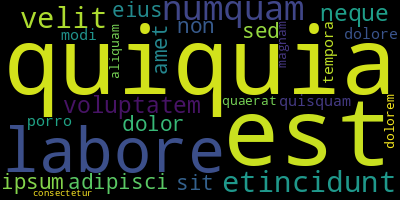
### Creating a word cloud
```python
import demesstify as dm
from demesstify.visualize import cloud
# Create the messages object and dataframes from dummy text
messages = dm.Messages.from_random(total_messages=1000)
# Create and save a Cloud object
wordcloud = cloud.Cloud(messages.as_string('all'))
wordcloud.min_word_length = 3
wordcloud.repeat = False # will not repeat any words
wordcloud.collocations = False # will not include pairs of words
wordcloud.include_numbers = False # will not include numbers
wordcloud.generate()
wordcloud.save('wordcloud.png')
```
## Future improvements
- Add support for other message sources, e.g. Android or social media platforms
- Add unit tests
## Authors
- **Jake Brehm** - [Email](mailto:mail@jakebrehm.com) | [Github](http://github.com/jakebrehm) | [LinkedIn](http://linkedin.com/in/jacobbrehm)