https://github.com/jakestanger/rofi_mpd
A rofi menu for interacting with MPD written in Python.
https://github.com/jakestanger/rofi_mpd
mpd mpd-client python python-3 rofi
Last synced: 9 months ago
JSON representation
A rofi menu for interacting with MPD written in Python.
- Host: GitHub
- URL: https://github.com/jakestanger/rofi_mpd
- Owner: JakeStanger
- License: mit
- Created: 2018-09-11T22:02:36.000Z (almost 8 years ago)
- Default Branch: master
- Last Pushed: 2020-07-10T10:21:39.000Z (about 6 years ago)
- Last Synced: 2025-08-13T04:40:45.479Z (11 months ago)
- Topics: mpd, mpd-client, python, python-3, rofi
- Language: Python
- Size: 65.4 KB
- Stars: 22
- Watchers: 3
- Forks: 5
- Open Issues: 3
-
Metadata Files:
- Readme: readme.md
- License: LICENSE
Awesome Lists containing this project
README
# Rofi MPD
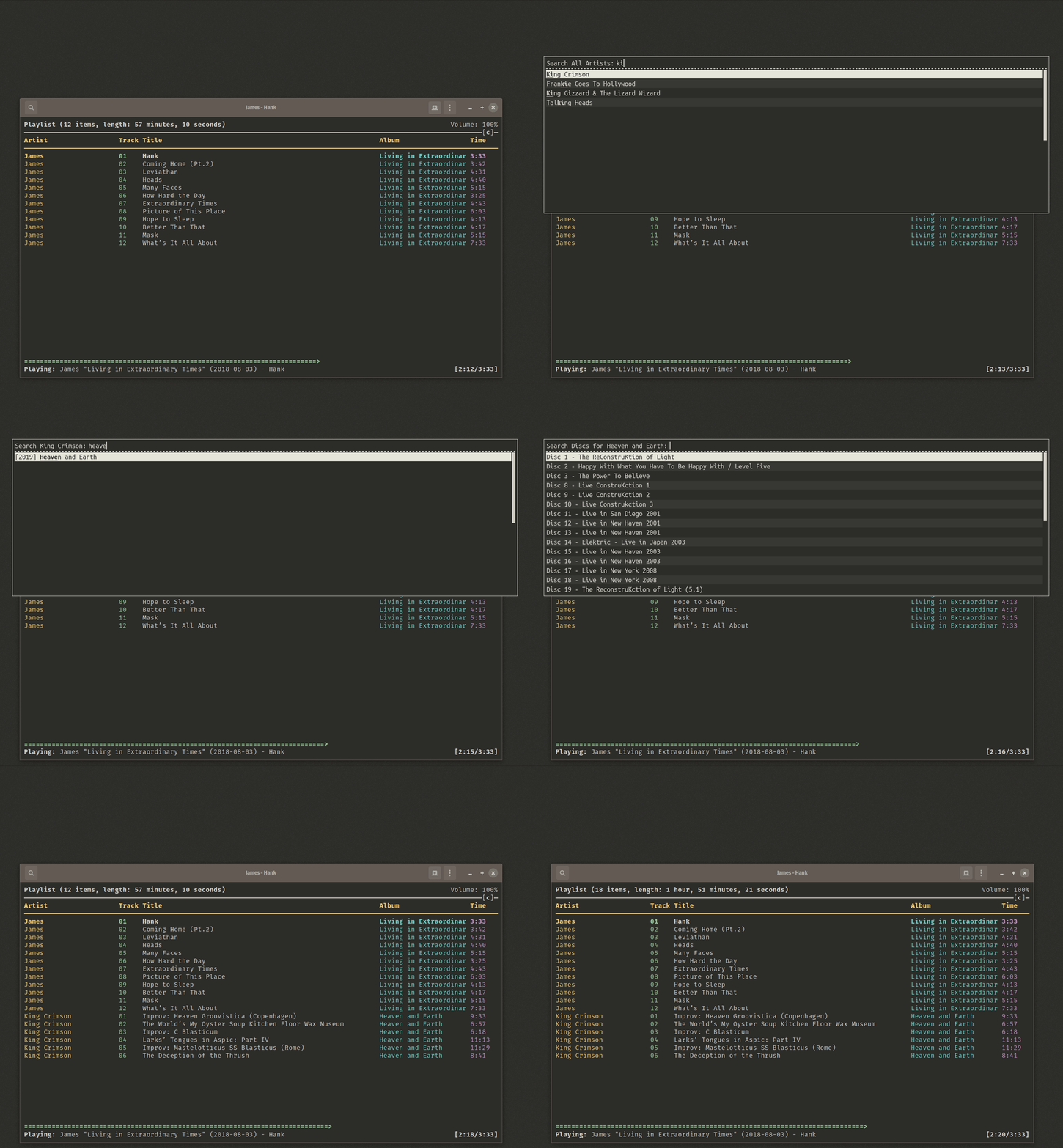
This is a simple MPD client for quickly adding albums or tracks using Rofi.
It supports a variety of modes, and can group longer albums by disc number (or even disc name).
## Installation
Unsurprisingly, you will require both MPD and Rofi to be installed. You will also require Python >= 3.6.
### Python Package
You can install the [pypi](https://pypi.org/project/Rofi-MPD/) package using `pip3 install Rofi-MPD`.
Make sure wherever it is installed to is on your path. You can check with `pip3 show Rofi-MPD`.
### Arch Linux
Arch users can install the [rofi-mpd-git](https://aur.archlinux.org/packages/rofi-mpd-git/) package.
### NixOS
NixOS users can add `rofi-mpd` to their `environment.systemPackages` or run `nix-env -iA nixos.rofi-mpd`.
The derivation can be found [here](https://github.com/NixOS/nixpkgs/blob/master/pkgs/applications/audio/rofi-mpd/default.nix)
### Other
Clone this repo somewhere, then run:
```bash
pip3 install -r requirements.txt
```
You may wish to use the provided script, in which case it needs to be marked as executable:
```bash
chmod +x bin/rofi-mpd
```
## Usage
If installed using a package manager, a script should have automatically been put on your path:
```bash
rofi-mpd # Normal usage
rofi-mpd -h # See help
```
If not, you can either do:
```bash
python3 rofi_mpd/rofi_mpd.py
# or
bin/rofi-mpd
```
By default, a list of artists is shown.
The program will take a second or so to load data from MPD. This data is cached for 10 minutes in the database file.
| Short | Long | Description | Default |
|--------|-------------------|-------------------------------------------------------------|---------------------------------------|
| -h | --help | Shows CLI help and exits | - |
| -w | --artists | Shows a list of all artists | True |
| -b | --albums | Shows a list of all albums | False |
| -t | --tracks | Shows a list of all tracks | False |
| -g | --genres | Shows a list of genres | False |
| -a | --playlists | Shows a list of playlists | False |
| -m | --music-directory | Specifies the path to your music library | ~/Music |
| -c | --host | Specifies the MPD server host | localhost |
| -p | --port | Specifies the MPD server port | 6600 |
| | --play | Start playback on track add | None (uses config value) |
| | --noplay | Do not start playback on track add | None (uses config value) |
| -i | --case-sensitive | Enables case sensitivity | False |
| -r | --args | Space-separated command line arguments to be passed to Rofi | [] |
## Configuration
Settings are stored in `~/.config/rofi-mpd/config.toml`. Many of these can be overridden using the arguments above so act as defaults.
Below is an example config file with each option explained:
```toml
music_directory = "~/Music" # Same as MPD `music_directory`
case_sensitive = false # Should searching be case sensitive by default?
# Should disc name tags be read?
# This requires opening the file to read its tags.
# Disc names can be stored in the `TSST` tag.
enable_disc_names = true
tracks_keep_open = false # Should the track selection menu re-open on selection?
discs_keep_open = true # Should the disc selection menu re-open on selection?
play_on_add = false # Should playback start as soon as tracks are added?
# Multiple hosts can be defined.
# If more than one host is defined, a menu is initially opened
# from which a host is selected.
# Passing the host argument bypasses this.
[[hosts]]
host = "localhost"
port = 6600
[[hosts]]
host = "media-server"
port = 6600
```