https://github.com/jakeyallop/quarer
A fast and simple QR code encoding library, employing vectorization. See the benchmarks!
https://github.com/jakeyallop/quarer
c-sharp csharp finite-fields galois-field nuget-package qrcode qrcode-generator vectorization
Last synced: 5 months ago
JSON representation
A fast and simple QR code encoding library, employing vectorization. See the benchmarks!
- Host: GitHub
- URL: https://github.com/jakeyallop/quarer
- Owner: JakeYallop
- License: mit
- Created: 2024-04-14T20:15:15.000Z (about 2 years ago)
- Default Branch: main
- Last Pushed: 2024-11-03T17:47:25.000Z (over 1 year ago)
- Last Synced: 2025-04-14T01:14:01.545Z (about 1 year ago)
- Topics: c-sharp, csharp, finite-fields, galois-field, nuget-package, qrcode, qrcode-generator, vectorization
- Language: C#
- Homepage:
- Size: 500 KB
- Stars: 1
- Watchers: 1
- Forks: 0
- Open Issues: 0
-
Metadata Files:
- Readme: README.md
- License: LICENSE
Awesome Lists containing this project
README
Quarer
=========


A fast and simple-to-use QR code encoding library.
By vectorizing many parts of the QR Code creation process, Quarer manages to be much faster than many other libraries. Quarer supports ECI mode encoding as well as Kanji.
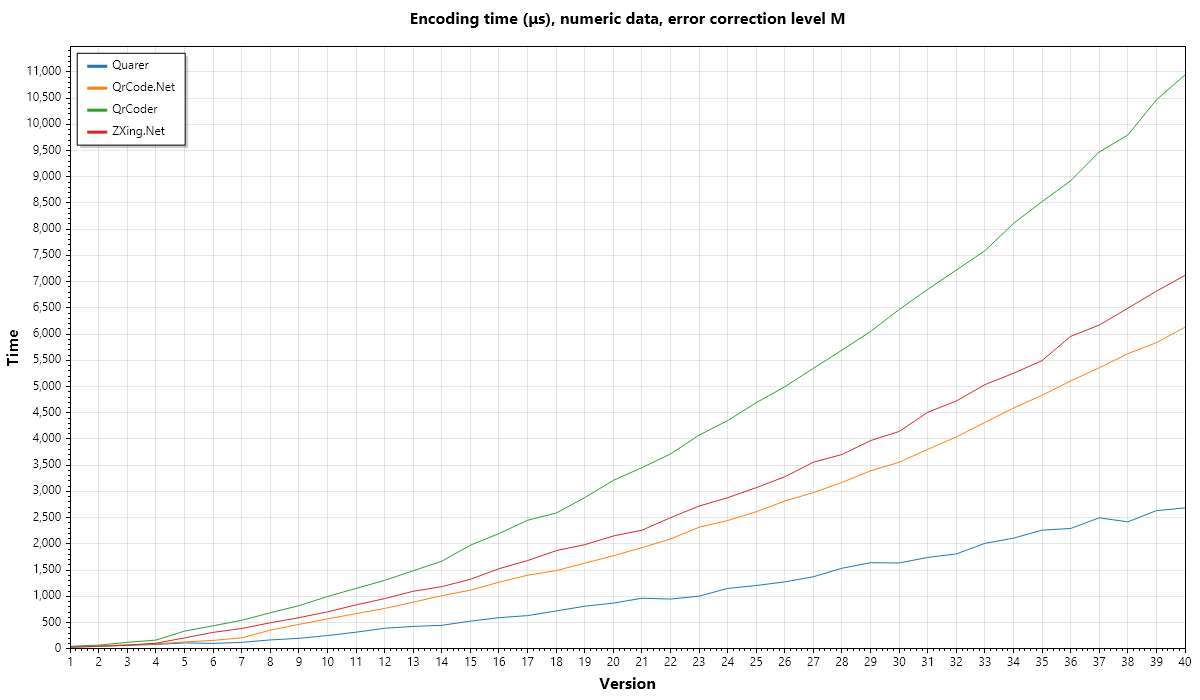
See the [full results](./benchmarks). Want to add get your library added to the benchmarks? Open an [issue](https://github.com/JakeYallop/Quarer/issues/new)!
## Installation
```bash
dotnet add package Quarer
```
## Usage
Create a QR Code
```csharp
using Quarer;
var qrCode = QrCode.Create("Hello, World!");
Console.WriteLine(qrCode.Version);
Console.WriteLine(qrCode.Width);
Console.WriteLine(qrCode.ErrorCorrectionLevel);
```
Output the QR code using a tool of your choice. The example below outputs directly to the console:
```csharp
Console.WriteLine("Encoding \"Hello, World!\"");
var qrCode = QrCode.Create("Hello, World");
var sb = new StringBuilder();
OutputYPadding(sb, qrCode.Width);
for (var y = 0; y < qrCode.Height; y++)
{
for (var x = -4; x < qrCode.Width + 4; x++)
{
if (x < 0 || x >= qrCode.Width)
{
sb.Append("██");
continue;
}
var v = qrCode.Data[x, y] != 0;
var s = v ? " " : "██";
sb.Append(s);
}
sb.AppendLine();
}
OutputYPadding(sb, qrCode.Width);
Console.WriteLine(sb.ToString());
static void OutputYPadding(StringBuilder sb, int width)
{
for (var y = 0; y < 4; y++)
{
for (var x = 0; x < width + 8; x++)
{
sb.Append('█');
sb.Append('█');
}
sb.AppendLine();
}
}
```
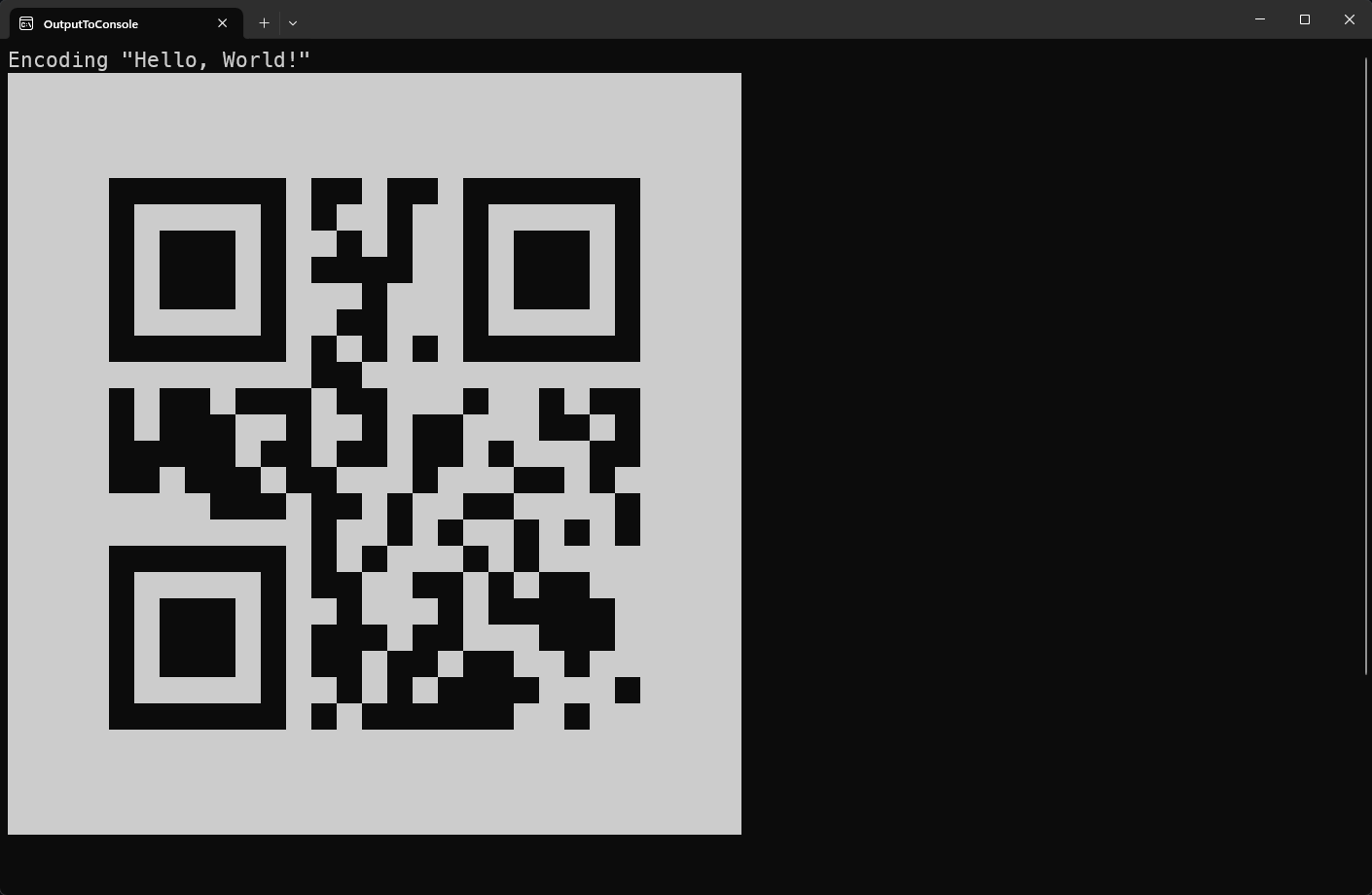
See more [samples](./samples).
## Features
### Automatic Latin1 detection
Byte-mode encoding for a QR Code defaults to Latin1. Quarer detects when it could be beneficial to transcode a string to Latin1, otherwise, Quarer defaults to UTF-8. Latin1 is a more compact encoding than UTF-8 for some characters. In addition, Quarer can also skip emitting the ECI indicator for such a case.
```csharp
var s = "Ã";
Console.WriteLine(Encoding.UTF8.GetBytes(s).Length); // 2
Console.WriteLine(Encoding.Latin1.GetBytes(s).Length); // 1
```
### Encode at a specific error correction level
```csharp
var qrCodeEncodingOptions = new QrCodeEncodingOptions
{
ErrorCorrectionLevel = ErrorCorrectionLevel.H
};
var qrCode = QrCode.Create("Hello, World!", qrCodeEncodingOptions);
```
### Encode using a specific version
```csharp
var qrCodeEncodingOptions = new QrCodeEncodingOptions
{
Version = QrVersion.GetVersion(5)
ErrorCorrectionLevel = ErrorCorrectionLevel.M
};
var qrCode = QrCode.Create("Hello, World!", qrCodeEncodingOptions);
```
### Encode binary data
```csharp
var qrCode = QrCode.Create([0xFE, 0xED, 0xCA, 0xFE]);
```
### ECI support
```csharp
// 26 is the ECI code for UTF-8
var eciCode = new EciCode(26);
var data = Encoding.UTF8.GetBytes("Hello, World!");
var qrCodeEncodingOptions = new QrCodeEncodingOptions
{
ErrorCorrectionLevel = ErrorCorrectionLevel.M
EciCode = eciCode
};
var qrCode = QrCode.Create(data, qrCodeEncodingOptions);
```
## Advanced Usage
The entire toolset used to encode a QR Code is exposed publicly. This allows for more advanced use cases, for example, choosing a specific mask level or inspecting parts of the QR Code creation process.
For example, encoding a QR code using a specific mask pattern:
```csharp
using System.Text;
using Quarer;
var str = "ABC123";
var data = Encoding.Latin1.GetBytes(str);
var errorCorrectionLevel = ErrorCorrectionLevel.M;
var eciCode = EciCode.Empty;
var analysisResult = QrDataEncoder.AnalyzeSimple(, errorCorrectionLevel, eciCode);
if (!analysisResult.Success)
{
throw new InvalidOperationException("Data too large to fit into QR code.");
}
var maskPattern = MaskPattern.PatternThree_DiagonalLines;
var qrCodeEncodingInfo = analysisResult.Value;
var dataCodewords = QrDataEncoder.EncodeDataBits(qrCodeEncodingInfo, data);
var withErrorCodewords = QrDataEncoder.EncodeAndInterleaveErrorCorrectionBlocks(dataCodewords, qrCodeEncodingInfo.Version, qrCodeEncodingInfo.ErrorCorrectionLevel);
// passing in a specific mask pattern here skips all the mask pattern analysis logic
var (matrix, _) = QrSymbolBuilder.BuildSymbol(withErrorCodewords, qrCodeEncodingInfo.Version, qrCodeEncodingInfo.ErrorCorrectionLevel, maskPattern);
// matrix contains the complete QR code.
```
## Roadmap
- Micro QR Codes
- rMQR Codes
- QR code Decoding