https://github.com/jakky1/webview_win_floating
Flutter webView for Windows. It's also a plugin that implements the interface of webview_flutter.
https://github.com/jakky1/webview_win_floating
flutter flutter-plugin webview webview2 windows
Last synced: 5 months ago
JSON representation
Flutter webView for Windows. It's also a plugin that implements the interface of webview_flutter.
- Host: GitHub
- URL: https://github.com/jakky1/webview_win_floating
- Owner: jakky1
- License: bsd-3-clause
- Created: 2022-11-24T08:34:20.000Z (over 3 years ago)
- Default Branch: master
- Last Pushed: 2025-11-20T08:27:25.000Z (8 months ago)
- Last Synced: 2025-11-20T10:18:20.848Z (8 months ago)
- Topics: flutter, flutter-plugin, webview, webview2, windows
- Language: C++
- Homepage:
- Size: 278 KB
- Stars: 21
- Watchers: 1
- Forks: 14
- Open Issues: 5
-
Metadata Files:
- Readme: README.md
- Changelog: CHANGELOG.md
- License: LICENSE
Awesome Lists containing this project
README
# webview_win_floating
Flutter webView for Windows / Linux.
It's also a plugin that implements the interface of [webview_flutter][1].
#### BREAKING CHANGES
For developers upgrading from version 2.x to 3.x, please refer to [API BREAKING CHANGES](https://github.com/jakky1/webview_win_floating/blob/master/BREAKING_CHANGES.md)
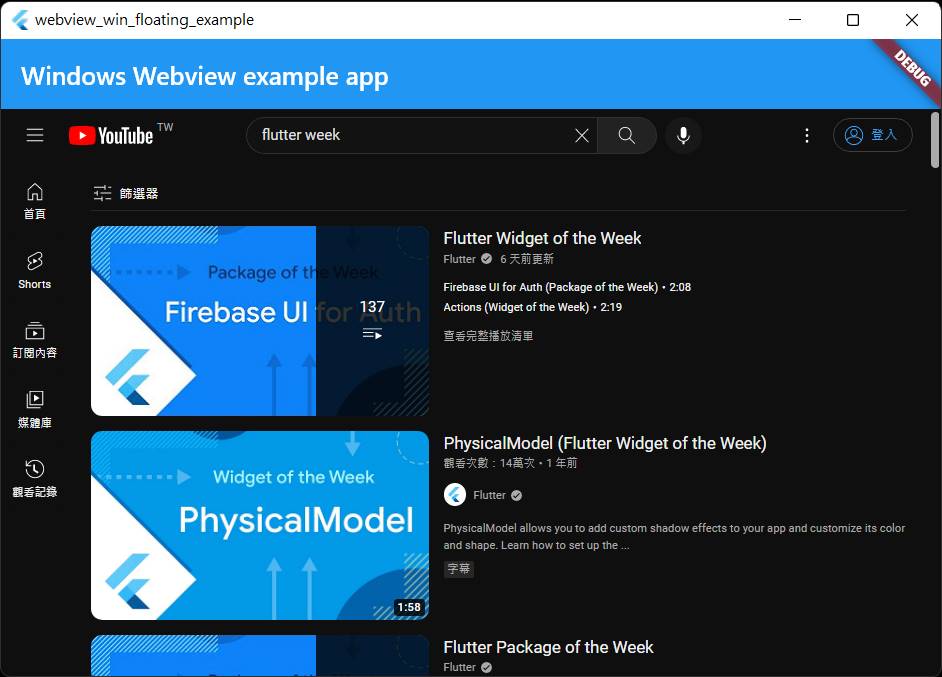
## Platform Support
| Platform | Support | Use Library
| :-----: | :-----: | :-----: |
| Windows | ✅ | [WebView2](https://learn.microsoft.com/en-us/microsoft-edge/webview2/reference/win32/icorewebview2?view=webview2-1.0.3537.50) |
| Linux | ✅ | [webkit2gtk-4.1](https://webkitgtk.org/reference/webkit2gtk/2.38.4/) |
You can call API of [webview_flutter](https://pub.dev/packages/webview_flutter) to use this package.
Meaning your app can run seamlessly across `ALL platforms`.
## Features & Limitations
This package place a native webview component on top of the window, no texture involved. That's why it called "floating", so:
```
On Windows / Linux,
all Flutter widgets cannot be displayed above the webview.
```
However, since it is a native WebView component, without texture involved, so:
```
the webview runs smoothly at a high fps,
just the same with a native WebView,
especially during playing video or scrolling.
```
Features:
- runs smooth at a high fps
- support fullscreen
- support all platforms (with package `webview_flutter`)
Limitations: (only in Windows / Linux)
- all the Flutter widgets cannot be displayed on top of the webview
- cannot push a new route on top of the webview
- There are some limitation switching focus between webview and flutter widgets via Tab key.
- The webview can be put in a scrollable widget, but you may need to assign a ScrollController to the scrollable widget (to enable reposition the webview when scrolling).
- The webview cannot be clipped by Flutter. So if the webview is put in a scrollable, and the webview is outside of the scrollable, the webview is still visible. (However, if the scrollable is filled with the window size, then this issue can be ignored)
Hmm... there are so many limitations.
So, only use this package when:
- need to play videos smoothly
- need a fluid scrolling experience
- if you don't mind the issue of widgets not being able to display above the webview
## For Linux platform
Refer to [this link](https://github.com/jakky1/webview_win_floating/blob/master/README_Linux.md) to learn about the important considerations when building app.
## Installation
Add this to your package's `pubspec.yaml` file:
```yaml
dependencies:
webview_win_floating: ^3.0.0
webview_flutter: ^4.13.0
```
# Problem shootting for building fail
If you build fail with this package, and the error message has the keyword "**MSB3073**":
- run "**flutter build .**" in command line in [**Administrator**] mode
# Usage
## Use webview now
NOTE: all the interface are supplied by [webview_flutter][1]
```dart
final controller = WebViewController();
@override
void initState() {
super.initState();
controller.setJavaScriptMode(JavaScriptMode.unrestricted);
controller.loadRequest(Uri.parse("https://www.google.com/"));
}
@override
Widget build(BuildContext context) {
return WebViewWidget(controller: controller);
}
```
#### enable javascript
don't forgot to add this line if you want to enable javascript:
```dart
controller.setJavaScriptMode(JavaScriptMode.unrestricted);
```
#### restricted user navigation
For example, to disable the facebook / twitter links in youtube website:
```dart
controller.setNavigationDelegate(NavigationDelegate(
onNavigationRequest: (request) {
return request.url.contains("youtube")
? NavigationDecision.navigate
: NavigationDecision.prevent;
},
));
```
#### Communication with javascript
Hint: you can rename the name 'myChannelName' in the following code
```dart
controller.addJavaScriptChannel("myChannelName",
onMessageReceived: (JavaScriptMessage jmsg) {
String message = jmsg.message;
print(message); // print "This message is from javascript"
}
);
controller.loadHtmlString(htmlContent);
controller.runJavascript("callByDart(100)");
var htmlContent = '''
function callByDart(int value) {
console.log("callByDart: " + value);
}
myChannelName.postMessage("This message is from javascript");
''';
```
#### Listen to events
- onPageStarted
- onPageFinished
- onUrlChange
- onHttpError (e.g. 404 Not Found)
- onSslAuthError (e.g. SSL certification expired, revoked, untrust)
- onWebResourceError (for non-ssl error and non-http error. e.g. connect timeout, hostname not found)
```dart
controller.setNavigationDelegate(NavigationDelegate(
onPageStarted: (url) {
print("onPageStarted: $url");
},
onPageFinished: (url) {
print("onPageFinished: $url");
},
onUrlChange: (change) {
String url = change.url ?? "";
print("onUrlChange: $url"),
},
onHttpError: (error) {
int httpCode = error.response!.statusCode; // e.g. 403 (Not Found)
String url = error.response!.uri.toString();
print("onHttpError: code=$httpCode, url : $url");
},
onSslAuthError: (error) {
if (error is WinSslAuthError) {
print("onSslAuthError: ${(error as WinSslAuthError).url}");
} else {
print("onSslAuthError: unknown url}");
}
error.cancel();
},
onWebResourceError: (error) {
print("onWebResourceError: ${error.url} => ${error.description}");
},
));
```
## controller operations
- controller.loadRequest(uri)
- controller.runJavascript( jsStr )
- controller.runJavaScriptReturningResult( jsStr ) // return javascript function's return value
- controller.reload()
- controller.canGoBack()
- controller.goBack()
- controller.goForward()
- controller.canGoForward()
- controller.currentUrl()
- controller.clearCache()
- controller.enableZoom()
## dispose controller (cleanup webview instance)
```dart
controller = null;
// and make sure no any WebViewWidget keep that controller object.
```
After official API interface ``webview_flutter: 4.0.0``, controller is disposed after the WebViewController object is garbage collected.
So the controller object may not be disposed immediately when no any pointer keep the controller object.
## Permission request (e.g., Notification, Camera)
Some websites use javascript to ask webview to provide certain access permissions. For example, javascript ask "Notification" permission to show notifications, ask "Camera" to access camera device.
You can decide whether to authorize these permission requests.
For example, you can test `Notification` permission with the following code, in [this site](https://www.bennish.net/web-notifications.html)
```dart
final controller = WebViewController(onPermissionRequest: (request) {
if (Platform.isWindows) {
var req = request.platform as WinWebViewPermissionRequest;
print("permission: ${req.kind} , ${req.url}");
// only allow "notification", deny all others
if (req.kind == WinWebViewPermissionResourceType.notification) {
req.grant();
} else {
req.deny();
}
}
});
```
If `onPermissionRequest` is not provided, all the permission requests will be denied automatically:
```dart
final controller = WebViewController();
```
Diffrent platforms have different implementations. Windows WebView2 allow you to grant/deny the following permission types:
```dart
enum WinWebViewPermissionResourceType {
unknown,
microphone,
camera,
geoLocation,
notification,
otherSensors,
clipboardRead
}
```
## set user data folder
```dart
String cacheDir = "c:\\test";
var params = WindowsWebViewControllerCreationParams(userDataFolder: cacheDir);
var controller = WebViewController.fromPlatformCreationParams(params);
```
## Build with InnoSetup
## Or if application installed in "C:/Program Files/" or other read-only dir
If your application build with InnoSetup, or can be installed in "C:/Program Files/" or other read-only system directory, the webview cannot create data folder in read-only directory, so it won't work.
In this case, you should specify user data folder as mentioned above.
# standalone mode
If your app only runs on Windows, and you want to remove library dependencies as many as possible, you can modify `pubspec.yaml` file:
```yaml
dependencies:
webview_win_floating: ^3.0.0
# webview_flutter: ^4.13.0 # mark this line for Windows only app
```
and modify all the following class name in your code:
```dart
WebViewWidget -> WinWebViewWidget // add "Win" prefix
WebViewController -> WinWebViewController // add "Win" prefix
NavigationDelegate -> WinNavigationDelegate // add "Win" prefix
```
just only modify class names. All the properties / method are the same with [webview_flutter][1]
For permission grant/deny:
```dart
final controller = WinWebViewController(onPermissionRequest: (req) {
print("permission: ${req.kind} , ${req.url}");
// only allow "notification", deny all others
if (req.kind == WinWebViewPermissionResourceType.notification) {
req.grant();
} else {
req.deny();
}
});
```
There are some Windows-only API:
* onPageTitleChanged` callback in WinNavigationDelegate
* onHistoryChanged` callback in WinNavigationDelegate
* controller.openDevTools()
* controller.dispose()
* controller.setStatusBar(bool isEnable): show/hide [status bar](https://learn.microsoft.com/en-us/dotnet/api/microsoft.web.webview2.core.corewebview2settings.isstatusbarenabled)
# TroubleShooting
## javascript 'history.back()' issue
If javascript `history.back()` is used in your project, please remove `NavigationDelegate.onNavigationRequest()` implementation in your code, which causes the `history.back()` work incorrectly.
# Example
```dart
import 'package:flutter/material.dart';
import 'package:webview_win_floating/webview_win_floating.dart';
import 'package:webview_flutter/webview_flutter.dart';
void main() {
runApp(const MyApp());
}
class MyApp extends StatefulWidget {
const MyApp({Key? key}) : super(key: key);
@override
State createState() => _MyAppState();
}
class _MyAppState extends State {
final controller = WebViewController();
@override
void initState() {
super.initState();
controller.setJavaScriptMode(JavaScriptMode.unrestricted);
controller.loadRequest(Uri.parse("https://www.google.com/"));
}
@override
Widget build(BuildContext context) {
return MaterialApp(
home: Scaffold(
appBar: AppBar(
title: const Text('Windows Webview example app'),
),
body: WebViewWidget(controller: controller),
),
);
}
}
```
[1]: https://pub.dev/packages/webview_flutter "webview_flutter"