https://github.com/james231/bootstrap-project-filters
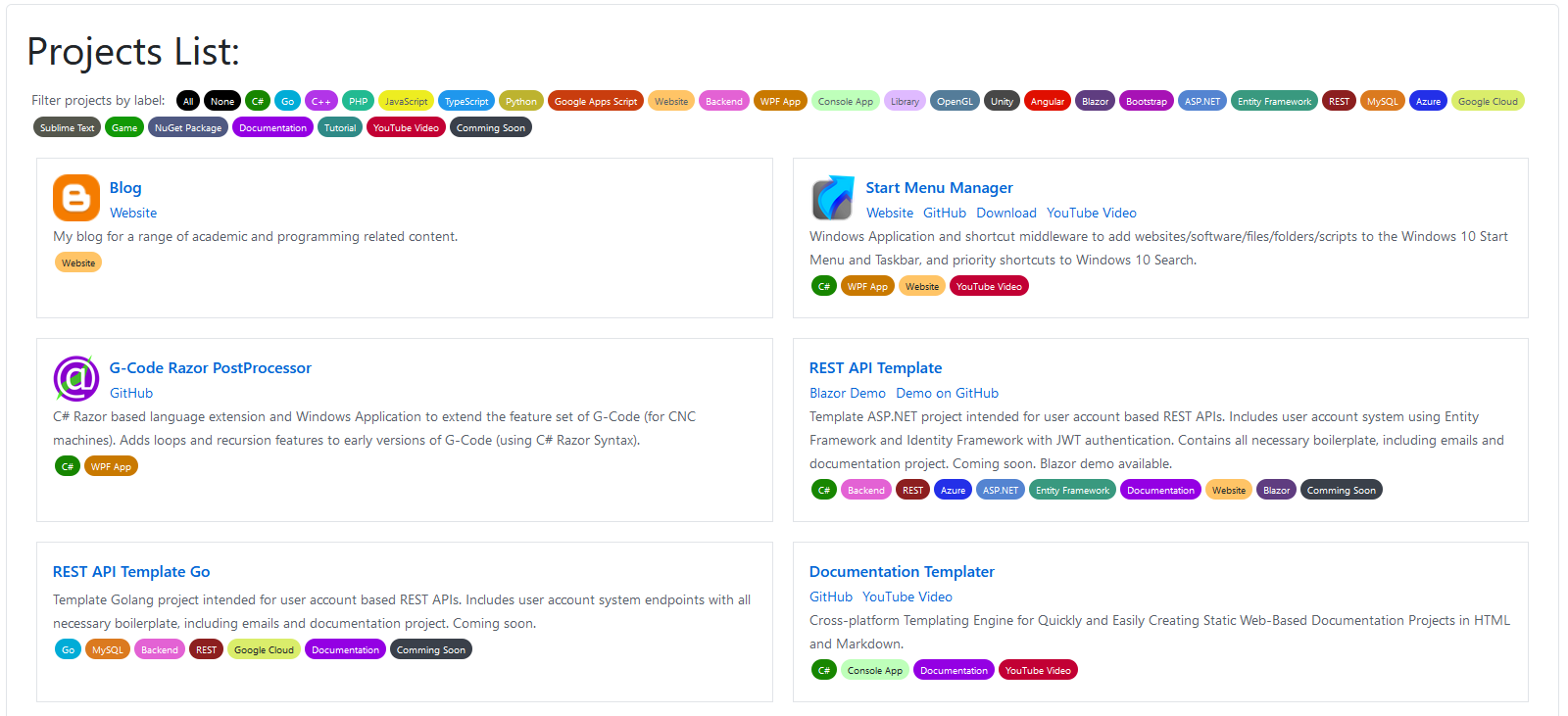
Bootstrap page containing a list of projects which can be filtered by associated tags.
https://github.com/james231/bootstrap-project-filters
badge bootstrap bootstrap4 filter filters flex jquery labels project projects tags website
Last synced: 2 months ago
JSON representation
Bootstrap page containing a list of projects which can be filtered by associated tags.
- Host: GitHub
- URL: https://github.com/james231/bootstrap-project-filters
- Owner: James231
- License: mit
- Created: 2020-09-17T14:19:48.000Z (almost 6 years ago)
- Default Branch: master
- Last Pushed: 2020-09-17T23:25:56.000Z (almost 6 years ago)
- Last Synced: 2025-06-13T16:41:50.998Z (about 1 year ago)
- Topics: badge, bootstrap, bootstrap4, filter, filters, flex, jquery, labels, project, projects, tags, website
- Language: JavaScript
- Homepage:
- Size: 12.7 KB
- Stars: 1
- Watchers: 1
- Forks: 1
- Open Issues: 0
-
Metadata Files:
- Readme: README.md
- License: LICENSE
Awesome Lists containing this project
README
# Bootstrap Project Filters
Bootstrap page containing list of projects which can be filtered by associated tags.
[See the demo here](https://bootstrap-project-list.jam-es.com/)
Screenshot below. Click the image for full size:
[ ](https://cdn.jam-es.com/img/bootstrap-project-filters/screen1.png)
## How to Use
1. Clone the repository.
2. Copy the code from the HTML, CSS and JS files into your website.
3. Edit the `json/projects.js` file to add/edit the list of projects.
You can add additional labels (or badges/filters/tags or whatever you want to call them). By adding the following JSON in the "labels" section:
```json
{
"id": "my-label",
"display_name": "My Label",
"hex_color": "#178600",
"hex_hover_color": "#32a852",
"is_label_font_white": true
},
```
Here `id` should be unique, lowercase, and contain no spaces. The `display_name` is what the user will see as the label's name. The `hex_color` is the colour of the label, and `hex_hover_color` is the mouse hover colour so should be slightly lighter/darker than the `hex_color`. And if `is_label_font_white` is true, the label text will be white, if false it will be dark grey. Set this depending on the lightness of your `hex_color` for readability.
Then to add a shortcut you can add the following JSON to the `projects` section:
```json
{
"id": "blog",
"title_link": "https://google.com/",
"display_name": "My Project Title",
"description": "My blog for a range of academic and programming related content.",
"icon": "https://www.blogger.com/img/logo_blogger_40px.png",
"labels": ["my-label-1", "my-label-2"],
"links": [{
"display_name": "Link 1",
"url": "https://google.com/"
},
{
"display_name": "Link 2",
"url": "https://google.com/"
}]
}
```
Again the `id` should be unique, lowercase, and without spaces and the `display_name` is the title of the project. The `title_link` is the URL you get redirected to when you click on the project title. The `description` is the description (obviously). The `icon` is optional and will be displayed to the left of the title if a URL is given. The `labels` should be an array of all labels for the project, these strings should match the `id` values you created for each label (see above). Finally the `links` should be an array of all the links to display below the title. The `display_name` is what you see for each link, and the `url` is where the link takes you.
## License
This code is released under MIT license. This means you can use this for whatever you want. Modify, distribute, sell, fork, and use this as much as you like. Both for personal and commercial use. I hold no responsibility if anything goes wrong.
If you use this, you don't need to refer to this repo, or give me any kind of credit but it would be appreciated. At least a :star: would be nice.
It took a lot of work to make this available for free. If you are feeling more generous, perhaps you could consider donating?
[](https://www.paypal.com/cgi-bin/webscr?cmd=_s-xclick&hosted_button_id=MLD56V6HQWCKU&source=url)
## Contributing
Pull Requests are welcome. But, note that by creating a pull request you are giving me permission to merge your code and release it under the MIT license mentioned above. At no point will you be able to withdraw merged code from the repository, or change the license under which it has been made available.