https://github.com/james2doyle/phalconphp-completions
A set of completions for the Phalcon PHP Framework made for Sublime Text 3
https://github.com/james2doyle/phalconphp-completions
Last synced: about 1 year ago
JSON representation
A set of completions for the Phalcon PHP Framework made for Sublime Text 3
- Host: GitHub
- URL: https://github.com/james2doyle/phalconphp-completions
- Owner: james2doyle
- Created: 2014-11-18T03:27:26.000Z (over 11 years ago)
- Default Branch: master
- Last Pushed: 2015-03-15T03:21:42.000Z (over 11 years ago)
- Last Synced: 2025-04-23T23:39:15.547Z (over 1 year ago)
- Language: JavaScript
- Size: 379 KB
- Stars: 27
- Watchers: 5
- Forks: 1
- Open Issues: 0
-
Metadata Files:
- Readme: README.md
Awesome Lists containing this project
README
phalconphp-completions
======================
A ton of completions for [Phalcon PHP](http://phalconphp.com/en/) 1.3.\*. There are **414** total right now. This is pretty much a copy-paste from my [sublime-node-snippets](https://github.com/james2doyle/sublime-node-snippets) repo.
## Installing
Drop this folder in your Sublime Text packages directory.
#### Package Control
Just look for `phalconphp-completions` on [Package Control](https://packagecontrol.io/packages/PhalconPHP%20Completions). It is called "Node Completions" on the site, but comes up as "phalconphp-completions".
#### Manual
* Open the Commands Palette (command+shift+p)
* Package Control: Add Repository
* Past in this repos URL
* Press Enter
* Open the palette again
* press enter on "phalconphp-completions"
* watch it install
## Using
Pressing `\` (backslash) or `:` will end the snippet lookup.
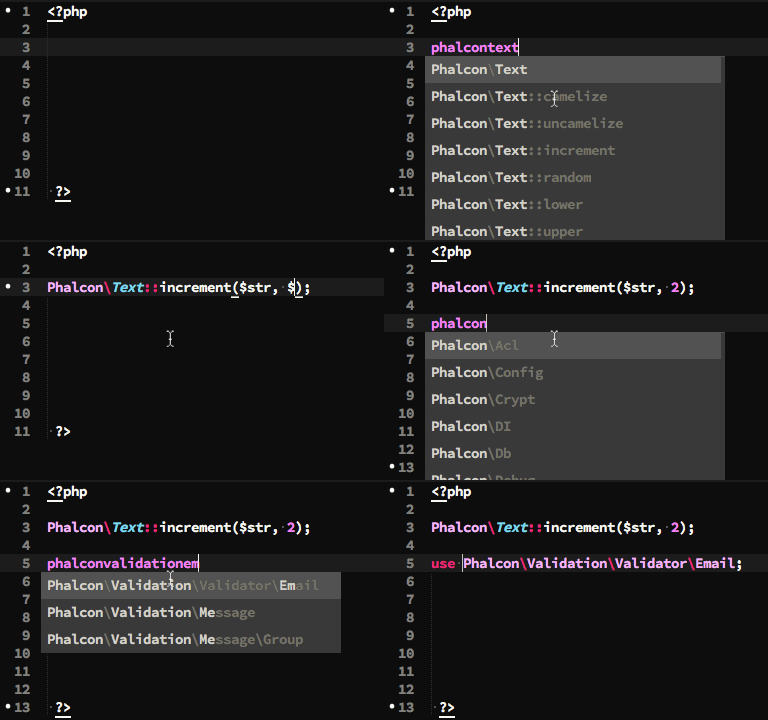
You will have better results if you pretend the slashes and colons aren't needed. So if you are looking for `Phalcon\Text::increment`, you would type `phalcontextincrement` and you would see the results coming up.
*See the GIF above!*
## Building
I went to each page of the node docs, and copied the functions. Then I wrote a converter to take each function and convert it to a snippet.
For Example, this line:
```
Phalcon\Text::endsWith($str, $end, $ignoreCase)
```
Is going to get converted to:
```
Phalcon\\Text::endsWith(\\$${1:str}, \\$${2:end}, \\$${3:ignoreCase});${0}
```
## sources.txt
This file is cool. It is just a line-by-line output of the Phalcon docs functions. This is the file that is raked over to generate the snippets.
## Running The Build
Just run `node build.js` and it will rake the sources.txt file and then write the new snippet in the snippets folder.
Everything before the first `(` will be used as the filename.
## Adding New Snippets
Here is how I quickly got all these snippets. First I went to the docs for the class, and I looked to see what the code examples were wrapped in.
For the all the docs pages, the methods and properties are show in a `p.method-signature` element. So to quickly get the list, I ran the following code:
```javascript
Array.prototype.slice.call(document.querySelectorAll(".method-signature"), 0).map(function(item){
return item.textContent.trim();
}).join("\n");
```
Then copied the output, added the class in front (replacing the type info), and pasted it in the sources.txt file. Done!
## Contributing
Just add (or edit) a line in the source file. Then run `node build.js` to generate the new snippets.
## License
**The MIT License**
Copyright (c) 2015 [James Doyle](http://twitter.com/james2doyle) james2doyle@gmail.com
Permission is hereby granted, free of charge, to any person obtaining
a copy of this software and associated documentation files (the
'Software'), to deal in the Software without restriction, including
without limitation the rights to use, copy, modify, merge, publish,
distribute, sublicense, and/or sell copies of the Software, and to
permit persons to whom the Software is furnished to do so, subject to
the following conditions:
The above copyright notice and this permission notice shall be
included in all copies or substantial portions of the Software.
THE SOFTWARE IS PROVIDED 'AS IS', WITHOUT WARRANTY OF ANY KIND,
EXPRESS OR IMPLIED, INCLUDING BUT NOT LIMITED TO THE WARRANTIES OF
MERCHANTABILITY, FITNESS FOR A PARTICULAR PURPOSE AND NONINFRINGEMENT.
IN NO EVENT SHALL THE AUTHORS OR COPYRIGHT HOLDERS BE LIABLE FOR ANY
CLAIM, DAMAGES OR OTHER LIABILITY, WHETHER IN AN ACTION OF CONTRACT,
TORT OR OTHERWISE, ARISING FROM, OUT OF OR IN CONNECTION WITH THE
SOFTWARE OR THE USE OR OTHER DEALINGS IN THE SOFTWARE.