https://github.com/jamesridgway/devdeck-slack
Slack deck and controls for DevDeck
https://github.com/jamesridgway/devdeck-slack
devdeck
Last synced: about 1 year ago
JSON representation
Slack deck and controls for DevDeck
- Host: GitHub
- URL: https://github.com/jamesridgway/devdeck-slack
- Owner: jamesridgway
- License: bsd-3-clause
- Created: 2020-12-23T17:51:40.000Z (over 5 years ago)
- Default Branch: main
- Last Pushed: 2021-11-08T10:28:38.000Z (over 4 years ago)
- Last Synced: 2024-08-14T22:20:51.202Z (almost 2 years ago)
- Topics: devdeck
- Language: Python
- Homepage:
- Size: 6.44 MB
- Stars: 21
- Watchers: 4
- Forks: 2
- Open Issues: 0
-
Metadata Files:
- Readme: README.md
- Funding: .github/funding.yml
- License: LICENSE
- Codeowners: .github/CODEOWNERS
Awesome Lists containing this project
README
# DevDeck - Slack

Slack deck and controls for [DevDeck](https://github.com/jamesridgway/devdeck).
In this example, you can manage your presence, status and do-not-disturb settings from your StreamDeck:
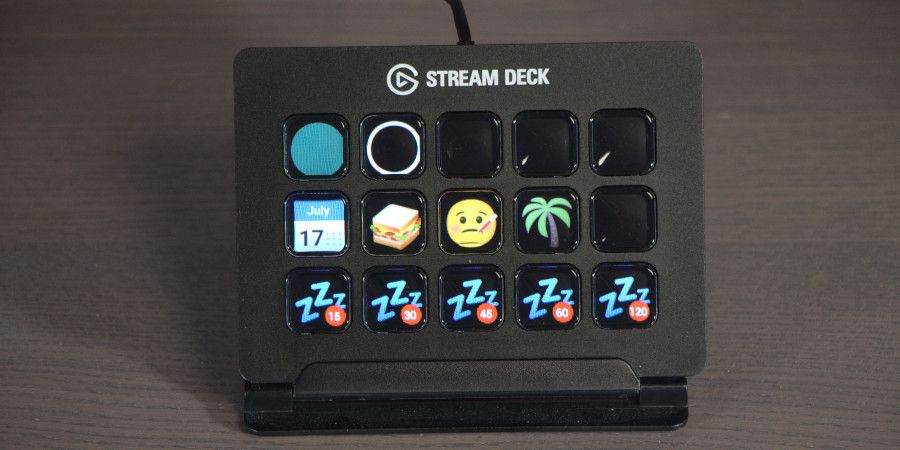
## Installing
Simplify install *DevDeck - Slack* into the same python environment that you have installed DevDeck.
pip install devdeck-slack
You can then update your DevDeck configuration to use decks and controls from this package.
## Configuration
Example configuration:
decks:
- serial_number: "ABC123"
name: 'devdeck.decks.single_page_deck_controller.SinglePageDeckController'
settings:
controls:
- name: 'devdeck_slack.slack_deck.SlackDeck'
key: 0
settings:
api_key: 'YOUR_API_KEY_GOES_HERE'
actions:
- action: online
key: 0
- action: away
key: 1
- action: status
key: 2
text: At my desk
emoji: ':desktop_computer:'
clear_dnd: true
- action: status
key: 5
text: In a meeting
emoji: ':calendar:'
- action: status
key: 6
text: Lunch
emoji: ':sandwich:'
- action: status
key: 7
text: Off sick
emoji: ':face_with_thermometer:'
until: tomorrow at 8am
- action: status
key: 8
text: On holiday
emoji: ':palm_tree:'
- action: dnd
key: 10
duration: 15
- action: dnd
key: 11
duration: 30
- action: dnd
key: 12
duration: 45
- action: dnd
key: 13
duration: 60
- action: dnd
key: 14
duration: 120
## Registering your app and creating permissions
This plugin requires a Slack API key to function.
Head over to https://api.slack.com/apps to create your app.
Once you have created your app you will be able to access your OAuth Access Token under **OAuth & Permissions** - this
is your `api_key` value.
### Scopes
Under **User Token Scopes** you need want to enable the following scopes:
* `dnd:read`
* `dnd:write`
* `users.profile:write`
* `users:write`