https://github.com/jannis-baum/vivify
Live viewer for Markdown, HTML, Jupyter Notebooks & more
https://github.com/jannis-baum/vivify
jupyter-notebook-viewer markdown-viewer vim-markdown vivify-viewer
Last synced: 5 months ago
JSON representation
Live viewer for Markdown, HTML, Jupyter Notebooks & more
- Host: GitHub
- URL: https://github.com/jannis-baum/vivify
- Owner: jannis-baum
- License: gpl-3.0
- Created: 2023-07-19T09:10:51.000Z (almost 3 years ago)
- Default Branch: main
- Last Pushed: 2025-11-09T09:11:54.000Z (7 months ago)
- Last Synced: 2025-11-09T11:20:54.129Z (7 months ago)
- Topics: jupyter-notebook-viewer, markdown-viewer, vim-markdown, vivify-viewer
- Language: TypeScript
- Homepage:
- Size: 4.43 MB
- Stars: 106
- Watchers: 3
- Forks: 10
- Open Issues: 16
-
Metadata Files:
- Readme: README.md
- Contributing: docs/CONTRIBUTING.md
- License: LICENSE
Awesome Lists containing this project
README
# Vivify
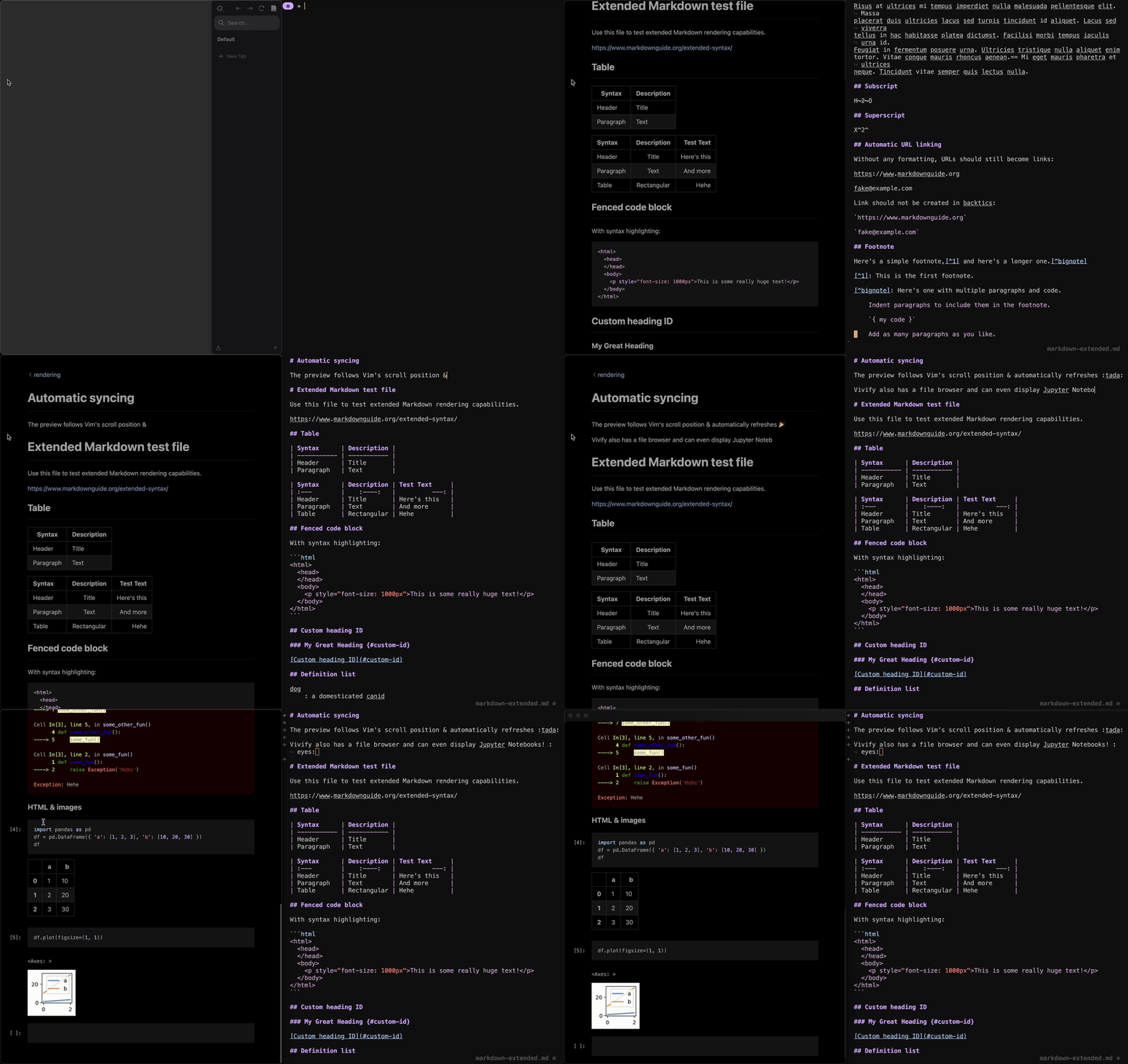
Vivify brings your files to life in the browser! Vivify is primarily made to
render Markdown and Jupyter Notebooks, but will also serve as a directory
browser and let you view code files with syntax highlighting. See below for
features!
> [!TIP]
> We recently released [Jupyviv](https://github.com/jannis-baum/Jupyviv), a new
> solution for interacting with Jupyter Notebooks from plain text editors like
> Neovim by using Vivify as a live viewer. If you like Vivify and use Jupyter
> Notebooks, make sure to check out the project!
## Features
- view Markdown with various [features](#markdown-features)
- view Jupyter Notebooks
- view other plain text files with code syntax highlighting, or
[optionally](docs/customization.md) render HTML files
- view image files
- view & navigate directories using "back to parent directory" button at the
top-left of the file viewer
- automatic reloads when files change
- easy to integrate with any editor for fully live synchronization without
saving the file (see [editor support](#editor-support))
- Vivify server starts lazily and automatically shuts down when no more viewers
are connected
- various [customization options](docs/customization.md)
- [produce nice looking PDFs](docs/pdfs.md) from Markdown
- automatic parsing of front matter allowing for [custom
usage](docs/front-matter.md)
If you need any additional features, feel free to [open an
issue](https://github.com/jannis-baum/vivify/issues/new/choose) or
[contribute](docs/CONTRIBUTING.md)!
### Markdown features
- full [basic](https://www.markdownguide.org/basic-syntax/) and
[extended](https://www.markdownguide.org/extended-syntax/) syntax support
- [KaTeX math](https://katex.org)
- [graphviz/dot graphs](https://graphviz.org/doc/info/lang.html)
- [Mermaid diagrams & charts](https://mermaid.js.org)
- alert blocks
- default styles like in [GitHub](https://docs.github.com/en/get-started/writing-on-github/getting-started-with-writing-and-formatting-on-github/basic-writing-and-formatting-syntax#alerts)
- [syntax extensions](docs/alerts.md#custom-marker) similar to [Obsidian
callouts](https://help.obsidian.md/callouts)
- configurable [custom alerts](docs/alerts.md#configuring-alert-icons)
- links to other files: [relative links like in
GitHub](https://docs.github.com/en/get-started/writing-on-github/getting-started-with-writing-and-formatting-on-github/basic-writing-and-formatting-syntax#relative-links)
as well as absolute file links
- [add styles, classes, ids or other attributes directly from
Markdown](https://github.com/arve0/markdown-it-attrs?tab=readme-ov-file#examples)
- table of contents with `[[toc]]`
- `` tags, e.g. to style keyboard shortcuts
You can find examples for all supported features in the files in the
[`tests/rendering`](tests/rendering) directory. In case you are looking at these
on GitHub, keep in mind that GitHub doesn't support some of the features that
Vivify supports so some things may look off.
### Editor Support
Vivify has a simple API to integrate your favorite editor so the viewer live
updates to any changes as you are typing and the scrolling is smoothly
synchronized!
See below for a list of existing editor plugins. In case your favorite editor is
not yet supported, use these as an example to write your own and add it to the
list!
#### Existing integration
- for Vim and Neovim: [vivify.vim](https://github.com/jannis-baum/vivify.vim)
- for micro: [micro-vivify](https://codeberg.org/gibbert/micro-vivify)
## Installation
Once you have Vivify installed, use it by running `viv` with any text file or
directory as an argument! See below for installation options.
### Packaged
> [!NOTE]
> Missing a package for your system or package manager? Help us fill the gap by
> creating and contributing one – we're happy about PRs and will help with any
> questions you might have.
- `brew install jannis-baum/tap/vivify` for [Homebrew](https://brew.sh)
(maintained by [@jannis-baum](https://github.com/jannis-baum))
- `yay -S vivify` for [AUR](https://aur.archlinux.org/packages/vivify)
(maintained by [@tuurep](https://github.com/tuurep))
- `nix-shell -p vivify`
for [Nixpkgs](https://search.nixos.org/packages?query=vivify)
(maintained by [@skohtv](https://github.com/skohtv))
### Manual
- download & unpack the [latest
release](https://github.com/jannis-baum/vivify/releases) for your system
(macOS or Linux)
- add the two executables to your `$PATH`
### Compile yourself
- make sure you have [`yarn`](https://yarnpkg.com), `make` and `zip` installed
- clone the repository
- run `yarn`
- run `./configure `
- run `make install`
> [!TIP]
> If you are having trouble building Vivify, or you'd like more detailed build
> instructions, see our [CONTRIBUTING](docs/CONTRIBUTING.md) page
## Get help
Is something not working or do you have any questions? [Start a
discussion!](https://github.com/jannis-baum/vivify/discussions/new?category=q-a)