https://github.com/janusgraph/janusgraph-visualizer
JanusGraph web-based visualization tool
https://github.com/janusgraph/janusgraph-visualizer
graph-visualization graph-visualizer graphdatabase visualization visualization-tools
Last synced: 4 months ago
JSON representation
JanusGraph web-based visualization tool
- Host: GitHub
- URL: https://github.com/janusgraph/janusgraph-visualizer
- Owner: JanusGraph
- License: mit
- Created: 2024-11-03T14:29:21.000Z (over 1 year ago)
- Default Branch: main
- Last Pushed: 2025-02-16T23:50:30.000Z (over 1 year ago)
- Last Synced: 2025-05-31T14:21:55.937Z (about 1 year ago)
- Topics: graph-visualization, graph-visualizer, graphdatabase, visualization, visualization-tools
- Language: JavaScript
- Homepage:
- Size: 1.07 MB
- Stars: 26
- Watchers: 5
- Forks: 6
- Open Issues: 3
-
Metadata Files:
- Readme: README.md
- License: LICENSE
Awesome Lists containing this project
README
# JanusGraph-Visualizer
This project is to visualize the graph network corresponding to a gremlin query.
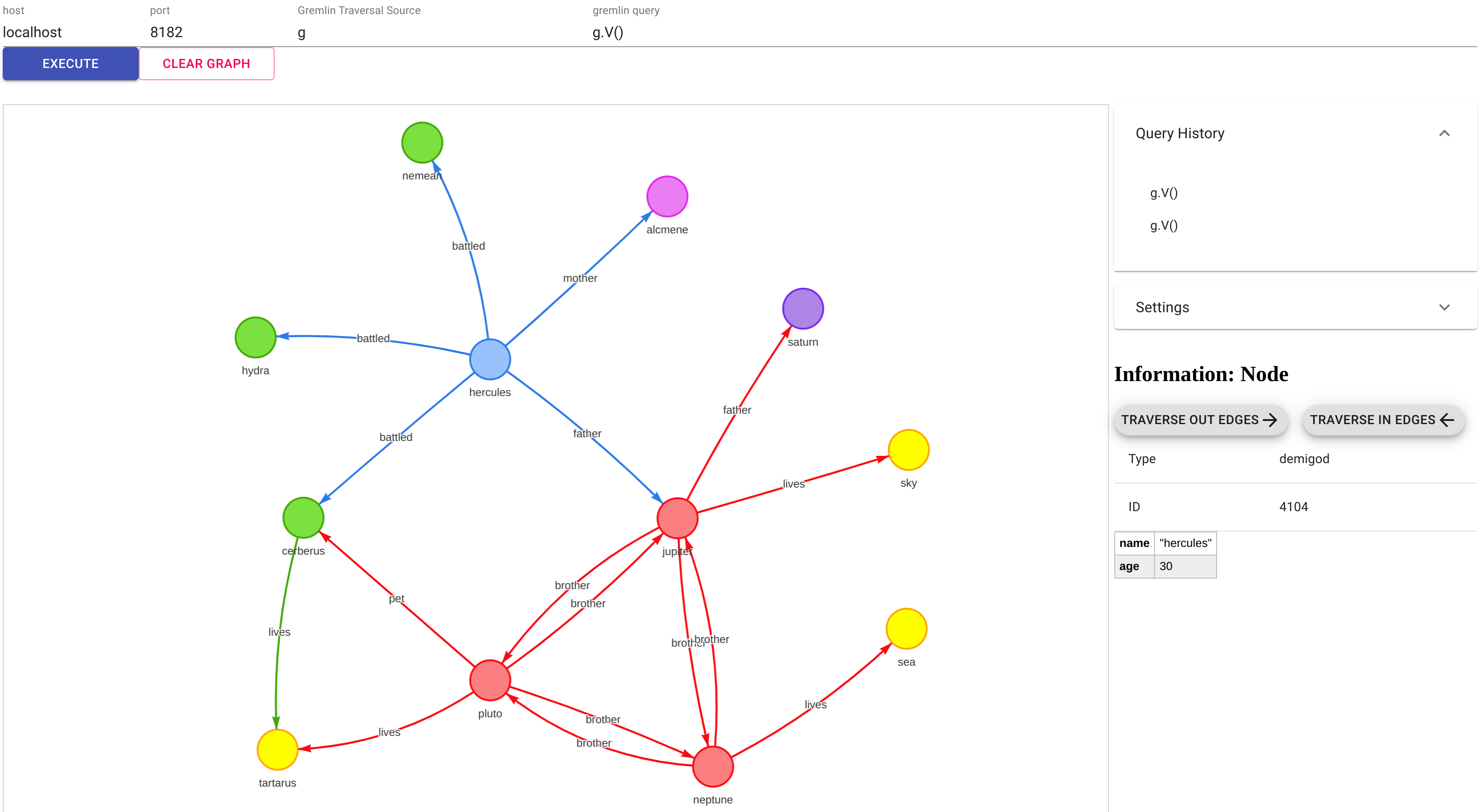
### Quick start guide
Below is a quick start guide to start JanusGraph, load the testing graph, and start visualization to show the graph.
Notice, this guide uses Docker compose, but it's possible to start JanusGraph and visualization tool without (see `Setting Up JanusGraph Visualizer` section below).
1. Start the docker services using `docker compose up` for the starting the Janusgraph service, loading the test data and starting the visualization service.
2. (Optional) If you want to specially build the visualizer from the source code, use `docker compose up --build`.
3. Open your browser and enter address `http://localhost:3001/`
4. Click `EXECUTE` button. You should see the same graph as the one specified on the image above.
5. The Docker containers can be stopped by calling `docker compose down`.
### Setting Up JanusGraph Visualizer
To setup JanusGraph visualizer, you need to have `node.js` and `npm` installed in your system.
* Clone the project
```sh
git clone https://github.com/JanusGraph/janusgraph-visualizer.git
```
* Install dependencies
```sh
npm install
```
* Run the project
```sh
npm start
```
* Open the browser and navigate to
```sh
http://localhost:3000
```
Note - Frontend starts on port 3000 and simple Node.js server also starts on port 3001. If you need to change the ports, configure in `package.json`, `proxy-server.js`, `src/constants`
See [docs/docker-build.md](docs/docker-build.md) to learn how to build the project directly using Docker images.
### Supported Environment Variables
* `GREMLIN_HOST` - sets gremlin server hostname for connection. Default is `janusgraph` if started via `docker compose up` (`docker-compose.yml` receives this value from `.env` file) or `localhost` if started directly via `docker run`.
* `GREMLIN_PORT` - sets gremlin server port for connection. Default is `8182`.
* `GREMLIN_TRAVERSAL_SOURCE` - sets default graph traversal source name to be used for queries. Default is `g`.
* `GREMLIN_DEFAULT_QUERY` - sets default query to show in visualizer. Default is `g.V()`.
You can change these values in the .env file.
### Usage
* Start JanusGraph-Visualizer as mentioned above
* Specify the host and port of the gremlin server
* Write a gremlin query to retrieve a set of nodes (eg. `g.V()`)
### Features
* If you don't clear the graph and execute another gremlin query, results of previous query and new query will be merged and be shown.
* Node and edge properties are shown once you click on a node/edge
* Change the labels of nodes to any property
* View the set of queries executed to generate the graph
* Traverse in/out from the selected node
## Credits
JanusGraph-Visualizer is based on the original Gremlin-Visualizer that can be found [here](https://github.com/prabushitha/gremlin-visualizer).
Author of the original Gremlin-Visualizer is: [Umesh Jayasinghe](https://github.com/prabushitha).
### What is the different in this fork comparing to the origin repo
1. Added suppport for different graph names
2. Added GitHub actions to build & push Docker image
3. Added productions mode to host in Kubernetes
4. Added ability to override default values (graph host, port, name) via environment variables
## Something Missing?
If you have new ideas to improve please create an issue and make a pull request