https://github.com/jason-fox/fox.jason.passthrough.doxygen
A DITA-OT Plug-in which creates DITA-based API documentation from Doxygen XML sources
https://github.com/jason-fox/fox.jason.passthrough.doxygen
dita-ot-plugin doxygen-xml
Last synced: 6 months ago
JSON representation
A DITA-OT Plug-in which creates DITA-based API documentation from Doxygen XML sources
- Host: GitHub
- URL: https://github.com/jason-fox/fox.jason.passthrough.doxygen
- Owner: jason-fox
- License: apache-2.0
- Created: 2020-04-25T14:00:51.000Z (over 6 years ago)
- Default Branch: master
- Last Pushed: 2024-02-18T08:25:22.000Z (over 2 years ago)
- Last Synced: 2025-03-29T12:26:48.221Z (over 1 year ago)
- Topics: dita-ot-plugin, doxygen-xml
- Language: XSLT
- Homepage: https://jason-fox.github.io/dita-ot-plugins/doxygen
- Size: 603 KB
- Stars: 4
- Watchers: 1
- Forks: 1
- Open Issues: 2
-
Metadata Files:
- Readme: README.md
- License: LICENSE
Awesome Lists containing this project
README
# Doxygen Plugin for DITA-OT [ ](http://doxygendita-ot.rtfd.io/)
[](http://www.apache.org/licenses/LICENSE-2.0)
[](http://www.dita-ot.org/4.2)
[](https://github.com/jason-fox/fox.jason.passthrough.doxygen/actions?query=workflow%3ACI)
[](https://coveralls.io/github/jason-fox/fox.jason.passthrough.doxygen?branch=master)
This is a [DITA-OT Plug-in](https://www.dita-ot.org/plugins) used to auto-create valid DITA-based Doxygen documentation.
The initial source of the documentation can be generated directly using the
[Doxygen XML](http://www.doxygen.nl/manual/customize.html#xmlgenerator). The XML file can be added to the source and
processed as if it had been written in DITA.
Table of Contents
- [Background](#background)
- [Install](#install)
- [Installing DITA-OT](#installing-dita-ot)
- [Installing the Plug-in](#installing-the-plug-in)
- [Usage](#usage)
- [License](#license)
## Background
[ ](https://docs.oracle.com/javase/1.5.0/docs/guide/doxygen/index.html)
[Doxygen](http://www.doxygen.nl/manual/) is a tool that parses the declarations and
documentation comments in a set of source files and produces a set of HTML pages describing the classes, interfaces,
constructors, methods, and fields.
#### Sample doxygen
```c++
namespace transport
{
/** Mountain bike implementation of a `Bicycle`.
*
* MountainBike is an implementation of a Bicycle
* providing a bike for cycling on rough terrain. Mountain bikes
* are pretty cool because they have stuff like **Suspension** (and
* you can even adjust it using SetSuspension). If you're looking
* for a bike for use on the road, you might be better off using a
* RacingBike though.
*
* @ingroup mountainbike
*/
class MountainBike : public Bicycle
{
public:
/** Set suspension stiffness.
* @stiffness the suspension stiffness.
*
* SetSuspension changes the stiffness of the suspension
* on the bike. The method will return false if the stiffness
* could not be adjusted.
*
* @return true if the suspension was adjusted successfully,
* false otherwise.
*/
bool SetSuspension(double stiffness);
```
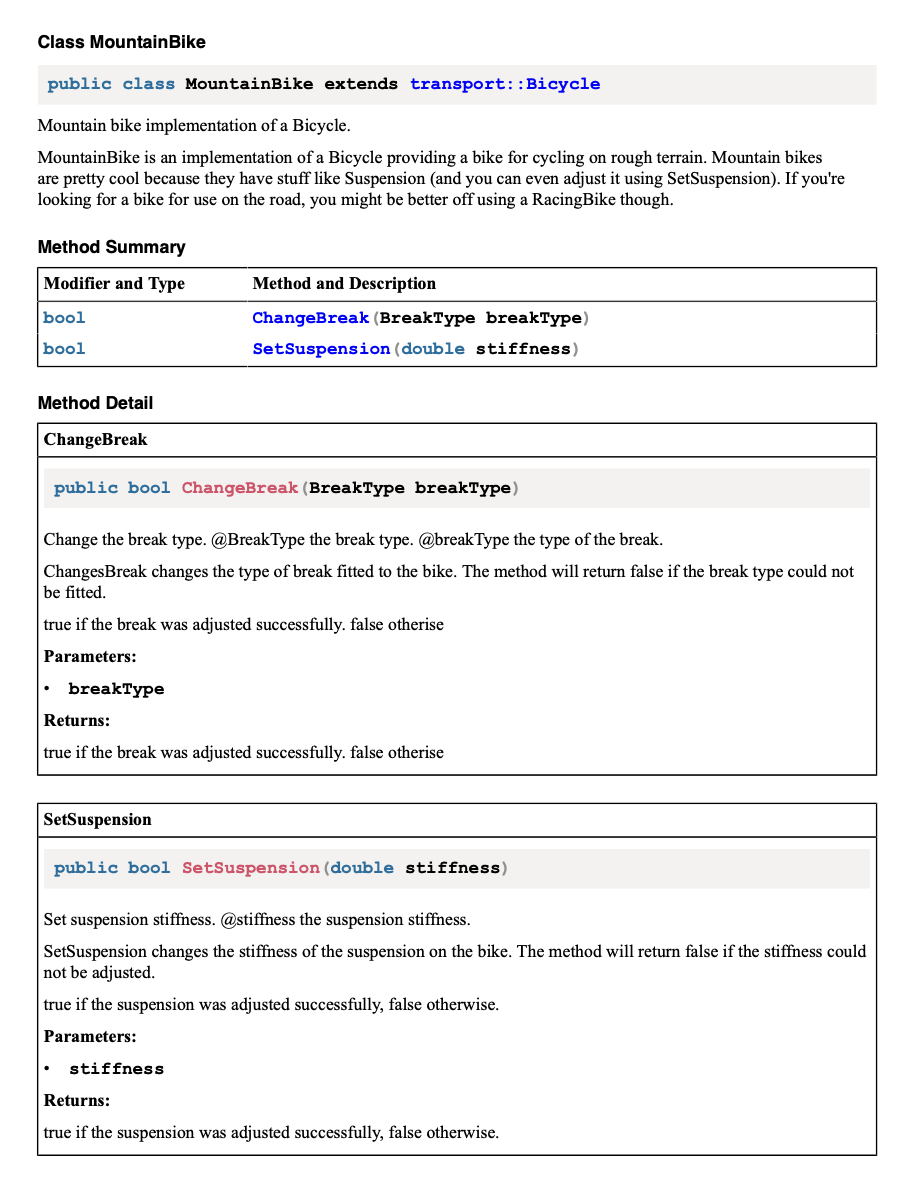
#### Sample DITA Output
> 
## Install
The DITA-OT doxygen plug-in has been tested against [DITA-OT 3.x](http://www.dita-ot.org/download). The plugin requires
the XSLT 3.0 support found in the [Saxon9.8HE](https://www.saxonica.com/html/download/java.html) library, so the mimimum
DITA-OT version is therefore 3.3. It is recommended that you upgrade to the latest version.
### Installing DITA-OT

The DITA-OT doxygen plug-in is a file reader for the DITA Open Toolkit.
- Full installation instructions for downloading DITA-OT can be found
[here](https://www.dita-ot.org/4.0/topics/installing-client.html).
1. Download the `dita-ot-4.2.zip` package from the project website at
[dita-ot.org/download](https://www.dita-ot.org/download)
2. Extract the contents of the package to the directory where you want to install DITA-OT.
3. **Optional**: Add the absolute path for the `bin` directory to the _PATH_ system variable.
This defines the necessary environment variable to run the `dita` command from the command line.
```console
curl -LO https://github.com/dita-ot/dita-ot/releases/download/4.2/dita-ot-4.2.zip
unzip -q dita-ot-4.2.zip
rm dita-ot-4.2.zip
```
### Installing the Plug-in
- Run the plug-in installation commands:
```console
dita install https://github.com/jason-fox/fox.jason.passthrough.doxygen/archive/master.zip
```
The `dita` command line tool requires no additional configuration.
---
## Usage
To do generate Doxygen XML set `GENERATE_XML` to `YES`.
The XML output consists of an index file named `index.xml` which lists all items extracted by doxygen with references to the other XML files for details. The structure of the index is described by a schema file `index.xsd`. The Doxygen source should be concatenated into one single XML file using the instructions found in the XSLT file `combine.xslt`.
Once the source XML has been created, add it to the `*.ditamap` and mark it for **doxygen** processing, by labelling it
with `format="doxygen"` within the `*.ditamap` as shown:
```xml
...etc
Appendices
```
The additional file will be converted to a `*.dita` file and will be added to the build job without further processing.
Unless overridden, the `navtitle` of the included topic will be the same as root name of the file. Any underscores in
the filename will be replaced by spaces in title.
## License
[Apache 2.0](LICENSE) © 2020 - 2024 Jason Fox