https://github.com/jason-fox/fox.jason.tabs.css
DITA-OT Plug-in used to create CSS-only tabbed dialogs within DITA HTML output.
https://github.com/jason-fox/fox.jason.tabs.css
dita-ot dita-ot-html-plugin dita-ot-plugin tabs
Last synced: 5 months ago
JSON representation
DITA-OT Plug-in used to create CSS-only tabbed dialogs within DITA HTML output.
- Host: GitHub
- URL: https://github.com/jason-fox/fox.jason.tabs.css
- Owner: jason-fox
- License: apache-2.0
- Created: 2021-04-06T05:57:00.000Z (about 5 years ago)
- Default Branch: master
- Last Pushed: 2024-02-18T07:49:18.000Z (over 2 years ago)
- Last Synced: 2025-02-04T13:27:41.700Z (over 1 year ago)
- Topics: dita-ot, dita-ot-html-plugin, dita-ot-plugin, tabs
- Language: XSLT
- Homepage: https://jason-fox.github.io/dita-ot-plugins/tabs.css
- Size: 157 KB
- Stars: 0
- Watchers: 0
- Forks: 0
- Open Issues: 0
-
Metadata Files:
- Readme: README.md
- License: LICENSE
Awesome Lists containing this project
README
# HTML Tab Plugin for DITA-OT [ ](http://tabsdita-ot.rtfd.io/)
[](http://www.apache.org/licenses/LICENSE-2.0)
[](http://www.dita-ot.org/4.2)
[](https://github.com/jason-fox/fox.jason.tabs.css/actions?query=workflow%3ACI)
[](https://coveralls.io/github/jason-fox/fox.jason.tabs.css?branch=master)
This is a [DITA-OT Plug-in](https://www.dita-ot.org/plugins) used to create CSS-only tabbed dialog within DITA HTML output.
Table of Contents
- [Background](#background)
- [Install](#install)
- [Installing DITA-OT](#installing-dita-ot)
- [Installing the Plug-in](#installing-the-plug-in)
- [Usage](#usage)
- [License](#license)
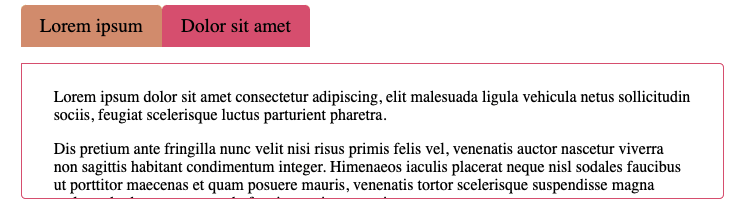
#### Sample DITA Input
```xml
Lorem ipsum
Lorem ipsum dolor sit amet consectetur adipiscing, elit malesuada ligula vehicula netus sollicitudin sociis, feugiat scelerisque luctus parturient pharetra.
Dis pretium ante fringilla nunc velit nisi risus primis felis vel, venenatis auctor nascetur viverra non sagittis habitant condimentum integer. Himenaeos iaculis placerat neque nisl sodales faucibus ut porttitor maecenas et quam posuere mauris, venenatis tortor scelerisque suspendisse magna malesuada rhoncus commodo feugiat pretium urna just
Dolor sit amet
Class ornare feugiat arcu parturient lacus mollis purus at, primis turpis morbi libero ultricies hendrerit. Volutpat sed ullamcorper bibendum mi sagittis ultricies ridiculus sociis nam, dapibus proin curae odio lacus est dignissim ad, commodo ornare nec phasellus condimentum laoreet vehicula porttitor.
Himenaeos nunc aptent massa ridiculus auctor nisi pellentesque maecenas a eleifend, fermentum fringilla semper nam viverra vivamus velit metus in posuere, conubia tellus venenatis rutrum proin erat enim mi libero.
```
#### Sample DITA Output
> 
## Install
The DITA-OT CSS Tabs Plug-in has been tested against [DITA-OT 4.x](http://www.dita-ot.org/download). It is recommended
that you upgrade to the latest version.
### Installing DITA-OT

The DITA-OT CSS Tabs Plug-in is a file reader for the DITA Open Toolkit.
- Full installation instructions for downloading DITA-OT can be found
[here](https://www.dita-ot.org/4.2/topics/installing-client.html).
1. Download the `dita-ot-4.2.zip` package from the project website at
[dita-ot.org/download](https://www.dita-ot.org/download)
2. Extract the contents of the package to the directory where you want to install DITA-OT.
3. **Optional**: Add the absolute path for the `bin` directory to the _PATH_ system variable.
This defines the necessary environment variable to run the `dita` command from the command line.
```console
curl -LO https://github.com/dita-ot/dita-ot/releases/download/4.2/dita-ot-4.2.zip
unzip -q dita-ot-4.2.zip
rm dita-ot-4.2.zip
```
### Installing the Plug-in
- Run the plug-in installation commands:
```console
dita install https://github.com/jason-fox/fox.jason.extend.css/archive/master.zip
dita install https://github.com/jason-fox/fox.jason.tabs.css/archive/master.zip
```
The `dita` command line tool requires no additional configuration.
---
## Usage
An HTML tabbed box is defined using a `` element with an `outputclass=tabs`. The default size is 400px high. Three other sizes are defined:
- `small` - 200px
- `medium` - 600px
- `large` - 1000px
For each tab, just place a `` element with a `` within the `` as shown:
```xml
Title goes here
Body text goes here
... etc
```
When running an HTML based transform, the section will be transformed into a tabbed dialog. e.g.:
```console
PATH_TO_DITA_OT/bin/dita -f html5 -o out -i document.ditamap
```
To alter the CSS, amend the `resource/tabs.css` file which is copied over as part of the DITA processing.
## License
[Apache 2.0](LICENSE) © 2021 - 2024 Jason Fox