https://github.com/jasondrawdy/autoarchiver
An advanced and flexible auto-archiving tool that allows the archiving of both individual files and entire directories using set intervals.
https://github.com/jasondrawdy/autoarchiver
application archiving automation backup cryptography dotnet encoding security utilities windows
Last synced: 2 months ago
JSON representation
An advanced and flexible auto-archiving tool that allows the archiving of both individual files and entire directories using set intervals.
- Host: GitHub
- URL: https://github.com/jasondrawdy/autoarchiver
- Owner: jasondrawdy
- License: other
- Created: 2018-07-23T04:52:38.000Z (almost 8 years ago)
- Default Branch: master
- Last Pushed: 2020-05-01T21:11:33.000Z (about 6 years ago)
- Last Synced: 2025-03-22T14:23:23.037Z (over 1 year ago)
- Topics: application, archiving, automation, backup, cryptography, dotnet, encoding, security, utilities, windows
- Language: C#
- Homepage:
- Size: 1.9 MB
- Stars: 2
- Watchers: 0
- Forks: 2
- Open Issues: 0
-
Metadata Files:
- Readme: README.md
- License: LICENSE.md
Awesome Lists containing this project
README

# Auto Archiver


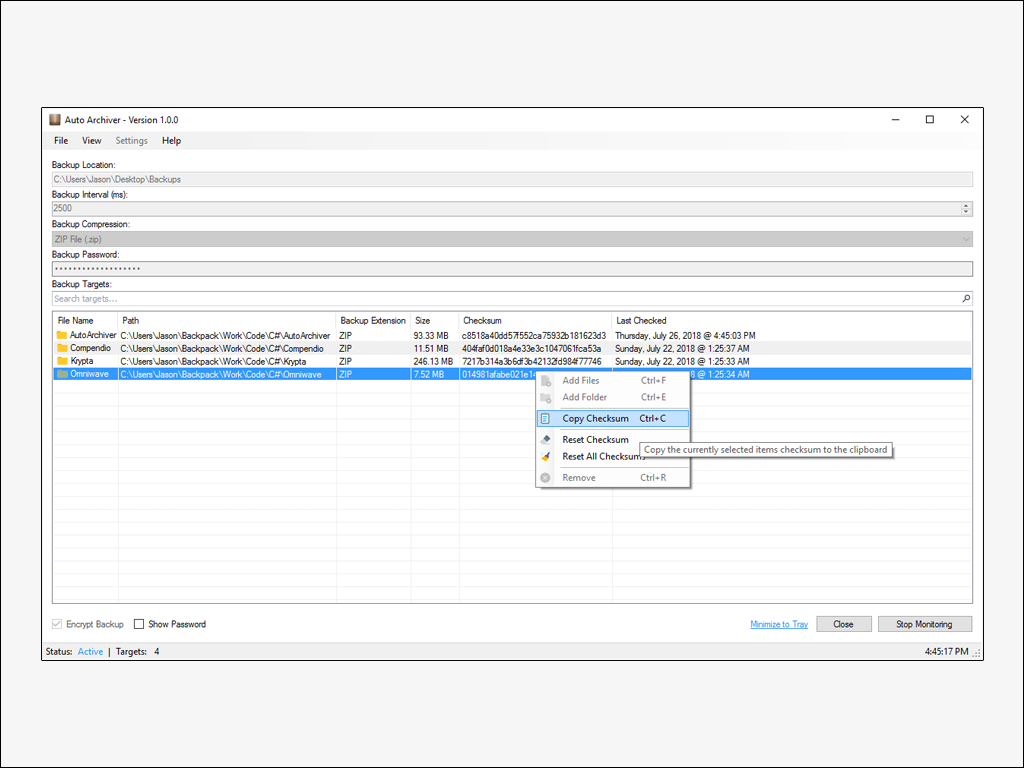
*Auto Archiver* is an advanced and flexible auto-archiving tool that allows the archiving of both individual files and entire directories using set intervals. It works by taking a checksum of whatever item is in the backup queue and compares the checksum to the previous hash that was generated when the item was last scanned (if at all). If a change has occurred since the last time the item was scanned the queue item will be updated with the latest checksum and the timestamp of the previous scan. The tool allows for a user to specify multiple parameters such as how often a backup should occur, the backup location, and even the hashing algorithm used to check for any changes that have been made since the last backup; which is saved and restored each time the application is closed and started. *Auto Archiver* also allows the ability to change which compression algorithm is used for each backup.
---
**Note:** *Auto Archiver uses libraries that contain "unsafe" code and therefore the `Allow unsafe code` build option must be selected in order to actually build the project. However, this shouldn't be a problem considering that the option has already enabled in the project solution prior to pushing to Github.*
---
### Requirements
- Windows 7 SP1 & Higher
- .NET Framework 4.6.1
# Features
- Automatic backups of files and folders
- Set backup location to a local or networked drive
- Set interval of backups
- Set compression levels of the backup archive
- Select the archive format of backups
- Select hashing algorithm for generating checksums
- Start application on startup
- Start application minimized
- Begin monitoring for backups on startup
- Encrypt backups with a master password
- Enable *`Ask Before Backup`* in settings to be prompted before a backup
- Search and sort through backup queue items
# TODO
- [x] Add setting to start minimized or not
- [x] Check if folder is ready before generating a checksum
- [x] Check if file is ready before generating a checksum
- [ ] Add check for updates
- [ ] New dialog box when asking to backup has "don't ask again" checkbox
- [ ] If this option is selected and the user clicks no, a confirmation dialog is shown
- [ ] New dialog box when asking to backup allows "do for all"
- [ ] Add backup indicator to let user know if the backup is in progress, complete, or has failed
- [ ] Temp files are now created in the user *AppData* folder instead of the "Backup Location"
- [ ] Keep previous hash instead of nulling the checksum if a backup has failed
# References
### ObjectListView
Auto Archiver utilizes a customized ListView called ObjectListView which can be found [here]("http://objectlistview.sourceforge.net/cs/index.html") or down below and is a fundamental dependency that is required in order to build the application from source.
### Embedded Assembly
ObjectListView has been embedded within the Auto Archiver assembly and thus an extra step will be needed in order to compile the project. First, download and reference *ObjectListView.dll* from the author's homepage above. Second, add an existing file to Auto Archiver by right-clicking on the project in the treeview and selecting the OLV DLL file. Lastly, change the ***`Build Action`*** on the added file from *`Compile`* to *`Embedded Resource`*.
# Screenshot
# Credits
**Icon:** `Ampeross`
https://ampeross.deviantart.com
**Compression:** `icsharpcode`
https://github.com/icsharpcode/SharpZipLib
**Encryption:** `sdrapkin`
https://github.com/sdrapkin/SecurityDriven.Inferno
**Long Paths:** `peteraritchie`
https://github.com/peteraritchie/LongPath
**ObjectListView:** `grammarian`
https://sourceforge.net/projects/objectlistview
# License
Copyright © ∞ Jason Drawdy
All rights reserved.
The MIT License (MIT)
Permission is hereby granted, free of charge, to any person obtaining a copy
of this software and associated documentation files (the "Software"), to deal
in the Software without restriction, including without limitation the rights
to use, copy, modify, merge, publish, distribute, sublicense, and/or sell
copies of the Software, and to permit persons to whom the Software is
furnished to do so, subject to the following conditions:
The above copyright notice and this permission notice shall be included in all
copies or substantial portions of the Software.
THE SOFTWARE IS PROVIDED "AS IS", WITHOUT WARRANTY OF ANY KIND, EXPRESS OR
IMPLIED, INCLUDING BUT NOT LIMITED TO THE WARRANTIES OF MERCHANTABILITY,
FITNESS FOR A PARTICULAR PURPOSE AND NONINFRINGEMENT. IN NO EVENT SHALL THE
AUTHORS OR COPYRIGHT HOLDERS BE LIABLE FOR ANY CLAIM, DAMAGES OR OTHER
LIABILITY, WHETHER IN AN ACTION OF CONTRACT, TORT OR OTHERWISE, ARISING FROM,
OUT OF OR IN CONNECTION WITH THE SOFTWARE OR THE USE OR OTHER DEALINGS IN
THE SOFTWARE.
Except as contained in this notice, the name of the above copyright holder
shall not be used in advertising or otherwise to promote the sale, use or
other dealings in this Software without prior written authorization.