https://github.com/jasperdevs/yoink
Free, open-source screenshot tool. Capture, annotate, and share with a single hotkey.
https://github.com/jasperdevs/yoink
annotation linux macos ocr open-source screen-capture screenshot screenshot-tool windows
Last synced: 3 months ago
JSON representation
Free, open-source screenshot tool. Capture, annotate, and share with a single hotkey.
- Host: GitHub
- URL: https://github.com/jasperdevs/yoink
- Owner: jasperdevs
- License: gpl-3.0
- Created: 2026-03-26T07:15:05.000Z (4 months ago)
- Default Branch: main
- Last Pushed: 2026-04-14T07:04:15.000Z (3 months ago)
- Last Synced: 2026-04-14T08:34:04.123Z (3 months ago)
- Topics: annotation, linux, macos, ocr, open-source, screen-capture, screenshot, screenshot-tool, windows
- Language: C#
- Homepage: https://jasperdevs.github.io/yoink/
- Size: 191 MB
- Stars: 170
- Watchers: 0
- Forks: 8
- Open Issues: 5
-
Metadata Files:
- Readme: README.md
- Funding: .github/FUNDING.yml
- License: LICENSE
Awesome Lists containing this project
README

Yoink: All-in-one open-source fast, clean ShareX alternative
Capture, annotate, OCR, make stickers, record video, drag out, save locally, and move on.








Yoink is a free, open-source screenshot tool that stays out of the way until you need it. Capture part of the screen, mark it up, copy it, save it, drag it out, record it, or upload it without breaking your flow.
## Download
Grab the latest release from the [**Releases page**](https://github.com/jasperdevs/yoink/releases/latest)
Release downloads include both direct `.exe` assets and portable `.zip` assets.
## Winget
Yoink's release pipeline now generates winget manifest files alongside the Windows release archives. Once the package is published to the winget community repository, install and update with:
```powershell
winget install --id JasperDevs.Yoink -e
winget upgrade --id JasperDevs.Yoink -e
```
The release ZIPs also include a `portable.txt` marker so winget-managed portable installs skip the app's first-run installer flow.
The repo is also wired to open a `winget-pkgs` pull request automatically when you publish a GitHub release. To enable that, add a repository secret named `WINGET_TOKEN` containing a classic GitHub PAT with `public_repo` scope, and make sure your account has a fork of `microsoft/winget-pkgs`.
If your fork lives under a different account, update `fork-user` in [`.github/workflows/publish-winget.yml`](.github/workflows/publish-winget.yml).
This automation only works after Yoink has at least one version accepted into `winget-pkgs` once.
For the first submission, use the helper script in [`scripts/winget/Publish-FirstWingetRelease.ps1`](scripts/winget/Publish-FirstWingetRelease.ps1). It generates the manifests, validates them, and submits them with `wingetcreate`.
## Why Yoink
- Fast region, fullscreen, active-window, and scroll capture with window snapping and a tray-first workflow
- Built-in annotation tools and configurable toolbar hotkeys for quick explanations and feedback
- OCR, color picking, QR/barcode scanning, stickers, and screen recording with GIF/MP4/WebM/MKV output
- Drag-and-drop preview plus local history for images, text, colors, stickers, and recordings
- Optional uploads for screenshots, stickers, and recordings to public hosts, cloud storage, or self-hosted targets
- More to come (and more i didnt mention lol)
## Stickers
Yoink can turn captures into stickers by removing the background, then saving, previewing, copying, and uploading them like normal images.

- Cloud sticker providers: `remove.bg`, `Photoroom`
- Local sticker models: `U2Netp`, `BRIA RMBG`
- Optional sticker finishing: drop shadow and white stroke
## Default hotkeys
| Action | Hotkey |
|---|---|
| Screenshot | `Alt + `` ` |
| OCR | `Alt + Shift + `` ` |
| Color picker | `Alt + C` |
| QR/barcode scanner | `Unassigned` |
| Sticker | `Unassigned` |
| Fullscreen capture | `Unassigned` |
| Active window capture | `Unassigned` |
| Scroll capture | `Unassigned` |
| Ruler | `Unassigned` |
| Record | `Unassigned` |
| Annotation tools | `1-9`, `0`, `-`, `=`, `[`, `]`, `\` |
Annotation tool hotkeys are assigned in toolbar order, so the exact tool on each key depends on which tools are enabled.
Hotkeys can be changed in settings.
## Build from source
```
git clone https://github.com/jasperdevs/yoink.git
cd yoink
dotnet publish src/Yoink/Yoink.csproj -c Release -r win-x64 --self-contained true -p:PublishSingleFile=true -o release
```
Requires [.NET 9 SDK](https://dotnet.microsoft.com/download/dotnet/9.0).
## Uploads
Yoink can upload screenshots, stickers, and recordings after capture. Upload targets include:
- Public hosts like `Imgur`, `ImgBB`, `Catbox`, `Litterbox`, `Gyazo`, `file.io`, and `Uguu`
- Cloud targets like `Dropbox`, `Google Drive`, `OneDrive`, `Azure Blob`, and `S3-compatible storage`
- Self-hosted and developer targets like `GitHub`, `Immich`, `FTP`, `SFTP`, `WebDAV`, and `Custom HTTP`
Availability depends on the target service and your credentials.
Sticker uploads use the same upload destinations as normal image uploads.
## License
[MIT](LICENSE)
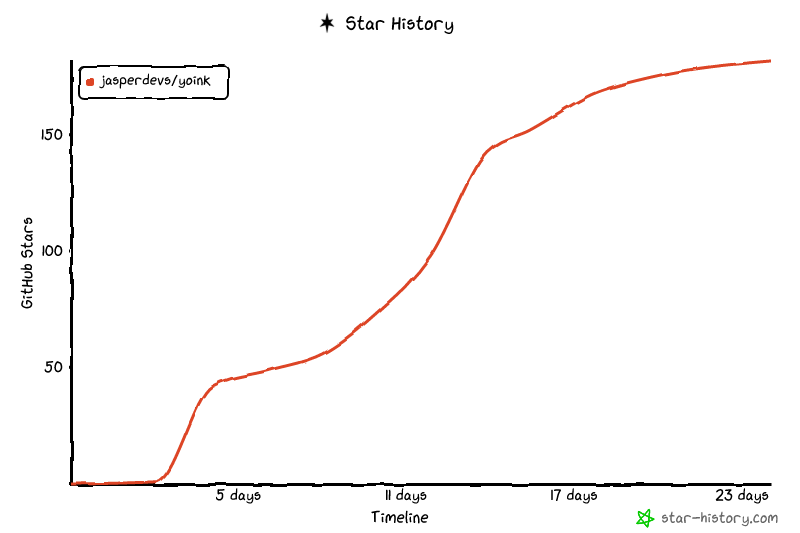
## Star History