https://github.com/javascript-pro/boilerplate-es6-sass
Quickly get up and running with an ES6 & SASS MVC Application. - Simple Sass file structure ready to use - Example ES6 application you can extend - Holy grail 3 column flexbox layout - Easy, modular integration with any project
https://github.com/javascript-pro/boilerplate-es6-sass
Last synced: 11 months ago
JSON representation
Quickly get up and running with an ES6 & SASS MVC Application. - Simple Sass file structure ready to use - Example ES6 application you can extend - Holy grail 3 column flexbox layout - Easy, modular integration with any project
- Host: GitHub
- URL: https://github.com/javascript-pro/boilerplate-es6-sass
- Owner: javascript-pro
- Created: 2017-05-11T01:39:21.000Z (about 9 years ago)
- Default Branch: Stable
- Last Pushed: 2017-06-07T05:02:11.000Z (about 9 years ago)
- Last Synced: 2025-02-12T11:37:33.210Z (over 1 year ago)
- Language: CSS
- Homepage:
- Size: 622 KB
- Stars: 1
- Watchers: 1
- Forks: 0
- Open Issues: 0
-
Metadata Files:
- Readme: README.md
Awesome Lists containing this project
README

## Boilerplate JavaScript ES6 MVC Application (with Sass)
Quickly get up and running with a JavaScript [ES6](https://es6.io) MVC Application and [Sass](http://sass-lang.com) styling. It uses [Gulp](http://gulpjs.com/) and [Babel](https://babeljs.io) as simply as possible to transpile the source code into browser-ready JavaScript and CSS but you can easily adapt it to your own workflow.
#### What does it give you?
- Simple Sass file structure ready to use
- Example ES6 application you can extend
- Holy grail 3 column flexbox layout
- Easy, modular integration with any project
- Koa 2 boilerplate Rest API
#### Install & Start developing
To get started as a developer, use your preferred command line application to change directory to your working folder and run the following commands.
```
git clone https://github.com/listingslab/boilerplate-es6-sass.git project-name
cd project-name
sudo npm install
gulp
```
This will create the codebase in a folder called __project-name__, install the node dependencies you need and start gulp running. The gulp process watches for any changes in the /src/js or scss folders and re-transpiles the JS and Sass into modern browser compliant, minimised code.
Install http-server locally and run it to start a tiny http webserver on http://127.0.0.1:8080 which allows us the freedom of loading in javascript (which you can only do when the JS is running on a webserver rather than as a flat file.)
```bash
sudo npm install http-server -g
http-server
```
Point your browser to http://127.0.0.1:8080 and your text editor to /__project-name__/src/ and start editing.
## Node.js KOA API Server
Using Koa we'll spin up a very minimal Node.js API to act as our bridging component for further integration.
### Install and run API server
```bash
sudo npm install
npm run api
```
#### Overrides
A list of possible quick overrides to the Module that are available
- __Sass variables file.__ Take full control of the colour in one easy to edit Sass file (/src/scss/_variables.scss)
#### Fork it here
If you'd like to detach this git repo from the origin so that you can fork it into your own repo on github with a clean commit history, then you can do so by typing the following commands in your __project-name__/ folder
```bash
cd /project-name
sudo rm -r .git
sudo rm README.md
git init
git add .
git commit -m 'Initial commit'
git remote add origin https://github.com/you/repo-name
git push origin master
```
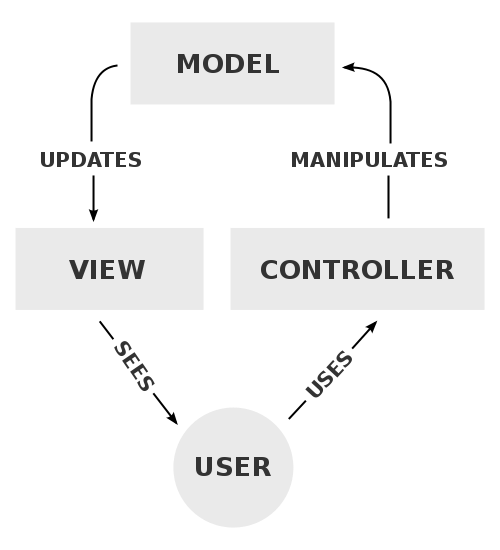
#### What is MVC?
Model–view–controller (MVC) is a software architectural pattern for implementing user interfaces on computers. It divides a given application into three interconnected parts in order to separate internal representations of information from the ways that information is presented to and accepted from the user.
#### License
[Open Software License 3.0](https://spdx.org/licenses/OSL-3.0.html)