https://github.com/javatechy/dokr
Helper package for docker and ECS tasks
https://github.com/javatechy/dokr
docker ecs ecs-cli python
Last synced: over 1 year ago
JSON representation
Helper package for docker and ECS tasks
- Host: GitHub
- URL: https://github.com/javatechy/dokr
- Owner: javatechy
- License: mit
- Created: 2018-08-31T09:57:48.000Z (almost 8 years ago)
- Default Branch: master
- Last Pushed: 2022-12-08T02:51:57.000Z (over 3 years ago)
- Last Synced: 2024-09-26T09:20:15.862Z (almost 2 years ago)
- Topics: docker, ecs, ecs-cli, python
- Language: Python
- Homepage: https://pypi.org/project/dokr/
- Size: 647 KB
- Stars: 20
- Watchers: 6
- Forks: 39
- Open Issues: 3
-
Metadata Files:
- Readme: README.md
- License: LICENSE
Awesome Lists containing this project
README
# dokr - Make your docker and ecs tasks easy
A Helper pip package for docker and ECS tasks. This pip package helps you automate your CI/CD pipeline. If your using docker and Amazon ECS for deployments, this tool can be really helpful. This package uses aws cli and ecs cli. Mak
### Assumptions:
+ Assuming python is installed on your system.
+ Docker is installed on your system
+ [aws-cli](https://docs.aws.amazon.com/cli/latest/userguide/installing.html) is installed and credentials are configured on your system.
+ [ecs-cli](https://docs.aws.amazon.com/AmazonECS/latest/developerguide/ECS_CLI_installation.html) is installed on system [*For Log Command only*]
Install `dokr` on your system using :
```
pip install dokr
```
## ECS Options
+ login into ecs directly (Assuming awscli is installed and configured)
```
dokr ecs login
```

+ Deploy an image on a cluster
```
dokr ecs deploy --cluster cluster_name --service service_name --tag image_version
```

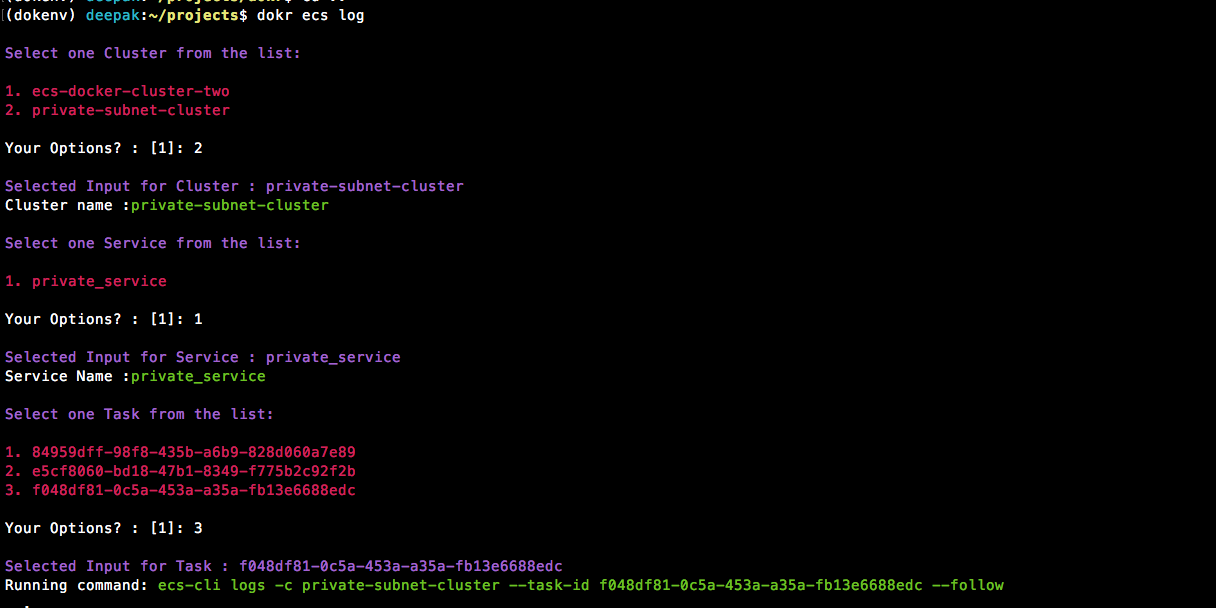
+ Check ecs running logs of a Task - this command will ask for cluster/service and task defination.
**Note:** Install ecs-cli before running this command from here:
https://docs.aws.amazon.com/AmazonECS/latest/developerguide/ECS_CLI_installation.html
```
dokr ecs log
```
## Docker Helper Commands
+ Prune whole system - Cleans unused images, containers and volumes.
```
dokr dock --clean-all
```

+ Delete all the images matching the pattern
```
dokr dock --clean pattern_xxx
```

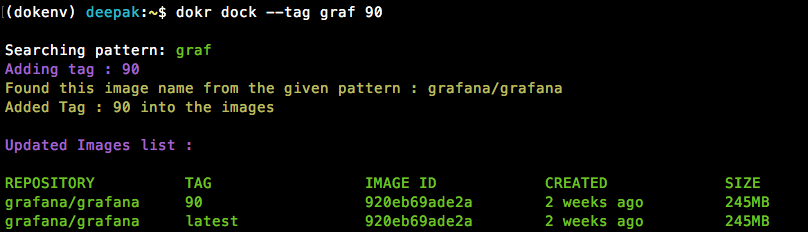
+ Add a tag to the existing image matching the provided pattern (for latest tag only)
```
dokr dock --tag pattern_xxx tag_name
```
+ Push all images on a system matching a pattern
This will push all images matching pattern 'pat'
```
dokr dock --push pat
```

#### AWS Commands
+ Check current public ip of a machine on AWS
```
dokr aws --ip jenkins
```

#### Run Apps (subsitute to `docker run` command and DockerCompose)
+ Configure your default values(like docker registry, port mapping, volume mapping etc. that will be same for all apps):

+ Add an new app for deployment:

+ Run all configured apps:

+ Run a particular app from ECR tags:

+ Run a particular app by providing a tag:

### Development:
+ Clean ununsed: `rm -rf build/ dist/ *egg* **.pyc __pycache__`
+ Build package: `python setup.py bdist_wheel`
+ deploy package: `python -m twine upload dist/*`
follow this link for more details https://dzone.com/articles/executable-package-pip-install