https://github.com/javieraviles/quarkus-github-flow
This is a Github Flow boilerplate project using Quarkus graal native image. The whole CICD process deploying to Heroku is already setup so the development can just get started.
https://github.com/javieraviles/quarkus-github-flow
boiler devops github-ac github-flow graalvm-native-image integration-tests load-tests postgres quarkus sonar sonarcloud
Last synced: about 1 year ago
JSON representation
This is a Github Flow boilerplate project using Quarkus graal native image. The whole CICD process deploying to Heroku is already setup so the development can just get started.
- Host: GitHub
- URL: https://github.com/javieraviles/quarkus-github-flow
- Owner: javieraviles
- License: mit
- Created: 2020-05-30T14:51:06.000Z (about 6 years ago)
- Default Branch: master
- Last Pushed: 2024-09-03T20:57:22.000Z (almost 2 years ago)
- Last Synced: 2025-03-28T18:21:23.592Z (over 1 year ago)
- Topics: boiler, devops, github-ac, github-flow, graalvm-native-image, integration-tests, load-tests, postgres, quarkus, sonar, sonarcloud
- Language: Java
- Homepage: https://quarkus-github-flow.herokuapp.com
- Size: 155 KB
- Stars: 7
- Watchers: 2
- Forks: 1
- Open Issues: 1
-
Metadata Files:
- Readme: README.md
- License: LICENSE
Awesome Lists containing this project
README
# quarkus-github-flow project
This is a **Github Flow** boilerplate project using **Quarkus** GraalVM native image. The whole CICD process deploying to Heroku is already setup so the development can just get started.
- [CICD Workflows in place](#cicd-workflows-in-place)
- [How to Github Flow](#how-to-github-flow)
- [Release](#release)
- [Load Tests](#load-tests)
- [Integration Tests](#integration-tests)
- [Sonar](#sonar)
- [Wrapping up developer responsabilities](#wrapping-up-developer-responsabilities)
- [Heroku DEV environment](#heroku-dev-environment)
- [Database](#database)
- [Api docs](#api-docs)
- [Quarkus](#quarkus)
- [Running the application in dev mode](#running-the-application-in-dev-mode)
- [Packaging and running the application](#packaging-and-running-the-application)
- [Creating a native executable](#creating-a-native-executable)
- [Continuous Deployment](#continuous-deployment)
- [How to do this?](#how-to-do-this)
## CICD Workflows in place
[Github Actions](https://github.com/features/actions) is the CICD tool for this project. Under the directory `.github/worflows` 4 workflows are defined:
- `cron.yml` -> runs periodically (cron expression). For now, two stages running locust **load tests** against **TEST** environment and updating SonarCloud dashboard will take place.
- `master.yml` -> full CICD, executed each time code gets merged into **master**. Stages: native image build / deploy to Heroku / run integration tests.
- `pullrequest.yml` -> each time a **PR** is created, runs **unitary tests**
- `tag.yml` -> whenever a **git tag** (v*) is created, this workflow creates a **release** in Github (https://github.com/javieraviles/quarkus-github-flow/releases)
Project workflows are displayed in the repo [Actions](https://github.com/javieraviles/quarkus-github-flow/actions) section.
## How to Github Flow
- Create a **feature** branch from **master**
- Send a **pull request** with your proposed changes to kick off a discussion against **master**
- Make changes on **your** branch as needed. Your pull request will **update automatically**
- **Merge** the pull request once the branch is **ready** to be merged
- Tidy up your branches using the delete button in the pull request or on the branches page.
Checkout [Github Guides](https://guides.github.com/introduction/flow/) for a nice and more detailed explanation on this topic.
## Release
Master branch will always be stable, as only ready branches will be merged into it. Still, not every commit from master will be a release. A **git tag** shall be created on **master specific commits** each time a new release is to be released, following a [semantic versioning](https://semver.org/) with `v` prefix (i.e. `v1.1.0`).
Once the tag has been created, the `tag.yml` workflow will get triggered, publishing a [github release](https://github.com/javieraviles/quarkus-github-flow/releases) in the repository.
## Load Tests
As load testing tool, [Locust](https://locust.io/) is the one this project will be using. Opensource, mature and super powerful. The load tests can be found under the directory `/loadtests`, containing an environment specific configuration file within `config` dir.
As part of the **cron** workflow, load tests will get executed against **TEST** periodically.
Whenever a new endpoint is created, or a new developed feature is to affect load tests, is the **responsability of the developer** to update load tests accordingly.
## Integration Tests
The chosen tool here is [Postman](https://www.postman.com/) due to the simplicity and universality of it.
Under the directory `/integrationtests` the test collection can be found. Within `env` an environment specific file is created so the collection can be reused.
The idea is every developer should **update and execute the collection locally** when **new features** are developed and a PR is created.
Thanks to [Newman](https://github.com/postmanlabs/newman) the collection can also be directly executed from the CLI. In this project, every time new code is pushed to **master** the tests are executed against **TEST** environment, currently running on Heroku.
## Sonar
[SonarCloud](https://sonarcloud.io/) is free for opensource projects, so you can register there with your github account and link it to a project. Then you have mainly two options, either SonarCloud takes care of pulling from your project whenever there are changes or PRs, or you push it from your CI (previously setting your properties in the `pom.xml`) performing a `mvn verify sonar:sonar`.
The [Dashboard](https://sonarcloud.io/dashboard?id=javieraviles_quarkus-github-flow) in this project will then get updated with the latest quality status whenever `cron.yml` worflow is executed, using **master** branch.
Therefore, notice the following piece of code in the `pom.xml`:
```
javieraviles_quarkus-github-flow
quarkus-github-flow
https://sonarcloud.io
214f06333c5b7090128e9144a144da8bc2439ab6
```
Even though the dashboard will always represent the quality status of master, is the **responsability of every developer** in the project not to worsen the **technical debt** of the project when a new feature is introduced. Some IDEs also allow you to bind the sonar project in SonarCloud to your local project so you check whether you are introducing some new code smells based on project rules.
## Wrapping up developer responsabilities
- Code within a feature branch starting from latest master
- Whenever is ready, create a Pull Request against develop and tell another developer to check it out and start a discussion
- Make sure your branch passes all unit tests and every piece of code you introduced contains its own unit test
- Make sure integration tests still work. Introduce some if needed.
- Make sure the technial debt in Sonar is the same or better when your code is merged.
## Heroku DEV environment
As mentioned before, `master.yml` pipeline will deploy to a DEV heroku environment every time new features are merged into master branch using a `push` mechanism.
A so called `Add-on` is already active in Heroku, making a `PostgreSQL` database hosted in AWS available through a connection string provided as `DATABASE_URL` environment variable.
Additionally, a `Dyno` is also created in Heroku so the platform knows how to bootstrap our docker image every time it gets deplyed, configured with the command `web ./application -Dquarkus.http.host\=0.0.0.0`.
Other than that, when the pipeline pushes to Heroku, the application downtime (startup time) will be around **50ms** thanks to the GraalVM native image.
## Database
For testing purposes an H2 database will be used (notice the %test prefix in `application properties` that only apply to mvn test). Once deployed, the application will use a *PostgreSQL* in Heroku. Connection details will get overriden as environment variables will replace some `application properties` (notice the ${PORT:8080} annotation, this will get a default value of `8080` unless a `PORT` environment variables is set, in which case its value will override the `8080`).
As version control for database, the selected tool is `flyway`. Schema migrations will take place automatically on application startup when new flyway scripts are created at `src/main/resources/db/migration` following the appropriate annotation.
## Api docs
Both [OpenAPI](https://quarkus-github-flow.herokuapp.com/openapi) and [Swagger-UI](https://quarkus-github-flow.herokuapp.com/swagger-ui) are available.
## Quarkus
This project uses Quarkus, the Supersonic Subatomic Java Framework.
If you want to learn more about Quarkus, please visit its website: https://quarkus.io/ .
### Running the application in dev mode
You can run your application in dev mode that enables live coding using:
```
./mvnw quarkus:dev
```
### Packaging and running the application
The application can be packaged using `./mvnw package`.
It produces the `quarkus-github-flow-1.0.0-SNAPSHOT-runner.jar` file in the `/target` directory.
Be aware that it’s not an _über-jar_ as the dependencies are copied into the `target/lib` directory.
The application is now runnable using `java -jar target/quarkus-github-flow-1.0.0-SNAPSHOT-runner.jar`.
### Creating a native executable
You can create a native executable using: `./mvnw package -Pnative`.
Or, if you don't have GraalVM installed, you can run the native executable build in a container using: `./mvnw package -Pnative -Dquarkus.native.container-build=true`.
You can then execute your native executable with: `./target/quarkus-github-flow-1.0.0-SNAPSHOT-runner`
If you want to learn more about building native executables, please consult https://quarkus.io/guides/building-native-image.
## Continuous Deployment
So the whole project is fine and the DEV environment looks very comfy and so, BUT, what if a real production deployment completely automated is needed, with zero downtime and a serious strategy?
Well, that's the reason why I'm adding this section here.
A very convenient strategy is the so called [BlueGreenDeployment](https://martinfowler.com/bliki/BlueGreenDeployment.html).
For our scenario we will have two exact replicas of the production environment, blue and green (active and inactive). New deployments will be performed over the green (inactive) environment (where the router is not pointing to at the moment), and ensure with our integration and load tests from pipeline that the new deployment is working correctly. Then, the swap can be performed (router points now to green, becoming the active one).
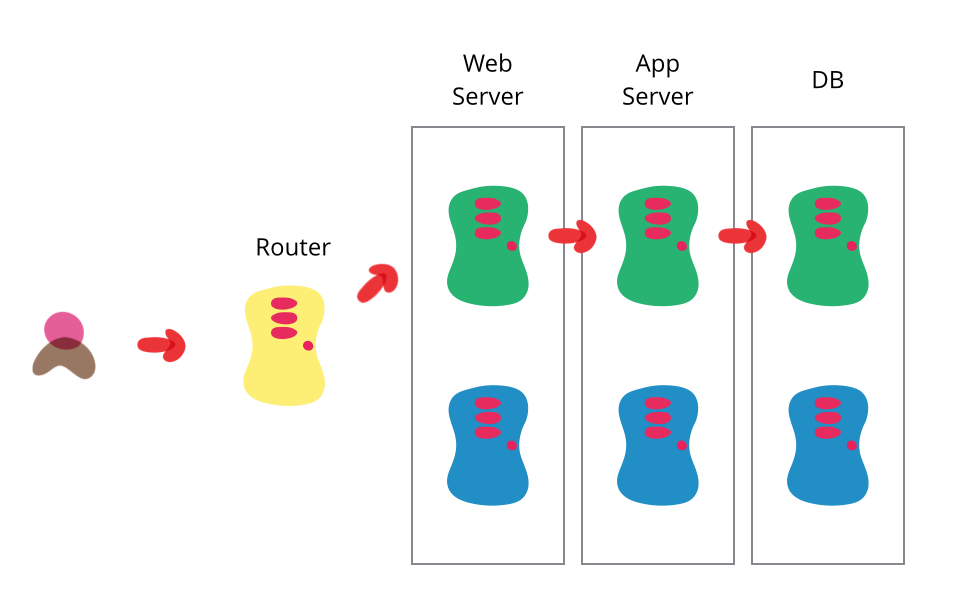
Both rollback and stability should be fine following this pattern.
### How to do this?
Your PROD environments can be created at Heroku in the same way you did for DEV. Deployment can be automated editing the `tag.yaml` workflow including the same heroku deployment stages `master.yaml` is using but for the prod release. Afterwards, you should include also the postman integration tests and locust load tests to ensure environment stability.
Now the end clients will not call Heroku prod environments directly, but using the **router** url. This router can be implemented using NGINX web server. Both the configuration and the swap script NGINX would use can be found at `bluegreendeployment` directory.
This is a very brief description to just give an insight of how this could be done, but don't hesitate to read further or contact me for more details about this specific approach.