https://github.com/javilatte/ticket-goat
TicketGOAT - Personal finance manager
https://github.com/javilatte/ticket-goat
finance open-source privacy
Last synced: 6 months ago
JSON representation
TicketGOAT - Personal finance manager
- Host: GitHub
- URL: https://github.com/javilatte/ticket-goat
- Owner: javilatte
- License: mit
- Created: 2026-01-06T00:11:42.000Z (6 months ago)
- Default Branch: develop
- Last Pushed: 2026-01-10T19:58:43.000Z (6 months ago)
- Last Synced: 2026-01-11T05:52:28.327Z (6 months ago)
- Topics: finance, open-source, privacy
- Language: TypeScript
- Homepage: https://ticketgoat.jagoan.es/
- Size: 2.53 MB
- Stars: 7
- Watchers: 1
- Forks: 0
- Open Issues: 1
-
Metadata Files:
- Readme: README.md
- Changelog: CHANGELOG.md
- Contributing: CONTRIBUTING.md
- License: LICENSE
- Code of conduct: CODE_OF_CONDUCT.md
- Security: SECURITY.md
Awesome Lists containing this project
README

**Your Personal Finance Tracker**
A modern, privacy-focused financial management app with OCR receipt scanning, investment tracking, and multi-account support.
[](https://reactnative.dev/)
[](https://expo.dev/)
[](https://www.typescriptlang.org/)
[](LICENSE)
[Features](#features) • [Getting Started](#getting-started) • [Screenshots](#screenshots) • [Tech Stack](#tech-stack) • [Contributing](#contributing)
---
> ## ⚠️ **IMPORTANT DISCLAIMER - BETA VERSION**
>
> **This application is currently in BETA and under active development.**
>
> ### 🔐 Data Security
> - All data is stored **locally on your device** with **AES encryption enabled by default**
> - Data is encrypted using industry-standard AES encryption via CryptoJS
> - Encryption keys are securely stored using Expo SecureStore (Keychain on iOS, KeyStore on Android)
> - You are responsible for maintaining device backups (uninstalling the app will lose the encryption key)
> - Exported Excel/CSV files are **NOT encrypted** - protect them appropriately
> - **No warranty is provided** regarding data loss, corruption, or unauthorized access
> - See [SECURITY.md](SECURITY.md) for detailed security information
>
> ### 📊 Stock Price Accuracy
> - Stock prices are fetched from **Yahoo Finance API** for informational purposes only
> - Prices may be **delayed, inaccurate, or unavailable**
> - **DO NOT use this app for making investment decisions**
> - Always verify prices with official sources before executing trades
> - The developers are not liable for any financial losses
>
> ### 🛡️ General Use
> - This software is provided "AS IS" without warranty of any kind
> - Use at your own risk
> - Not intended for commercial or professional financial management
> - Regular backups (export feature) are strongly recommended
>
> **By using TicketGOAT, you acknowledge and accept these limitations.**
---
## ✨ Features
### 💰 Financial Management
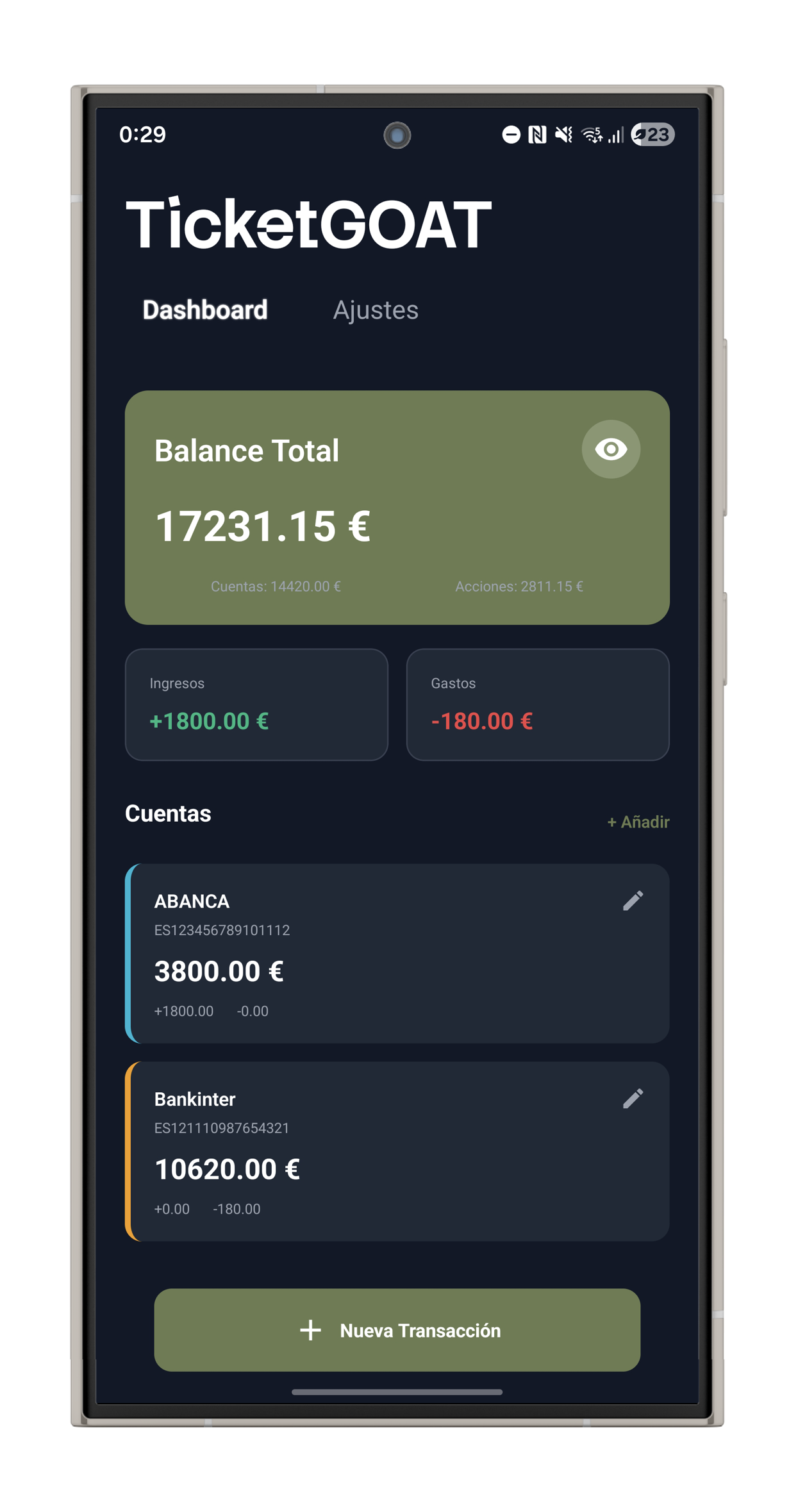
- **Transaction Tracking** - Record income and expenses with customizable categories
- **Multiple Accounts** - Manage unlimited bank accounts with custom colours and IBAN
- **Period Filters** - View transactions by month or payroll period
- **Balance Overview** - Real-time balance calculation across all accounts
### 🎫 OCR Receipt Scanning
- **Automatic Total Detection** - Scan receipts and extract amounts automatically
- **Self-hosted Service** - Optional Docker-based OCR service (Python + Tesseract)
- **Privacy First** - All processing can be done locally
### 📈 Investment Tracking
- **Stock Portfolio** - Track your investments with real-time price updates
- **Performance Charts** - Visual representation of gains/losses
- **Auto-price Updates** - Fetch current stock prices from Yahoo Finance API (for informational purposes only)
> ⚠️ **Investment Disclaimer**: Prices may be delayed or inaccurate. Do not use for trading decisions. Always verify with official sources.
### 📊 Data Management
- **Excel Export** - Multi-sheet workbooks with summary, transactions, accounts, and stocks
- **CSV Export** - Universal format for data analysis
- **Import Support** - Restore data from Excel/CSV backups
- **Local Storage** - All data stays on your device
- **🔒 AES Encryption** - All data encrypted by default using AES with SecureStore keys
### 🎨 Modern UI/UX
- **Dark Theme** - Easy on the eyes with a sleek dark interface
- **Smooth Animations** - Gesture-based navigation between screens
- **Cross-Platform** - Works on iOS, Android, and Web
- **Unique branding** - Modern look for a modern app
---
## 🚀 Getting Started
### Prerequisites
- [Node.js](https://nodejs.org/) (v20 or higher)
- [npm](https://www.npmjs.com/) or [yarn](https://yarnpkg.com/)
- [Expo CLI](https://docs.expo.dev/get-started/installation/)
### Installation
1. **Clone the repository**
```bash
git clone https://github.com/javilatte/ticket-goat.git
cd ticket-goat
```
2. **Install dependencies**
```bash
npm install
```
3. **Start the development server**
```bash
npm start
```
4. **Run on your platform**
- **iOS**: Press `i` or run `npm run ios`
- **Android**: Press `a` or run `npm run android`
- **Web**: Press `w` or run `npm run web`
---
## 📱 Screenshots


---
## 🛠 Tech Stack
### Frontend
| Technology | Purpose |
|------------|---------|
| [React Native](https://reactnative.dev/) | Cross-platform mobile framework |
| [Expo SDK 54](https://expo.dev/) | Development toolchain and native APIs |
| [TypeScript](https://www.typescriptlang.org/) | Static type checking |
| [AsyncStorage](https://react-native-async-storage.github.io/async-storage/) | Local data persistence |
| [Expo Secure Store](https://docs.expo.dev/versions/latest/sdk/securestore/) | Encrypted key storage |
| [SheetJS CE](https://git.sheetjs.com/sheetjs/sheetjs) | Excel file generation |
| [Axios](https://axios-http.com/) | HTTP client |
| [React Native SVG](https://github.com/software-mansion/react-native-svg) | Charts and graphics |
### Backend (Optional OCR Service)
| Technology | Purpose |
|------------|---------|
| [Python 3.11](https://www.python.org/) | Runtime environment |
| [FastAPI](https://fastapi.tiangolo.com/) | REST API framework |
| [Tesseract OCR](https://github.com/tesseract-ocr/tesseract) | Text recognition engine |
| [Pillow](https://python-pillow.org/) | Image processing |
| [Docker](https://www.docker.com/) | Containerization |
---
## 🏗 Project Structure
```
ticket-goat/
├── assets/ # Images, fonts, and static files
├── components/ # React components
│ ├── Dashboard.tsx
│ ├── TransactionModal.tsx
│ ├── SettingsScreen.tsx
│ └── ...
├── contexts/ # React Context providers
│ └── AppContext.tsx
├── hooks/ # Custom React hooks
│ ├── useApp.ts
│ ├── useTransactions.ts
│ ├── useAccounts.ts
│ └── useStocks.ts
├── services/ # Business logic
│ ├── database.ts # Local storage operations
│ ├── export.ts # Excel/CSV export
│ └── stockApi.ts # Stock price API
├── styles/ # StyleSheet definitions
├── types/ # TypeScript type definitions
├── ocr-service/ # Optional OCR backend
│ ├── Dockerfile
│ ├── main.py
│ └── requirements.txt
├── app.json # Expo configuration
├── docker-compose.yml # Docker orchestration
└── package.json
```
---
## 🐳 Docker Setup (Optional OCR Service)
### Quick Start with Docker Compose
```bash
docker-compose up -d
```
This starts:
- **OCR API**: http://localhost:8000
- **Web App**: http://localhost:3000
### OCR Service Only
```bash
cd ocr-service
docker build -t ticketgoat-ocr .
docker run -d -p 8000:8000 ticketgoat-ocr
```
### Configure in App
1. Open the app and go to **Settings**
2. Find "Receipt Scanner (OCR)" section
3. Enter OCR service URL:
- Local: `http://localhost:8000`
- Network: `http://192.168.x.x:8000`
4. Save and scan receipts from expense transactions
---
## 📖 Usage
### Adding Transactions
1. Tap the **"+ New Transaction"** button
2. Choose **Income** or **Expense**
3. Enter amount, description, and category
4. For expenses, optionally scan a receipt with OCR
5. Select account and save
### Managing Accounts
1. Add accounts with custom names and colors
2. Set initial balance and IBAN (optional)
3. Edit or delete accounts as needed
### Tracking Stocks
1. Expand the **"Stocks"** section on the dashboard by tapping on the title
2. Tap **"+ Add"** to create a new stock entry
3. Enter symbol (e.g., AAPL), quantity, and purchase price
4. Tap refresh icon to update current prices
### Exporting Data
1. Go to **Settings** → **Export Data**
2. Choose **Excel** or **CSV** format
3. Share via your device's native sharing options
---
## 📥 Download & Installation
### Android
Download the latest APK from the [Releases page](https://github.com/javilatte/ticket-goat/releases/latest).
1. Download `TicketGOAT-vX.X.X.apk`
2. Enable "Install from Unknown Sources" in your device settings
3. Open the APK file and install
4. Open TicketGOAT and start tracking your finances!
> **Note**: iOS support coming soon.
### Build from Source
See [Getting Started](#getting-started) section for development setup instructions.
---
## 🤝 Contributing
Contributions are welcome! Please follow these steps:
1. **Fork** the repository
2. **Create** a feature branch (`git checkout -b feature/AmazingFeature`)
3. **Commit** your changes (`git commit -m 'Add some AmazingFeature'`)
4. **Push** to the branch (`git push origin feature/AmazingFeature`)
5. **Open** a Pull Request
### Development Guidelines
- Follow TypeScript strict mode
- Use functional components with hooks
- Document code with JSDoc comments
- Keep components small and focused
- Write meaningful commit messages
---
## 🔒 Privacy & Security
- **100% Local Storage** - All data stays on your device using AsyncStorage
- **No Cloud Sync** - No external servers or tracking
- **No Encryption by Default** - AsyncStorage is unencrypted; device security is your responsibility
- **Optional Encryption** - Built-in encryption utilities available (must be manually enabled)
- **Optional OCR** - Self-host the OCR service if needed
- **Self-Hosted OCR** - Run the OCR service locally for complete privacy
> ⚠️ **OCR Security Notice**: The OCR service uses HTTP by default. Only use in local/trusted networks. HTTPS configuration required for production environments.
> 💡 **Recommendation**: Enable device encryption, use strong passwords/biometrics, and perform regular data exports as backups.
---
## 📄 License
This project is licensed under the MIT License - see the [LICENSE](LICENSE) file for details.
---
## 🙏 Acknowledgments
- **Stack Sans Notch** - Custom font for branding
- **Yahoo Finance API** - Free stock price data
- **Tesseract OCR** - Open-source text recognition
- **Expo Team** - Amazing development tools
---
## 📞 Support
- **Issues**: [GitHub Issues](https://github.com/javilatte/ticket-goat/issues)
- **Discussions**: [GitHub Discussions](https://github.com/javilatte/ticket-goat/discussions)
---
Made with ❤️ for personal finance management by the TicketGOAT team