https://github.com/jayanaxhf/gitv
gitv is a terminal-based viewer for GitHub issues. It allows you to view and manage your GitHub issues directly from the terminal.
https://github.com/jayanaxhf/gitv
cli github productivity tui
Last synced: 3 months ago
JSON representation
gitv is a terminal-based viewer for GitHub issues. It allows you to view and manage your GitHub issues directly from the terminal.
- Host: GitHub
- URL: https://github.com/jayanaxhf/gitv
- Owner: JayanAXHF
- License: unlicense
- Created: 2026-02-09T12:07:10.000Z (5 months ago)
- Default Branch: main
- Last Pushed: 2026-04-19T05:09:46.000Z (3 months ago)
- Last Synced: 2026-04-19T06:31:31.570Z (3 months ago)
- Topics: cli, github, productivity, tui
- Language: Rust
- Homepage: https://crates.io/crates/gitv-tui
- Size: 933 KB
- Stars: 103
- Watchers: 1
- Forks: 3
- Open Issues: 3
-
Metadata Files:
- Readme: README.md
- Changelog: CHANGELOG.md
- License: LICENSE-MIT
Awesome Lists containing this project
- awesome-ratatui - gitv - A beautiful, feature-rich and performant terminal client for GitHub issues. (💻 Apps / 🚀 Productivity and Utilities)
- awesome-tuis - gitv - rich and performant terminal client for GitHub issues. (Table of Contents)
README

[](https://ratatui.rs/)

---
# gitv
> [!NOTE]
>
> Following in the footsteps of the `g`lobal `r`egex `e`xpression `p`rint `grep`, I introduce to you `g`ithub `i`ssues `t`ui `v`iewer `gitv`.
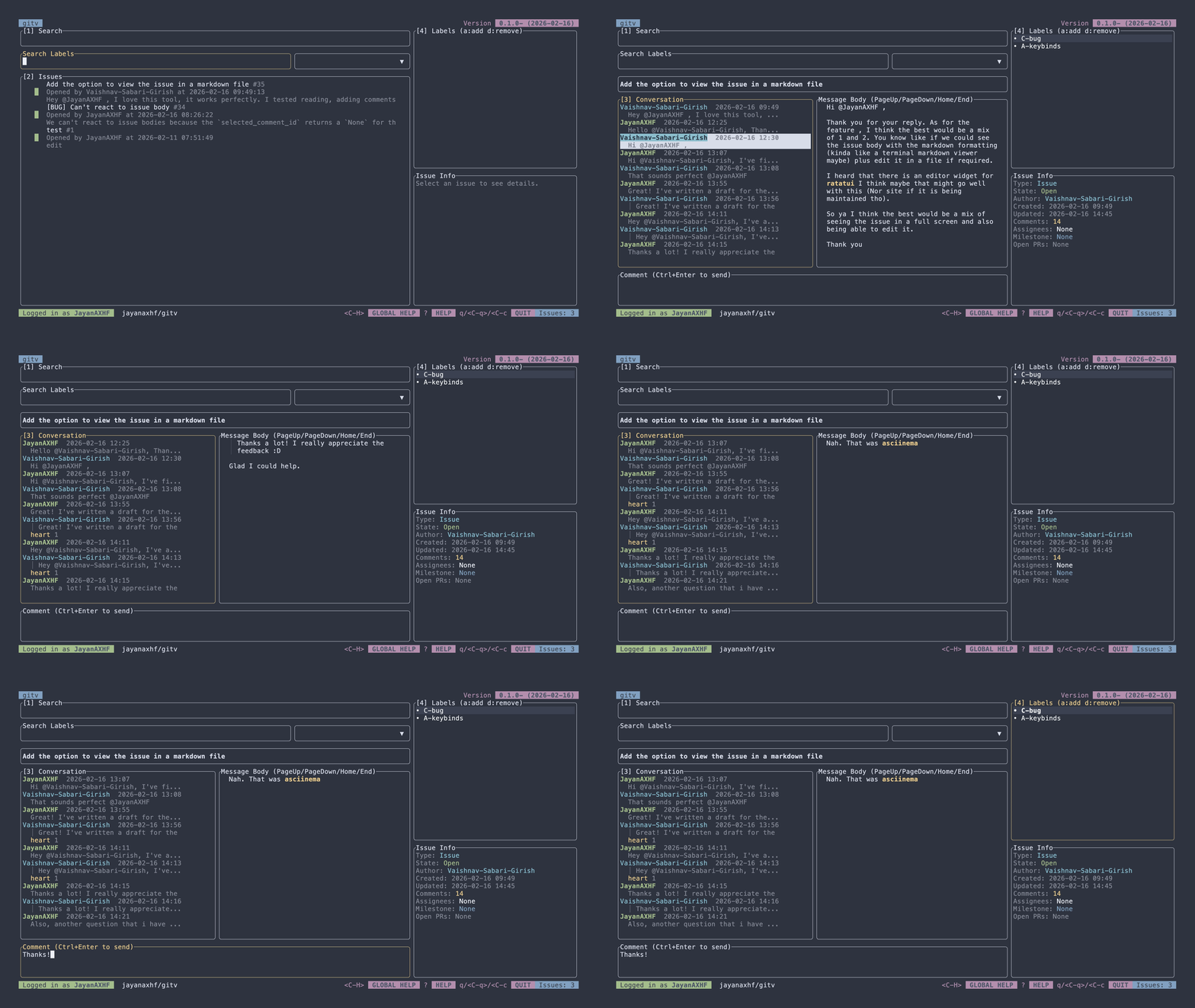
`gitv` is a terminal-based viewer for GitHub issues. It allows you to view and manage your GitHub issues directly from the terminal.
### Features
- View issues from any GitHub repository
- View issue conversations, including parsed markdown content
- Full support for adding and removing reactions
- Regex search for labels, plus the ability to create, edit, add, and remove labels from issues
- Commenting on issues, with support for markdown formatting and quoting comments
- Editing comments
- Closing issues
- Assigning and unassigning issues to users
- Creating new issues
- Syntax highlighting for code blocks in issue conversations
### Installation
#### Homebrew (macOS)
```bash
brew install jayanaxhf/taps/gitv
```
#### Using Cargo
```bash
cargo install --locked gitv-tui
```
#### From Source
1. Clone the repository:
```bash
git clone https://github.com/jayanaxhf/gitv.git
```
2. Navigate to the project directory:
```bash
cd gitv
```
3. Build the project:
```bash
cargo install --path .
```
#### NixOS
Flake
First add the repository to your inputs.
Point to main branch:
```nix
inputs = {
...
gitv.url = "github:JayanAXHF/gitv";
...
};
```
Point to a rev in main branch:
```nix
inputs = {
...
gitv.url = "github:JayanAXHF/gitv/d70273b05c5e80b05446e4aa0847758e54435d62";
...
};
```
Point to a tag:
```nix
inputs = {
...
gitv.url = "github:JayanAXHF/gitv/refs/tags/gitv-tui-v0.3.2";
...
};
```
Then your outputs should look something like this:
```nix
outputs = {...} @ inputs: {
# Don't forget to add nixpkgs to your inputs
nixosConfigurations."nixos" = inputs.nixpkgs.lib.nixosSystem {
...
specialArgs = {inherit inputs;};
modules = [
./configuration.nix
...
];
};
};
```
And finally, somewhere in your `configuration.nix`:
```nix
{inputs, pkgs, ...}: {
...
environment.systemPackages = [
inputs.gitv.packages.${pkgs.stdenv.hostPlatform.system}.default
];
...
}
```
Non-Flake
##### Pinning Tool
First add the pin using your pinning tool.
We are going to show examples using npins.
Point to a branch:
```bash
npins add github JayanAXHF gitv -b main
```
Point to a rev in main branch:
```bash
npins add github JayanAXHF gitv -b main --at d70273b05c5e80b05446e4aa0847758e54435d62
```
Point to a tag:
```bash
npins add github JayanAXHF gitv --at gitv-tui-v0.3.2
```
Or point to latest release:
```bash
npins add github JayanAXHF gitv
```
Then add the package to your `systemPackages`:
```nix
let
sources = import ./npins;
in {
environment.systemPackages = [
(import sources.gitv {})
];
}
```
##### No Pinning Tool
```nix
let
rev = "d70273b05c5e80b05446e4aa0847758e54435d62";
gitv = import (fetchTarball "https://github.com/JayanAXHF/gitv/archive/${rev}.tar.gz") {};
in {
environment.systemPackages = [
gitv
];
}
```
### Usage
```
Usage: gitv [OPTIONS] [OWNER] [REPO]
Arguments:
[OWNER]
GitHub repository owner or organization (for example: `rust-lang`).
This is required unless `--print-log-dir` or `--set-token` is provided.
[REPO]
GitHub repository name under `owner` (for example: `rust`).
This is required unless `--print-log-dir` or `--set-token` is provided.
Options:
-l, --log-level
Global logging verbosity used by the application logger.
Defaults to `info`.
[default: info]
[possible values: trace, debug, info, warn, error, none]
-p, --print-log-dir
Prints the directory where log files are written and exits
-s, --set-token
Stores/updates the GitHub token in the configured credential store.
When provided, this command updates the saved token value.
--generate-man
Generate man pages using clap-mangen and exit
-e, --env
When provided, this command will read the GitHub token from the environment variable
-h, --help
Print help (see a summary with '-h')
-V, --version
Print version
```
See [KEYBINDINGS.md](./KEYBINDS.md) for a list of keybindings used in the application.
### Token Security
> [!NOTE]
> To persist the token across reboots (i.e. to store it on disk) on Linux, build with the `persist-token` feature flag. This requires for `dbus` to be present and `DBUS_SESSION_BUS_ADDRESS` to be set.
`gitv` uses the `keyring` crate to securely store your GitHub token in your system's credential store. This means that your token is encrypted and protected by your operating system's security features, providing a secure way to manage your authentication credentials.
### Contributing
Contributions to `gitv` are welcome! If you have an idea for a new feature or have found a bug, please open an issue or submit a pull request on the GitHub repository.
> [!TIP]
> Run the `init.py` initialization script to set up your development environment. It installs a pre-push hook that runs `typos` and `clippy` to help maintain code quality and consistency. Ensure that you have the `typos-cli` installed and available in your PATH for the pre-push hook to work correctly. You can install it using `cargo install typos-cli`.
> [!TIP]
> If you're using nix then you can use the provided devshell to get your development environment up and running, it also includes the pre-push hook provided. You can do so by executing `direnv allow` or `nix develop`.
### License
`gitv` is dual-licensed under the MIT License and the Unlicense, at your option. See the [MIT](./LICENSE-MIT) and [Unlicense](./UNLICENSE) for more information.