https://github.com/jayanttripathy/hangfire.api
Hangfire with ASP.Net Core 7.0- Background Jobs
https://github.com/jayanttripathy/hangfire.api
asp-net-core aspnetcore background-jobs hangfire hangfire-dotnet-core
Last synced: 3 months ago
JSON representation
Hangfire with ASP.Net Core 7.0- Background Jobs
- Host: GitHub
- URL: https://github.com/jayanttripathy/hangfire.api
- Owner: JayantTripathy
- Created: 2023-07-08T20:49:44.000Z (over 2 years ago)
- Default Branch: master
- Last Pushed: 2023-07-09T07:09:25.000Z (over 2 years ago)
- Last Synced: 2025-06-02T20:08:40.905Z (7 months ago)
- Topics: asp-net-core, aspnetcore, background-jobs, hangfire, hangfire-dotnet-core
- Language: C#
- Homepage: https://jayanttripathy.com/hangfire-with-asp-net-core-7/
- Size: 8.79 KB
- Stars: 1
- Watchers: 1
- Forks: 2
- Open Issues: 0
-
Metadata Files:
- Readme: README.md
Awesome Lists containing this project
README
# Hangfire.API
What Is Hangfire?
Hangfire is an open-source and well-documented task scheduler for ASP.NET and ASP.NET Core. It’s multi-threaded, easily scalable, and offers a variety of job types. It’s well structured, simple to use, and gives a powerful performance.
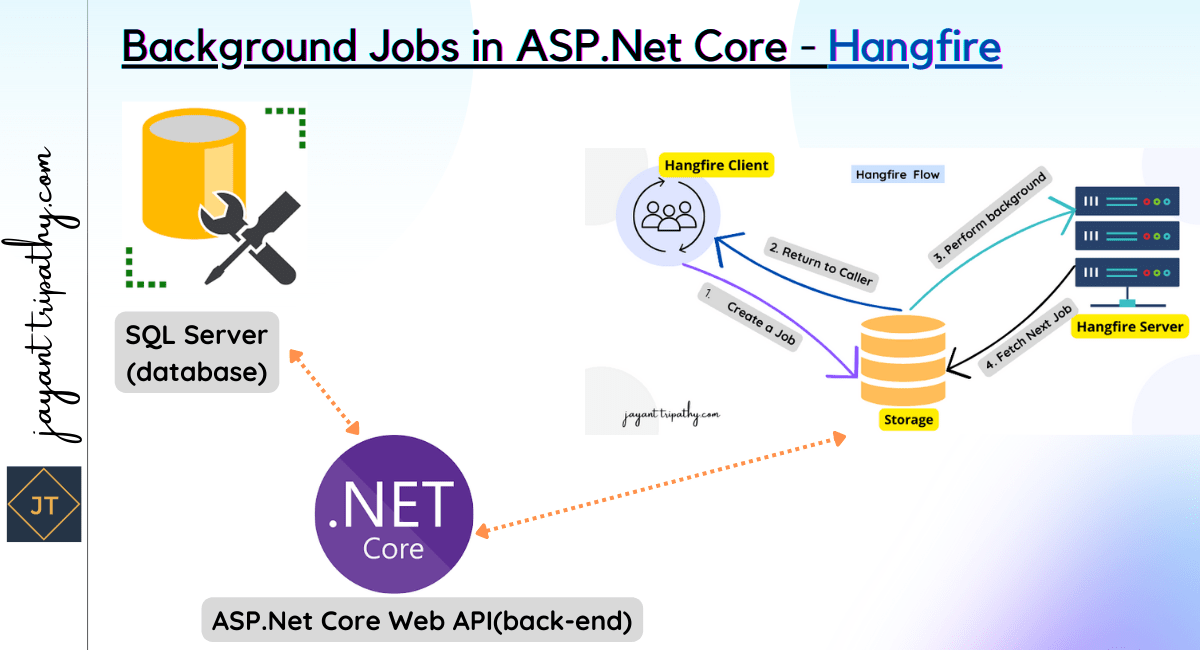
Hangfire Workflow
The client, server, and storage are the three essential components of Hangfire architecture. They are connected throughout the process and rely on one another.
Role of Each Component
Let’s see what each component is responsible for:
Hangfire client – These are the actual libraries inside our application. The client creates the job, serializes its definition, and makes sure to store it into our persistent storage.
Hangfire storage – This is our database. It uses a couple of designated tables that Hangfire creates for us. It stores all the information about our jobs – definitions, execution status, etc. Hangfire supports both RDBMS and NoSQL options, so we can choose which one works for our project. By default, it uses SQL Server, but any other supported option is also easy to configure.
Hangfire server – The server has the task of picking up job definitions from the storage and executing them. It’s also responsible for keeping our job storage clean from any data that we don’t use anymore. The server can live within our application, or it can be on another server. It always points to the database storage so its location doesn’t play a role, but this diversity can be very useful.
For more details please visit the blog post link
https://jayanttripathy.com/hangfire-with-asp-net-core-7/