https://github.com/jayexdesigns/socket-chat
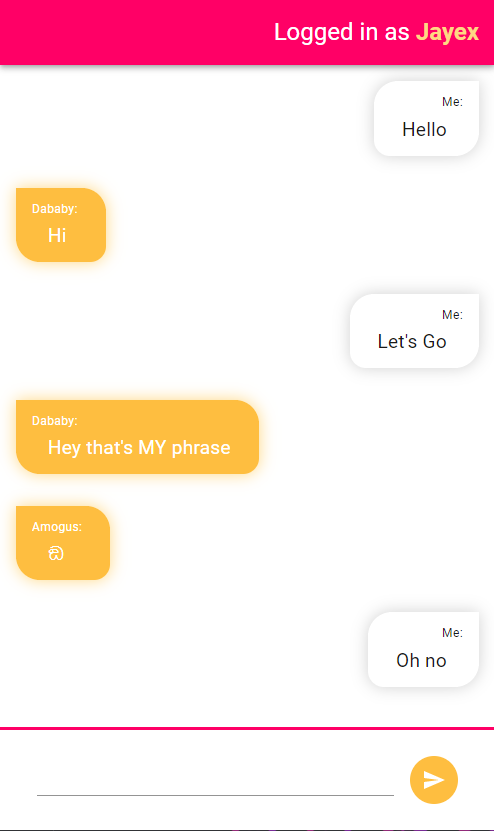
A WebSocket chat made with express and socket io for the backend and react and Material UI for the frontend
https://github.com/jayexdesigns/socket-chat
chat react socket-io websockets
Last synced: about 2 months ago
JSON representation
A WebSocket chat made with express and socket io for the backend and react and Material UI for the frontend
- Host: GitHub
- URL: https://github.com/jayexdesigns/socket-chat
- Owner: JayexDesigns
- Created: 2021-04-08T21:06:43.000Z (about 5 years ago)
- Default Branch: main
- Last Pushed: 2022-03-02T02:18:56.000Z (over 4 years ago)
- Last Synced: 2025-05-02T10:11:33.287Z (about 1 year ago)
- Topics: chat, react, socket-io, websockets
- Language: JavaScript
- Homepage:
- Size: 1.61 MB
- Stars: 0
- Watchers: 2
- Forks: 0
- Open Issues: 0
-
Metadata Files:
- Readme: README.md
Awesome Lists containing this project
README

Socket Chat

This is a WebSocket project that allows you to chat with anybody connected to the same server


Summary

The backend is done with NodeJS using Express for the web server and Socket IO for the WebSocket communication, for testing and temporary hosting I used a Raspberry Pi 4 model B 2GB of RAM. The frontend it's done with React, Material UI and Socket IO Client.


Backend

To install all the dependencies simply use the command npm install if you have node and npm installed. Using the command node /src/index.js will start the server or if you prefer you can use nodemon to update the server whenever a file changes.


Frontend

To install all the dependencies simply use the command yarn install if you have yarn installed, if not using npm should work too. Using the command npm run start will start a development server with a slow testing version of the frontend, using npm run build will create a build folder in which you can copy the content and replace the public folder content on the backend with it.


Preview