https://github.com/jaywood/wordpress-block-report
Get a full report of blocks for every post, post type, and post status you want without having to figure it out on your own. Even in CSV format.
https://github.com/jaywood/wordpress-block-report
gutenberg-blocks wordpress wpcli
Last synced: about 2 months ago
JSON representation
Get a full report of blocks for every post, post type, and post status you want without having to figure it out on your own. Even in CSV format.
- Host: GitHub
- URL: https://github.com/jaywood/wordpress-block-report
- Owner: JayWood
- License: gpl-3.0
- Created: 2022-08-28T23:36:53.000Z (almost 4 years ago)
- Default Branch: main
- Last Pushed: 2022-08-29T00:30:26.000Z (almost 4 years ago)
- Last Synced: 2025-09-29T08:56:06.123Z (9 months ago)
- Topics: gutenberg-blocks, wordpress, wpcli
- Language: PHP
- Homepage:
- Size: 77.1 KB
- Stars: 1
- Watchers: 1
- Forks: 0
- Open Issues: 0
-
Metadata Files:
- Readme: README.md
- License: LICENSE
Awesome Lists containing this project
README
# WordPress Block Report
A [WordPress CLI](https://github.com/wp-cli/wp-cli) Script designed to provide a report of all Gutenberg Blocks on your site in CSV format ( or in the
terminal ). Easy to use, multi-site compatible with options for post type and post status. Also, with the ability to customize the fields output.

[](https://www.linkedin.com/in/jerrywoodjr/)
[](https://twitter.com/plugish/)
[](https://www.instagram.com/therealjaywood/)
## Screenshots
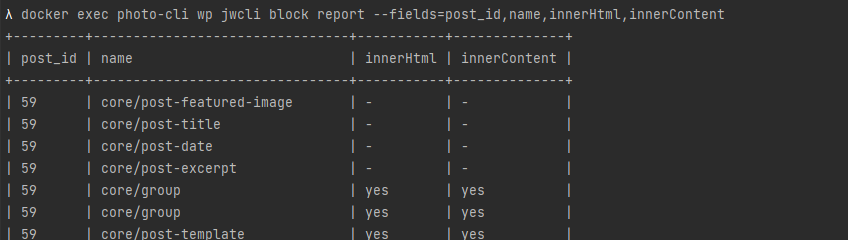
_Showing a simple table output excluding details_
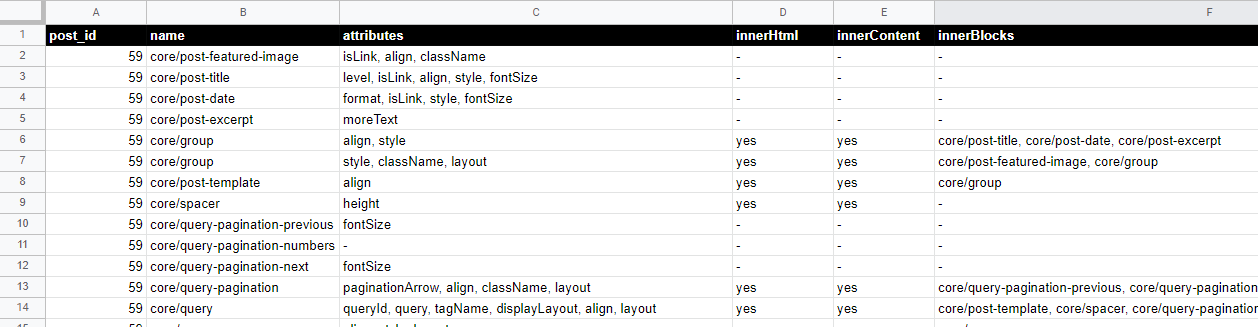
_Showing the resulting CSV of a full export_
## Installation
### Composer
Add this repository to your composer.json
```
{
"repositories": [
{
"type": "vcs",
"url": "https://github.com/JayWood/wordpress-block-report"
}
]
}
```
Or if you're fancy:
`composer config repositories.wp-block-report vcs https://github.com/JayWood/wordpress-block-report`
Require the package
`composer require jaywood/wordpress-block-report`
> If you happen to use the sweet [Composer Installers](https://github.com/composer/installers) library, this CLI script is
marked as a `wp-cli-package` for ease of use later.
### Manual
1. Download or clone the repository to `wp-content/mu-plugins/wordpress-block-report/` _( Name is up to you )_
1. Create a new file in `wp-content/mu-plugins` call it whatever you want, I use `init.php`
1. Require the file like so:
```
] [--fields=] [--post-status=] [--csv]`
> Multisite flags like --url are supported.
### --post-type
Supports any post type slug that's registered at run-time. Comma separated lists are supported as well.
**Default:** `post,page`
**Example:**
```
$> wp jwcli block report --post-type=article,publication
```
### --post-status
Supports any post status slug that's registered at run-time. Comma separated lists are supported as well.
**Default:** `any`
**Example:**
```
$> wp jwcli block report --post-status=publish,in-review
```
### --fields
Supports specific fields to return within the report.
**Default:** `post_id,name,attributes,innerHtml,innerContent,innerBlocks`
**Example:**
```
$> wp jwcli block report --fields=post_id,name,innerBlocks
```
### --csv
Prints out the CSV data to the terminal instead of displaying a table.
**Example:**
```
$> wp jwcli block report --csv
```
#### File Output
To output to a file is quite easy with the proper terminal. Below is how you would do this with a unix terminal.
```
$> wp jwcli block report --csv > out.csv
```
_( A wp-cli plugin by [Jay Wood](https://twitter.com/plugish) )_