https://github.com/jazzenchen/vibearound
Keep your vibe coding agents around. From desktop to mobile, from browser to messaging, keeps your local coding agents connected, reachable, and ready to work. Run Claude Code, Codex CLI, Gemini CLI, and more side by side with different provider profiles, all routed through one universal proxy.
https://github.com/jazzenchen/vibearound
ai-agent ai-tools remote-execution vibe-coding
Last synced: 20 days ago
JSON representation
Keep your vibe coding agents around. From desktop to mobile, from browser to messaging, keeps your local coding agents connected, reachable, and ready to work. Run Claude Code, Codex CLI, Gemini CLI, and more side by side with different provider profiles, all routed through one universal proxy.
- Host: GitHub
- URL: https://github.com/jazzenchen/vibearound
- Owner: jazzenchen
- License: mit
- Created: 2026-02-23T10:23:58.000Z (4 months ago)
- Default Branch: main
- Last Pushed: 2026-05-17T14:19:18.000Z (27 days ago)
- Last Synced: 2026-05-17T15:58:23.701Z (27 days ago)
- Topics: ai-agent, ai-tools, remote-execution, vibe-coding
- Language: Rust
- Homepage: https://vibearound.ai/
- Size: 4.7 MB
- Stars: 293
- Watchers: 0
- Forks: 29
- Open Issues: 5
-
Metadata Files:
- Readme: README.md
- License: LICENSE
Awesome Lists containing this project
- awesome-ai-startups - VibeAround - VibeAround is a lightweight Tauri desktop app that gives you two ways to reach your local AI coding agent from anywhere: chat from your. (🤖 AI Agents & Assistants)
README

# VibeAround
**Keep your local coding agents reachable from desktop, web, and messaging.**
[Download](https://github.com/jazzenchen/VibeAround/releases/latest) | [Demo](https://youtu.be/6kxNKTMz-AM) | [Wiki](https://github.com/jazzenchen/VibeAround/wiki) | [Discord](https://discord.gg/KsJWkY64GN) | [WeChat](#community) | [简体中文](README_CN.md)


VibeAround is a desktop hub for local AI coding agents. It keeps Claude Code, Codex CLI, Gemini CLI, OpenCode, and other agent runtimes available from a Tauri desktop app, a browser dashboard, mobile-friendly web chat, a web terminal, and messaging channels such as Telegram, Feishu/Lark, Discord, Slack, WeChat, DingTalk, WeCom, and QQ Bot.
The core idea is simple: keep the agent running on your machine, but let you reach it from the surface that makes sense in the moment.
## Screenshots
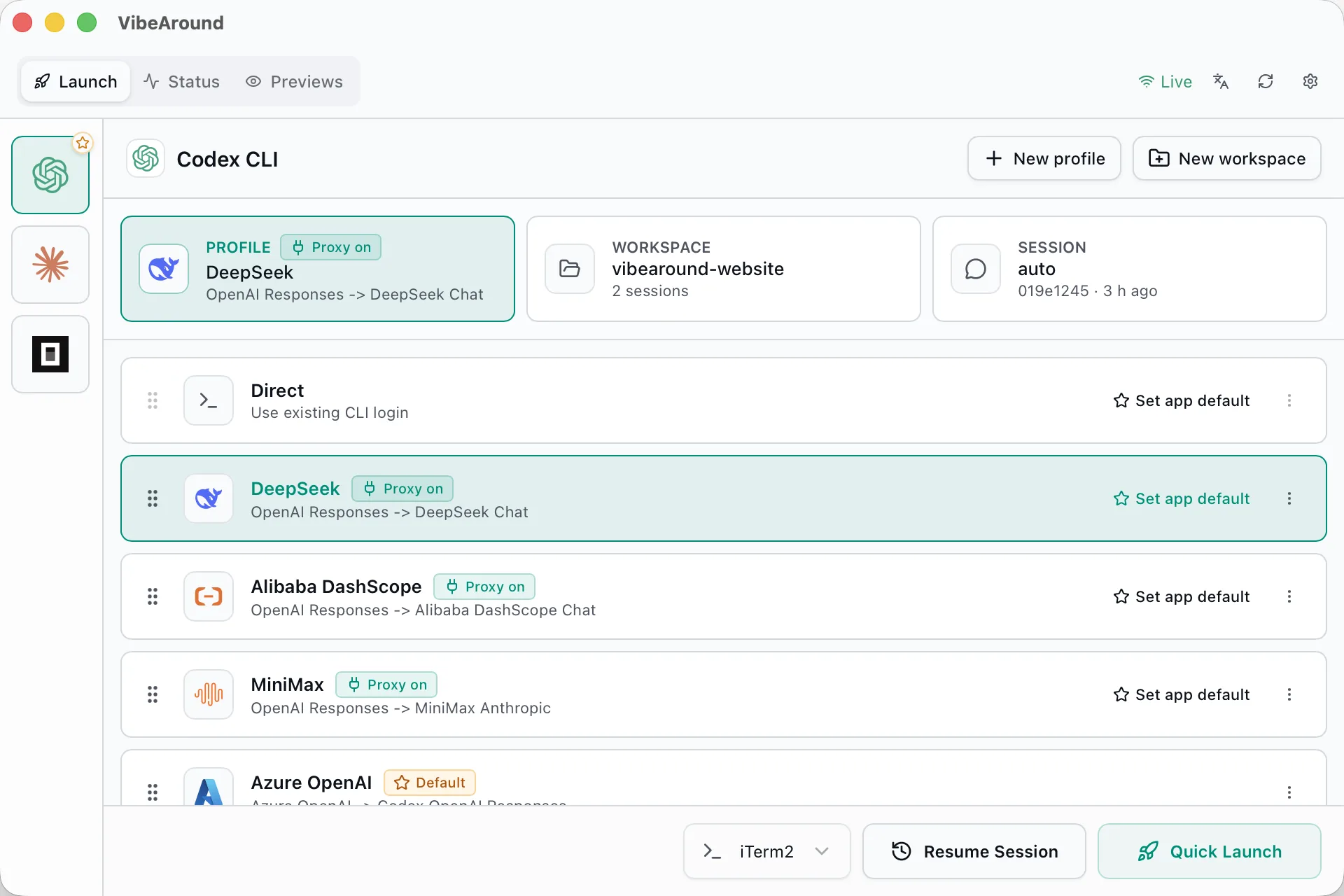
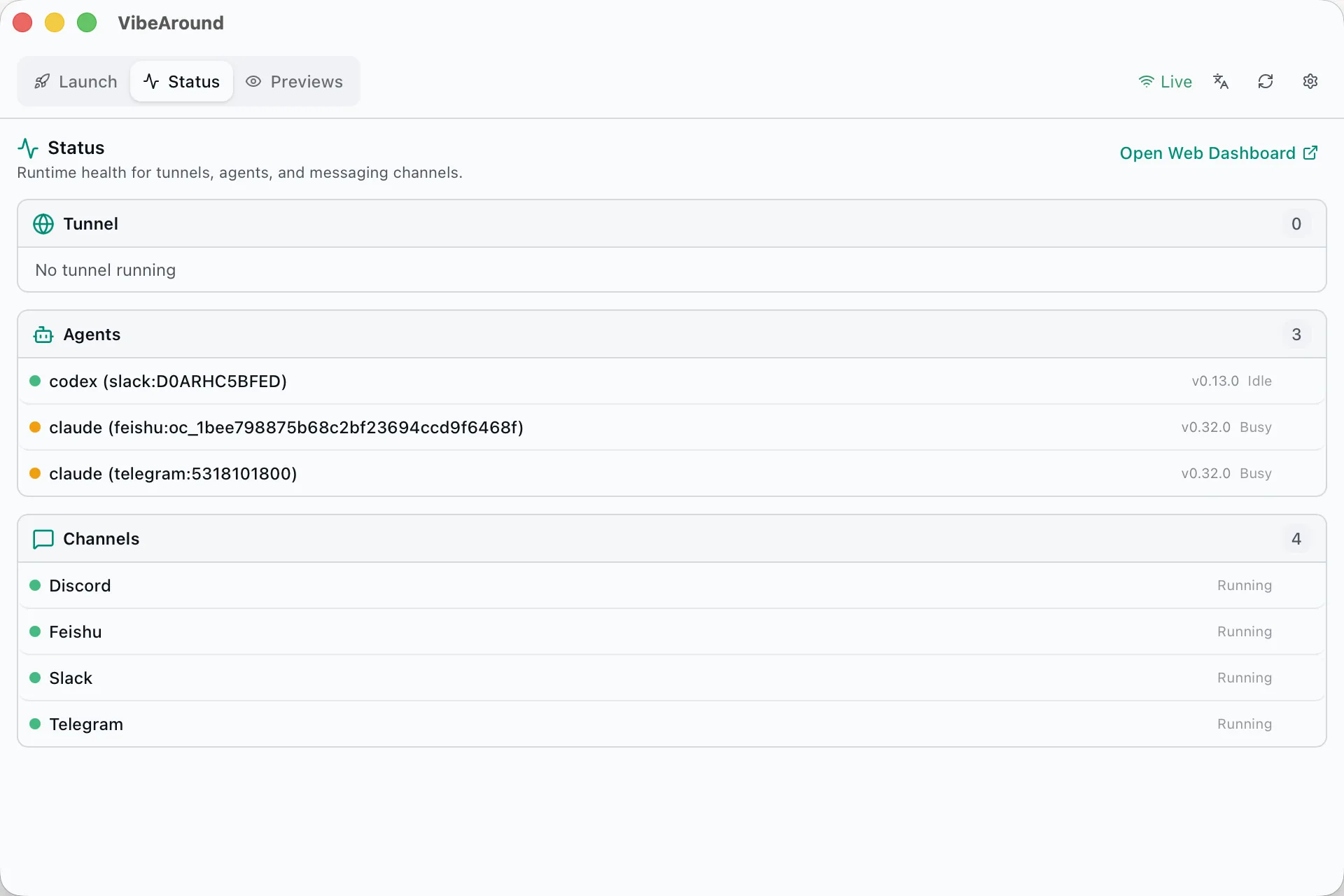
| Model profiles | Channel plugins |
|---|---|
|  |
|  |
|
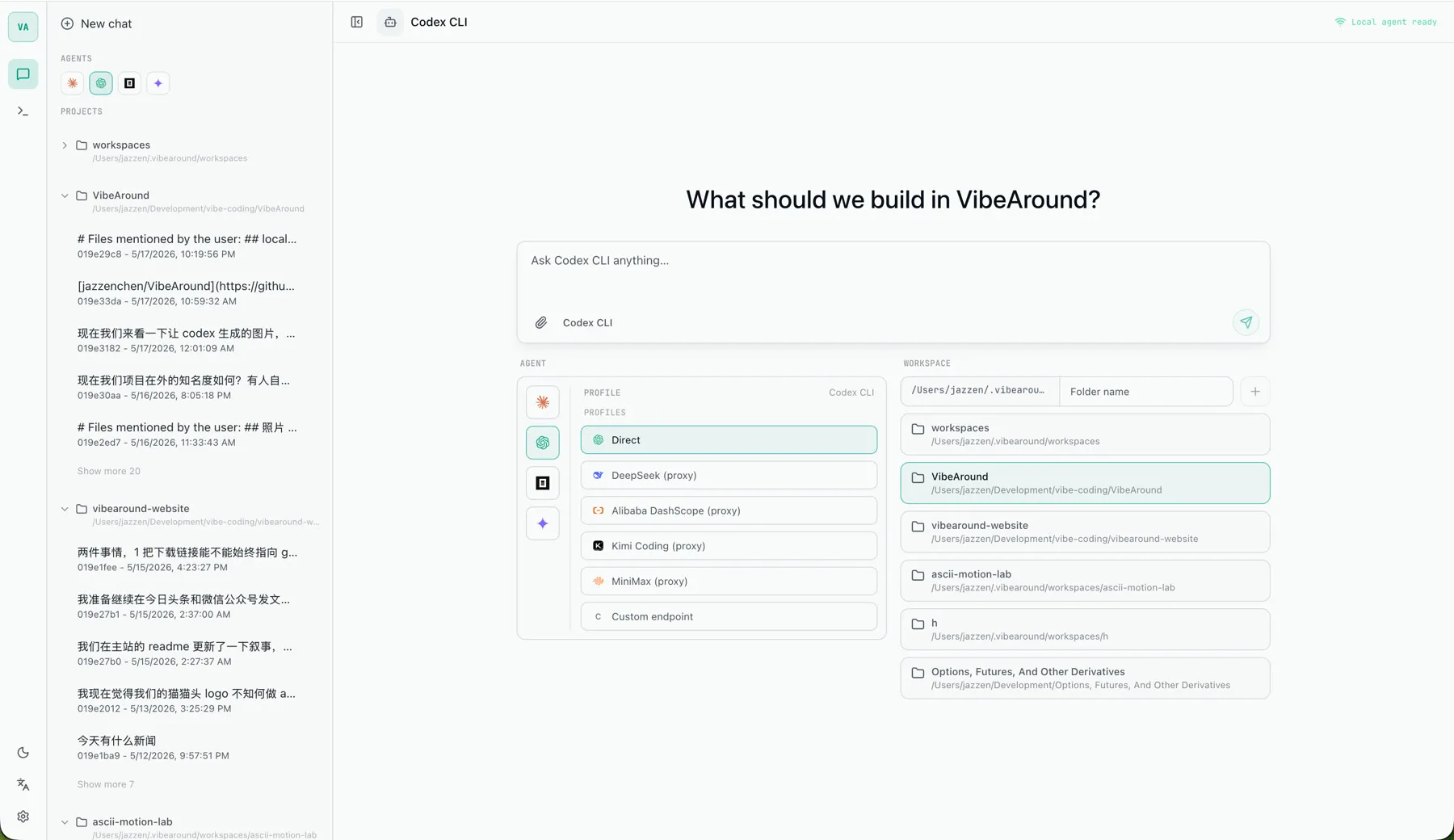
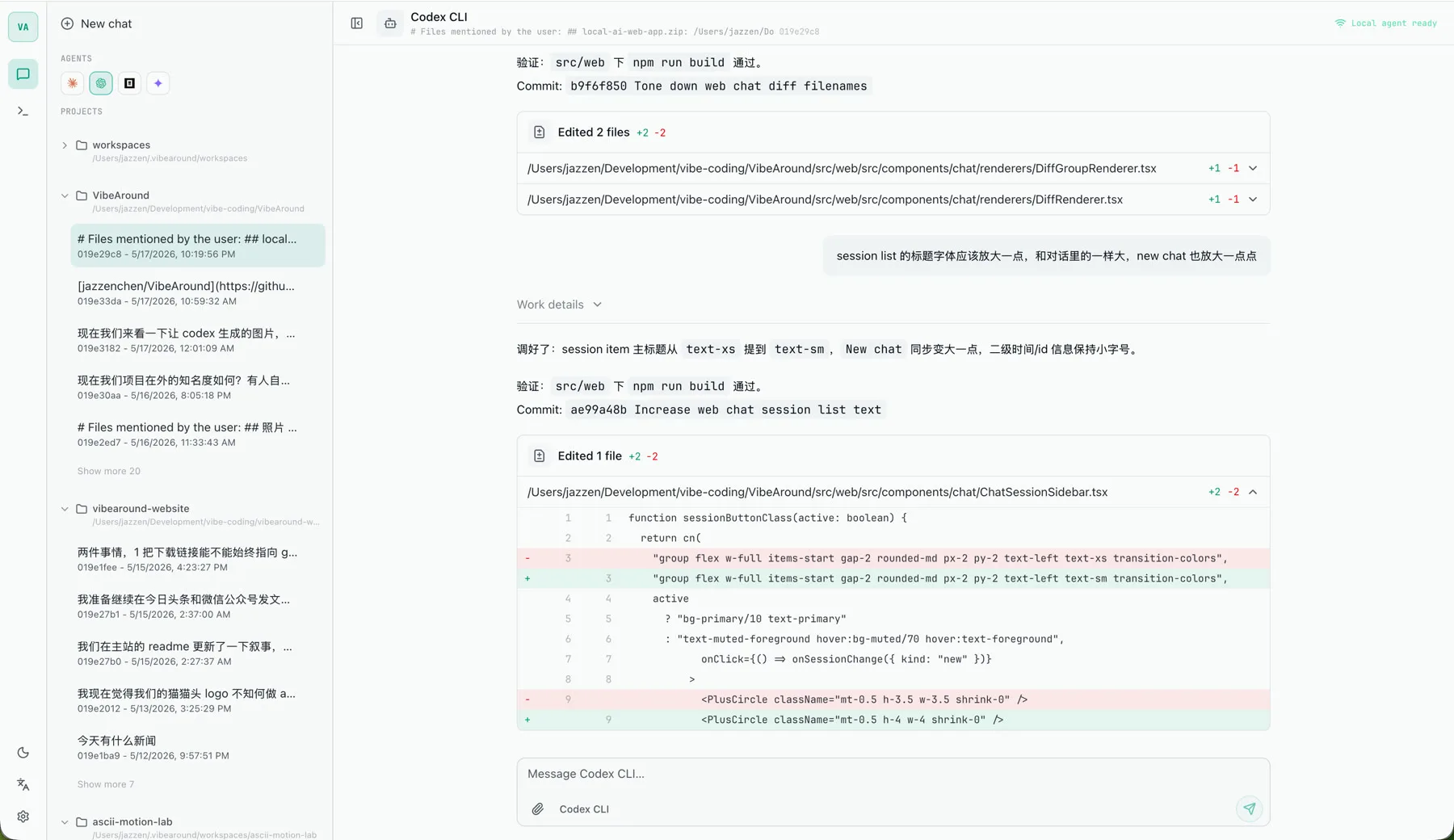
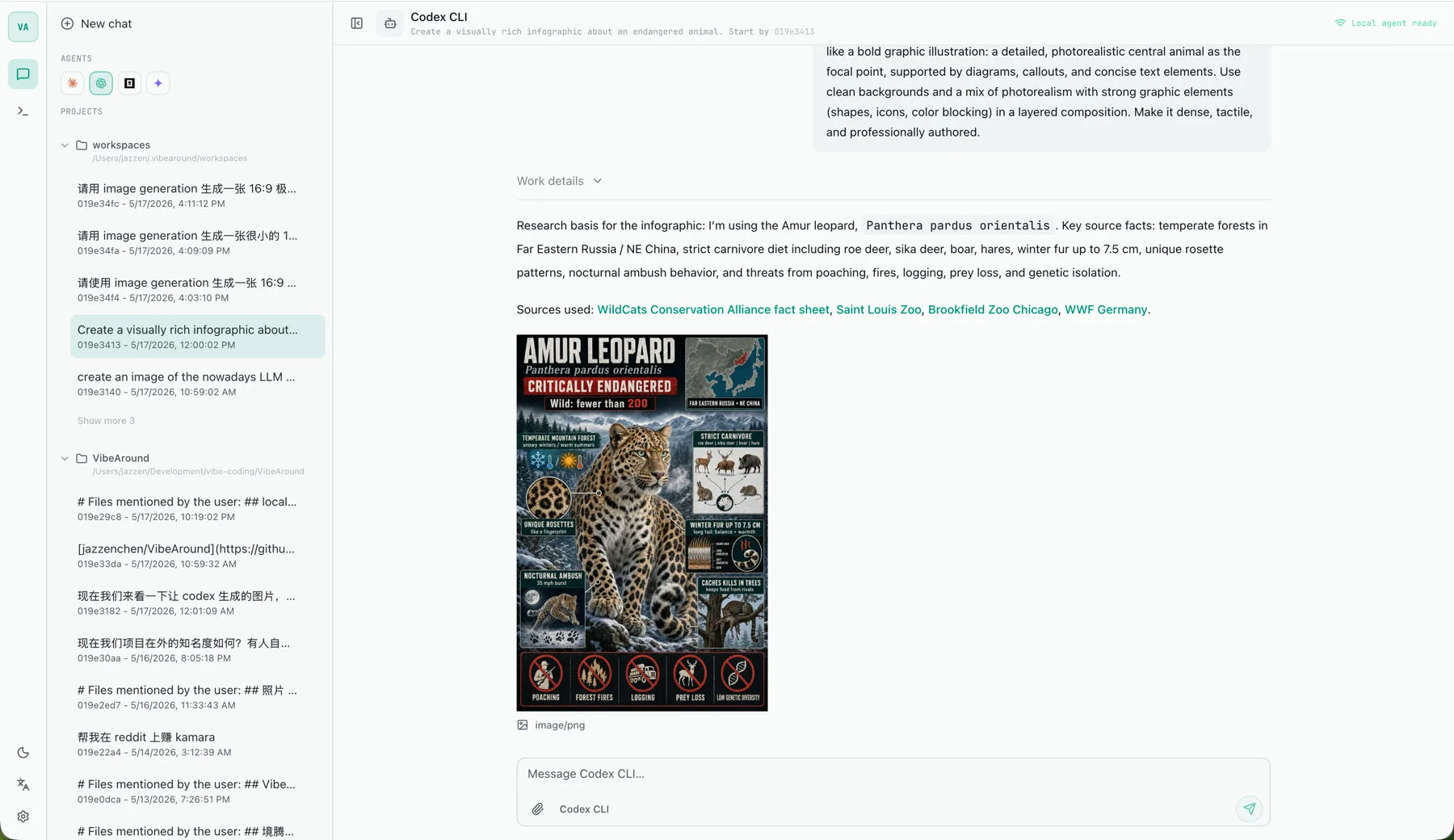
| Start a local agent | Review code changes | Generate visual assets |
|---|---|---|
|  |
|  |
|  |
|
## Why VibeAround
Local coding agents are powerful, but they are usually trapped inside one terminal tab. VibeAround gives them durable doors:
| Need | What VibeAround adds |
|---|---|
| Launch agents with different model providers | Saved profiles, Agent Launch defaults, and direct launch modes |
| Use non-native model APIs with local CLIs | A local API bridge across OpenAI Responses, Chat Completions, Anthropic Messages, and Gemini Generate Content |
| Continue work away from the terminal | Web Chat, IM channels, web terminal, and session handover |
| Share local work safely | Short-lived preview links for dev servers, Markdown, and HTML |
| Keep setup repeatable | Onboarding, plugin install, config sync, MCP and skill injection |
## Product Surfaces
| Surface | What it is for |
|---|---|
| Desktop app | Onboarding, profiles, launch defaults, workspaces, channel plugins, tunnels, previews, and quick launch |
| Web dashboard | Browser access to Web Chat, Web Terminal, live previews, session lists, and local runtime status |
| Web Chat | Multi-agent chat with session resume, file/image/document attachments, archived sessions, and thinking/tool visibility settings |
| Web Terminal | A browser terminal for local PTY sessions, with mobile-friendly controls and optional tmux attachment |
| Messaging channels | DM your local agents from Telegram, Feishu/Lark, Discord, Slack, WeChat, DingTalk, WeCom, or QQ Bot |
| Local API bridge | Profile-specific loopback endpoints for model routing and API-shape translation |
## What You Can Do
### Launch local coding agents
Start Claude Code, Codex CLI, Gemini CLI, OpenCode, and other agents directly or through saved provider profiles. Keep multiple agents and profiles available side by side.
### Bridge model traffic across API shapes
Use provider profiles to connect local agent CLIs to DeepSeek, Alibaba DashScope, Moonshot/Kimi, MiniMax, Z.AI/GLM, Google Gemini, OpenRouter, Azure OpenAI, first-party APIs, or custom compatible endpoints.
### Chat from web and messaging
Use the built-in Web Chat or messaging channels to talk to the same local agents. Web Chat supports resumed sessions, incremental session syncing, archived-session display, multi-file uploads, drag-and-drop attachments, and configurable send shortcuts.
### Keep terminal workflows alive
Open a web terminal, attach tmux sessions when available, or launch the native terminal from the desktop tray. Use `/handover` and `/pickup` to move a running session between terminal, web, and messaging.
### Preview local work remotely
Expose local dev servers, Markdown files, and HTML previews through short-lived authenticated links so you can inspect work from another browser or phone.
## Demo
[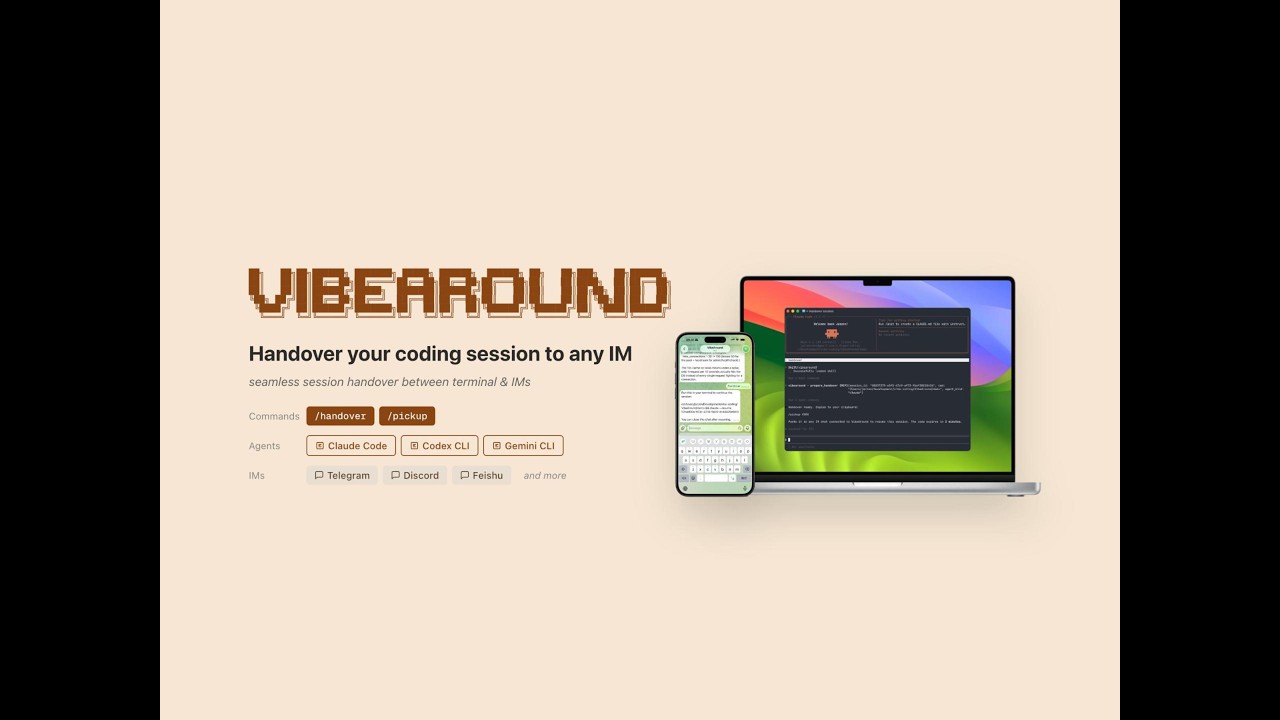](https://youtu.be/6kxNKTMz-AM)
Remotely control local agents from messaging apps, and hand over sessions between terminal and phone.
## Download
Latest release: [VibeAround v0.6.5](https://github.com/jazzenchen/VibeAround/releases/tag/v0.6.5).
| Platform | Recommended download |
|---|---|
| macOS Apple Silicon | [VibeAround_0.6.5_arm64.dmg](https://github.com/jazzenchen/VibeAround/releases/download/v0.6.5/VibeAround_0.6.5_arm64.dmg) |
| Windows x64 | [Setup EXE](https://github.com/jazzenchen/VibeAround/releases/download/v0.6.5/VibeAround_0.6.5_x64-setup.exe), [MSI](https://github.com/jazzenchen/VibeAround/releases/download/v0.6.5/VibeAround_0.6.5_x64_en-US.msi), or [portable ZIP](https://github.com/jazzenchen/VibeAround/releases/download/v0.6.5/VibeAround-win-0.6.5-portable.zip) |
| Linux x64 | [AppImage](https://github.com/jazzenchen/VibeAround/releases/download/v0.6.5/VibeAround_0.6.5_amd64.AppImage) or [deb](https://github.com/jazzenchen/VibeAround/releases/download/v0.6.5/VibeAround_0.6.5_amd64.deb) |
macOS is currently published for Apple Silicon. Windows and Linux desktop packages are produced by GitHub Actions; the macOS DMG is signed and notarized.
## Supported Agents
Agents communicate over stdio through [ACP (Agent Client Protocol)](https://agentclientprotocol.com/). VibeAround can install npm-distributed bridges when they are needed.
| Agent | IM chat | Session handover | Profile launch | Manual bridge config |
|---|---|---|---|---|
| Claude Code | Yes | Yes | Yes | Yes |
| Codex CLI | Yes | Yes | Yes | Yes |
| Gemini CLI | Yes | Yes | Yes | Yes |
| Cursor CLI | Yes | Yes | Direct launch | No |
| Kiro CLI | Yes | Yes | Direct launch | No |
| Qwen Code | Yes | Yes | Direct launch | No |
| OpenCode | Yes | No | Yes | Yes |
## Model Providers And Proxy Routes
Provider profiles let you launch local agents against first-party APIs, OpenAI-compatible endpoints, and translated routes without hand-editing CLI config files.
| Provider | Profile support |
|---|---|
| DeepSeek | Built-in endpoints and bridge routes |
| Alibaba DashScope | Built-in Coding Plan and Token Plan endpoints |
| Moonshot / Kimi | Built-in OpenAI-compatible and bridge routes |
| MiniMax | Built-in OpenAI-compatible and bridge routes |
| Z.AI / GLM | Built-in endpoints and bridge routes |
| Google Gemini | Built-in Gemini API profile |
| OpenRouter | Built-in OpenRouter profile |
| Azure OpenAI | Built-in Azure profile |
| Custom endpoint | Bring your own compatible base URL |
VibeAround's local API bridge is powered by [va-ai-api-bridge](https://github.com/jazzenchen/va-ai-api-bridge), nicknamed `va-aab`. It translates between the common agent API shapes:
| API shape | Common endpoint |
|---|---|
| OpenAI Responses | `/v1/responses` |
| OpenAI Chat Completions | `/v1/chat/completions` |
| Anthropic Messages | `/v1/messages` |
| Gemini Generate Content | `/v1beta/models/{model}:generateContent` |
## Channel Plugins
Each messaging channel runs as a standalone Node.js plugin built with [@vibearound/plugin-channel-sdk](https://www.npmjs.com/package/@vibearound/plugin-channel-sdk). Official plugin entries can be installed during onboarding.
| Channel | Auth | DM | File/Image | Streaming |
|---|---|---|---|---|
| Telegram | Bot token | Yes | Yes | Yes |
| Feishu / Lark | App credentials | Yes | Yes | Yes |
| Discord | Bot token | Yes | Yes | Yes |
| Slack | Bot + App token | Yes | Yes | Yes |
| WeChat | QR code login | Yes | Yes | No |
| DingTalk | AppKey + Secret | Yes | Yes | Yes |
| WeCom | Bot ID + Secret | Yes | Yes | Yes |
| QQ Bot | App ID + Token | Yes | Yes | No |
## Security Model
- The daemon listens on loopback by default: `127.0.0.1:12358`.
- Dashboard APIs and WebSocket routes use a local auth token.
- Public tunnel URLs require browser pairing.
- Preview links are short-lived and scoped to the preview session.
- Provider credentials stay local in VibeAround's settings/profile storage.
## Quick Start For Users
1. Download the latest package for your platform.
2. Open VibeAround and finish onboarding.
3. Enable the agents and channel plugins you want to use.
4. Add one or more model provider profiles.
5. Use Quick Launch from the desktop app, or open the Web Dashboard for Web Chat, Web Terminal, and previews.
For detailed setup, see the [Setup Guide](https://github.com/jazzenchen/VibeAround/wiki/Setup-Guide).
## Develop Locally
```bash
cd src
bun install
bun run prebuild
# Start the Tauri desktop app in development mode
bun run dev
```
The AI API bridge SDK (`va-aab`) is maintained as a separate open-source Rust crate. Local SDK checkouts can live under `src/sdks/` for development; after the first crates.io release, the app should consume the published crate rather than a submodule or vendored checkout.
Prerequisites: Rust 1.82+, Node.js 24 LTS recommended, Bun 1.3+. On macOS, also run `xcode-select --install`; on Linux, install the WebKitGTK/Tauri system dependencies for your distro.
## Slash Commands
| Command | What it does |
|---|---|
| `/help` | Show available commands |
| `/new` | Reset the session and start a fresh conversation |
| `/switch ` | Switch agents mid-conversation |
| `/profile ` | Switch profile |
| `/close` | Close the conversation |
| `/handover` | Export the current session so you can resume it elsewhere |
| `/pickup ` | Resume a session handed over from another channel |
| `/agent ` | Send a slash command to the underlying agent, for example `/agent status` |
In Slack, the `/` prefix is reserved by the client, so use `/va` or `/vibearound`, for example `/va switch claude`.
## Documentation
- [Setup Guide](https://github.com/jazzenchen/VibeAround/wiki/Setup-Guide)
- [Product Surfaces](https://github.com/jazzenchen/VibeAround/wiki/Product-Surfaces)
- [Supported Agents](https://github.com/jazzenchen/VibeAround/wiki/Supported-Agents)
- [Model Profiles and Agent Launch](https://github.com/jazzenchen/VibeAround/wiki/Model-Profiles-and-Agent-Launch)
- [Channel Plugins](https://github.com/jazzenchen/VibeAround/wiki/Channel-Plugins)
- [Configuration Model](https://github.com/jazzenchen/VibeAround/wiki/Configuration-Model)
- [Tunnel Configuration](https://github.com/jazzenchen/VibeAround/wiki/Tunnel-Configuration)
- [Authentication](https://github.com/jazzenchen/VibeAround/wiki/Authentication)
- [Architecture](https://github.com/jazzenchen/VibeAround/wiki/Architecture)
- [Build and Packaging](https://github.com/jazzenchen/VibeAround/wiki/Build-and-Packaging)
- [FAQ and Troubleshooting](https://github.com/jazzenchen/VibeAround/wiki/FAQ-and-Troubleshooting)
## Community
Ask questions, share ideas, and talk about how you use VibeAround.
[](https://discord.gg/KsJWkY64GN)
[](https://www.producthunt.com/products/vibearound)
WeChat group for Chinese-language discussion:

The WeChat QR code expires periodically. If it has expired, use Discord or GitHub Issues to ask for the latest one.
## License
[MIT](LICENSE)