https://github.com/jd-opensource/xanimation
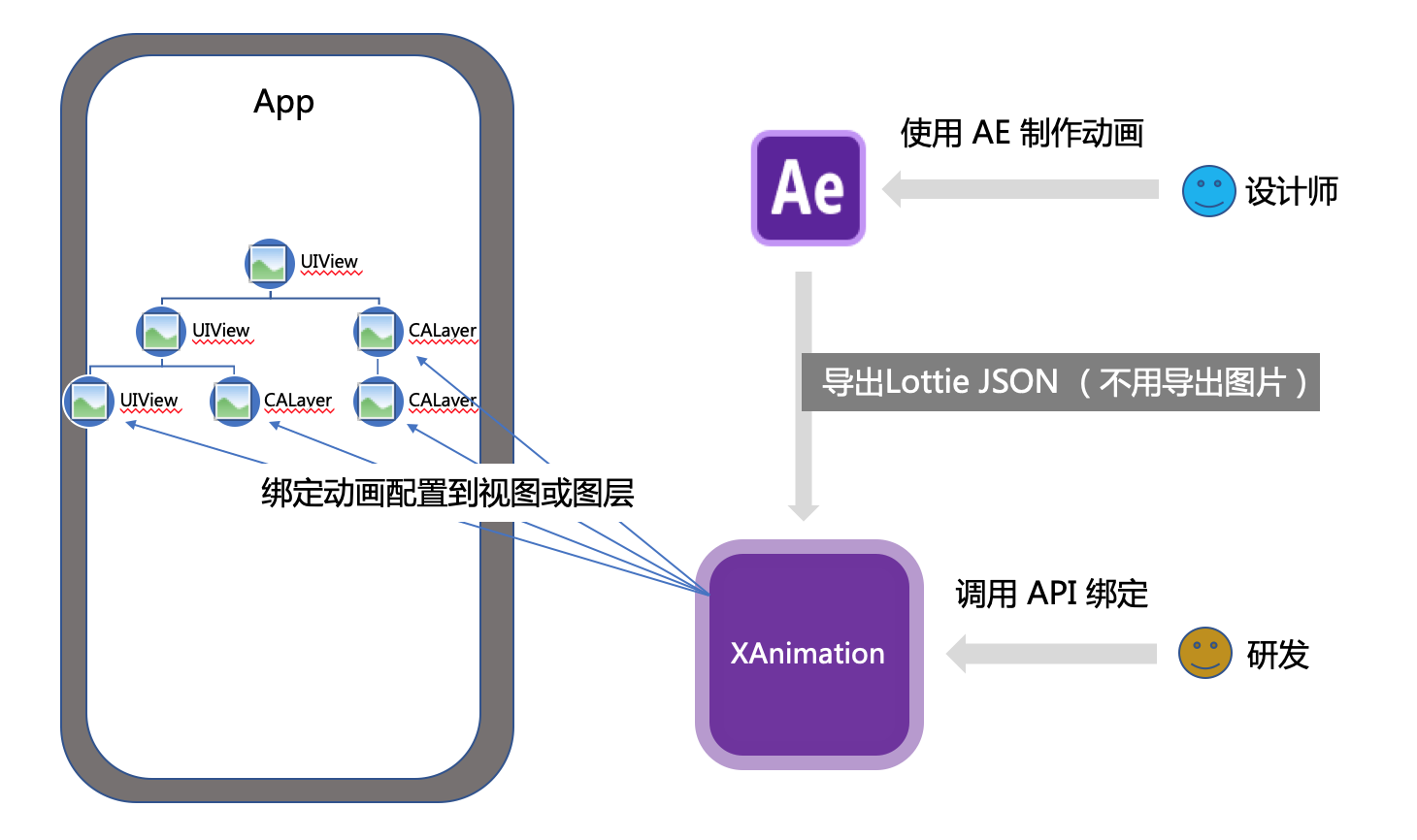
使用 XAnimation, 你可以快速将设计师设计的lottie动效,应用到你的 App 中现有的任何视图(或图层)上
https://github.com/jd-opensource/xanimation
bind-lottie-effect
Last synced: 4 months ago
JSON representation
使用 XAnimation, 你可以快速将设计师设计的lottie动效,应用到你的 App 中现有的任何视图(或图层)上
- Host: GitHub
- URL: https://github.com/jd-opensource/xanimation
- Owner: jd-opensource
- License: apache-2.0
- Created: 2022-11-07T05:48:38.000Z (over 3 years ago)
- Default Branch: master
- Last Pushed: 2022-11-18T06:54:07.000Z (over 3 years ago)
- Last Synced: 2025-08-04T23:24:47.116Z (11 months ago)
- Topics: bind-lottie-effect
- Language: Objective-C
- Homepage:
- Size: 188 KB
- Stars: 88
- Watchers: 3
- Forks: 5
- Open Issues: 0
-
Metadata Files:
- Readme: README.md
- License: LICENSE
Awesome Lists containing this project
README
# XAnimation
[](https://travis-ci.org/wangxiyuan/XAnimation)
[](https://cocoapods.org/pods/XAnimation)
[](https://cocoapods.org/pods/XAnimation)
[](https://cocoapods.org/pods/XAnimation)
## Introduce 简介 😊
使用 **XAnimation**, 你可以快速将设计师设计的动画效果,应用到你的 App 中现有的任何视图(或图层)上,由于 XAnimation 基于 **Lottie** 进行二次开源,因此它同样具备以下特征:
* **高还原度 🎆**
* **少代码 ♻️**
* **高稳定性 💪**
## Example 效果预览
> 你可以在 Example 工程中体验它。


## Requirements
iOS 9.0+
## Installation 安装
XAnimation 可以通过 CocoaPods 来安装 (https://cocoapods.org) 只需要将下面代码加入到 Podfile 中。
```ruby
pod install 'XAnimation'
```
## API 使用
> 以下调示例为 UIView 绑定动画, CALayer 可以直接去源码看相关接口定义.
1. 依赖头文件.
```objc
#import
#import
```
2. Lottie 绑定到一个根 UIView(或 CALayer)上.
```objc
/**
* animationName 即为本地Json文件名
* aView 你的任意一个视图
*/
[aView bindLottieWithAnimationNamed:@"牌子动画(旋转+位移+缩放)"];
```
3. 你的视图绑定 Lottie json 中某个图层.
```objc
[aView bindLottieLayerName:@"牌子"];
```
4. 播放动画.
```objc
[[aView currentBindController] play];
```
## Future 展望
请试想,动画绑定的能力该如何运用呢?
每个人可能都有不同想法 🤔, 但这里有一个推荐,我现在对上面的流程做一点点改进,将 App 中的视图和 Lottie 中的图层的绑定关系,改为后台配置,这样流程看起来会像下图:

这样做的好处是:
- 0 代码开发,任意时刻配置,可立即上线
- 减少测试环节,由平台提供稳定性,提高效能
好了,现在你能想到哪些配置应用场景呢?比如:春节的时候🧨🧨🧨,让你的大 Icon 开心的跳起来?😄
## Author 作者
wangxiyuan (wangxiyuan613@163.com)
如果你有更多更好的想法,欢迎发件交流 🤝🤝🤝。
## License 版权
XAnimation is available under the Apache License 2.0. See the LICENSE file for more info.