https://github.com/jdan/rubycards
Ruby playing cards library
https://github.com/jdan/rubycards
Last synced: over 1 year ago
JSON representation
Ruby playing cards library
- Host: GitHub
- URL: https://github.com/jdan/rubycards
- Owner: jdan
- License: mit
- Created: 2013-04-19T18:17:05.000Z (about 13 years ago)
- Default Branch: master
- Last Pushed: 2016-03-13T22:58:15.000Z (over 10 years ago)
- Last Synced: 2025-03-31T04:07:35.497Z (over 1 year ago)
- Language: Ruby
- Homepage: http://rubydoc.info/github/jdan/rubycards/master/frames
- Size: 458 KB
- Stars: 147
- Watchers: 9
- Forks: 23
- Open Issues: 2
-
Metadata Files:
- Readme: README.md
- License: LICENSE.txt
Awesome Lists containing this project
README
# Rubycards
[](https://travis-ci.org/jdan/rubycards) [](https://coveralls.io/r/prezjordan/rubycards)
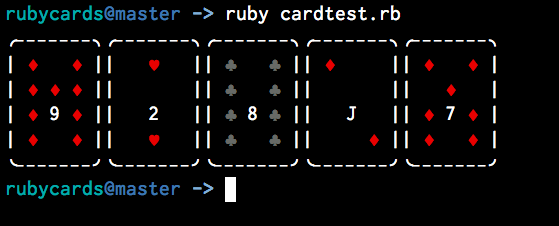
Rubycards is a library to emulate playing cards (cards, hands, decks). As an added bonus, you can display the cards as tiny pictures. I'm mainly doing this as an exercise to learn better Ruby organization, as well as documentation and testing. More importantly it's just fun.
**See the extended documentation**: [http://rubydoc.info/github/jdan/rubycards](http://rubydoc.info/github/jdan/rubycards/master/frames)
## Installation
Add this line to your application's Gemfile:
gem 'rubycards'
And then execute:
$ bundle
Or install it yourself as:
$ gem install rubycards
## Example
Here's a trivial example of declaring a new deck, shuffling, and drawing 5 cards into a hand:
```ruby
require 'rubycards'
include RubyCards
hand = Hand.new
deck = Deck.new
deck.shuffle!
hand.draw(deck, 5)
puts hand
```
Which produces the image at the top of this README.
Here's a second example showing 2 decks, with the 2 and Jacks removed, shuffling, and drawing 10 cards into a hand:
```ruby
require 'rubycards'
include RubyCards
hand = Hand.new
deck = Deck.new(number_decks: 2, exclude_rank: [2, 'Jack'])
deck.shuffle!
hand.draw(deck, 10)
puts hand
```
## Contributing
1. Fork it
2. Create your feature branch (`git checkout -b my-new-feature`)
3. Commit your changes (`git commit -am 'Add some feature'`)
4. Push to the branch (`git push origin my-new-feature`)
5. Create new Pull Request