https://github.com/jdtsmith/splitview
Hammerspoon Spoon to automate putting two windows in fullscreen split-view
https://github.com/jdtsmith/splitview
Last synced: 8 months ago
JSON representation
Hammerspoon Spoon to automate putting two windows in fullscreen split-view
- Host: GitHub
- URL: https://github.com/jdtsmith/splitview
- Owner: jdtsmith
- License: mit
- Created: 2018-12-16T00:17:57.000Z (over 7 years ago)
- Default Branch: master
- Last Pushed: 2024-12-16T02:09:59.000Z (over 1 year ago)
- Last Synced: 2025-07-11T16:53:47.283Z (11 months ago)
- Language: Lua
- Size: 599 KB
- Stars: 11
- Watchers: 2
- Forks: 1
- Open Issues: 0
-
Metadata Files:
- Readme: README.md
- License: LICENSE
Awesome Lists containing this project
README
# SplitView 
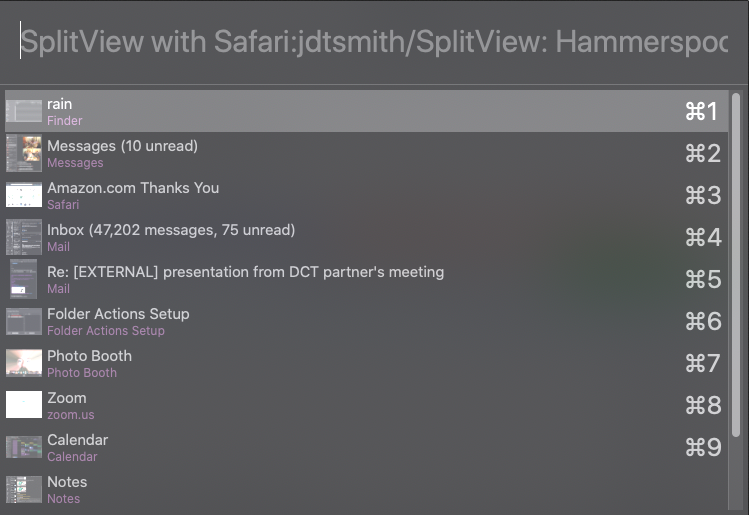
`SplitView` is a [Hammerspoon](https://www.hammerspoon.org) Spoon which can automate the painful chore of putting two windows side by side in MacOS's fullscreen split-view mode. Using it is simple: just navigate to the first window you'd like in the split view, invoke the assigned key shortcut, choose another window from the popup (with search and shortcuts; see above), and then watch the magic happen. You can also create special bindings to search by application and/or window name, or even invoke `SplitView` from the command line. And as a bonus, you can bind shortcut keys to toggle focus while in split view from one side to the other, swap the two Split View windows left and right, or remove a full screen space (single or split-view).
Important points:
* `SplitView` relies on the `spaces` API. This _must_ be installed for `SplitView` to work; see https://github.com/asmagill/hs._asm.spaces. Note that the old "undocumented" spaces module is no longer supported or compatible. The spaces extension is a work in progress, so caveat splitviewor.
* Requires Hammerspoon v0.9.79 or later and works on MacOS 14.1 or later. For releases compatible with earlier MacOS versions, see [releases](https://github.com/jdtsmith/SplitView/releases).
* This tool works by _simulating_ the split-view user interface: a long green-button click followed by clicking the appropriate tile-left/right menu item, followed by a 2nd window click on the chosen miniature window. This requires a short time delay to work reliably (to wait for mini-windows to move fully into position). If this is unreliable for you (e.g. if you get max iteration errors), trying increasing this (see `delay` variable in [the reference](http://htmlpreview.github.io/?https://github.com/jdtsmith/SplitView/blob/master/html/SplitView.html).
* `SplitView` uses `hw.window.filter` to try to ignore atypical windows (menu panes, etc.), which see. Unrecognized non-standard windows may interfere with `SplitView`'s operation.
* In addition to the normal `choose` binding, you can bind numerous additional hotkeys to customize which windows are considered for split-view. You can also specify bindings for special commands `removeDesktop`, `swapWindows`, and `switchFocus` (see [`bindHotkeys` docs](https://htmlpreview.github.io/?https://github.com/jdtsmith/SplitView/blob/master/html/SplitView.html#bindHotkeys)).
Example config in your `~/.hammerspoon/init.lua`:
```
mash = {"ctrl", "cmd"}
mashshift = {"ctrl", "cmd","shift"}
-- SplitView for Split Screen
hs.spoons.use("SplitView",
{config = {tileSide="right"},
hotkeys={choose={mash,"e"},
chooseAppEmacs={mashshift,"e","Emacs"},
chooseAppWin130={mashshift,"o","Terminal","130"},
removeDesktop={mashshift,"k"},
swapWindows={mashshift,"x"},
switchFocus={mash,"x"}}})
```
In words, this sets `Cmd-Ctrl-e` to invoke normal (all window) `SplitView`, `Cmd-Ctrl-o` to `SplitView` the current window with a window of the Terminal application with "130" in its window title, `Cmd-Ctrl-Shift-k` to close the the split-view (or fullscreen) space, `Cmd-Ctrl-Shift-x` to swap the split-view windows left to right, and `Cmd-Ctrl-x` to switch focus between split view windows.
To install, just [download](https://github.com/jdtsmith/SplitView/releases/latest) `SplitView.spoon.zip` and double-click it!
See [the docs](http://htmlpreview.github.io/?https://github.com/jdtsmith/SplitView/blob/master/html/SplitView.html) for complete information on configuring `SplitView`.