https://github.com/jdugarte/rails-bootstrap-form-extensions
Specialized controls added to the bootstrap_form gem
https://github.com/jdugarte/rails-bootstrap-form-extensions
bootstrap bootstrap-form-builder duration rails rails-form-builder ruby schedule timespan
Last synced: 2 months ago
JSON representation
Specialized controls added to the bootstrap_form gem
- Host: GitHub
- URL: https://github.com/jdugarte/rails-bootstrap-form-extensions
- Owner: jdugarte
- License: mit
- Created: 2015-09-22T18:02:01.000Z (almost 11 years ago)
- Default Branch: master
- Last Pushed: 2019-06-22T16:26:34.000Z (about 7 years ago)
- Last Synced: 2026-03-12T21:10:26.292Z (4 months ago)
- Topics: bootstrap, bootstrap-form-builder, duration, rails, rails-form-builder, ruby, schedule, timespan
- Language: Ruby
- Size: 246 KB
- Stars: 0
- Watchers: 1
- Forks: 0
- Open Issues: 1
-
Metadata Files:
- Readme: README.md
- Changelog: CHANGELOG.md
- License: MIT-LICENSE
Awesome Lists containing this project
README
If you are using Bootstrap v3, refer to the legacy [legacy-1.2.1](https://github.com/jdugarte/rails-bootstrap-form-extensions/tree/legacy-1.2.1) branch.
---
# Rails Bootstrap Form Extensions
**Table of Contents**
- [Requirements](#requirements)
- [Dependencies](#dependencies)
- [Installation](#installation)
- [SubmitBar](#submitbar)
- [Configuration](#configuration)
- [Default partial](#default-partial)
- [Duration](#duration)
- [Duration without bootstrap](#duration-without-bootstrap)
- [Timespan](#timespan)
- [Configuration](#configuration-1)
- [ArrayedField](#arrayedfield)
- [arrayed_text_field](#arrayed_text_field)
- [arrayed_url_field](#arrayed_url_field)
- [arrayed_json_field](#arrayed_json_field)
- [Scheduler](#scheduler)
- [Model](#Model)
- [Default selection](#Default-selection)
- [Date and Time Pickers](#date-and-time-pickers)
- [SelectOrNew](#selectornew)
- [Handling the new value](#Handling-the-new-value)
- [Contributing](#contributing)
## Requirements
* Ruby 2.0+
* Rails 5.0+
* Twitter Bootstrap 4.0+
## Dependencies
This gem will install the following gems/libraries:
* [Rails Bootstrap Forms](https://github.com/bootstrap-ruby/rails-bootstrap-forms), ~> 4.x
* [$.html5data](http://markdalgleish.com/projects/jquery-html5data/), 1.0
## Installation
Add it to your Gemfile:
```ruby
gem 'bootstrap_form_extensions'
```
Then:
`bundle`
Then require the JS in your `application.js` file:
```js
/*
*= require bootstrap_form_extensions
*/
```
And require the CSS in your `application.css` file:
```css
/*
*= require bootstrap_form_extensions
*/
```
## SubmitBar
Using all the default arguments, doing this:
```erb
<%= f.submit_bar %>
```
generates a form group, with two buttons: Save (a dropdown menu, that includes 'Save and duplicate', and 'Save and new' options), and Cancel:
```html
```
### Configuration
The following arguments can be used to configure the submit bar:
| Argument | Description | Default |
| -------- |-------------| --------|
| show_submit_button | Show the Save button | true |
| submit_button_text | Text used in the save button | 'Save' |
| show_submit_menu | Show the dropdown menu on the save button | true |
| show_submit_and_dup_button | Show a 'Save and duplicate' option in the dropdown submit menu. The 'Save' text is affected by the submit_button_text argument | true |
| show_submit_and_new_button | Show a 'Save and new' option in the dropdown submit menu. The 'Save' text is affected by the submit_button_text argument | true |
| show_cancel_button | Show the Cancel button| true |
| cancel_button_text | Text used in the cancel button | 'Cancel' |
| cancel_button_url | URL used in the cancel button | If the form object is a persisted ActiveRecord instance, the url to the show action; if not, the index action. If none of these path exit, then it uses 'javascript:history.back();' |
| extra_buttons | An array of hashes with the definition of the extra buttons to be added between the submit and cancel buttons. The options should include at least :text and :url for the button. Anything else is passed as html options to the button | [] |
| right_buttons | An array of hashes with the definition of the extra buttons to be added on the right side of the submit bar. The options should include at least :text and :url for the button. Anything else is passed as html options to the button | [] |
| partial | Partial template used to render the submit bar | See _Default partial_ below for details |
You can also change the default of `partial`, `show_submit_button`, `submit_button_text`, `show_submit_menu`, `show_submit_and_dup_button`, `show_submit_and_new_button`, `show_cancel_button`, `cancel_button_text`, or `back_button_text`, by invoking them on the BootstrapFormExtensions::SubmitBar, for example in an initializer file, like this:
```ruby
BootstrapFormExtensions::SubmitBar.partial = 'layouts/form_footer'
BootstrapFormExtensions::SubmitBar.show_submit_menu = false
```
### Default partial
This is the actual code of the default partial (located in app/views/bootstrap_form_extensions/_submit_bar.html.erb):
```erb
<% if right_buttons.any? %>
<% end %>
```
You can use it as a template to create your own partial(s).
## Duration
Having, for example, a column `duration_in_seconds` (a float column, to handle milliseconds), doing this:
```erb
<%= f.duration :duration_in_seconds %>
```
generates this html:
```html
Duration in seconds
:
:
.
```
It accepts any option you'd pass to a form_group.
### Duration without bootstrap
There is a version of this control that doesn't apply all bootstrap styling:
```erb
<%= f.duration_without_bootstrap :duration_in_seconds %>
```
generates this html:
```html
:
:
.
```
If you still want to use the bootstrap styling, but not the form formatting (for instance, when you need to include this control in an inline form, or inside another element), you can customize like this:
```erb
<%= f.duration_without_bootstrap :duration_in_seconds, class: 'form-control', wrapper_class: 'form-inline' %>
```
## Timespan
Having, for example, a column `duration_in_seconds`, doing this:
```erb
<%= f.timespan :duration_in_seconds %>
```
generates this html:
```html
seconds
minutes
hours
days
weeks
months
```
### Configuration
The following arguments can be used to configure the timespan:
| Argument | Description | Default |
| -------- |-------------| --------|
| units | The list of units that will be displayed | [ :seconds, :minutes, :hours, :days, :weeks, :months ] |
| quantity_options | html options to be added to the quantity input | {} |
| unit_options | html options to be added to the unit select | {} |
You can also change the default of `units` by invoking it on the BootstrapFormExtensions::Timespan, for example in an initializer file, like this:
```ruby
BootstrapFormExtensions::Timespan.units = [ :hours, :days ]
```
## ArrayedField
ArrayedField provides three helpers:
### arrayed_text_field
Given a column that holds an array of texts, this helper adds a multiple line text inputs:
```erb
<%= f.arrayed_text_field :lists %>
```
It accepts any option you'd pass to a form_group. If the column provided doesn't exist, or is not an array, it assumes an empty array as the value.
### arrayed_url_field
Given a column that holds an array of URLs, this helper adds a multiple line url inputs:
```erb
<%= f.arrayed_url_field :urls %>
```
It accepts any option you'd pass to a form_group. If the column provided doesn't exist, or is not an array, it assumes an empty array as the value.
### arrayed_json_field
Given a column that holds an array of hashes, this helper adds a multiple line, multiple field, text/select inputs:
```erb
<%= f.arrayed_json_field :variables, [ :name, :value ] %>
```
The generated html contains multiple lines like this:
```html
```
The list of fields in the hash can be customized further:
```erb
<%= f.arrayed_json_field :variables, [ { name: { type: :select, options: [ [ "One", "var1" ], [ "Two", "var2" ] ] } }, :value ] %>
```
`type` can be `:text` or `:select`.
The generated html for each element of the array would look something like this:
```html
One
Two
```
It accepts any option you'd pass to a form_group. If the column provided doesn't exist, or is not an array, it assumes an empty array as the value.
## Scheduler
This widget creates a grid of days and hours to choose a schedule. Called like this:
```erb
<%= f.scheduler :schedule %>
```
generates this:

This grid reflects the schedule selected. Clicking on the grid brings up the schedule editor:
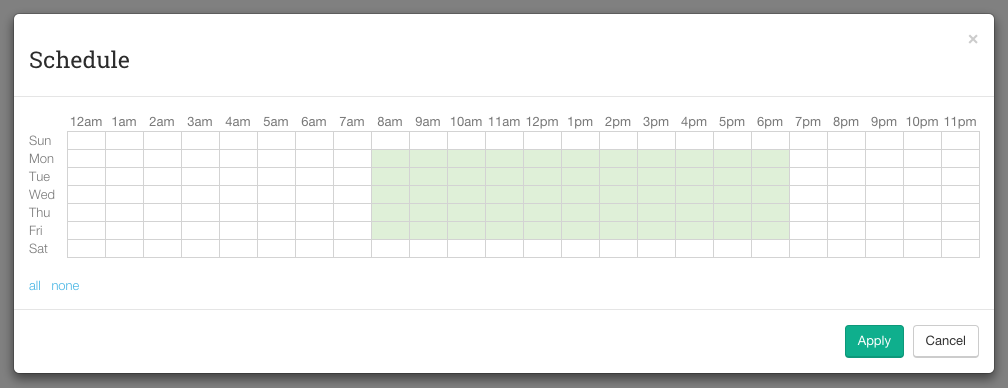
The days and hours headers are clickable, as well as each cell, to allow any custom selection.
`scheduler` accepts the same arguments than bootstrap form's `form_group`: a method for the value, and options for the form group.
### Model
This control expects the attribute to be serialized like this:
```ruby
# Migration:
class AddSchedulerField < ActiveRecord::Migration
def change
add_column :things, :schedule, :text
end
end
# Model
class Thing < ActiveRecord::Base
...
serialize :schedule, BootstrapFormExtensions::Scheduler.serializer
...
end
```
This will serialize the column to yaml. If you're using an array column (e.g. PostgreSQL), you could do:
```ruby
# Migration:
class AddSchedulerField < ActiveRecord::Migration
def change
add_column :things, :schedule, :text, array: true, default: []
end
end
# Model
class Thing < ActiveRecord::Base
...
serialize :schedule, BootstrapFormExtensions::Scheduler.serializer to: :array
...
end
```
#### Default selection
Each hour in the schedule grid is selected by default:
```ruby
> thing = Thing.new schedule: []
> thing.schedule
=> [[true, true, true, true, true, true, true, true, true, true, true, true, true, true, true, true, true, true, true, true, true, true, true, true], ...]
```
You can change this default in the model:
```ruby
class Thing < ActiveRecord::Base
...
serialize :schedule, BootstrapFormExtensions::Scheduler.serializer default_selection: false
...
end
```
This would result in:
```ruby
> thing = Thing.new schedule: []
> thing.schedule
=> [[false, false, false, false, false, false, false, false, false, false, false, false, false, false, false, false, false, false, false, false, false, false, false, false], ...]
```
## Date and Time Pickers
Date and Time Pickers have been deprecated since bootstrap form already offers good replacements for them.
## SelectOrNew
This helpers creates a select tag with an extra "New..." option at the end, that allows the user to input a new item. For instance:
```erb
<%= f.select_or_new :category, [ [ 'One', 1 ], [ 'Two', 2 ] ] %>
```
generates this html:
```html
Category
Please select
One
Two
New...
×
```
Initially, the control looks like a regular select tag:

When "New..." is selected, it turns to:

To go back to the select (canceling the new input), click on the cancel button (the red X).
The helper accepts the same parameters as [Rails' select helper](http://api.rubyonrails.org/classes/ActionView/Helpers/FormOptionsHelper.html#method-i-select), plus any option you'd pass to a form_group.
If any of the choices you provided is selected, the appropriate value will be set in the filed (category_id, in the previous example). If "New..." is selected, the id will be set to '0', and a field called "new\__field_" will be added (in the previous example that would be: category_id = '0', new_category = 'New Category').
### Handling the new value
You could have something like this in the controller:
```ruby
class ThingsController < ApplicationController
...
def create
@thing = Thing.build thing_params
@thing.save_with_category
respond_with @thing
end
def update
@thing = Thing.find(params[:id])
@thing.assign_attributes thing_params
@thing.save_with_category
respond_with @thing
end
private
def thing_params
params.require(:thing).permit :name, :category_id, :new_category
end
...
end
```
And then in the model:
```ruby
class Thing < ActiveRecord::Base
belongs_to :category
validates :name, :category_id, presence: true
validate :new_category_presence
attr_accessor :new_category
def save_with_category
return false unless valid?
transaction { add_category_if_new && save }
end
private
def add_category_if_new
return true unless category_id == 0
category = Category.build name: new_category
if category.save
self.category, self.new_category = category, ''
return true
end
errors.add :category_id, category.errors.full_messages
return false
end
def new_category_presence
return true unless category_id == 0
if new_category.blank?
errors.add :category_id, "can't be blank"
return false
end
end
end
```
## Contributing
Here's a quick guide for contributing:
1. Fork the repo.
2. Run the existing test suite:
```
$ bundle exec rake -f test/dummy/Rakefile db:create db:migrate RAILS_ENV=test
$ bundle exec rake
$ bundle exec rake jasmine:ci
```
3. Add tests for your change.
4. Add your changes and make your test(s) pass.
5. Update the README if necessary.
6. Add a line to the CHANGELOG for your bug fix or feature.
7. Push to your fork and submit a pull request.