https://github.com/jefedcreator/memoer
A nodejs express server application for note keeping and task tracking, with scheduled daily email reminders
https://github.com/jefedcreator/memoer
expressjs mysql nodejs nodemailer prisma typedi typescript
Last synced: 4 months ago
JSON representation
A nodejs express server application for note keeping and task tracking, with scheduled daily email reminders
- Host: GitHub
- URL: https://github.com/jefedcreator/memoer
- Owner: jefedcreator
- Created: 2023-02-17T15:39:18.000Z (over 3 years ago)
- Default Branch: main
- Last Pushed: 2025-01-10T14:30:31.000Z (over 1 year ago)
- Last Synced: 2025-07-16T14:54:54.940Z (about 1 year ago)
- Topics: expressjs, mysql, nodejs, nodemailer, prisma, typedi, typescript
- Language: TypeScript
- Homepage:
- Size: 253 KB
- Stars: 1
- Watchers: 1
- Forks: 0
- Open Issues: 0
-
Metadata Files:
- Readme: README.md
Awesome Lists containing this project
README
# Memoer
A nodejs express server application for a note keeping, with scheduled daily email reminders
# Table of Contents
[Intoduction](#Introduction)
[Local development](#local-development)
[Docker](#docker)
[Testing](#testing)
## Introduction
committing to a to-do list or an important note can be a hassle, especially if you run on a very busy schedule. Memoer helps to solve the issue of forgetting an important action or task to be carried out. It is a Node.js, Express with mySQL database application that helps users capture their thoughts and allows them to add notes and lists. Additionally, it provides daily email reminders for incomplete tasks based on the priority you set while creating a note. Email reminders for high-priority notes are sent every 8 hours, medium-priority notes every 16 hours, and low-priority notes every 24 hours.
MySQL database server is open-source database software that is faster, secured, reliable and cheaper because of its unique storage engine architecture.
## API Documentation
This is the documentation for the REST API built using Express.js. The API is used for a note-keeping application that requires users to sign up and log in to access the service.
### Instructions
Getting Started
To get started with the API, follow these steps:
1. Clone the repository onto your local machine using git clone https://github.com/jefedcreator/memoer.git.
2. Run `yarn install` to install all the required dependencies.
3. Run `yarn start` to start the server.
The server will be available at http://localhost:8000/api/v1/
# 🚀 Get started here
This template guides you through CRUD operations (GET, POST, PUT, DELETE), variables, and tests.
## 🔖 **How to use this template**
#### **Step 1: Send requests**
RESTful APIs allow you to perform CRUD operations using the POST, GET, PUT, and DELETE HTTP methods.
This collection contains each of these [request](https://learning.postman.com/docs/sending-requests/requests/) types. Open each request and click "Send" to see what happens.
#### **Step 2: View responses**
Observe the response tab for status code (200 OK), response time, and size.
#### **Step 3: Send new Body data**
Update or add new data in "Body" in the POST request. Typically, Body data is also used in PUT request.
```
{
"name": "Add your name in the body"
}
```
#### **Step 4: Update the variable**
Variables enable you to store and reuse values in Postman. We have created a [variable](https://learning.postman.com/docs/sending-requests/variables/) called `base_url` with the sample request [https://postman-api-learner.glitch.me](https://postman-api-learner.glitch.me). Replace it with your API endpoint to customize this collection.
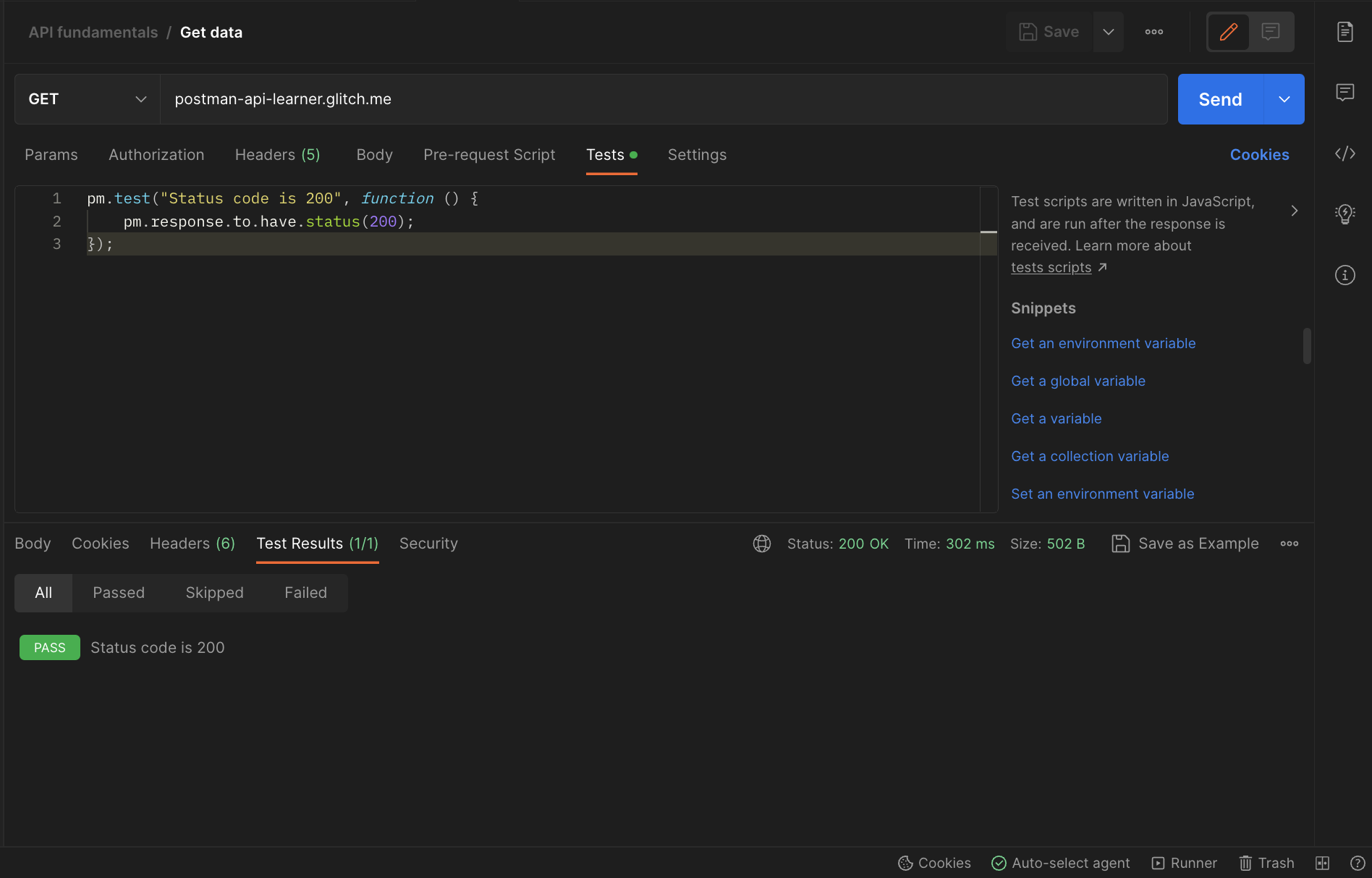
#### **Step 5: Add tests in the "Tests" tab**
Tests help you confirm that your API is working as expected. You can write test scripts in JavaScript and view the output in the "Test Results" tab.
## 💪 Pro tips
- Use folders to group related requests and organize the collection.
- Add more [scripts](https://learning.postman.com/docs/writing-scripts/intro-to-scripts/) in "Tests" to verify if the API works as expected and execute workflows.
## 💡Related templates
[API testing basics](https://go.postman.co/redirect/workspace?type=personal&collectionTemplateId=e9a37a28-055b-49cd-8c7e-97494a21eb54&sourceTemplateId=ddb19591-3097-41cf-82af-c84273e56719)
[API documentation](https://go.postman.co/redirect/workspace?type=personal&collectionTemplateId=e9c28f47-1253-44af-a2f3-20dce4da1f18&sourceTemplateId=ddb19591-3097-41cf-82af-c84273e56719)
[Authorization methods](https://go.postman.co/redirect/workspace?type=personal&collectionTemplateId=31a9a6ed-4cdf-4ced-984c-d12c9aec1c27&sourceTemplateId=ddb19591-3097-41cf-82af-c84273e56719)
# 📁 Collection: Auth
## End-point: sign up
### Method: POST
> ```
> {{baseUrl}}/auth/signup
> ```
### Response: 201
```json
{
"statusCode": 201,
"message": "user created",
"data": {
"id": 219,
"name": "Jon doe",
"email": "kodeyow624@amankro.com",
"createdAt": "2024-05-05T11:12:55.668Z",
"updatedAt": "2024-05-05T11:12:55.668Z"
}
}
```
⁃ ⁃ ⁃ ⁃ ⁃ ⁃ ⁃ ⁃ ⁃ ⁃ ⁃ ⁃ ⁃ ⁃ ⁃ ⁃ ⁃ ⁃ ⁃ ⁃ ⁃ ⁃ ⁃ ⁃ ⁃ ⁃ ⁃ ⁃ ⁃ ⁃ ⁃ ⁃ ⁃ ⁃ ⁃ ⁃ ⁃ ⁃ ⁃ ⁃ ⁃ ⁃ ⁃ ⁃ ⁃ ⁃ ⁃
## End-point: sign in
### Method: POST
> ```
> {{baseUrl}}/auth/signin
> ```
### Body (**raw**)
```json
{
"email": "kodeyow624@amankro.com",
"password": "notarealpassword10"
}
```
### Response: 201
```json
{
"statusCode": 201,
"message": "logged in",
"data": {
"id": 219,
"name": "Jon doe",
"email": "kodeyow624@amankro.com",
"password": "$2b$10$XJbIfv9dRdQCAnYzyVKeh.gjcJ1QOUlI0KFM/C824WBkiC95iA9VG",
"createdAt": "2024-05-05T11:12:55.668Z",
"updatedAt": "2024-05-05T11:12:55.668Z",
"token": "eyJhbGciOiJIUzI1NiIsInR5cCI6IkpXVCJ9.eyJpZCI6ImtvZGV5b3c2MjRAYW1hbmtyby5jb20iLCJpYXQiOjE3MTQ5MDc4OTksImV4cCI6MTcxNTMzOTg5OX0.dLET8CbnW37D7MG_yAXhtz6w_SAkhucRtCsLTPTIuOw"
}
}
```
⁃ ⁃ ⁃ ⁃ ⁃ ⁃ ⁃ ⁃ ⁃ ⁃ ⁃ ⁃ ⁃ ⁃ ⁃ ⁃ ⁃ ⁃ ⁃ ⁃ ⁃ ⁃ ⁃ ⁃ ⁃ ⁃ ⁃ ⁃ ⁃ ⁃ ⁃ ⁃ ⁃ ⁃ ⁃ ⁃ ⁃ ⁃ ⁃ ⁃ ⁃ ⁃ ⁃ ⁃ ⁃ ⁃ ⁃
## End-point: change password
### Method: POST
> ```
> {{baseUrl}}/auth/password/reset
> ```
⁃ ⁃ ⁃ ⁃ ⁃ ⁃ ⁃ ⁃ ⁃ ⁃ ⁃ ⁃ ⁃ ⁃ ⁃ ⁃ ⁃ ⁃ ⁃ ⁃ ⁃ ⁃ ⁃ ⁃ ⁃ ⁃ ⁃ ⁃ ⁃ ⁃ ⁃ ⁃ ⁃ ⁃ ⁃ ⁃ ⁃ ⁃ ⁃ ⁃ ⁃ ⁃ ⁃ ⁃ ⁃ ⁃ ⁃
# 📁 Collection: User
## End-point: Get authenticated user
Gets information about the authenticated user.
### Method: GET
> ```
> {{baseUrl}}/user
> ```
### Response: 200
```json
{
"statusCode": 200,
"message": "user fetched",
"data": {
"email": "kodeyow624@amankro.com",
"name": "Jon doe",
"createdAt": "2024-05-05T00:44:46.156Z",
"updatedAt": "2024-05-05T00:44:46.156Z",
"id": 217,
"totalNotes": 0
}
}
```
### Response: 429
```json
{
"error": "rateLimited",
"message": "Rate limit exceeded. Please retry after 1669048687"
}
```
### Response: 200
```json
{
"statusCode": 200,
"message": "user fetched",
"data": {
"email": "kodeyow624@amankro.com",
"name": "Jon doe",
"createdAt": "2024-05-05T00:44:46.156Z",
"updatedAt": "2024-05-05T00:44:46.156Z",
"id": 217,
"totalNotes": 0
}
}
```
⁃ ⁃ ⁃ ⁃ ⁃ ⁃ ⁃ ⁃ ⁃ ⁃ ⁃ ⁃ ⁃ ⁃ ⁃ ⁃ ⁃ ⁃ ⁃ ⁃ ⁃ ⁃ ⁃ ⁃ ⁃ ⁃ ⁃ ⁃ ⁃ ⁃ ⁃ ⁃ ⁃ ⁃ ⁃ ⁃ ⁃ ⁃ ⁃ ⁃ ⁃ ⁃ ⁃ ⁃ ⁃ ⁃ ⁃
## End-point: new note
### Method: POST
> ```
> {{baseUrl}}/notes
> ```
### Headers
| Content-Type | Value |
| ------------ | --------- |
| x-auth-token | {{token}} |
### Body (**raw**)
```json
{
"title": "Random",
"content": "Random stuff",
"priority": "MEDIUM",
"category": ["work", "play"]
}
```
### Response: 201
```json
{
"statusCode": 201,
"message": "note created",
"data": {
"id": 72,
"title": "random",
"content": "Random stuff",
"status": "INCOMPLETE",
"userId": 219,
"priority": "MEDIUM",
"createdAt": "2024-05-05T11:26:57.729Z",
"updatedAt": "2024-05-05T11:26:57.729Z"
}
}
```
⁃ ⁃ ⁃ ⁃ ⁃ ⁃ ⁃ ⁃ ⁃ ⁃ ⁃ ⁃ ⁃ ⁃ ⁃ ⁃ ⁃ ⁃ ⁃ ⁃ ⁃ ⁃ ⁃ ⁃ ⁃ ⁃ ⁃ ⁃ ⁃ ⁃ ⁃ ⁃ ⁃ ⁃ ⁃ ⁃ ⁃ ⁃ ⁃ ⁃ ⁃ ⁃ ⁃ ⁃ ⁃ ⁃ ⁃
## End-point: get notes
### Method: GET
> ```
> {{baseUrl}}/notes
> ```
### Headers
| Content-Type | Value |
| ------------ | --------- |
| x-auth-token | {{token}} |
### Response: 200
```json
{
"statusCode": 200,
"message": "notes fetched",
"data": [
{
"id": 72,
"title": "random",
"content": "Random stuff",
"status": "INCOMPLETE",
"userId": 219,
"priority": "MEDIUM",
"createdAt": "2024-05-05T11:26:57.729Z",
"updatedAt": "2024-05-05T11:26:57.729Z",
"categories": [
{
"name": "play",
"id": 124
},
{
"name": "work",
"id": 125
}
]
}
]
}
```
⁃ ⁃ ⁃ ⁃ ⁃ ⁃ ⁃ ⁃ ⁃ ⁃ ⁃ ⁃ ⁃ ⁃ ⁃ ⁃ ⁃ ⁃ ⁃ ⁃ ⁃ ⁃ ⁃ ⁃ ⁃ ⁃ ⁃ ⁃ ⁃ ⁃ ⁃ ⁃ ⁃ ⁃ ⁃ ⁃ ⁃ ⁃ ⁃ ⁃ ⁃ ⁃ ⁃ ⁃ ⁃ ⁃ ⁃
## End-point: update note
### Method: PATCH
> ```
> {{baseUrl}}/notes/:id
> ```
### Body (**raw**)
```json
{
"status": "COMPLETE"
}
```
### Response: 200
```json
{
"statusCode": 200,
"message": "note updated",
"data": {
"id": 72,
"title": "random",
"content": "Random stuff",
"status": "COMPLETE",
"userId": 219,
"priority": "MEDIUM",
"createdAt": "2024-05-05T11:26:57.729Z",
"updatedAt": "2024-05-05T11:35:46.971Z"
}
}
```
⁃ ⁃ ⁃ ⁃ ⁃ ⁃ ⁃ ⁃ ⁃ ⁃ ⁃ ⁃ ⁃ ⁃ ⁃ ⁃ ⁃ ⁃ ⁃ ⁃ ⁃ ⁃ ⁃ ⁃ ⁃ ⁃ ⁃ ⁃ ⁃ ⁃ ⁃ ⁃ ⁃ ⁃ ⁃ ⁃ ⁃ ⁃ ⁃ ⁃ ⁃ ⁃ ⁃ ⁃ ⁃ ⁃ ⁃
## End-point: update user
### Method: PATCH
> ```
> {{baseUrl}}/user
> ```
### Body (**raw**)
```json
{
"name": "John doe"
}
```
### Response: 200
```json
{
"statusCode": 200,
"message": "user updated",
"data": {
"id": 219,
"name": "John doe",
"email": "kodeyow624@amankro.com",
"password": "$2b$10$XJbIfv9dRdQCAnYzyVKeh.gjcJ1QOUlI0KFM/C824WBkiC95iA9VG",
"createdAt": "2024-05-05T11:12:55.668Z",
"updatedAt": "2024-05-05T11:36:24.367Z"
}
}
```
⁃ ⁃ ⁃ ⁃ ⁃ ⁃ ⁃ ⁃ ⁃ ⁃ ⁃ ⁃ ⁃ ⁃ ⁃ ⁃ ⁃ ⁃ ⁃ ⁃ ⁃ ⁃ ⁃ ⁃ ⁃ ⁃ ⁃ ⁃ ⁃ ⁃ ⁃ ⁃ ⁃ ⁃ ⁃ ⁃ ⁃ ⁃ ⁃ ⁃ ⁃ ⁃ ⁃ ⁃ ⁃ ⁃ ⁃
## End-point: delete note
### Method: DELETE
> ```
> {{baseUrl}}/notes/:id
> ```
### Response: 200
```json
{
"statusCode": 200,
"message": "note deleted",
"data": {
"id": 72,
"title": "random",
"content": "Random stuff",
"status": "COMPLETE",
"userId": 219,
"priority": "MEDIUM",
"createdAt": "2024-05-05T11:26:57.729Z",
"updatedAt": "2024-05-05T11:35:46.971Z"
}
}
```
⁃ ⁃ ⁃ ⁃ ⁃ ⁃ ⁃ ⁃ ⁃ ⁃ ⁃ ⁃ ⁃ ⁃ ⁃ ⁃ ⁃ ⁃ ⁃ ⁃ ⁃ ⁃ ⁃ ⁃ ⁃ ⁃ ⁃ ⁃ ⁃ ⁃ ⁃ ⁃ ⁃ ⁃ ⁃ ⁃ ⁃ ⁃ ⁃ ⁃ ⁃ ⁃ ⁃ ⁃ ⁃ ⁃ ⁃
## End-point: delete authenticated user
### Method: DELETE
> ```
> {{baseUrl}}/user
> ```
### Response: 200
```json
{
"statusCode": 200,
"message": "user deleted",
"data": true
}
```
⁃ ⁃ ⁃ ⁃ ⁃ ⁃ ⁃ ⁃ ⁃ ⁃ ⁃ ⁃ ⁃ ⁃ ⁃ ⁃ ⁃ ⁃ ⁃ ⁃ ⁃ ⁃ ⁃ ⁃ ⁃ ⁃ ⁃ ⁃ ⁃ ⁃ ⁃ ⁃ ⁃ ⁃ ⁃ ⁃ ⁃ ⁃ ⁃ ⁃ ⁃ ⁃ ⁃ ⁃ ⁃ ⁃ ⁃
## End-point: get note
### Method: GET
> ```
> {{baseUrl}}/notes/:id
> ```
### Headers
| Content-Type | Value |
| ------------ | --------- |
| x-auth-token | {{token}} |
### Response: 200
```json
{
"statusCode": 200,
"message": "note fetched",
"data": {
"id": 72,
"title": "random",
"content": "Random stuff",
"status": "INCOMPLETE",
"userId": 219,
"priority": "MEDIUM",
"createdAt": "2024-05-05T11:26:57.729Z",
"updatedAt": "2024-05-05T11:26:57.729Z"
}
}
```
# Docker
This guide explains how to pull and run the **Memoer** application using Docker. Memoer is a Node.js application that can be easily deployed using Docker.
## Prerequisites
Before you start, ensure you have the following installed:
- [Docker](https://www.docker.com/products/docker-desktop) (Make sure Docker is running)
## Steps to Pull Memoer
First, pull the latest Docker image for Memoer from Docker Hub using the following command:
> ```
> docker docker pull jefedcreator/memoer
> ```
To run the server:
> ```
> docker run -d -p 3000:3000 jefedcreator/memoer
> ```
After running the container, the Memoer application will be accessible at: http://localhost:3000
# Testing
To test the authentication service, use the following command:
> ```
> yarn test:auth
> ```
To test the user service, use the following command:
> ```
> yarn test:user
> ```