https://github.com/jenreh/appkit
Reflex.dev components based on mantine.dev and and basic application with nav and chat widget
https://github.com/jenreh/appkit
components mantine python reflex
Last synced: 4 months ago
JSON representation
Reflex.dev components based on mantine.dev and and basic application with nav and chat widget
- Host: GitHub
- URL: https://github.com/jenreh/appkit
- Owner: jenreh
- License: mit
- Created: 2025-10-04T22:39:44.000Z (9 months ago)
- Default Branch: main
- Last Pushed: 2026-03-05T18:24:41.000Z (4 months ago)
- Last Synced: 2026-03-05T20:29:49.355Z (4 months ago)
- Topics: components, mantine, python, reflex
- Language: Python
- Homepage:
- Size: 7.87 MB
- Stars: 2
- Watchers: 0
- Forks: 1
- Open Issues: 2
-
Metadata Files:
- Readme: README.md
- License: LICENSE.md
- Agents: AGENTS.md
Awesome Lists containing this project
README
# AppKit
[](https://www.python.org/downloads/)
[](https://opensource.org/licenses/MIT)
[](https://github.com/jenreh/appkit)
**A comprehensive, production-ready Reflex web application framework with AI-powered features, enterprise user management, and Mantine UI components.**
Appkit is a full-featured web application framework built on [Reflex](https://reflex.dev) that combines modular, reusable components with production-grade infrastructure. It serves as both a functional application and a showcase for building robust Python web applications with AI integrations, multi-tenant support, and professional UI patterns.
---
## 🎯 Core Components
Appkit is structured as a workspace of specialized modules, each solving specific problems:
### UI Components
**[appkit-mantine](./components/appkit-mantine)** - Comprehensive Mantine UI wrapper for Reflex
- 50+ production-ready Mantine input components with full type safety
- Text inputs, date pickers, number inputs, masked inputs, rich editors, and more
- Inheritance-based architecture eliminates 40+ common properties duplication
- Complete examples and integration patterns
### Application Features
**[appkit-assistant](./components/appkit-assistant)** - AI assistant with MCP server integration
- OpenAI-powered conversational interface
- Multi-model support (OpenAI, Perplexity, etc.)
- Model Context Protocol (MCP) server management
- Secure server credential handling with encryption
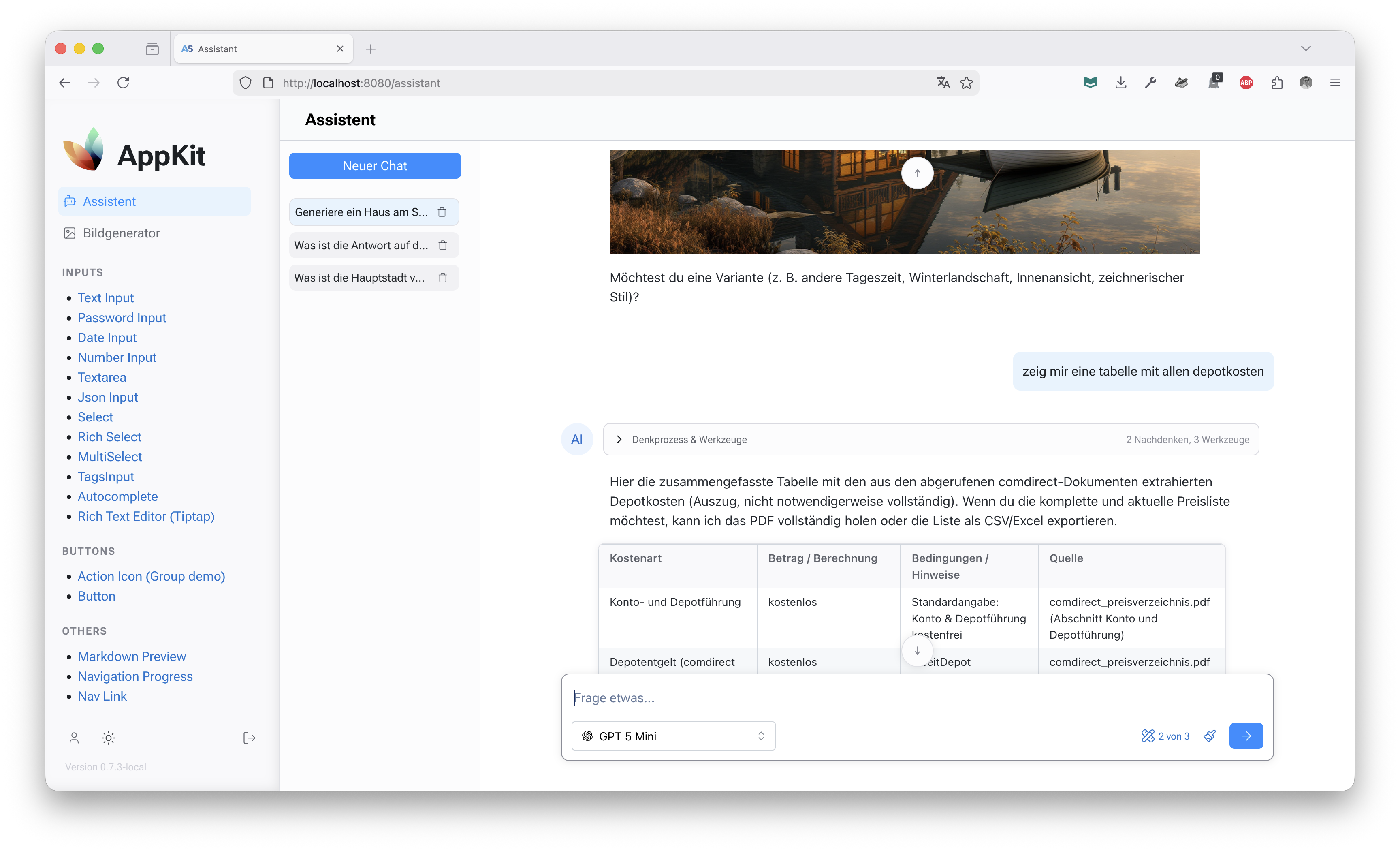
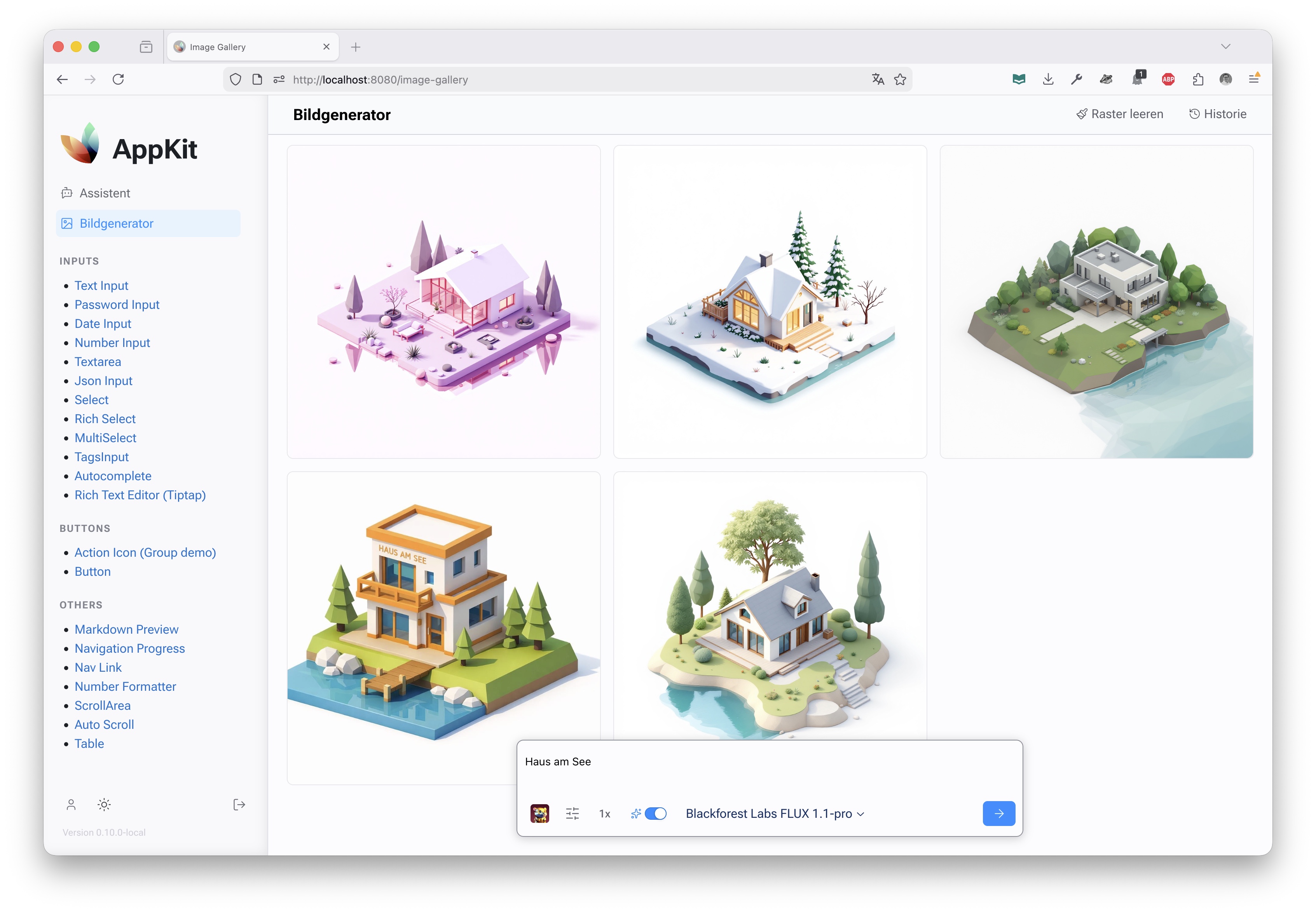
**[appkit-imagecreator](./components/appkit-imagecreator)** - Multi-AI image generation
- Google Gemini and OpenAI integration
- Unified API for image generation workflows
- Production-ready error handling and streaming
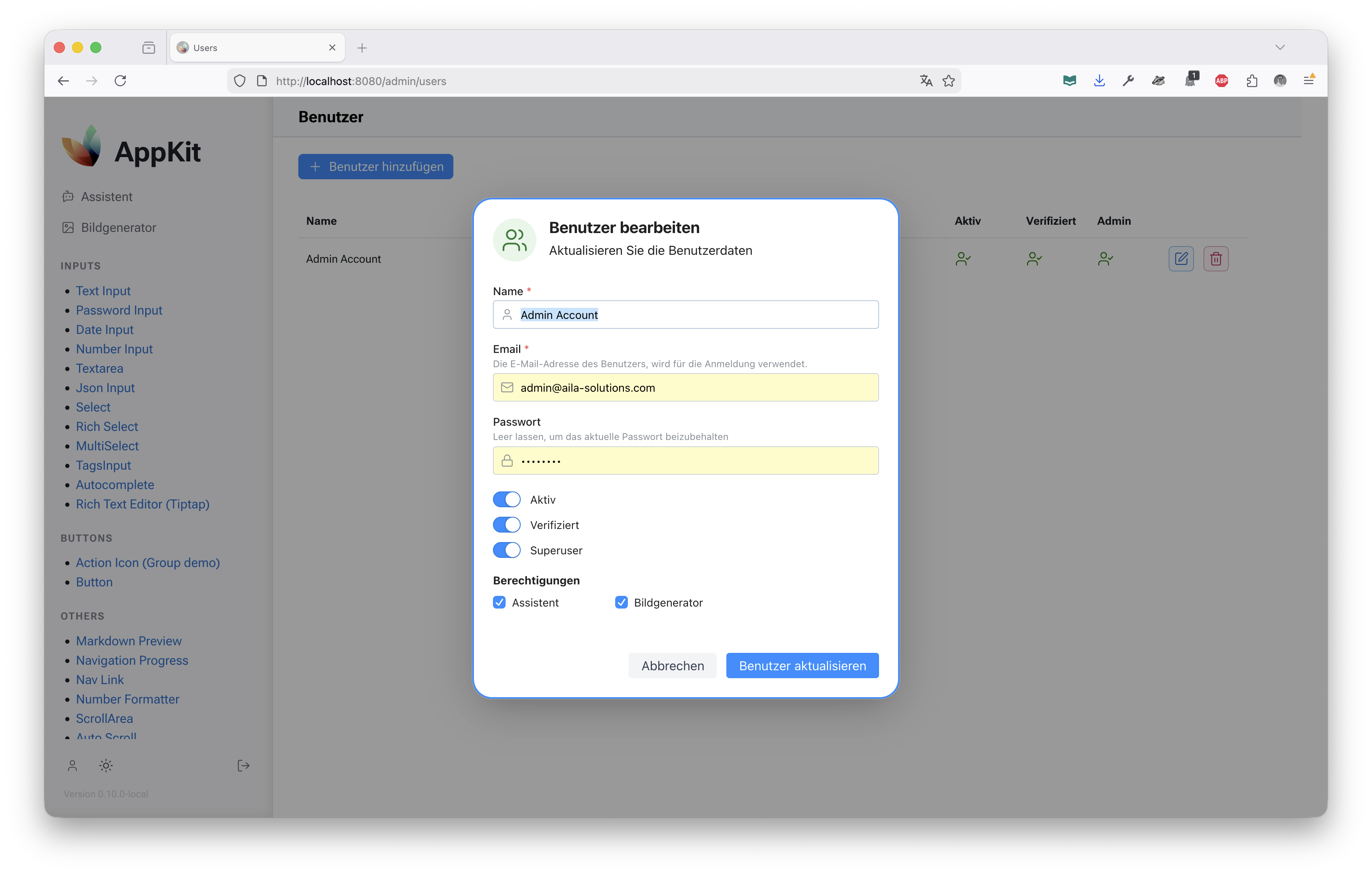
**[appkit-user](./components/appkit-user)** - Enterprise user management
- OAuth2 authentication (GitHub, Azure, custom providers)
- Role-based access control (RBAC)
- Multi-tenant user profiles and project organization
- Session management and security
### Shared Infrastructure
**[appkit-commons](./components/appkit-commons)** - Shared utilities and data models
- Database models and ORM integration
- Common configuration and settings
- Logging and error handling utilities
**[appkit-ui](./components/appkit-ui)** - Layout and styling components
- Responsive page templates
- Navigation components
- Common UI patterns and utilities
---
## ✨ Key Features
- **AI-First Architecture** - Built-in support for OpenAI, Google Gemini, and MCP server integrations
- **Enterprise Ready** - Multi-tenant support, RBAC, OAuth2 authentication, and secure credential management
- **Type-Safe UI** - Full type annotations across 50+ Mantine components with IDE autocomplete
- **Modular Design** - Workspace-based architecture allows independent component use
- **Production Infrastructure** - Database migrations, logging, configuration management, and Docker support
- **Clean Architecture** - Inheritance-based component design and clear separation of concerns
- **Modern Stack** - Python 3.13+, Reflex 0.8.24+, React 18, SQLAlchemy 2.0, Pydantic, Alembic
---
## 🚀 Quick Start
### Prerequisites
- Python 3.13 or higher
- PostgreSQL (for development)
### Installation
Clone and install the development environment:
```bash
git clone https://github.com/jenreh/appkit.git
cd appkit
# Install dependencies with uv (includes all workspace components)
uv sync
# Run migrations
uv run alembic upgrade head
# Start the development server
uv run reflex run
```
Access the application at `http://localhost:3000`
### Using Individual Components
To use appkit-mantine in your own Reflex project:
```bash
# Using uv
uv add appkit-mantine
# Using pip
pip install appkit-mantine
```
```python
import reflex as rx
import appkit_mantine as mn
class DemoState(rx.State):
value: str = ""
def index() -> rx.Component:
return rx.container(
mn.input(
placeholder="Type something...",
value=DemoState.value,
on_change=DemoState.set_value,
),
)
app = rx.App()
app.add_page(index)
```
---
## 🏗️ Project Structure
```text
appkit/
├── app/ # Main Reflex application
│ ├── pages/ # Application pages
│ │ ├── examples/ # Component showcase examples
│ │ ├── assistant/ # AI assistant interface
│ │ ├── image_creator.py # Image generation UI
│ │ └── users.py # User management
│ └── components/ # Shared UI components
├── components/ # Workspace modules
│ ├── appkit-mantine/ # Mantine UI wrapper components
│ ├── appkit-assistant/ # AI assistant integration
│ ├── appkit-imagecreator/ # Image generation
│ ├── appkit-user/ # User authentication & management
│ ├── appkit-ui/ # Layout & UI utilities
│ └── appkit-commons/ # Shared utilities & models
├── alembic/ # Database migrations
├── configuration/ # Configuration files
└── assets/ # CSS, JavaScript, and static assets
```
---
## 📚 Development
### Common Commands
```bash
# Install dependencies
make install
# Run the development server
make reflex
# Run with debug logging
make reflex-debug
# Run tests
make test
# Format and lint code
make format
make lint
# Database operations
make db-migrate # Run migrations
make db-migrate-history # Show migration history
make db-migrate-down # Downgrade one revision
```
### Database Setup
Appkit uses SQLAlchemy 2.0 with Alembic for migrations:
```bash
# Run all pending migrations
uv run alembic upgrade head
# Create new migration
uv run alembic revision --autogenerate -m "Description of changes"
# View current migration status
uv run alembic current
```
### Configuration
Environment-specific configurations are in `configuration/`:
- `config.yaml` - Default configuration
- `config.local.yaml` - Local development overrides
- `config.docker_test.yaml` - Docker test environment
- `logging.yaml` - Logging configuration
Set `APP_ENV` to load specific configs:
```bash
export APP_ENV=local
reflex run
```
---
## 🐳 Docker Support
Build and run the application in Docker:
```bash
# Build the container
docker build -t appkit .
# Run with compose
docker-compose up
# The application will be available at http://localhost
```
The Docker setup includes:
- Multi-stage build for optimized images
- Caddy reverse proxy for static file serving
- Automatic database migrations on startup
- Production-optimized Reflex export
---
## 🔐 Security Considerations
- Credentials are managed through environment variables and never committed to source control
- Sensitive MCP server headers are encrypted in the database
- OAuth2 tokens use secure session management
- Database connections use SSL/TLS in production
- PKCE is enforced for OAuth2 flows
> **Tip:** Review security considerations when deploying to production. Use a secrets management service like Azure Key Vault or AWS Secrets Manager.
---
## 📖 Documentation
- **[Mantine Components](./components/appkit-mantine/docs)** - API reference and examples for all UI components
- **[Configuration](./configuration)** - Environment and application settings
- **[Database Migrations](./alembic/versions)** - Schema evolution history
---
## 🤝 Architecture Highlights
### Inheritance-Based Component Design
All Mantine input components inherit from `MantineInputComponentBase`, providing 40+ common properties without duplication:
```python
# Only define component-specific props
class NumberInput(MantineInputComponentBase):
tag = "NumberInput"
min: Var[int | float] = None
max: Var[int | float] = None
decimal_scale: Var[int] = None
# label, placeholder, required, etc. inherited automatically
```
### MCP Server Integration
Appkit includes enterprise-grade Model Context Protocol support with secure credential management:
```python
# Manage MCP servers with automatic encryption/decryption
mcp_server = MCPServer(
name="my-server",
url="sse://localhost:3000",
auth_type="headers",
auth_config={...} # Automatically encrypted
)
```
### Multi-Tenant User Management
Built-in support for organizations, projects, and role-based access:
```python
# OAuth2 login with automatic profile creation
user = await authenticate_oauth(provider="github", code=code)
# Profile automatically includes role and organization context
```
---
## 📋 Pre-Release Status
This project is in active development (v0.13.1). While core functionality is stable and used in production, the API may evolve. Check the [GitHub releases](https://github.com/jenreh/appkit/releases) for version-specific changes.
> **Note:** Component APIs in appkit-mantine are stable. Higher-level application features may change between releases.
---
## 🙏 Acknowledgments
- **[Reflex](https://reflex.dev)** - The full-stack Python framework
- **[Mantine](https://mantine.dev)** - Beautiful React component library
- **[FastAPI](https://fastapi.tiangolo.com)** - Modern Python web API framework
- **OpenAI and Google** - AI model providers
- **PostgreSQL** - Reliable database backend