https://github.com/jeremehancock/posteria
A Media Poster Managment App
https://github.com/jeremehancock/posteria
metadata movie plex plex-media-server plexmediaserver tv
Last synced: about 1 year ago
JSON representation
A Media Poster Managment App
- Host: GitHub
- URL: https://github.com/jeremehancock/posteria
- Owner: jeremehancock
- License: mit
- Created: 2025-02-22T00:50:52.000Z (over 1 year ago)
- Default Branch: main
- Last Pushed: 2025-04-02T22:30:13.000Z (about 1 year ago)
- Last Synced: 2025-04-02T23:27:02.394Z (about 1 year ago)
- Topics: metadata, movie, plex, plex-media-server, plexmediaserver, tv
- Language: PHP
- Homepage: https://posteria.app
- Size: 104 MB
- Stars: 104
- Watchers: 1
- Forks: 2
- Open Issues: 0
-
Metadata Files:
- Readme: README.md
- Changelog: changelog.md
- License: LICENSE
Awesome Lists containing this project
README
 Posteria
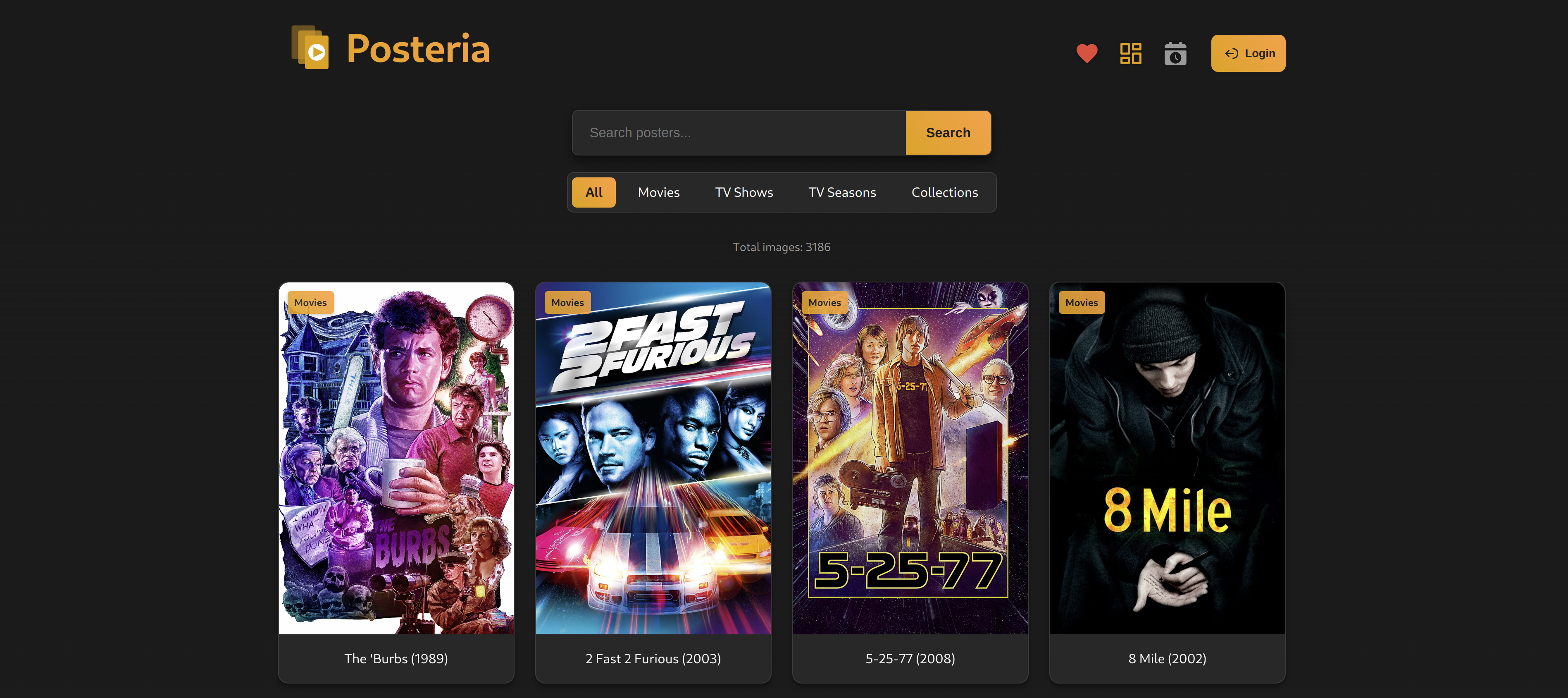
Posteria is a web-based media poster management system that allows you to organize and store custom posters for your movies, TV shows, seasons, and collections. It provides an elegant interface for uploading, importing, managing, and accessing your media artwork.
## Features
Here's the updated version with the PWA line added:
- 🖥️ Clean, modern interface for managing media posters
- 📁 Organized categories for Movies, TV Shows, TV Seasons, and Collections
- 🔍 Fast, fuzzy search functionality
- 📱 Mobile-responsive design
- 📲 Installable as a PWA (Progressive Web App)
- 🔒 Simple authentication system
- ⚡ Easy poster upload from local files or URLs
- 🎬 Grab posters directly from [TMDB](https://www.themoviedb.org/), [TVDB](https://www.thetvdb.com/) & [Fanart.tv](https://fanart.tv)
- 📥 Import posters from Plex
- 🔄 Sync posters to Plex
- 🤖 Schedule Auto Imports
- 🧹 Orphan Poster detection
- 🎨 Support for JPG, JPEG, PNG, and WebP formats
- 🖼️ Includes built-in Poster Wall for showing off your posters
- 🛒 Available in the [Unraid Community App Store](https://unraid.net/community/apps?q=posteria#r)
- Thanks to [@ctrlaltd1337ed](https://github.com/ctrlaltd1337ed/unraid-templates) for putting this together.
## Support this project
[](https://www.buymeacoffee.com/jeremehancock)
## Screenshots
#### Main Screen
#### Poster Wall

## Installation
1. Create a `docker-compose.yml` file with the following content:
```yaml
services:
posteria:
image: bozodev/posteria:latest
container_name: posteria
ports:
- "1818:80"
environment:
- SITE_TITLE=Posteria
- AUTH_USERNAME=admin # Change this!
- AUTH_PASSWORD=changeme # Change this!
- SESSION_DURATION=3600 # In seconds
- IMAGES_PER_PAGE=24
- MAX_FILE_SIZE=5242880 # In bytes
- PLEX_SERVER_URL=
- PLEX_TOKEN=
- PLEX_REMOVE_OVERLAY_LABEL=false # Set to true for Kometa compatibility
- IGNORE_ARTICLES_IN_SORT=true # Set to false to sort with articles (A, An, The) included
- SORT_BY_DATE_ADDED=false # Set to true to sort by Recently Added date in Plex instead of Alphabetically
- AUTO_IMPORT_ENABLED=false # Enable/disable auto-import
- AUTO_IMPORT_SCHEDULE=1h # Schedule 24h, 12h, 6h, 3h, 1h
- AUTO_IMPORT_MOVIES=false # Import Movie posters
- AUTO_IMPORT_SHOWS=false # Import TV Show posters
- AUTO_IMPORT_SEASONS=false # Import TV season posters
- AUTO_IMPORT_COLLECTIONS=false # Import Collection posters
volumes:
- ./posters/movies:/var/www/html/posters/movies
- ./posters/tv-shows:/var/www/html/posters/tv-shows
- ./posters/tv-seasons:/var/www/html/posters/tv-seasons
- ./posters/collections:/var/www/html/posters/collections
- ./data:/var/www/html/data # Logs are found here
restart: unless-stopped
```
2. Start the container:
```bash
docker-compose up -d
```
## Configuration
### Environment Variables
| Variable | Description | Default |
| ------------------------- | ------------------------------------ | ----------------------------------------------------------------------------------------------------- |
| SITE_TITLE | Website title | Posteria |
| AUTH_USERNAME | Admin username | admin |
| AUTH_PASSWORD | Admin password | changeme |
| SESSION_DURATION | Login session duration in seconds | 3600 (1 Hour) |
| IMAGES_PER_PAGE | Number of posters displayed per page | 24 |
| MAX_FILE_SIZE | Maximum upload file size in bytes | 5242880 (5MB) |
| PLEX_SERVER_URL | URL for your Plex Server | ex: http://your-server:32400 |
| PLEX_TOKEN | Plex Server Token | [More info](https://support.plex.tv/articles/204059436-finding-an-authentication-token-x-plex-token/) |
| PLEX_REMOVE_OVERLAY_LABEL | Remove Overlay Label | false [More info](#note) |
| IGNORE_ARTICLES_IN_SORT | Ignore articles in sort | true |
| SORT_BY_DATE_ADDED | Sort by Recently Added | false |
| AUTO_IMPORT_ENABLED | Enable/disable auto-import | true |
| AUTO_IMPORT_SCHEDULE | Schedule 24h, 12h, 6h, 3h, 1h | 1h |
| AUTO_IMPORT_MOVIES | Import Movie posters | true |
| AUTO_IMPORT_SHOWS | Import TV Shows posters | true |
| AUTO_IMPORT_SEASONS | Import TV Seasons posters | true |
| AUTO_IMPORT_COLLECTIONS | Import Collection posters | true |
#### Note:
`PLEX_REMOVE_OVERLAY_LABEL`
Controls whether Posteria will remove the "Overlay" label in Plex when the poster is updated. The "Overlay" label is used by Kometa for re-applying overlays on updated posters. Set to true if you use [Kometa](https://kometa.wiki/en/latest/).
[More info](https://kometa.wiki/en/latest/files/overlays/#overlay-understandings)
### Volume Mounts
The Docker container uses the following volume mounts:
- `./posters/movies`: Movie posters
- `./posters/tv-shows`: TV show posters
- `./posters/tv-seasons`: TV season posters
- `./posters/collections`: Collection posters
## Usage
1. Access the web interface at `http://your-server:1818`
2. Log in using your configured credentials
3. Import posters form Plex
4. Change posters:
- Support for local file upload
- Support for direct URL upload
- Grab posters from TMDB & Fanart.tv
5. Posters are automatically updated on Plex
6. As you add more media to Plex just re-import to add new posters
7. Orphaned poster detection
## Frequently Asked Questions
#### How does Posteria interact with Plex?
Posteria can import posters directly from your Plex Media Server and sync customized posters back to it. To enable this functionality, you need to provide your Plex server URL and authentication token in the configuration. This allows Posteria to securely communicate with your server while maintaining all your customizations.
#### How do I find my Plex auth token?
You can find your Plex authentication token (X-Plex-Token) by following these steps:
1. Log in to your Plex Web App
2. Browse to any media item
3. Click the 3 dots menu and select "Get Info"
4. In the info dialog, click "View XML"
5. In the URL of the new tab, find the "X-Plex-Token=" parameter
For more detailed instructions, visit the [Plex Support article](https://support.plex.tv/articles/204059436-finding-an-authentication-token-x-plex-token/).
#### Can I use Posteria as a backup for my Plex posters?
No, Posteria should not be considered a backup of your Plex posters. Posteria treats Plex as the "source of truth," which means any changes made in Plex will automatically sync to Posteria during the next import (whether scheduled or manual). This synchronization will override any poster selections in Posteria that differ from what's currently in Plex. We strongly recommend keeping separate backups of both your Plex metadata and your Posteria poster directories to ensure you can restore your preferred poster selections if needed.
#### What is "Orphan Detection"?
Orphan Detection is a feature that helps you identify posters in Posteria that aren't linked to any media in your Plex library. This can happen when you remove content from your library but the posters remain in Posteria. Posteria can detect these orphaned posters so you can decide whether to keep them for future use or remove them to save space.
#### How secure is Posteria?
Posteria includes basic authentication to protect your poster collection. You can set your username and password in the docker-compose.yml file. We recommend changing the default credentials and using a strong password. All communication with your Plex server is done securely using your Plex authentication token.
If you want to make Posteria accesible outside your network it is recommended you use a service such as **[Tailscale](https://www.tailscale.com)™** or another VPN solution.
#### How do I update Posteria?
To update Posteria to the latest version, follow these steps:
1. Navigate to your Posteria directory
2. Run `docker-compose pull` to download the latest image
3. Run `docker-compose up -d` to restart with the new version
Your poster collection and settings will be preserved during updates as they're stored in the mounted volumes.
#### Where can I find posters for my media?
There are several excellent resources where you can find high-quality posters for your media library:
- **[The Poster Database](https://theposterdb.com/)** - A community-driven collection of custom posters with various styles and themes
- **[The Movie Database (TMDB)](https://www.themoviedb.org/)** - Extensive library of official and fan-made artwork, now fully integrated with Posteria for automatic poster fetching
- **[The TV Database (TVDB)](https://www.thetvdb.com/)** - Comprehensive database for TV show posters and fanart, now fully integrated with Posteria for automatic poster fetching
- **[Fanart.tv](https://www.fanart.tv/)** - High-quality artwork for movies, TV shows, and collections, now fully integrated with Posteria for automatic poster fetching
- **[Mediux](https://mediux.pro/)** - Collection of professionally designed media artwork
Posteria supports using URLS from Mediux YAML files in the URL uploader when changing posters, making it a convenient choice for managing your collection.
#### Is Posteria available on Unraid?
Yes!
Posteria is available in the **[Unraid](https://www.unraid.net)™** Community Apps store.
[More info](https://unraid.net/community/apps?q=posteria#r)
#### Is Posteria mobile-friendly?
Yes! Posteria is designed as a responsive Progressive Web App (PWA), which means it works beautifully on all devices from desktops to smartphones. You can even install it on your mobile device's home screen for quick access, just like a native app.
## Security Considerations
1. Change the default username and password
2. Use HTTPS if exposing to the internet
3. Regularly backup your poster directories
## Breaking Change Notice
[More info](https://github.com/jeremehancock/Posteria/discussions/28)
## License
[MIT License](LICENSE)
## AI Assistance Disclosure
This tool was developed with assistance from AI language models.