https://github.com/jerolba/jfleet
JFleet persist to database large collections of Java POJOs using alternate persistence methods from JDBC
https://github.com/jerolba/jfleet
batching load-data mysql performance postgresql
Last synced: 5 months ago
JSON representation
JFleet persist to database large collections of Java POJOs using alternate persistence methods from JDBC
- Host: GitHub
- URL: https://github.com/jerolba/jfleet
- Owner: jerolba
- License: apache-2.0
- Created: 2017-08-25T16:28:44.000Z (almost 9 years ago)
- Default Branch: master
- Last Pushed: 2024-06-08T16:32:22.000Z (about 2 years ago)
- Last Synced: 2024-06-08T17:52:52.061Z (about 2 years ago)
- Topics: batching, load-data, mysql, performance, postgresql
- Language: Java
- Homepage:
- Size: 1.26 MB
- Stars: 44
- Watchers: 8
- Forks: 4
- Open Issues: 0
-
Metadata Files:
- Readme: README.md
- Contributing: CONTRIBUTING.md
- License: LICENSE.txt
- Code of conduct: CODE_OF_CONDUCT.md
Awesome Lists containing this project
README
[](https://maven-badges.herokuapp.com/maven-central/org.jfleet/jfleet)
[](https://github.com/jerolba/jfleet/actions)
[](https://codecov.io/gh/jerolba/jfleet)
[](http://www.apache.org/licenses/LICENSE-2.0.html)
# JFleet
JFleet is a Java library which persist in database large collections of Java POJOs as fast as possible, using the best available technique in each database provider, achieving it with alternate persistence methods from each JDBC driver implementation.
Its goal is to store a large amount of information in a **single table** using available batch persistence techniques.
despite being able to use JPA annotations to map Java objects to tables and columns, **JFleet is not an ORM**.
## Table of Contents
- [Supported databases](#supported-databases)
- [Benchmark](#benchmark)
- [Usage](#usage)
- [Dependency](#dependency)
- [Supported database versions](#supported-database-versions)
- [Running the tests](#running-the-tests)
- [Contribute](#contribute)
- [License](#license)
## Supported databases
Each database provides some technique to insert a bulk of information bypassing standard JDBC commands, but accessible from Java:
- **MySQL** : Using the [LOAD DATA](https://dev.mysql.com/doc/refman/5.7/en/load-data.html) statement.
- **PostgreSQL**: Using the [COPY](https://www.postgresql.org/docs/9.6/static/sql-copy.html) command.
In both cases, and in unsupported databases, you can use the default implementation based on the standard [JDBC executeBatch](https://docs.oracle.com/javase/8/docs/api/java/sql/Statement.html#executeBatch--) statement.
## Benchmark
**JFleet performance is comparable to using the native database import tool, and is between 2.1X and 3.8X faster than using the JDBC driver directly.**
[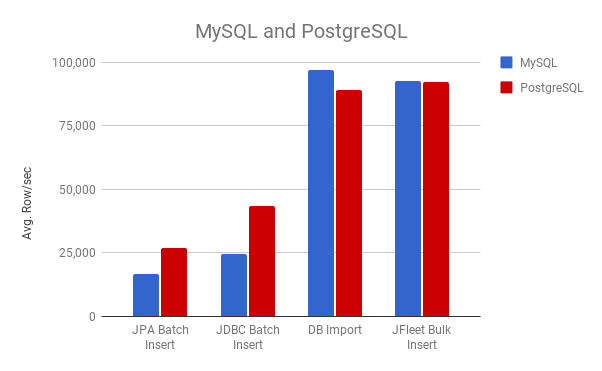](https://docs.google.com/spreadsheets/d/e/2PACX-1vTx61C0YNYlczo0S-ZTN56FH2mxvHPHf4jamTnY4wdMwjjF3TvxcW3Ti7VR83dd1R5EznB7xVhD1HD6/pubchart?oid=485493047&format=interactive)
You can find all the benchmarks numbers and results [here](https://github.com/jerolba/jfleet-benchmark#jfleet-benchmark)
## Usage
JFleet needs to know how to map your Java objects or entities to a table. JFleet provides two mechanisms to map your objects to a table:
- Using standard [JPA annotations](https://docs.oracle.com/javaee/6/api/javax/persistence/package-summary.html) like [@Entity](https://docs.oracle.com/javaee/6/api/javax/persistence/Entity.html), [@Column](https://docs.oracle.com/javaee/6/api/javax/persistence/Column.html) or [@ManyToOne](https://docs.oracle.com/javaee/6/api/javax/persistence/ManyToOne.html).
- Mapping manually each column to one object field or with a `Function`
### Using standard JPA annotations
Using the usual JPA annotations, JFleet extract their information and creates a map between fields and columns:
```java
import javax.persistence.*;
@Entity
@Table(name = "customer_contact")
public class Customer {
private Long id;
private String telephone;
@Column(name="customer_name")
private String name;
@ManyToOne
@JoinColumn(name = "city_id")
private City city;
@Temporal(TemporalType.DATE)
private Date birthDate;
//Getters and setters
}
@Entity
@Table(name = "city")
public class City {
@Id
private Integer id;
private String name;
//Getters and setters
}
```
Like JPA, JFleet follows the convention of using the field name if no `@Column` name is provided, or the class name if no `@Table` name is provided.
Given a collection of objects Customer to persist in MySQL with the Load Data technique, you only need to provide a JDBC Connection:
```java
try (Connection connection = dataSource.getConnection()){
Collection customers = buildLargeAmountOfCustomers();
BulkInsert bulkInsert = new LoadDataBulkInsert<>(Customer.class);
bulkInsert.insertAll(connection, customers);
}
```
If you are using PostgreSQL the `BulkInsert` implementation is `PgCopyBulkInsert`.
JFleet prefers Streams to Collections because it does not force you to instantiate all objects in memory, and allows you to create them lazily in some stream process:
```java
try (Connection connection = dataSource.getConnection()){
Stream customers = createLongStreamOfCustomers();
BulkInsert bulkInsert = new PgCopyBulkInsert<>(Customer.class);
bulkInsert.insertAll(connection, customers);
}
```
More information about supported annotations and limitations can be found in the project [wiki page](https://github.com/jerolba/jfleet/wiki/Supported-JPA-annotations)
### Maping manually each column
If you have any problem using JPA annotations in your domain objects or directly you don't want to add `javax.persistence` dependency to your project, you can configure it manually mapping each column to a field path. If a field has a reference to other object, separate each field name in the path with `.`.
This mechanism is much more powerfull than JPA, and allows you also to map values that are not present in the object or transform it.
Given a similar domain object, we need to persist the customer age. The object only have the country name, but not a needed country code:
```java
public class Customer {
private Long id;
private String telephone;
private String name;
private City city;
private String countryName;
private Date birthDate;
//Getters and setters
}
```
You configure JFleet with the mapping info:
```java
Date today = new Date();
EntityInfo customerMap = new EntityInfoBuilder(Customer.class, "customer_contact")
.addField("id", "id")
.addField("telephone")
.addField("name", "customer_name")
.addField("city_id", "city.id")
.addColumn("country_id", INT, customer -> mapCountryName2CountryId.get(customer.getCountryName()))
.addColumn("age", INT, custormer -> calculateDifferenceYears(customer.getBirthDate(), today));
.build();
```
And instead of instantiate the BulkInsert with the annotated class, use the created EntityInfo:
```java
try (Connection connection = dataSource.getConnection()){
Collection customers = buildLargeAmountOfCustomers();
BulkInsert bulkInsert = new LoadDataBulkInsert<>(customerMap);
bulkInsert.insertAll(connection, customers);
}
```
You can find more examples on how to map objects in the [example project](https://github.com/jerolba/jfleet/tree/master/jfleet-samples/src/main/java/org/jfleet/samples).
In both cases, transactionality, batch size or error management in MySQL can be configured in the same way. You can find more information in the project [wiki page](https://github.com/jerolba/jfleet/wiki/BulkInsert-configuration).
## Dependency
JFleet is uploaded to Maven Central Repository and to use it, you need to add the following Maven dependency:
```xml
org.jfleet
jfleet
0.6.9
```
```
implementation 'org.jfleet:jfleet:0.6.9'
```
You can always find the latest published version in the [MvnRepository searcher](https://mvnrepository.com/artifact/org.jfleet/jfleet).
By default JFleet uses basic `javax.persistence` annotations. If you use it, and you don't have any JPA implementation as a dependency in your project, you must add the Javax Persistence API dependency:
```xml
javax.persistence
persistence-api
1.0.2
```
Apart from `persistence-api` and [SLF4J](https://www.slf4j.org/) for logging, JFleet does not have any dependency.
JFleet has not been tested against all JDBC driver versions, but it is expected that any modern version will work properly.
## Supported database versions
JFleet is configured to execute continuous integration tests against with [GihubActions](https://github.com/jerolba/jfleet/actions/workflows/ci.yml), using the latest stable release of **MySQL 5.7** and **MySQL 8.0**, and the latest stable release of **PostgreSQL 12.5** and **PostgreSQL 13.1**.
**JFleet is currently running in production against AWS Aurora MySQL and Aurora PostgreSQL**, and has been tested for [benchmarks](https://github.com/jerolba/jfleet-benchmark#jfleet-benchmark) with the Google Cloud managed versions of MySQL and Postgres.
Any database engine with a standard JDBC driver should be used with the `JdbcBulkInsert` implementation.
## Running the tests
The tests utilize [TestContainers](https://testcontainers.com/) to create lightweight, temporary instances of common databases.
TestContainers automatically handles downloading the required database images and managing their lifecycle.
During test execution, two databases—MySQL and PostgreSQL—are instantiated and will automatically shut down once the tests complete.
For details on how these containers are configured, refer to the `DatabaseContainers` class in the `jfleet-core` module.
To run the tests locally, ensure that Docker or a compatible Docker-API runtime is installed. For more information on configuring TestContainers, please consult the [System Requirements guide](https://java.testcontainers.org/supported_docker_environment/).
To execute all test you must execute the command:
```bash
$ .\gradlew test
```
Because gradle can not resolve both drivers version concurrently, by default tests are executed with the MySQL 5.X JDBC driver.
To execute it with MySQL 8.0 driver, you must add a modifier to gradle command:
```bash
$ .\gradlew test -Pmysql8
```
You can also fork the project and test it in your own repository's [Github Actions](https://docs.github.com/en/actions).
## Contribute
Feel free to dive in! [Open an issue](https://github.com/jerolba/jfleet/issues/new) or submit PRs.
Any contributor and maintainer of this project follows the [Contributor Covenant Code of Conduct](https://github.com/jerolba/jfleet/blob/master/CODE_OF_CONDUCT.md).
## License
[Apache 2](https://github.com/jerolba/jfleet/blob/master/LICENSE.txt) © Jerónimo López