https://github.com/jeromedalbert/ace-template
Rails 8+ app template. Go from 0 to full-featured deployed app in less than 5 minutes (self-hosted or PaaS)
https://github.com/jeromedalbert/ace-template
rails ruby starter template
Last synced: 6 days ago
JSON representation
Rails 8+ app template. Go from 0 to full-featured deployed app in less than 5 minutes (self-hosted or PaaS)
- Host: GitHub
- URL: https://github.com/jeromedalbert/ace-template
- Owner: jeromedalbert
- License: mit
- Created: 2026-05-04T17:51:20.000Z (about 2 months ago)
- Default Branch: main
- Last Pushed: 2026-06-06T20:18:01.000Z (14 days ago)
- Last Synced: 2026-06-06T22:10:33.702Z (14 days ago)
- Topics: rails, ruby, starter, template
- Language: Ruby
- Homepage:
- Size: 271 KB
- Stars: 10
- Watchers: 0
- Forks: 0
- Open Issues: 0
-
Metadata Files:
- Readme: README.md
- Changelog: CHANGELOG.md
- Contributing: CONTRIBUTING.md
- License: LICENSE.txt
- Code of conduct: CODE_OF_CONDUCT.md
Awesome Lists containing this project
README
# Ace Template
A Rails application template to generate full-featured web apps fast:
- Go from `rails new` to deployed in **less than 5 minutes**.
Demos: [self-hosted server](https://www.youtube.com/watch?v=kCXugP63Cqc) |
[Fly.io](https://www.youtube.com/watch?v=2PsQQIbSsg0) |
[Heroku](https://www.youtube.com/watch?v=iY_kVYGbbRk).
- Designed to keep up with future versions of Rails. Tested
[daily](.github/workflows/ci.yml#L8) against Rails `main`.
- Automated yet thoughtful. Code diffs are applied in just the right places.
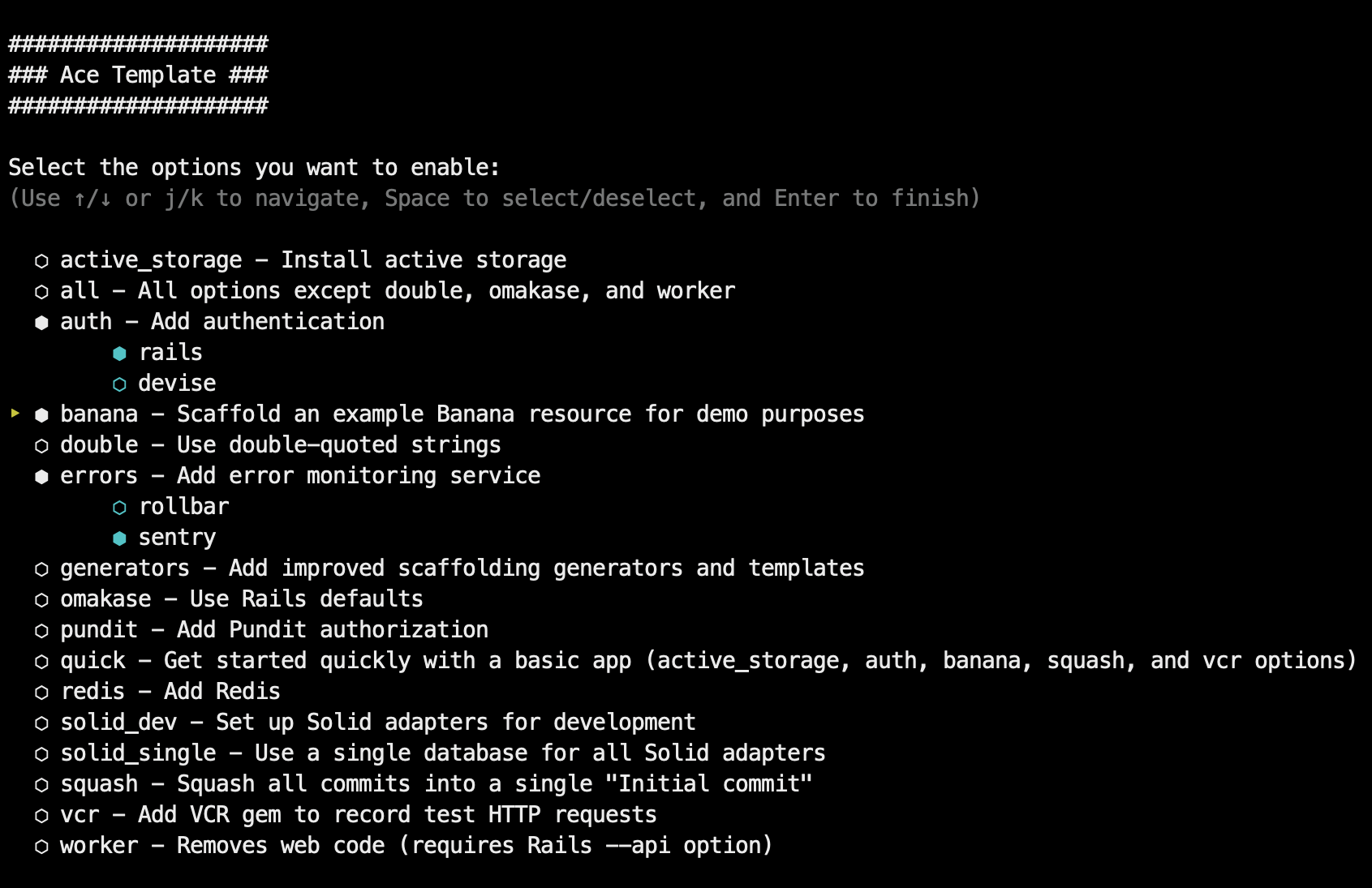
- Use interactive mode or command-line options for extra customization.
- Use carefully curated defaults or the omakase default Rails way.
Ship your idea in record time, or learn how modern Rails 8+ apps are structured
and deployed. See [list of features](#features) and [why I made this](#why-ace-template).
[](https://www.youtube.com/watch?v=kCXugP63Cqc)
## Usage
To create a basic app:
```bash
rails new myapp -m https://raw.githubusercontent.com/jeromedalbert/ace-template/stable/template.rb
```
It gets more interesting with options! You can choose template options
interactively with `-i`:
```bash
rails new myapp -i -m https://raw.githubusercontent.com/jeromedalbert/ace-template/stable/template.rb
```
Or you can pass template options manually with `-o` (see [`-o help`](template.rb#L17)
for details). Rails options are also supported. For example, to create an app
with an example "Banana" resource and styled with Tailwind:
```bash
rails new myapp -o banana --css tailwind \
-m https://raw.githubusercontent.com/jeromedalbert/ace-template/stable/template.rb
```
#### Pro-tip
To make commands shorter, you can add this function to your shell config (like
`~/.bashrc` or `~/.zshrc`):
```bash
rn() {
rails new $1 -m https://raw.githubusercontent.com/jeromedalbert/ace-template/stable/template.rb ${@:2}
}
```
The previous example can now be shortened to `rn myapp -o banana --css tailwind`.
## Features
#### General
- Easy-to-follow instructions to deploy with [Kamal](https://kamal-deploy.org/),
[Fly.io](https://fly.io/), or [Heroku](https://www.heroku.com/). Most
instructions are copy-pasteable and can be found in the generated project Readme.
- Supports SQLite, Postgres, and MySQL databases.
- Supports the [Tailwind](https://tailwindcss.com/) and [Bootstrap](https://getbootstrap.com/)
CSS frameworks, with default styles and HTML boilerplate that are ready to go.
- Each configuration step has its own commit, so you can see exactly how
everything is set up.
- All generated code has thoughtful corresponding tests.
- Uses single quotes by default. Double quotes are supported as an option.
- Supports most `rails new` options like `--api`, `--skip-*`, `--main`,
`--edge`, etc.
#### Default gems
- `IRB` and ruby `debug` are kept as defaults for interactive Ruby sessions.
This combo now works just as well as the old Pry gems.
[Amazing Print](https://github.com/amazing-print/amazing_print) is used for
pretty printing and is a modern successor to Awesome Print that works with
ruby `debug` sessions and Rails 8.2+.
- [Solid Cable](https://github.com/rails/solid_cable),
[Solid Cache](https://github.com/rails/solid_cache),
and [Solid Queue](https://github.com/rails/solid_queue) are kept as great
defaults that can get you pretty far.
- [Rubocop](https://github.com/rubocop/rubocop) for linting and
[SyntaxTree](https://github.com/ruby-syntax-tree/syntax_tree) for
auto-formatting that looks good.
[Standard](https://github.com/standardrb/standard) is also used as a
collection of sensible Rubocop defaults that are further customized to fit
Ace Template's own style.
- [RSpec](https://github.com/rspec/rspec-rails) tests by default.
[Rails test cases](https://guides.rubyonrails.org/testing.html#writing-your-first-test)
(backed by [Minitest](https://github.com/minitest/minitest)) are supported as
an option.
- [Dotenv](https://github.com/bkeepers/dotenv) as a simple way to manage
secrets.
[Rails credentials](https://guides.rubyonrails.org/security.html#custom-credentials)
are supported as an option.
- [FactoryBot](https://github.com/thoughtbot/factory_bot) for test data.
[Rails fixtures](https://guides.rubyonrails.org/testing.html#fixtures) are
supported as an option.
- [Spring](https://github.com/rails/spring) to run Rails commands and tests
instantly on your local.
- [Lograge](https://github.com/roidrage/lograge) to make production logs simple
and easy to read.
If you prefer to stick to Rails defaults, use the `omakase` template option.
#### Options
- `banana`: scaffolds an example "Banana" resource for quick demos or as a
starting point.
- `authentication`: adds authentication that is ready to go with login
**and signup** pages, either with
[Rails authentication](https://guides.rubyonrails.org/security.html#authentication)
or [Devise](https://github.com/heartcombo/devise).
- `omakase`: uses Rails [omakase](https://rubyonrails.org/doctrine#omakase)
defaults instead of Ace Template's defaults.
- `solid-dev`: configures [Solid Cable](https://github.com/rails/solid_cable),
[Solid Cache](https://github.com/rails/solid_cache),
and [Solid Queue](https://github.com/rails/solid_queue) to work in development.
- `worker`: removes web code, for apps like bots or scheduled scripts that do
not need to be accessible with a web page.
- `errors`: adds an error monitoring service (either [Rollbar](https://rollbar.com/)
or [Sentry](https://sentry.io/)).
- `pundit`: adds [Pundit](https://github.com/varvet/pundit) authorization.
- `redis`: adds Redis.
- `vcr`: adds the [VCR](https://github.com/vcr/vcr) gem to record test HTTP requests.
See [`-o help`](template.rb#L17) for the full list of options.
Options can **synergize** with each other. For example if both `banana` and
`authentication` are selected, bananas will belong to a user and logged in users
will only have access to their own bananas.
## Why Ace Template?
My goal with this template is to have both quality and speed, where you can
quickly deploy an app for a demo or an interview, while having a solid
foundation with polished internals.
The template runs with `rails new` and it is just plain Rails with some
sprinkles. This is not a heavier SaaS starter kit.
Ace Template is also built to stay up to date. Partials are preferred over
whole files, and end-to-end tests run on a [cron
schedule](.github/workflows/ci.yml#L8) against Rails `main` with alerts on
failures, so fixes are proactive and require minimal focused effort.
Most other templates are too static and become completely out of date after
5-10 years, needing a full rewrite or significant maintenance effort. Here's
hoping Ace Template still works flawlessly in 15 years (famous last words)!
## Contributing
Bug reports and pull requests are welcome! See [guide to contributing](CONTRIBUTING.md)
for more information.
## License
The project is available as open source under the terms of the
[MIT License](https://opensource.org/licenses/MIT).
## Code of Conduct
Everyone interacting in the Ace Template project's codebases, issue trackers,
chat rooms and mailing lists is expected to follow the
[code of conduct](CODE_OF_CONDUCT.md).