https://github.com/jesse-wei/sapsim
Simulation of SAP (Simple-As-Possible computer) programs
https://github.com/jesse-wei/sapsim
assembly comp311 computer-organization python sap unc
Last synced: 11 months ago
JSON representation
Simulation of SAP (Simple-As-Possible computer) programs
- Host: GitHub
- URL: https://github.com/jesse-wei/sapsim
- Owner: jesse-wei
- License: mit
- Created: 2023-02-23T19:53:12.000Z (over 3 years ago)
- Default Branch: main
- Last Pushed: 2025-03-20T12:03:40.000Z (over 1 year ago)
- Last Synced: 2025-06-29T13:50:00.278Z (12 months ago)
- Topics: assembly, comp311, computer-organization, python, sap, unc
- Language: Python
- Homepage: https://SAPsim.readthedocs.io
- Size: 1.51 MB
- Stars: 6
- Watchers: 1
- Forks: 2
- Open Issues: 3
-
Metadata Files:
- Readme: README.md
- License: LICENSE
Awesome Lists containing this project
README
[](https://www.python.org/downloads/) [](https://pypi.org/project/SAPsim/) [](https://github.com/jesse-wei/SAPsim/actions/workflows/tests.yml) [](https://codecov.io/github/jesse-wei/SAPsim) [](https://SAPsim.readthedocs.io/en/latest/)
# SAPsim
Simulation of SAP (Simple-As-Possible computer) programs from COMP 311 (Computer Organization) @ [UNC](https://unc.edu).
## Install
`pip install SAPsim`
If you get the error `pip not found`, use `pip3` instead[^alias]. Similarly, for later commands that use `python`, you'll need to use `python3` instead.
Python 3.9+ is required.
[^alias]: Consider [aliasing `pip` to `pip3`](https://stackoverflow.com/a/44455078) and similar for `python`. Also consider using `pyenv`. [Relevant XKCD](https://opensource.com/sites/default/files/uploads/python_environment_xkcd.png)
## Usage
In a `.csv` file, write a SAP program in this format (use these exact column names):
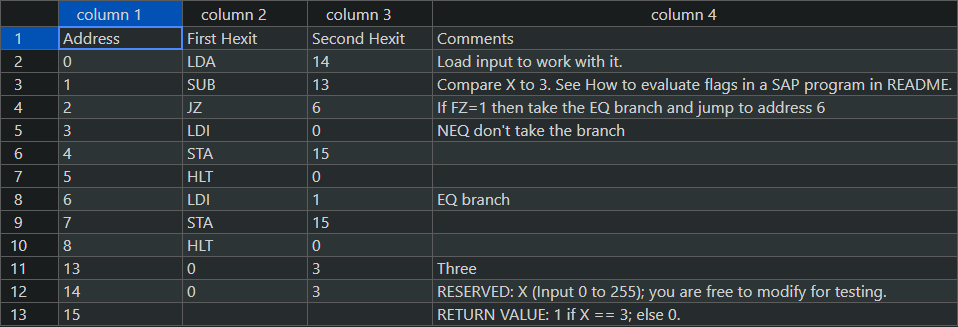
In a Python shell, import `SAPsim` and use `SAPsim.run` to run the program.
```py
❯ python
>>> from SAPsim import run
>>> run("ex1.csv") # Run ex1.csv at full speed (default)
┌──────┬────────┬───────────────┬───────┬───────┐
│ PC │ Addr │ Instruction │ Dec │ Hex │
├──────┼────────┼───────────────┼───────┼───────┤
│ │ 0 │ LDA 14 │ 30 │ 0x1e │
│ │ 1 │ SUB 13 │ 61 │ 0x3d │
│ │ 2 │ JZ 6 │ 134 │ 0x86 │
│ │ 3 │ LDI 0 │ 80 │ 0x50 │
│ │ 4 │ STA 15 │ 79 │ 0x4f │
│ │ 5 │ HLT 0 │ 240 │ 0xf0 │
│ │ 6 │ LDI 1 │ 81 │ 0x51 │
│ │ 7 │ STA 15 │ 79 │ 0x4f │
│ > │ 8 │ HLT 0 │ 240 │ 0xf0 │
│ │ 13 │ NOP 3 │ 3 │ 0x03 │
│ │ 14 │ NOP 3 │ 3 │ 0x03 │
│ │ 15 │ NOP 1 │ 1 │ 0x01 │
└──────┴────────┴───────────────┴───────┴───────┘
┌───────┬───┐
│ PC │ 8 │
│ Reg A │ 1 │
│ Reg B │ 3 │
│ FlagC │ 1 │
│ FlagZ │ 1 │
└───────┴───┘
>>> run("ex1.csv", debug=True) # Run in debug (step) mode
Initial state of simulation of ex1.csv
...
Debug mode: press Enter to execute next instruction ( > ).
...
```
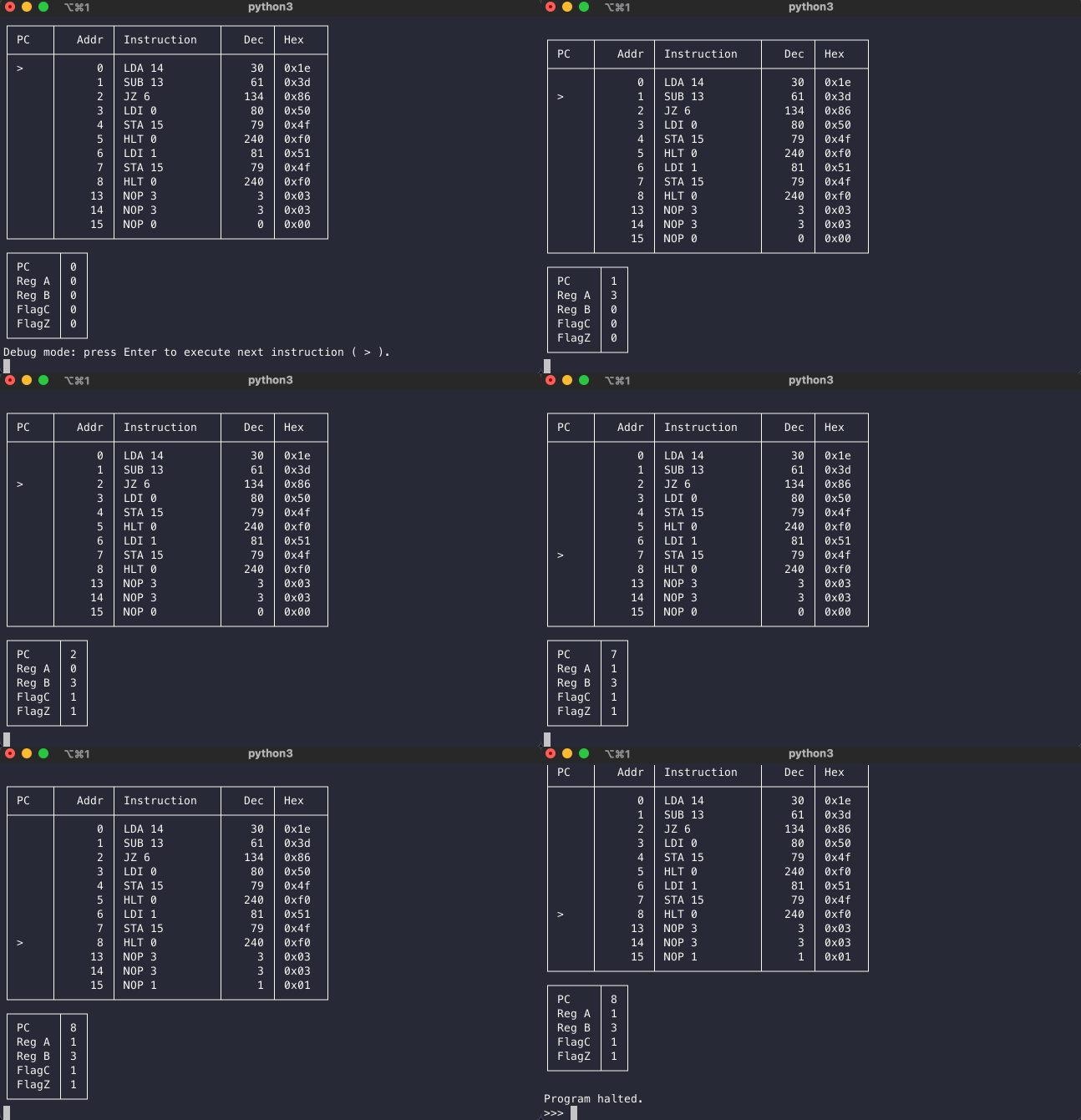
SAPsim running in Python terminal
**Debug mode**: There is a debug (step) mode that runs one instruction at a time, as shown above. By default, the program is run at full speed.
I recommend editing the CSV in VSCode or Excel. If you use VSCode, I recommend the extensions [Edit CSV](https://marketplace.visualstudio.com/items?itemName=janisdd.vscode-edit-csv) (Excel-like editing) and [Rainbow CSV](https://marketplace.visualstudio.com/items?itemName=mechatroner.rainbow-csv) (adds color to columns).
Lastly, here's a [blank template](https://github.com/jesse-wei/SAPsim/blob/main/docs/_static/template.csv) that includes only the column names and addresses 0-15 and [two commented example programs](https://github.com/jesse-wei/SAPsim/tree/main/tests/public_prog).
### SAP instruction set
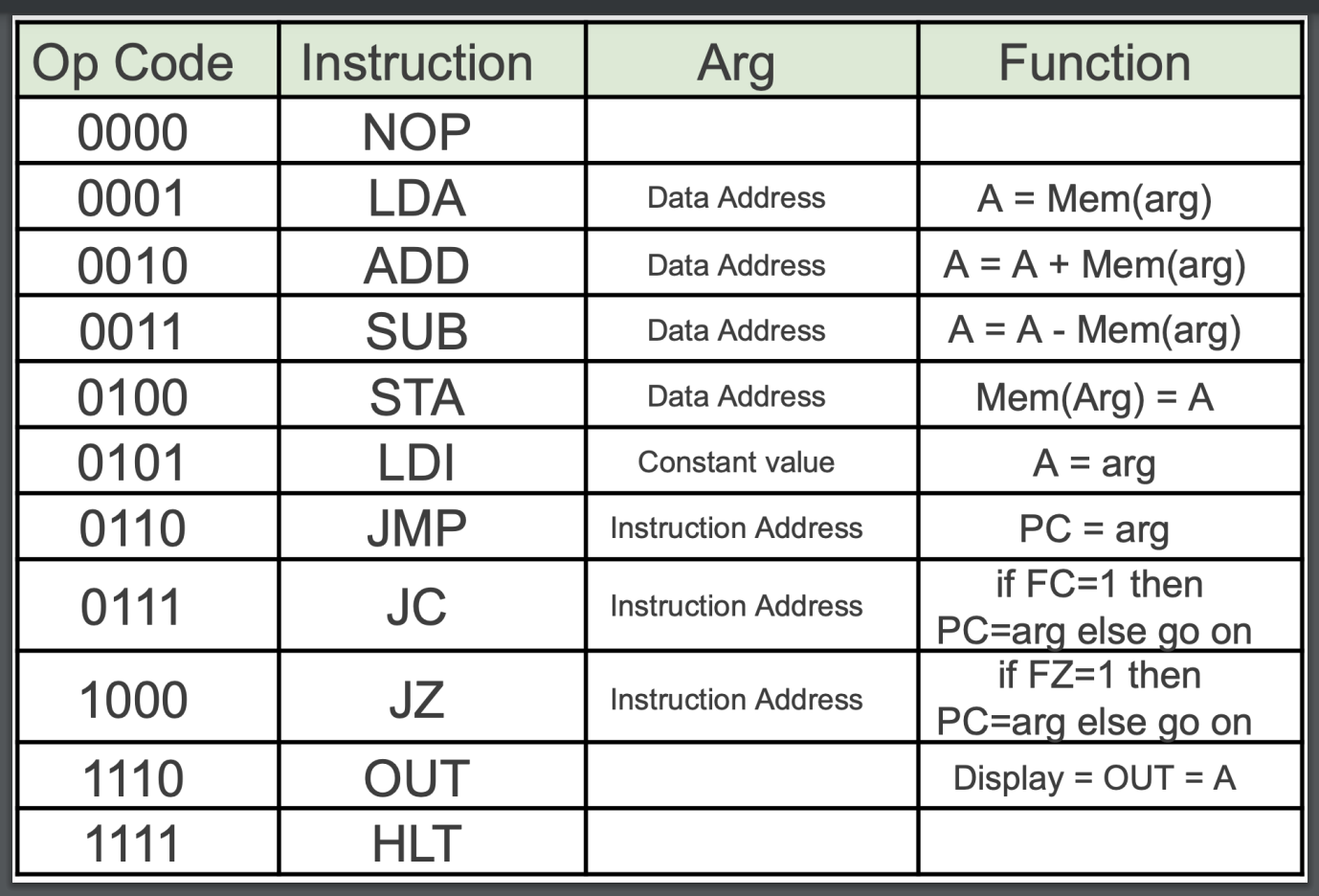
All instructions are supported.
## Settings
To customize table appearance, use `table_format`. [Options](https://github.com/astanin/python-tabulate#table-format).
```py
>>> run("ex1.csv", table_format="outline")
+------+--------+---------------+-------+-------+
| PC | Addr | Instruction | Dec | Hex |
+======+========+===============+=======+=======+
| | 0 | LDA 14 | 30 | 0x1e |
| | 1 | SUB 13 | 61 | 0x3d |
| | 2 | JZ 6 | 134 | 0x86 |
| | 3 | LDI 0 | 80 | 0x50 |
| | 4 | STA 15 | 79 | 0x4f |
| | 5 | HLT 0 | 240 | 0xf0 |
| | 6 | LDI 1 | 81 | 0x51 |
| | 7 | STA 15 | 79 | 0x4f |
| > | 8 | HLT 0 | 240 | 0xf0 |
| | 13 | NOP 3 | 3 | 0x03 |
| | 14 | NOP 3 | 3 | 0x03 |
| | 15 | NOP 1 | 1 | 0x01 |
+------+--------+---------------+-------+-------+
+-------+---+
| PC | 8 |
| Reg A | 1 |
| Reg B | 3 |
| FlagC | 1 |
| FlagZ | 1 |
+-------+---+
```
To modify values in the SAP program without editing the CSV, use the `change` keyword argument. For example, `run("ex1.csv", change={14: 4, 13: 2})` would change the byte at address 14 to 4 and at 13 to 2 before execution.
## Rules
It's easy to just mimic the [example programs](https://github.com/jesse-wei/SAPsim/tree/main/tests/public_prog), but if you need it, here are the [rules for SAPsim programs](https://SAPsim.readthedocs.io/en/latest/rules.html).
## Documentation
[https://SAPsim.readthedocs.io](https://SAPsim.readthedocs.io/en/latest/)