https://github.com/jetthoughts/rails-crystal-integration
Example how to migrate from Ruby Sidekiq to Crystal Lang Sidekiq.cr for Ruby on Rails application
https://github.com/jetthoughts/rails-crystal-integration
Last synced: 10 months ago
JSON representation
Example how to migrate from Ruby Sidekiq to Crystal Lang Sidekiq.cr for Ruby on Rails application
- Host: GitHub
- URL: https://github.com/jetthoughts/rails-crystal-integration
- Owner: jetthoughts
- License: mit
- Created: 2019-11-17T12:17:49.000Z (over 6 years ago)
- Default Branch: master
- Last Pushed: 2019-12-01T17:39:35.000Z (over 6 years ago)
- Last Synced: 2025-05-18T17:03:06.327Z (about 1 year ago)
- Language: Ruby
- Homepage: https://jtway.co
- Size: 187 KB
- Stars: 0
- Watchers: 0
- Forks: 0
- Open Issues: 1
-
Metadata Files:
- Readme: README.md
- License: LICENSE
Awesome Lists containing this project
README
# Setting up Rails 6 with PWA, Turbolinks, Webpack(er) 4, Babel 7, Vue.js 2 and Jest.
**NOTE:** For Rails 5.2 please check
https://github.com/jetthoughts/vuejs-rails-starterkit/tree/rails-5-latest
A quick and easy way to setup Rails + PWA + Turbolinks + Webpacker + Vue + Jest.
If your team is considering, or has already decided, to use Vue, this is the right for you.
As extra review how to setup PWA, Turbolinks, CSS frameworks, Storybook.
Things you may want to cover:
* [Ruby](https://www.ruby-lang.org/en/) version: 2.6.5
* System dependencies: [Node.js](https://nodejs.org/en/), [Yarn](https://yarnpkg.com/en/), [PostgreSQL](https://www.postgresql.org/), [Heroku CLI](https://devcenter.heroku.com/articles/heroku-cli)
* Key Dependencies: [Ruby on Rails](https://rubyonrails.org/) version 6, [Vue.js](https://vuejs.org) version 2, [Webpacker](https://github.com/rails/webpacker) with Webpack 4 and Babel 7
## Generate Ruby on Rails Project with Vue.js (No Turbolinks included on this stage)
```bash
gem install rails
rails new vuejs-rails-starterkit --force --database=postgresql \
--skip-action-mailer --skip-action-cable --skip-sprockets --skip-turbolinks \
--webpack=vue
cd ./vuejs-rails-starterkit
bin/rails db:create db:migrate
```
### Setup development environment:
1. Uncomment `system('bin/yarn')` in `bin/setup` and `bin/update` to
install new node modules.
2. Install dependencies:
```bash
bin/setup
```
3. Enable *unsafe-eval rule* to support runtime-only build and
*webpacker-dev-server*
This can be done in the `config/initializers/content_security_policy.rb` with the following
configuration:
```ruby
Rails.application.config.content_security_policy do |policy|
if Rails.env.development?
policy.script_src :self, :https, :unsafe_eval
policy.connect_src :self, :https, 'http://localhost:3035', 'ws://localhost:3035'
else
policy.script_src :self, :https
end
end
```
You can learn more about this from: [Vue.js Docs](https://vuejs.org/v2/guide/installation.html#CSP-environments) and [Webpacker/Vue Docs](https://github.com/rails/webpacker#vue).
4. Verify that we have not broken anything
```bash
bin/webpack
bin/rails runner "exit"
```
### Use Webpacker assets in the application
2. Enable Webpacker by updating `app/views/layout/application.html.erb`:
Add after:
```erb
<%= stylesheet_link_tag 'application', media: 'all' %>
<%= javascript_pack_tag 'application' %>
```
inlcude of vue example:
```erb
<%= stylesheet_pack_tag 'hello_vue', media: 'all' %>
<%= javascript_pack_tag 'hello_vue' %>
```
3. Add sample page to host Vue.js component:
```bash
bin/rails generate controller Landing index --no-javascripts --no-stylesheets --no-helper --no-assets --no-fixture
```
4. Setup sample page as home page by updating `config/routes.rb`:
```ruby
root 'landing#index'
```
7. Verify locally that vue.js working
```bash
bin/rails s
open "http://localhost:3000/"
```
Expect to see 
## Install Jest for Component Unit Tests
1. Add Jest
```bash
yarn add --dev jest vue-jest babel-jest @vue/test-utils jest-serializer-vue 'babel-core@^7.0.0-bridge' @babel/core
```
2. Add to `package.json`:
```json
"scripts": {
"test": "jest"
},
"jest": {
"verbose": true,
"testURL": "http://localhost/",
"roots": [
"test/javascript"
],
"moduleDirectories": [
"node_modules",
"app/javascript"
],
"moduleNameMapper": {
"^@/(.*)$": "app/javascript/$1"
},
"moduleFileExtensions": [
"js",
"json",
"vue"
],
"transform": {
"^.+\\.js$": "/node_modules/babel-jest",
".*\\.(vue)$": "/node_modules/vue-jest"
},
"snapshotSerializers": [
"/node_modules/jest-serializer-vue"
]
},
```
3. Add `test/javascript/test.test.js`:
```js
test('there is no I in team', () => {
expect('team').not.toMatch(/I/);
});
```
4. Verify installation
```bash
yarn test
```
You should found 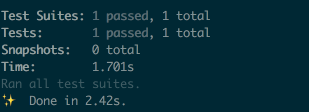
6. Add component test for App in `test/javascript/app.test.js`:
```js
import { mount, shallowMount } from '@vue/test-utils'
import App from 'app';
describe('App', () => {
test('is a Vue instance', () => {
const wrapper = mount(App)
expect(wrapper.isVueInstance()).toBeTruthy()
})
test('matches snapshot', () => {
const wrapper = shallowMount(App)
expect(wrapper.html()).toMatchSnapshot()
})
});
```
7. Verify by
```bash
yarn test
```
You should see all tests passed
## Setup Heroku and Deploy
1. Confirm compilation is working:
```bash
RAILS_ENV=production \
NODE_ENV=production \
RAILS_SERVE_STATIC_FILES=true \
SECRET_KEY_BASE="7aa51097e982f34be02abe83528c3308768dff3837b405e0907028c750d22d067367fb79e2b223e3f223fea50ddf2d5dc9b3c933cf5bc8c7f2a3d3d75f73c4a7" \
bin/rails assets:precompile
```
2. Create Heroku App and provision it
Requirements: [Heroku CLI](https://devcenter.heroku.com/articles/heroku-cli#download-and-install).
**NOTE:** Do not forget to commit all your changes: `git add . && git
commit -m "Generates Ruby on Rails application with Vue.js onboard"`
```bash
heroku create
heroku buildpacks:add heroku/ruby
heroku config:set RAILS_ENV=production NODE_ENV=production
```
5. Deploy and verify that vue.js working on Heroku
```bash
git push heroku master
heroku apps:open
```
## Setup basic PWA
1. Install `serviceworker-rails` by adding into `Gemfile`:
```ruby
gem 'serviceworker-rails', github: 'rossta/serviceworker-rails'
```
2. By following guide: https://github.com/rossta/serviceworker-rails
should get something to: https://gist.github.com/pftg/786b147eff85a6fc98bd8dc1c3c9778e
## Setup Turbolinks
1. Add node dependencies
```bash
yarn add vue-turbolinks turbolinks
yarn install
```
2. Load Turbolinks by adding
`app/javascript/initializers/turbolinks.js`:
```javascript
import Turbolinks from 'turbolinks'
Turbolinks.start()
```
3. Add to `app/javascript/packs/application.js`:
```javascript
import 'initializers/turbolinks.js'
```
4. Uncomment in `hello_vue.js`:
```javascript
import TurbolinksAdapter from 'vue-turbolinks'
import Vue from 'vue/dist/vue.esm'
import App from '../app.vue'
Vue.use(TurbolinksAdapter)
document.addEventListener('turbolinks:load', () => {
const app = new Vue({
el: '#hello',
data: () => {
return {
message: "Can you say hello?"
}
},
components: { App }
})
})
```
5. Update layout with:
```html
```
6. Run tests and server to verify:
```bash
bin/rails t
bin/rails s
```