https://github.com/jevonsflash/V-Control
An out-of-the-box .NET MAUI component library
https://github.com/jevonsflash/V-Control
dotnet maui ui ui-components uikit
Last synced: about 1 year ago
JSON representation
An out-of-the-box .NET MAUI component library
- Host: GitHub
- URL: https://github.com/jevonsflash/V-Control
- Owner: jevonsflash
- License: mit
- Created: 2023-06-10T03:37:20.000Z (about 3 years ago)
- Default Branch: master
- Last Pushed: 2025-04-01T03:48:00.000Z (over 1 year ago)
- Last Synced: 2025-04-07T15:05:32.626Z (over 1 year ago)
- Topics: dotnet, maui, ui, ui-components, uikit
- Language: C#
- Homepage: https://vcontrol.matoapp.net
- Size: 21.8 MB
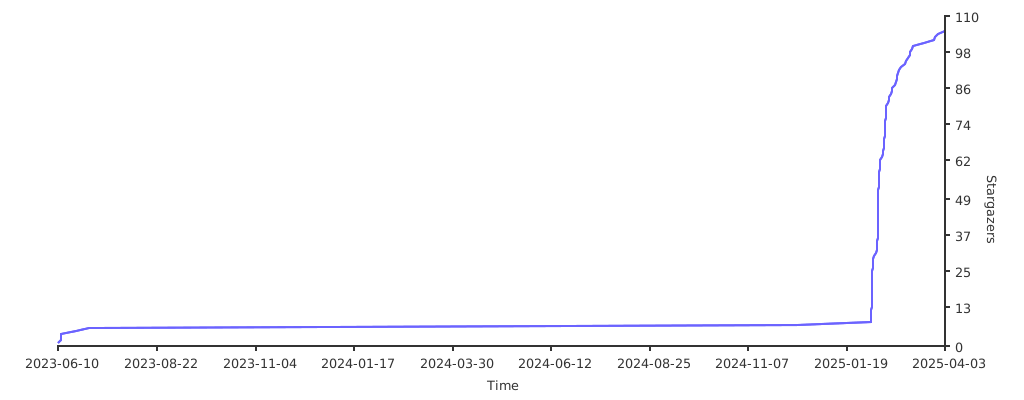
- Stars: 105
- Watchers: 4
- Forks: 12
- Open Issues: 0
-
Metadata Files:
- Readme: README.md
- License: LICENSE
Awesome Lists containing this project
- awesome-dotnet-maui - V-Control - of-the-box UI controls to quickly build business-oriented app interfaces.|[](https://github.com/jevonsflash/V-Control/stargazers)|[](https://github.com/jevonsflash/V-Control/commits) (UI)
README
# V-Control
[](https://github.com/jevonsflash/VControl/blob/master/LICENSE)
[](https://www.nuget.org/packages/VControl)


English | [中文](README_zh.md)
V-Control is a component library for [ .NET MAUI](https://dotnet.microsoft.com/zh-cn/apps/maui), providing a set of out-of-the-box UI controls to quickly build business-oriented app interfaces.

## Features
* [VButton](https://vcontrol.matoapp.net/documents/v-button) - Button Component
* VCard - Card Component
* [VCheckableCollection](https://vcontrol.matoapp.net/documents/v-checkable-collection) - Checkable Collection Component
* [VCheckBox](https://vcontrol.matoapp.net/documents/v-checkbox) - Checkbox Component
* [VCheckBoxButton](https://vcontrol.matoapp.net/documents/v-checkbox-button) - Checkbox Button Component
* [VCheckBoxGroup](https://vcontrol.matoapp.net/documents/v-checkbox-group) - Checkbox Group Component
* [VCollection](https://vcontrol.matoapp.net/documents/v-collection) - Collection View Component
* VDateNativePicker - Native Date Picker Component
* [VDatePicker](https://vcontrol.matoapp.net/documents/v-date-picker) - Date Picker Component
* [VEditor](https://vcontrol.matoapp.net/documents/v-editor) - Editor Component
* [VExpander](https://vcontrol.matoapp.net/documents/v-expander) - Expander Component
* [VFormItem](https://vcontrol.matoapp.net/documents/v-form-item) - Form Component
* VIndicator - Progress Indicator Component
* [VMenuCell](https://vcontrol.matoapp.net/documents/v-menu-cell) - Menu Item Component
* [VNumberEntry](https://vcontrol.matoapp.net/documents/v-number-entry) - Number Entry Component
* [VPicker](https://vcontrol.matoapp.net/documents/v-picker) - Picker Component
* VRadioButton - Radio Button Component
* [VRadioButtonGroup](https://vcontrol.matoapp.net/documents/v-radio-button-group) - Radio Button Group Component (Toggle Bar)
* [VSearchBar](https://vcontrol.matoapp.net/documents/v-search-bar) - Search Bar Component
* [VTagPicker](https://vcontrol.matoapp.net/documents/v-tag-picker) - Tag Picker Component
* [VTimeLine](https://vcontrol.matoapp.net/documents/v-time-line) - Timeline Component
* [VTopAppBar](https://vcontrol.matoapp.net/documents/v-top-app-bar) - Top App Bar Component
* VTouchContentView - Gesture Listener Component
* VUploader - File Upload Component
* [VValidatingEntry](https://vcontrol.matoapp.net/documents/v-validating-entry) - Validating Entry Component
* [VValidatingPicker](https://vcontrol.matoapp.net/documents/v-validating-picker) - Validating Picker Component
* [VRichTextEditor](https://vcontrol.matoapp.net/documents/v-rich-text-editor) - Rich Text Editor Component
* [VEntry](https://vcontrol.matoapp.net/documents/v-entry) - Entry Component
* [VPlaceholderView](https://vcontrol.matoapp.net/documents/v-placeholder-view) - Placeholder View Component
## Todo
* VAutocomplete - Autocomplete Component
* VComparisonView - Comparison View Component
* VCalendar - Calendar Component
* Dark Mode
* BlazorApp-based Components
## Quick Start
1. Run the following command in your .NET MAUI project to install V-Control:
```bash
dotnet add package VControl
```
Or search for "V-Control" in NUGET and install it.
2. In `MauiProgram`, use `.UseVControl()` to add the V-Control handler in the MauiAppBuilder.
```csharp
public static MauiApp CreateMauiApp()
{
var builder = MauiApp.CreateBuilder();
builder
.UseMauiApp()
.UseVControl() //👈 Add V-Control handler here
var mauiApp = builder.Build();
return mauiApp;
}
```
3. Open the `App.xaml` file and add `` to the resources.
```xml
...
```
## Documentation
Visit [V-Control Docs](https://vcontrol.matoapp.net/documents/starter)
## Source Code and Samples
You can visit the [GitHub](https://github.com/jevonsflash/VControl) to view the source code and examples for V-Control.
## Stargazers over time
[](https://starchart.cc/jevonsflash/V-Control)