https://github.com/jhermann/rituals
:wrench: :package: Project automation task library for ‘Invoke’ tasks that are needed again and again.
https://github.com/jhermann/rituals
invoke project-automation python release-automation tasks
Last synced: about 1 year ago
JSON representation
:wrench: :package: Project automation task library for ‘Invoke’ tasks that are needed again and again.
- Host: GitHub
- URL: https://github.com/jhermann/rituals
- Owner: jhermann
- License: gpl-2.0
- Created: 2015-02-17T16:36:28.000Z (over 11 years ago)
- Default Branch: master
- Last Pushed: 2023-02-08T01:13:34.000Z (over 3 years ago)
- Last Synced: 2025-06-20T03:43:38.994Z (about 1 year ago)
- Topics: invoke, project-automation, python, release-automation, tasks
- Language: Python
- Homepage: http://rituals.readthedocs.io/
- Size: 574 KB
- Stars: 30
- Watchers: 3
- Forks: 4
- Open Issues: 26
-
Metadata Files:
- Readme: README.md
- Contributing: CONTRIBUTING.md
- License: LICENSE
Awesome Lists containing this project
README
# Rituals
Common tasks for [Invoke](http://www.pyinvoke.org/) that are needed again and again.
 … and again and again.
[](https://groups.google.com/forum/#!forum/rituals-dev)
[](https://travis-ci.org/jhermann/rituals)
[](https://coveralls.io/r/jhermann/rituals)
[](https://github.com/jhermann/rituals/issues)
[](https://github.com/jhermann/rituals/blob/master/LICENSE)
[](https://pypi.python.org/pypi/rituals/)
[](https://pypi.python.org/pypi/rituals/)
## Overview
“Rituals” is a task library for [Invoke](http://www.pyinvoke.org/) that keeps the
most common tasks you always need out of your project, and makes them centrally maintained.
This leaves your `tasks.py` small and to the point,
with only things specific to the project at hand.
The following lists the common task implementations that the ``rituals.easy`` module offers.
See the [full docs](https://rituals.readthedocs.io/en/latest/usage.html#adding-rituals-to-your-project)
on how to integrate them into your `tasks.py`.
* ``help`` – Default task, when invoked with no task names.
* ``clean`` – Perform house-cleaning.
* ``build`` – Build the project.
* ``test`` – Perform standard unittests.
* ``check`` – Perform source code checks.
* ``release.bump`` – Bump a development version.
* ``release.dist`` – Distribute the project.
* ``release.prep`` – Prepare for a release (perform QA checks, and switch to non-dev versioning).
* … and *many* more, see `inv -l` for a complete list.
The guiding principle for these tasks is to strictly separate
low-level tasks for building and installing (via ``setup.py``)
from high-level convenience tasks a developer uses (via ``invoke``).
Invoke tasks can use Setuptools ones as building blocks,
but never the other way 'round
– this avoids any bootstrapping headaches during package installations.
Use ``inv -h ‹task›`` as usual to get details on the options of these tasks.
Look at the modules in [acts](https://github.com/jhermann/rituals/blob/master/src/rituals/acts)
if you want to know what these tasks do exactly.
Also consult the [full documentation](https://rituals.readthedocs.io/)
for a complete reference.
:bulb: | The easiest way to get a working project using `rituals` is the [py-generic-project](https://github.com/Springerle/py-generic-project) cookiecutter archetype. That way you have a working project skeleton within minutes that is fully equipped, with all aspects of building, testing, quality checks, continuous integration, documentation, and releasing covered.
---- | :----
## Some Practical Examples
The following table shows a selection of typical use-cases and how to
carry them out in projects that include *Rituals* in their `tasks.py`
(e.g. this one).
Command | Description
----: | :----
`inv docs -w -b` | Start a `sphinx-autobuild` watchdog and open the resulting live-reload preview in your browser.
`inv test.tox --clean -e py34` | Run `tox` for Python 3.4 with a clean status, i.e. an empty `.tox` directory.
`inv release.bump` | Set the `tag_build` value in `setup.cfg` to something like `0.3.0.dev117+0.2.0.g993edd3.20150408t1747`, uniquely identifying dev builds, even in dirty working directories.
See the [full documentation](https://rituals.readthedocs.io/)
for more examples and a complete reference.
## Contributing
To create a working directory for this project, call these commands:
```sh
git clone "https://github.com/jhermann/rituals.git"
cd rituals
command . .env --yes --develop # add '--virtualenv /usr/bin/virtualenv' for Python2
invoke build --docs test check
```
To use the source in this working directory within another project,
change your current directory to _this_ project,
then call `bin/pip` from *that* project's virtualenv like so:
…/.venv/…/bin/pip install -e .
See [CONTRIBUTING](https://github.com/jhermann/rituals/blob/master/CONTRIBUTING.md) for more.
[](https://waffle.io/jhermann/rituals/metrics)
## Releasing
This is the process of releasing ``rituals`` itself,
projects that use it will have an identical to very similar sequence of commands.
```sh
inv release.prep
inv release.dist --devpi # local release + tox testing
git push && git push --tags # … and wait for Travis CI to do its thing
twine upload -r pypi dist/*
```
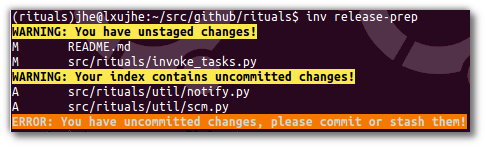
If you have any pending changes, staged or unstaged, you'll get an error like this:
## Related Projects
* [Springerle/py-generic-project](https://github.com/Springerle/py-generic-project) – Cookiecutter template that creates a basic Python project, which can be later on augmented with various optional accessories.
* [pyinvoke/invoke](https://github.com/pyinvoke/invoke) – Task execution tool & library.
* [pyinvoke/invocations](https://github.com/pyinvoke/invocations) – A collection of reusable Invoke tasks and task modules.
## Acknowledgements
* Logo elements from [clker.com Free Clipart](http://www.clker.com/).
* In case you wonder about the logo, [watch this](http://youtu.be/9VDvgL58h_Y).