https://github.com/jhj0517/stable-diffusion-webui-layer-divider
Layer-Divider, an extension for stable-diffusion-webui using the segment-anything model (SAM)
https://github.com/jhj0517/stable-diffusion-webui-layer-divider
ai gradio open-source python stable-diffusion stable-diffusion-webui-plugin
Last synced: about 1 year ago
JSON representation
Layer-Divider, an extension for stable-diffusion-webui using the segment-anything model (SAM)
- Host: GitHub
- URL: https://github.com/jhj0517/stable-diffusion-webui-layer-divider
- Owner: jhj0517
- License: apache-2.0
- Created: 2023-04-10T20:42:18.000Z (over 3 years ago)
- Default Branch: master
- Last Pushed: 2024-09-22T07:49:31.000Z (almost 2 years ago)
- Last Synced: 2024-10-10T19:24:25.969Z (almost 2 years ago)
- Topics: ai, gradio, open-source, python, stable-diffusion, stable-diffusion-webui-plugin
- Language: Python
- Homepage:
- Size: 1.58 MB
- Stars: 165
- Watchers: 4
- Forks: 13
- Open Issues: 6
-
Metadata Files:
- Readme: README.md
- License: LICENSE
Awesome Lists containing this project
README
# Layer-Divider
This is an implementaion of the [SAM](https://github.com/facebookresearch/segment-anything) (Segment-Anything Model) within the [SD WebUI](https://github.com/AUTOMATIC1111/stable-diffusion-webui).
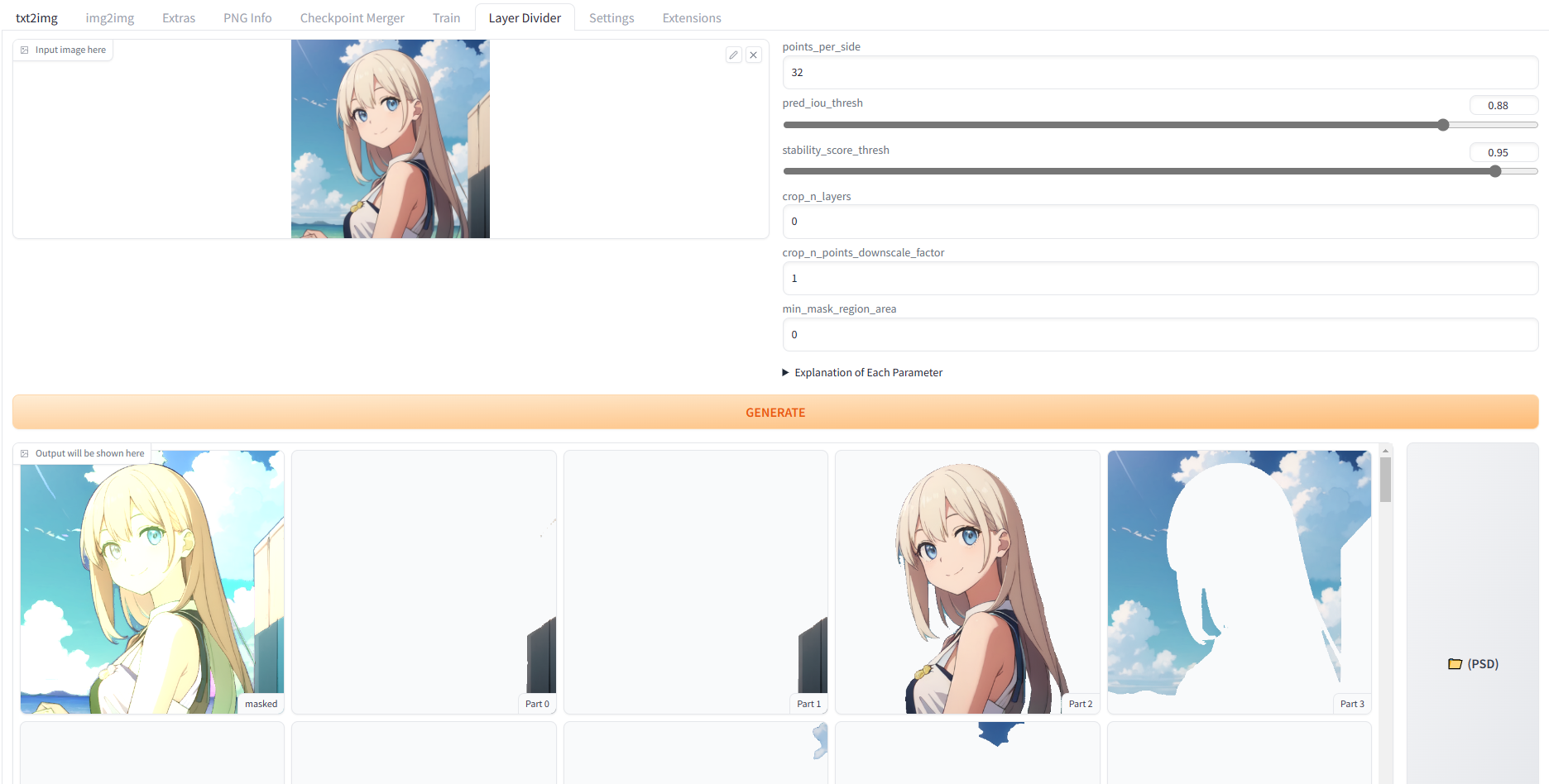
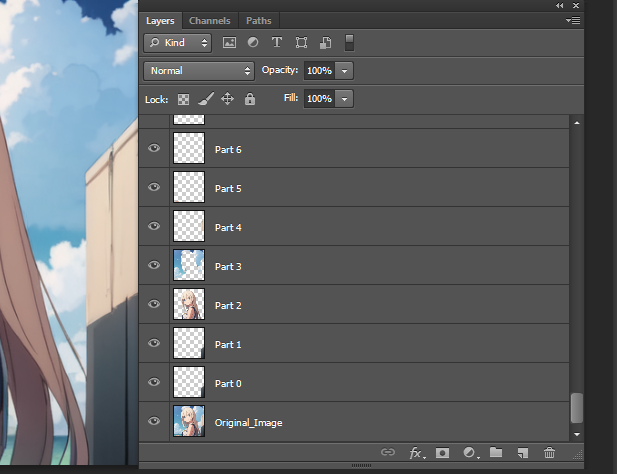
Divide layers in the SD WebUI and save them as PSD files.
## About segment-anything-2
If you want to try [segment-anything-2](https://github.com/facebookresearch/segment-anything-2), there's a new dedicated webui :
- https://github.com/jhj0517/stable-diffusion-webui-Layer-Divider
The web ui supports prompt and video segmentation, I recommend using the new web ui.
# Installation
`git clone https://github.com/jhj0517/stable-diffusion-webui-Layer-Divider.git` to your stable-diffusion-webui extensions folder.
or alternatively, download and unzip the repository in your extensions folder!
### Notice ( Read if you face an error during installation )
**Some packages are problematic to install programmatically when starting webui.**
**So you need to manually activate venv and install these packages before running webui.**
1. Open the terminal in the WebUI and activate the venv
```
C:\YourPath\To_SD_WebUI>venv\Scripts\activate
```
Then it will display (venv) in front of the terminal like this.
```
(venv) C:\YourPath\To_SD_WebUI>
```
2. In this state, run
```
pip uninstall -y pytoshop
pip uninstall -y packbits
pip install git+https://github.com/jhj0517/forked-pytoshop.git
pip install packbits
```
# How to use
Adjust the parameters and click "Generate". The output will be displayed below, and a PSD file will be saved in the `extensions\stable-diffusion-webui-layer-divider\layer_divider_outputs\psd` folder.
## Explanation of Parameters
| Parameter | Description |
|--------------------------------|------------------------------------------------------------------------------------------------------------------------------------------------------------------------------------------------------------------------------------------------------------------------------------------|
| points_per_side | The number of points to be sampled along one side of the image. The total number of points is points_per_side**2. If None, 'point_grids' must provide explicit point sampling. |
| pred_iou_thresh | A filtering threshold in [0,1], using the model's predicted mask quality. |
| stability_score_thresh | A filtering threshold in [0,1], using the stability of the mask under changes to the cutoff used to binarize the model's mask predictions. |
| crops_n_layers | If >0, mask prediction will be run again on crops of the image. Sets the number of layers to run, where each layer has 2**i_layer number of image crops. |
| crop_n_points_downscale_factor | The number of points-per-side sampled in layer n is scaled down by crop_n_points_downscale_factor**n. |
| min_mask_region_area | If >0, postprocessing will be applied to remove disconnected regions and holes in masks with area smaller than min_mask_region_area. Requires opencv. |
## Todo
- [ ] Migrate to [SAM-2](https://github.com/facebookresearch/segment-anything-2)