https://github.com/jhuckaby/magic-sorting-system
A data pack for Minecraft 1.13, 1.14 and 1.15 (Java) for automatically sorting every item in the game.
https://github.com/jhuckaby/magic-sorting-system
datapack minecraft
Last synced: 11 months ago
JSON representation
A data pack for Minecraft 1.13, 1.14 and 1.15 (Java) for automatically sorting every item in the game.
- Host: GitHub
- URL: https://github.com/jhuckaby/magic-sorting-system
- Owner: jhuckaby
- Archived: true
- Created: 2018-10-05T21:45:02.000Z (over 7 years ago)
- Default Branch: master
- Last Pushed: 2025-05-15T15:45:49.000Z (about 1 year ago)
- Last Synced: 2025-06-04T04:16:42.665Z (about 1 year ago)
- Topics: datapack, minecraft
- Language: mcfunction
- Homepage:
- Size: 71.3 KB
- Stars: 40
- Watchers: 5
- Forks: 13
- Open Issues: 19
-
Metadata Files:
- Readme: README.md
Awesome Lists containing this project
README
# Project Abandoned
Hey everyone,
I'm so sorry, but I have to archive this project. It hasn't been updated in 5 years, and reports are coming in that it is broken in newer versions of the game. Unfortunately, I just don't have the time to work on it anymore. Life got in the way.
Huge thanks to everyone who helped me test it, and those who submitted issues. You all made this possible!
See you around the overworld!
-- Joe
# Overview
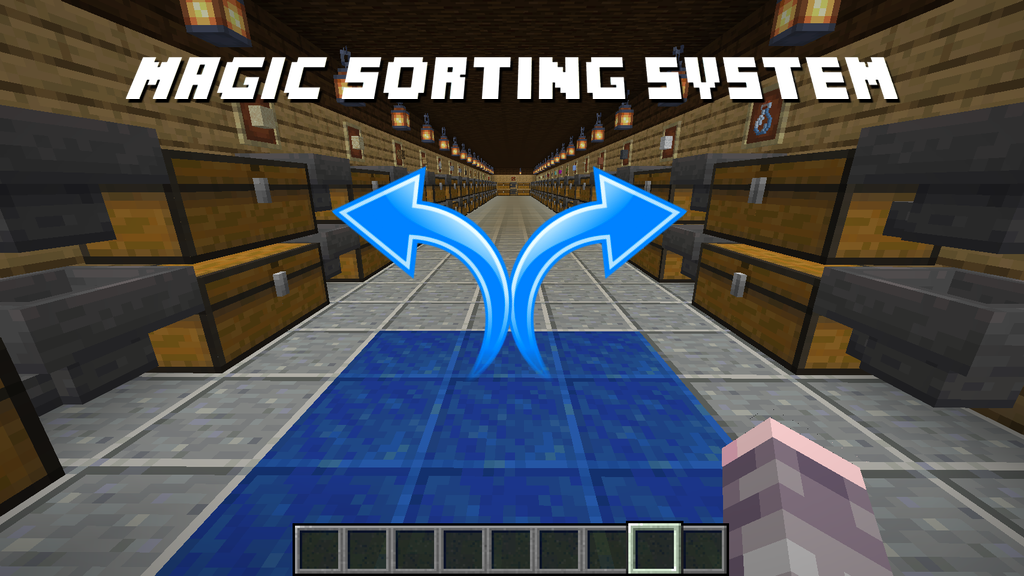
The **Magic Sorting System** is a free [Data Pack](https://minecraft.gamepedia.com/Data_pack) available for [Minecraft](https://minecraft.net/) v1.13, v1.14, v1.15 and v1.16 (Java edition). It provides an easy way to craft an automatic, extensible item sorting system, which does not require redstone, nor console commands, nor command blocks. Items are teleported to matching item frames, where they can be routed via hoppers into chests or furnaces (so it still requires considerable resources and building). The whole system can be entirely built in survival mode, and supports both single and multiplayer (local or server install).
The sorting system works by providing a special magic drop off area, where you can dump any number of unsorted items (for e.g. when you come back from a mining trip), and they will be automatically sorted into [39 different categories](#groups), each with its own item frame. Note that you do not need all 39 categories to start out -- you can progressively build your storage system over time, and have it look however you want. You can also provide a "misc" (catch-all) category, which catches all items which don't have their own group built.
Items are teleported directly to their matching [item frames](https://minecraft.gamepedia.com/Item_Frame) for the category. The idea is that you can place a [hopper](https://minecraft.gamepedia.com/Hopper) directly under each item frame, which then routes the items into a connected chest (or multiple chests), or furnaces for auto-smelting. Item routing and storing is left up to the player, which can be simple or quite complex.
## Why
It is already possible to build a complete item sorting and storage system using built-in vanilla Minecraft features. I've seen some [incredible systems](https://www.youtube.com/watch?v=wsNV9Mo00Gw), and my hat is off to those amazing builders. However in practice, actually doing it is very difficult and tedious in my experience. It requires a large amount of hoppers and complex redstone contraptions for filtering. For example, to filter and store every item in the game, it would take at least 2 hoppers per unique item, or 1,550 hoppers total (3,875 iron ingots). Doing this in survival mode would take a very long time, and use up an enormous amount of space just for the machinery.
The magic sorting system is designed to make all this much easier to build. It requires only 1 hopper per category (39 categories total for sorting all items in the game), and handles all the item filtering and routing "magically" (i.e. by automatic item teleportation). It is server-friendly (lag-free), and it keeps survival gameplay balanced by requiring some expensive resources to start out.
Players can still build out custom storage systems using hoppers, chests, furnaces and more. They can be as simple or complex as they want. The magic sorting system *only* teleports items to special item frames. The rest is up to the player.
## Features at a Glance
- Build and setup everything in pure survival mode
- Design your storage system to look however you like
- Progressively add new categories over time
- Sorts 878 unique items into 39 categories
- Unsorted items automatically go into a "misc" group
- Can have multiple sorting systems in same world (128+ blocks apart)
- Items are sorted to nearest matching item frames
- Very server-friendly (lag-free design)
- No redstone, no command blocks, and no console commands required
- Costs 1 gold block and 1 lapis block for controller
- Each sort group costs at least 1 item frame, 1 hopper and 1 chest
- Can extend sort groups into infinite chests with chained hoppers
- Can dump entire stacks quickly using `Ctrl-Q` keybind (Windows only)
- Items are sorted the moment they land on the pickup area
- Many categories have fallback groups (i.e. sandstone falls back to sand, etc.)
- Automatically distributes items across multiple item frames in same group
- Support for automatic smelting, and automatic food cooking
- Create your own custom sort groups by modifying config file
## Upgrading from v1.0
Are you upgrading from Magic Sorting System v1.0? Version 2.0 has been completely redesigned, and no longer uses a chest (well, it still can if you want one), and there is no need to "activate" a controller by standing on it. Please see the [Creating the Controller](#creating-the-controller) section for updated instructions. If you still want to use a drop chest, see the [Advanced](#advanced) section for instructions.
## Table of Contents
- [Installation](#installation)
* [Single Player](#single-player)
* [Multiplayer](#multiplayer)
- [Usage](#usage)
* [Building](#building)
* [Creating the Controller](#creating-the-controller)
* [Creating an Item Receiver](#creating-an-item-receiver)
+ [Multiple Chests](#multiple-chests)
+ [Multiple Item Frames](#multiple-item-frames)
+ [Automatic Smelting or Cooking](#automatic-smelting-or-cooking)
+ [Automatic Coal Fuel](#automatic-coal-fuel)
+ [Fallback Groups](#fallback-groups)
+ [Misc Catch-All Group](#misc-catch-all-group)
* [Controller for Farms](#controller-for-farms)
* [Advanced](#advanced)
+ [Double Speed Auto-Drop Chest](#double-speed-auto-drop-chest)
* [Groups](#groups)
+ [Dirt](#dirt)
- [Gravel](#gravel)
+ [Sand](#sand)
- [Sandstone](#sandstone)
+ [Wood](#wood)
- [Woodwork](#woodwork)
* [Office](#office)
+ [Stone](#stone)
- [Stonework](#stonework)
+ [Coal](#coal)
+ [Tools](#tools)
- [Storage](#storage)
- [Armor](#armor)
- [Rails](#rails)
+ [Plants](#plants)
- [Flowers](#flowers)
+ [Food](#food)
- [Raw](#raw)
+ [Mobs](#mobs)
+ [Precious](#precious)
- [Lapis](#lapis)
+ [Magic](#magic)
- [Potions](#potions)
- [Books](#books)
+ [Wool](#wool)
+ [Concrete](#concrete)
+ [Terracotta](#terracotta)
+ [Glass](#glass)
+ [Ice](#ice)
+ [Ocean](#ocean)
- [Coral](#coral)
- [Prismarine](#prismarine)
+ [Ink](#ink)
+ [Nether](#nether)
+ [Ores](#ores)
+ [Redstone](#redstone)
+ [End](#end)
+ [Music](#music)
+ [Misc](#misc)
- [FAQ](#faq)
- [Development](#development)
* [Maximum Teleport Distance](#maximum-teleport-distance)
* [Teleport Effects](#teleport-effects)
* [Compiling](#compiling)
- [References](#references)
- [License](#license)
# Installation
To install the data pack, download the latest ZIP file from the [releases page](https://github.com/jhuckaby/magic-sorting-system/releases), unzip the file, and copy the `magic-sorting-system-#.#.#` folder into your `datapacks` folder for your Minecraft world. Here are specific instructions for single and multiplayer:
## Single Player
- Open Minecraft.
- Select your world, click on "**Edit**", then "**Open world folder**".
- Open the folder named `datapacks`, and put the data pack folder file into it.
- Play the world.
## Multiplayer
- FTP to your server.
- Open your server folder, then open the folder named `world`.
- Upload the data pack folder into a folder named `datapacks`.
- Restart the server.
# Usage
In a nutshell, the magic sorting system is an item teleporter. It will teleport unsorted items dropped onto a special pickup area, to their respective item frames nearby, and from there they simply fall into hoppers and into your storage chests. So you need a special magic drop-off block, and one or more item groups containing item frames, hoppers and chests. The item frames require special items displayed which identify the groups. See [Groups](#groups) below to learn which groups require which framed items.
## Building
To build the magic sorting system, assuming survival mode, you will have to play your way to gold level first. You will need some gold, lapis, wood, and plenty of iron to build a storage system. At the bare minimum to get things started, you will need the following raw materials:
| Item | Name | Amount | Purpose |
|------|------|--------|---------|
|  | [Gold Ingot](https://minecraft.gamepedia.com/Gold_Ingot) | 9 | To build the lower base controller block. |
|  | [Lapis Lazuli](https://minecraft.gamepedia.com/Lapis_Lazuli) | 9 | To build the upper base controller block. |
|  | [Iron Ingot](https://minecraft.gamepedia.com/Iron_Ingot) | 5 | To build the first [hopper](https://minecraft.gamepedia.com/Hopper). |
|  | [Wood Log](https://minecraft.gamepedia.com/Log) | 4 | To build the first [chests](https://minecraft.gamepedia.com/Chest) and [item frame](https://minecraft.gamepedia.com/Item_Frame). |
|  | [Leather](https://minecraft.gamepedia.com/Leather) | 1 | To build the first item frame. |
As you add more groups to your sorting system, you will need additional chests, item frames (plus one special target item to put in the item frame), and a hopper. For larger groups, multiple chests and chained hoppers are recommended (instructions below).
## Creating the Controller
The first thing you will need is a storage "controller" to deposit your unsorted items onto. This is created by placing down a [gold block](https://minecraft.gamepedia.com/Block_of_Gold), with a [lapis block](https://minecraft.gamepedia.com/Lapis_Lazuli_Block) on top of it.
Typically the two blocks are submerged underground, so you could start with a 2-block-deep hole like this:
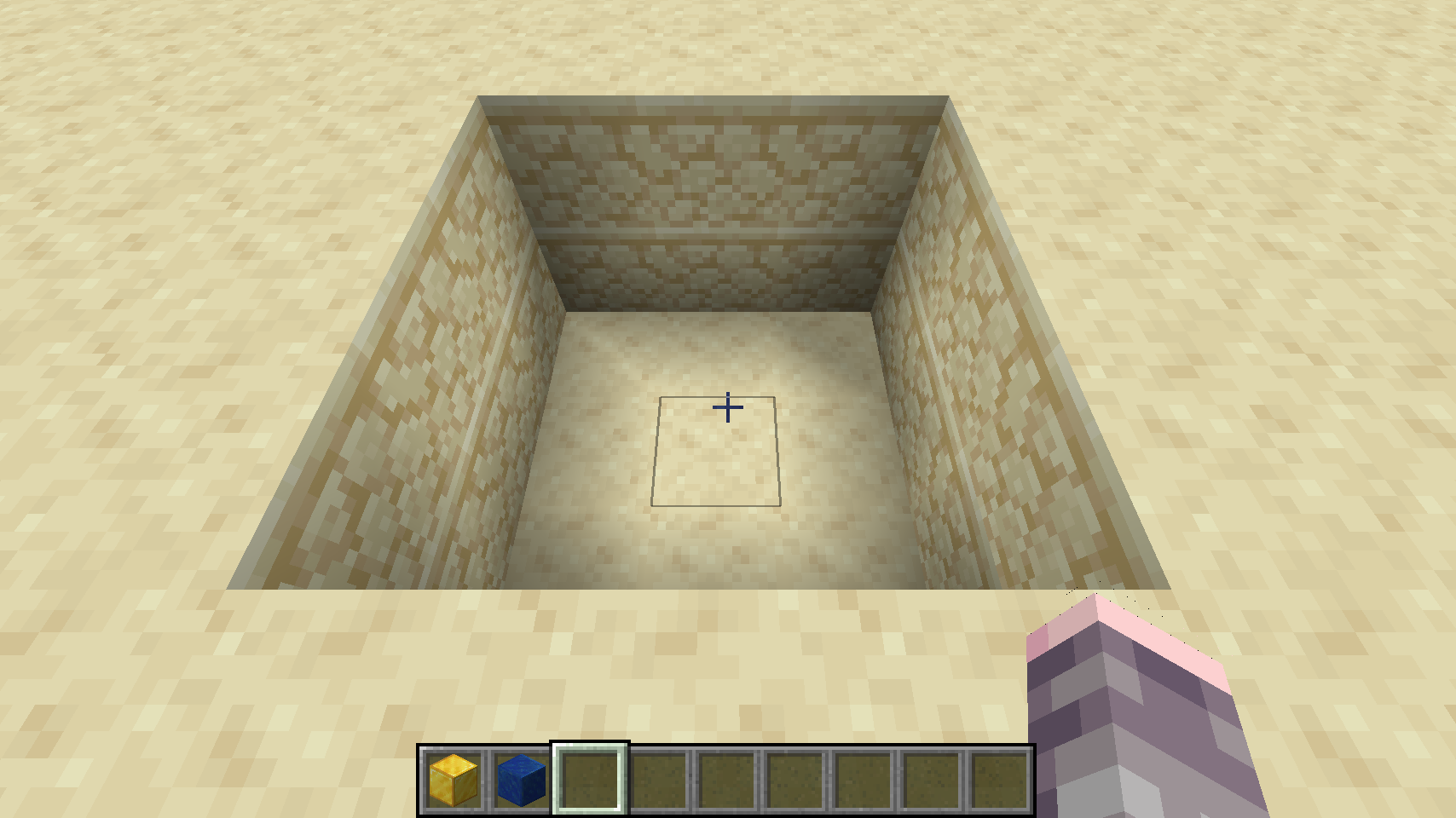
Place the gold block on the bottom:
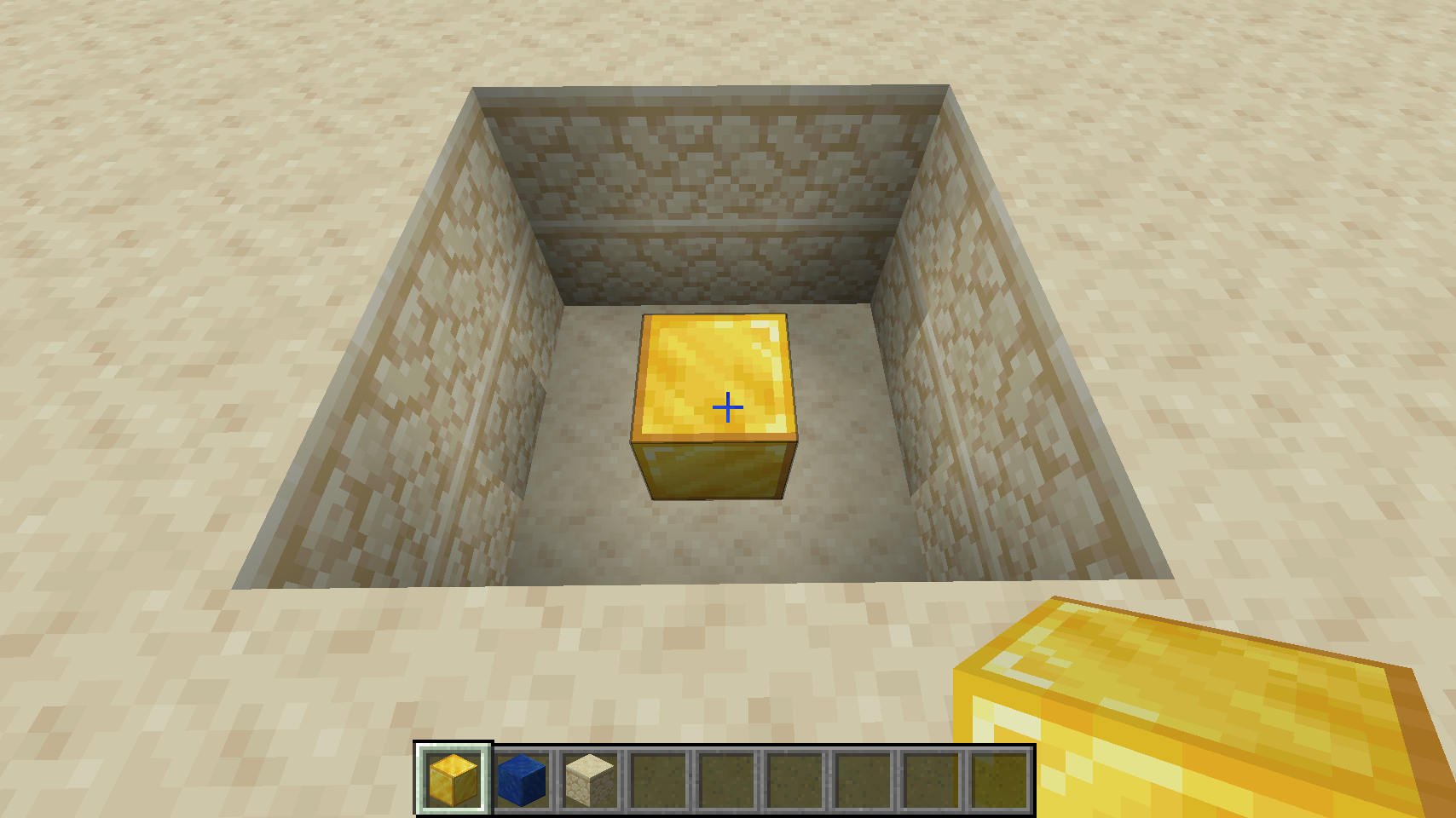
And then place the lapis block on top of that:
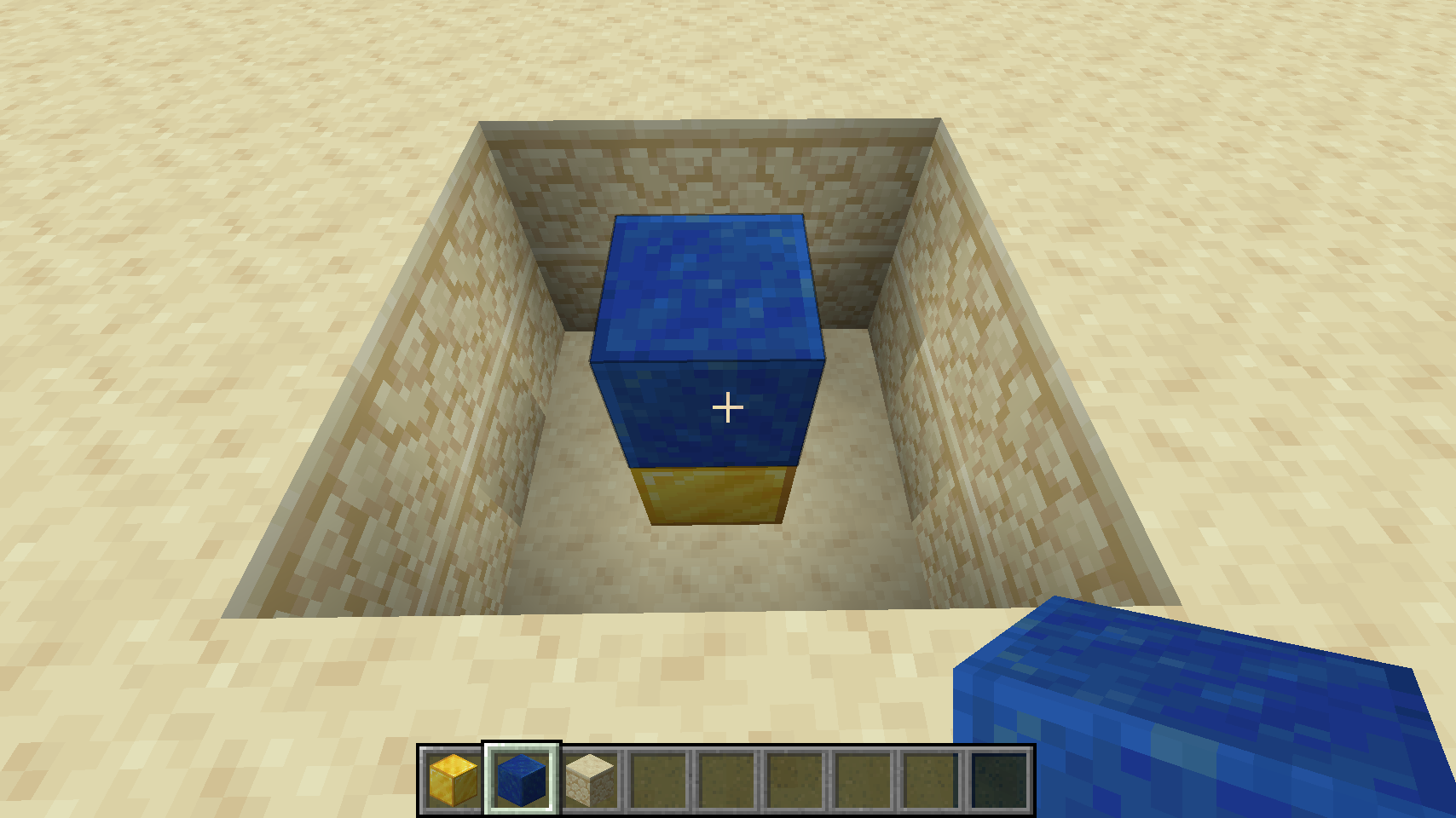
Fill in the rest of the hole:
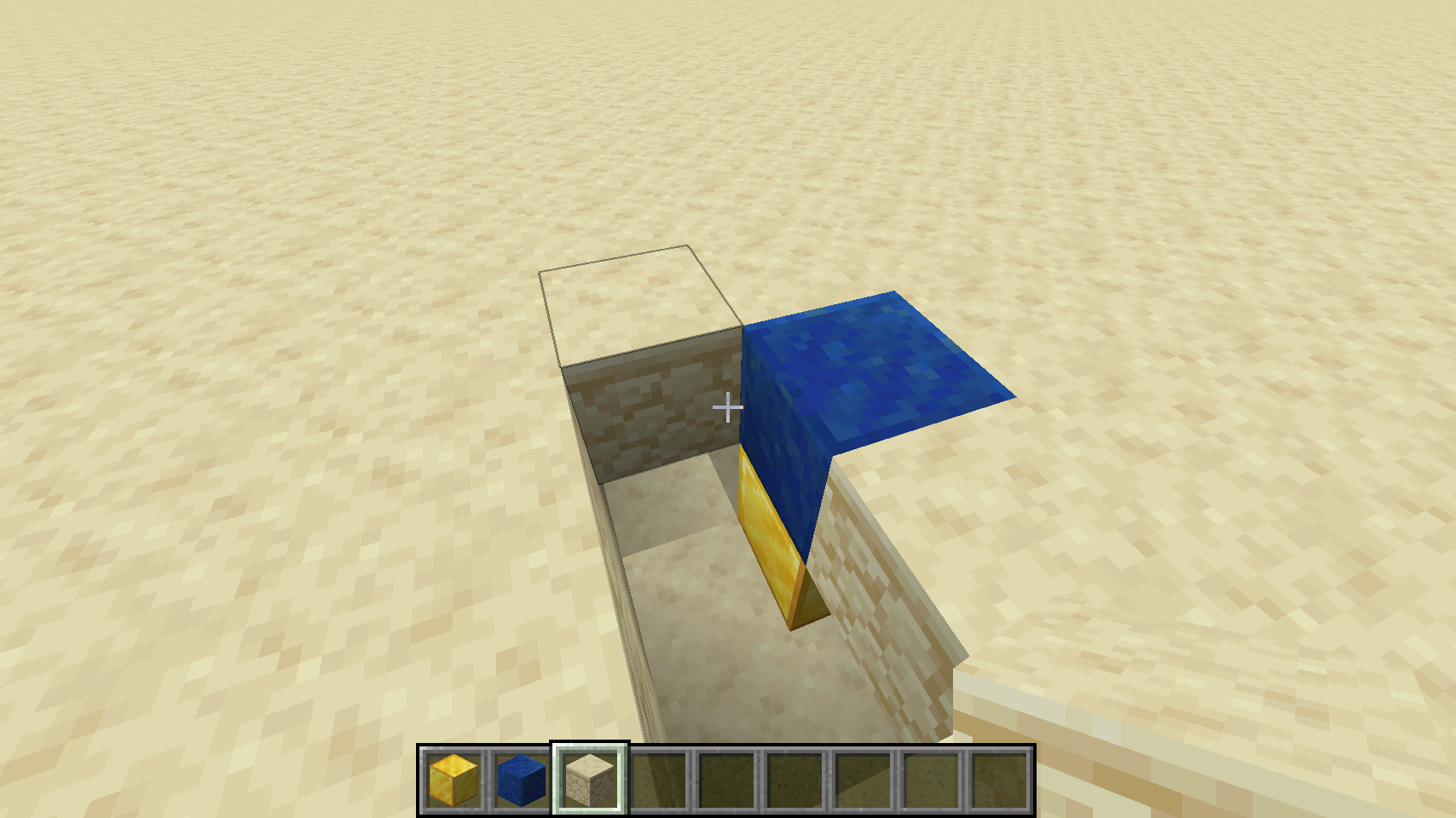
And you're done:
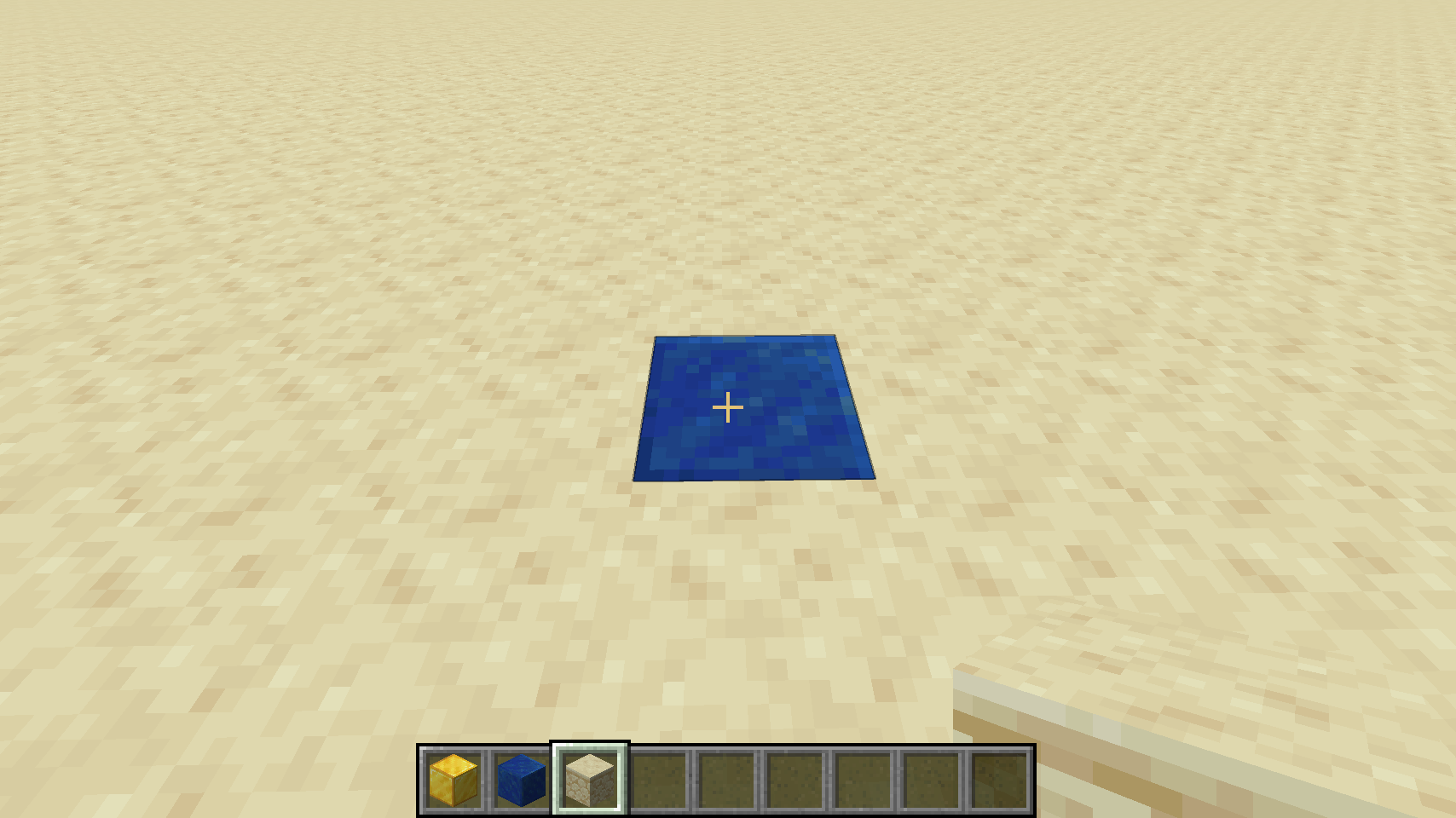
If you have more lapis and gold blocks, a 3x3 grid is recommended, so it's easier to drop items onto:
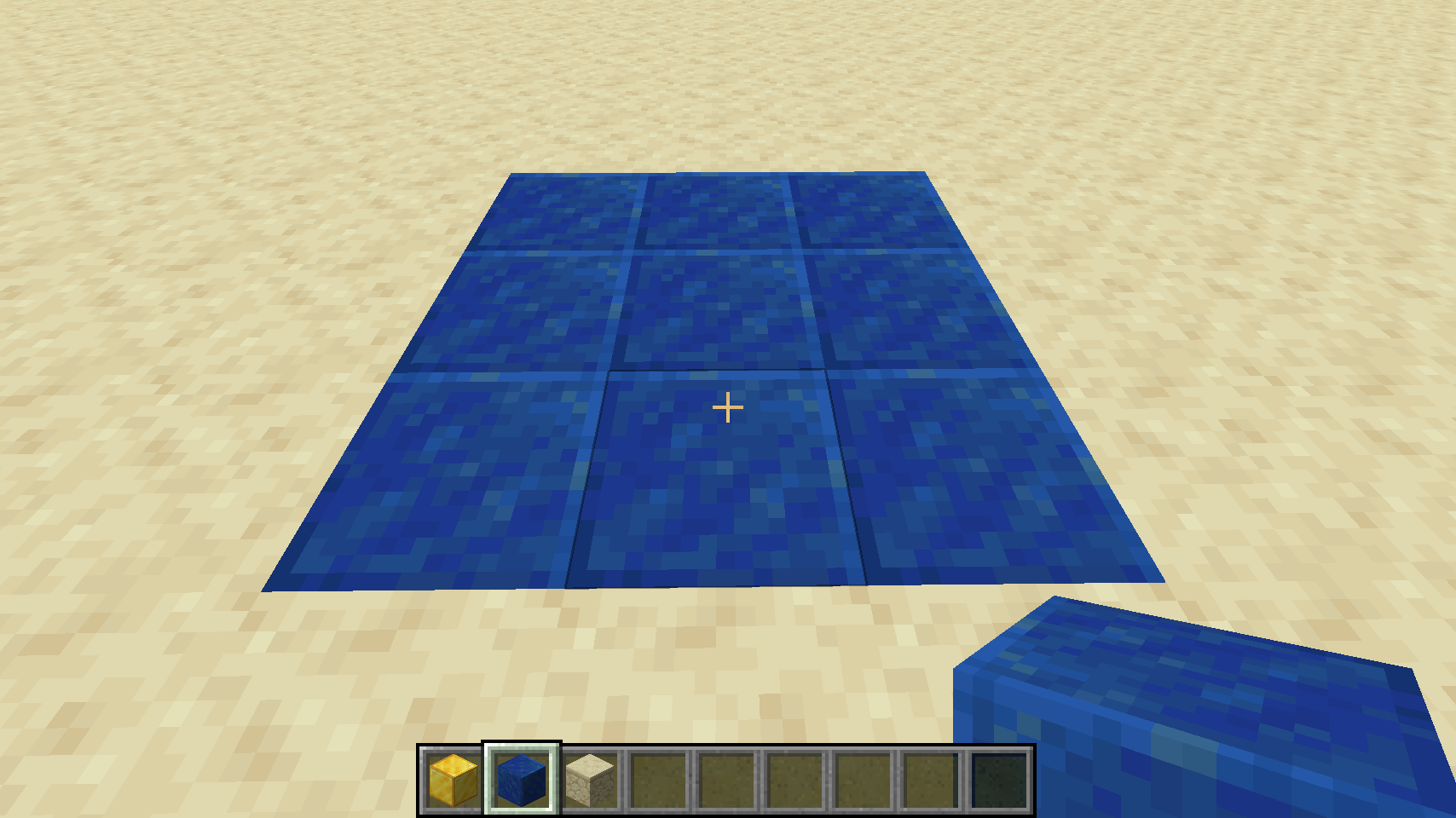
Now the controller is ready to go! All you have to do now is drop your items to be sorted onto any lapis block, and they will be teleported to their respective item frames. For Windows PC users, you can drop entire stacks at a time from your inventory using the `Ctrl-Q` keybind. For Mac users, you can press `Q` to drop single items, or click and drag each stack out of your inventory to drop it.
For a more advanced auto-controller, see the [Advanced](#advanced) section below. It requires a tiny bit of redstone, but it allows you to design a dropoff chest that automatically sorts all items placed into it.
## Creating an Item Receiver
An "item receiver" is just an [item frame](https://minecraft.gamepedia.com/Item_Frame) that contains a special item which represents one of the [39 groups](#groups). Then, all items to be sorted within that group will teleport to the item frame. What happens then? Well, it's actually entirely up to you! But the most common thing is to simply place a [hopper](https://minecraft.gamepedia.com/Hopper) underneath the item frame, and route that to a nearby chest. Example:
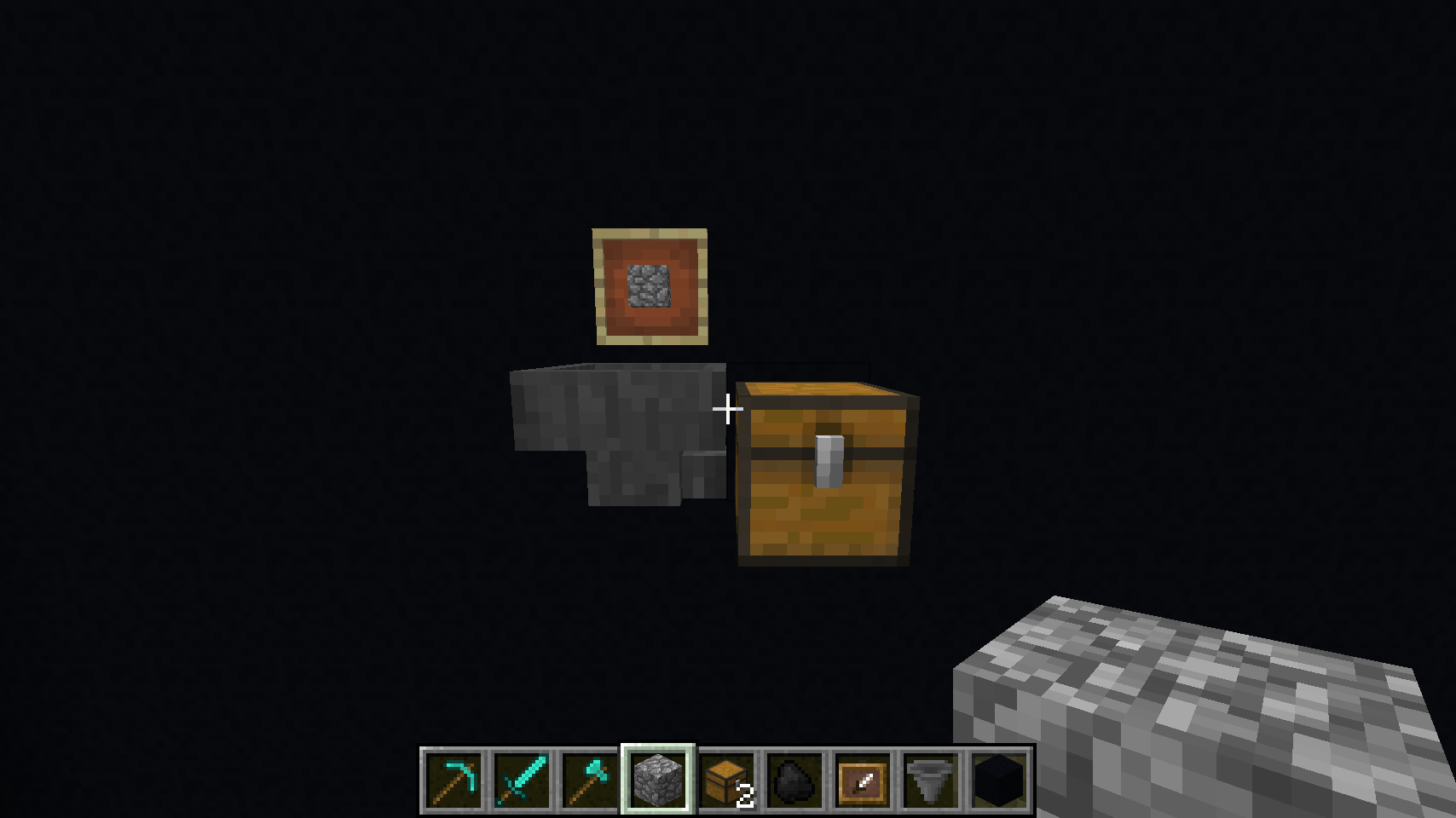
In this example, the item frame contains a [block of cobblestone](https://minecraft.gamepedia.com/Cobblestone), which is the item representing the [Stone](#stone) group, so all stone items will be routed here. They'll teleport to the item frame, drop into hopper and be delivered to the chest.
**Tip:** Make sure you shift-click on the chest when placing the hopper, so it directs the output accordingly. By default hoppers drop straight down.
### Multiple Chests
To handle item overflow, the best way is to simply build downward by adding more chests and hoppers directly beneath. The hopper system in Minecraft seems to handle distribution by filling the topmost and bottommost chests evenly, working inwards as things fill up. Example:
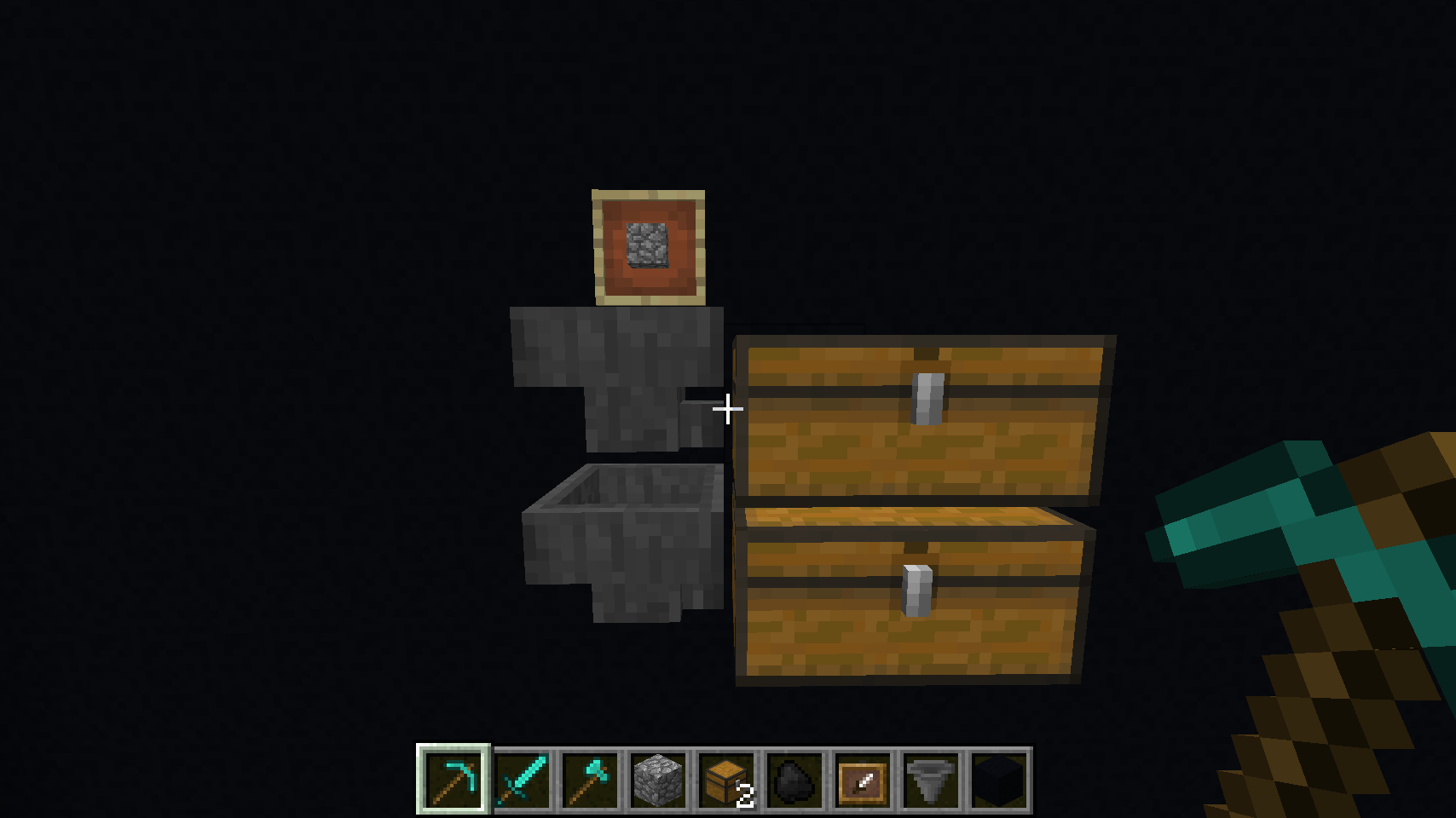
There are, of course, a million different ways to solve this problem -- this is only one simple example. But the idea with the magic sorting system is that it leaves things up to you! It only teleports items to appropriate frames, but *you* can decide how to handle routing and storage.
### Multiple Item Frames
For high traffic groups such as [Stone](#stone), where a player might drop off a large number of item stacks at once, it is recommended that you use multiple item frames. This is because a single hopper can only handle up to 5 stacks of items at one time. If you drop off more all at once, your hopper might overflow and dump some items onto the floor before it can route them. To handle this situation better, consider the following setup:
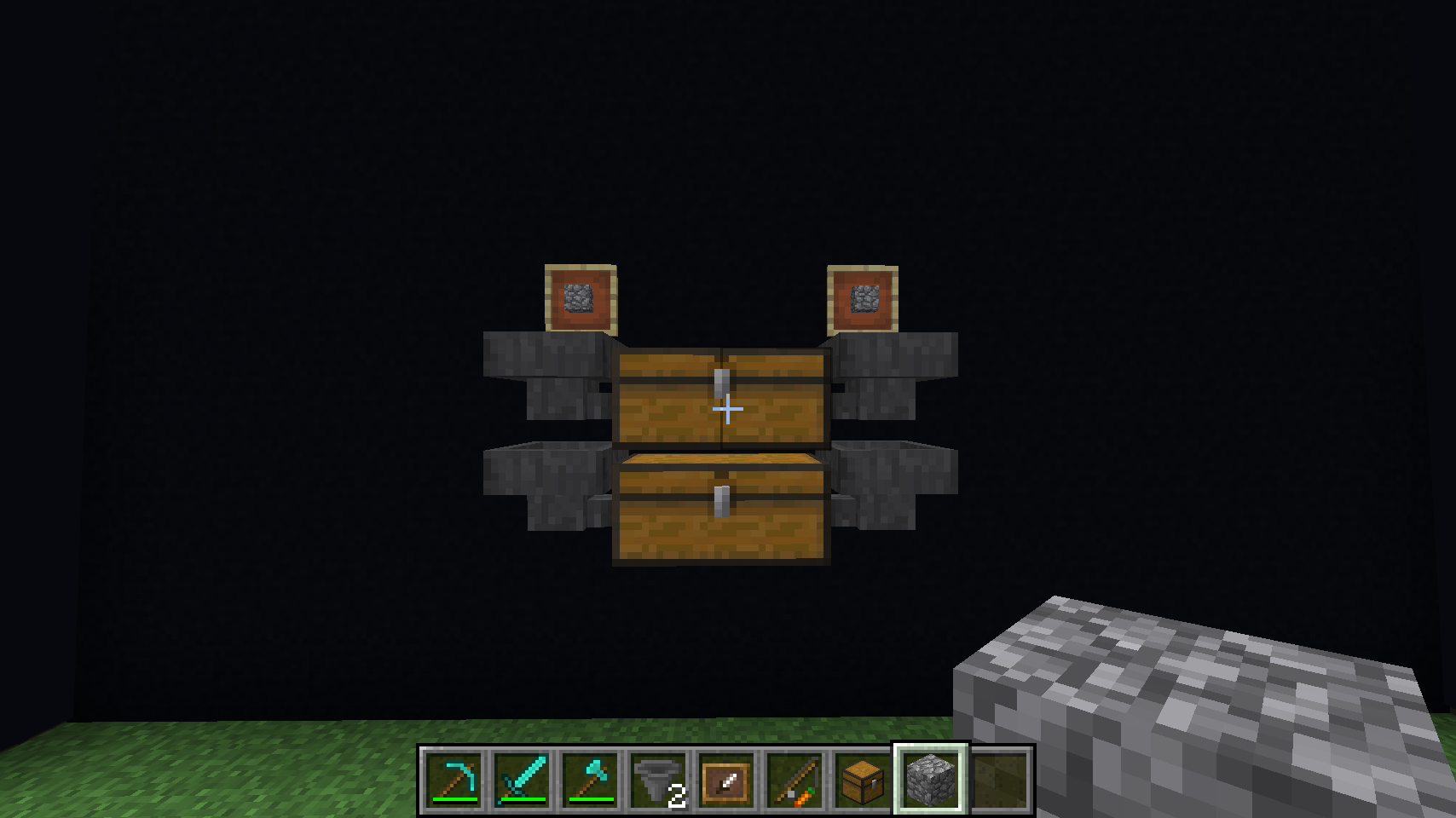
Here we have two item frames with identical items inside them, pointing to hoppers that route to the same chest. This works because the magic sorting system will pick *random item frame targets* for teleporting each item, if they both display the correct group target item, effectively balancing the drop-off load between the matching frames. So in this case the group could handle up to 10 stacks of items dropped off at once before it overflows.
There are other ways to handle item drop-off overflow, including building walls all around your item frames, so the items get "trapped" after teleporting, and just sit and wait until the hopper can service them. However, this means your item frame would have to be hidden in a wall, or in the ceiling, and thus you lose the dual-purpose nature of having the item frame be both a visual label, and a teleportation target.
Also see the [Advanced](#advanced) section for another way to solve item overflow, which is to build an automatic drop chest.
### Automatic Smelting or Cooking
You can route your items into things other than chests -- you can also setup an easy auto-smelting system, for [ores](#ores) and/or [raw food](#raw). Simply add an additional hopper under the item chest, and route it to a furnace on its top side:
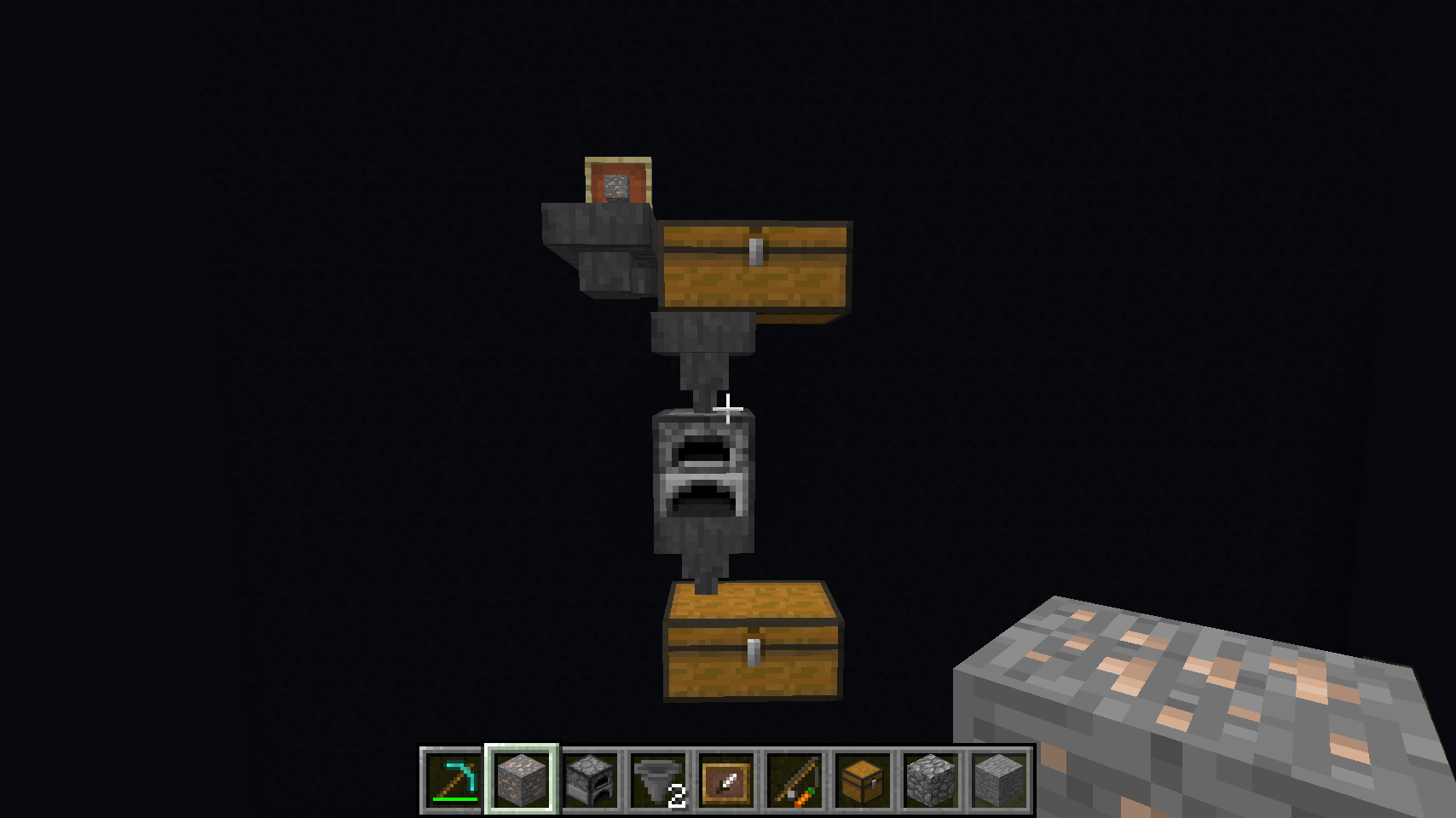
As you can see in the above example, you can also route the *output* of the furnace to another chest out the bottom, to hold your completed ingots or cooked food.
### Automatic Coal Fuel
Furnaces need fuel as well. So taking this a step further, you can route the [Coal](#coal) item group into the *sides* of the furnace, to automatically supply it with fuel. Here is a more complete example, with double item frames for handling many items at once:
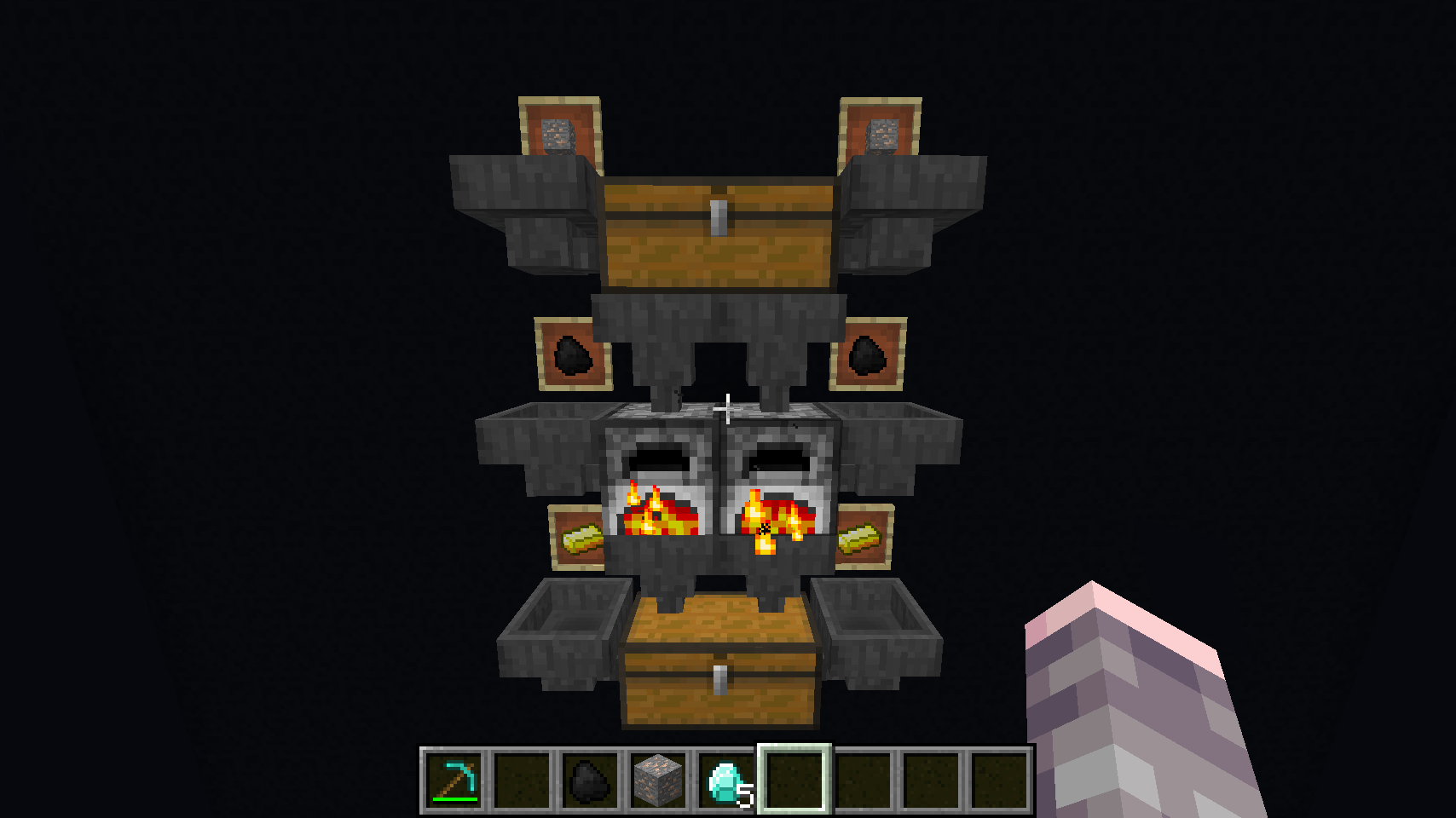
Here we have [Ores](#ores) routed into a double-chest at the top, which is then routed into two furnaces, which are auto supplied with fuel from the [Coal](#coal) group into the sides. Finally, the furnaces deposit smelted ingots into a double chest at the bottom, which is also setup as the [Precious](#precious) group (with the [gold ingots](https://minecraft.gamepedia.com/Gold_Ingot) displayed in the bottom item frames).
So let's say you come home from a mining trip and have some raw ores, some coal, and some ingots you found in a treasure chest. Simply drop off *all* the items at once, and the ores will get smelted, the coal fuel will power the furnaces, and all the ingots (including the ones you brought with you, *and* the smelted ones from the ore), will all end up in the [Precious](#precious) chest.
Remember that the magic sorting system will randomly pick item frames if multiple are available for a group. So you can *also* have a [Coal](#coal) group with additional item frames routed to plain chests, and it'll balance between storing the coal in your chests, and fueling your auto-smelting system.
### Fallback Groups
Several of the item groups have sub-groups, which are optional and fall back to the main group if a more specific item frame isn't found. For example, consider the following simple item receiver for the [Ocean](#ocean) group:
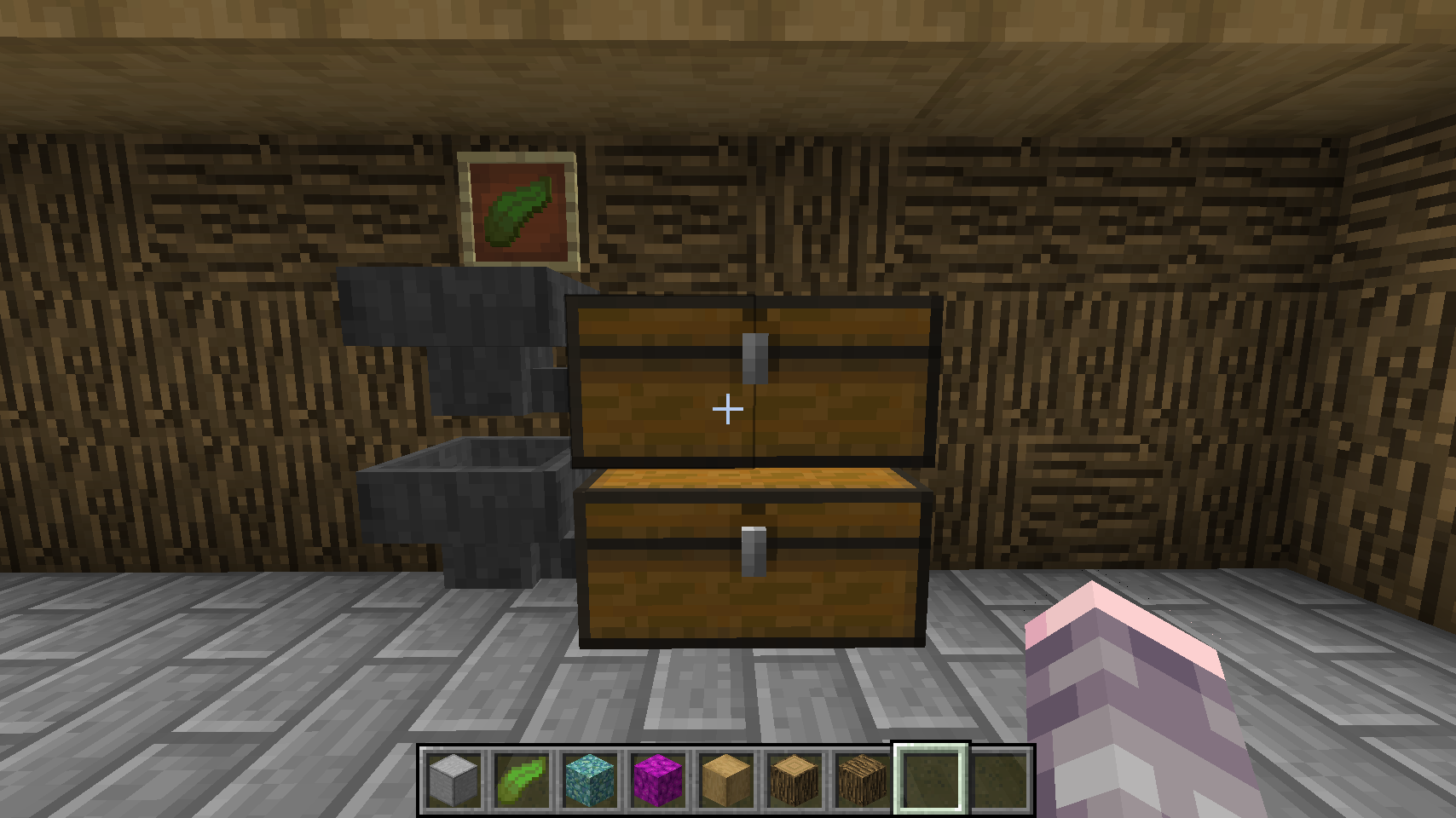
By default, this item frame with the [kelp](https://minecraft.gamepedia.com/Kelp) leaf on display would receive *all* items that come from the ocean. However, the sorting system defines two sub-groups under ocean, [Prismarine](#prismarine) and [Coral](#coral). These optional sub-groups can further sort the ocean's many items into 3 categories, if you want:
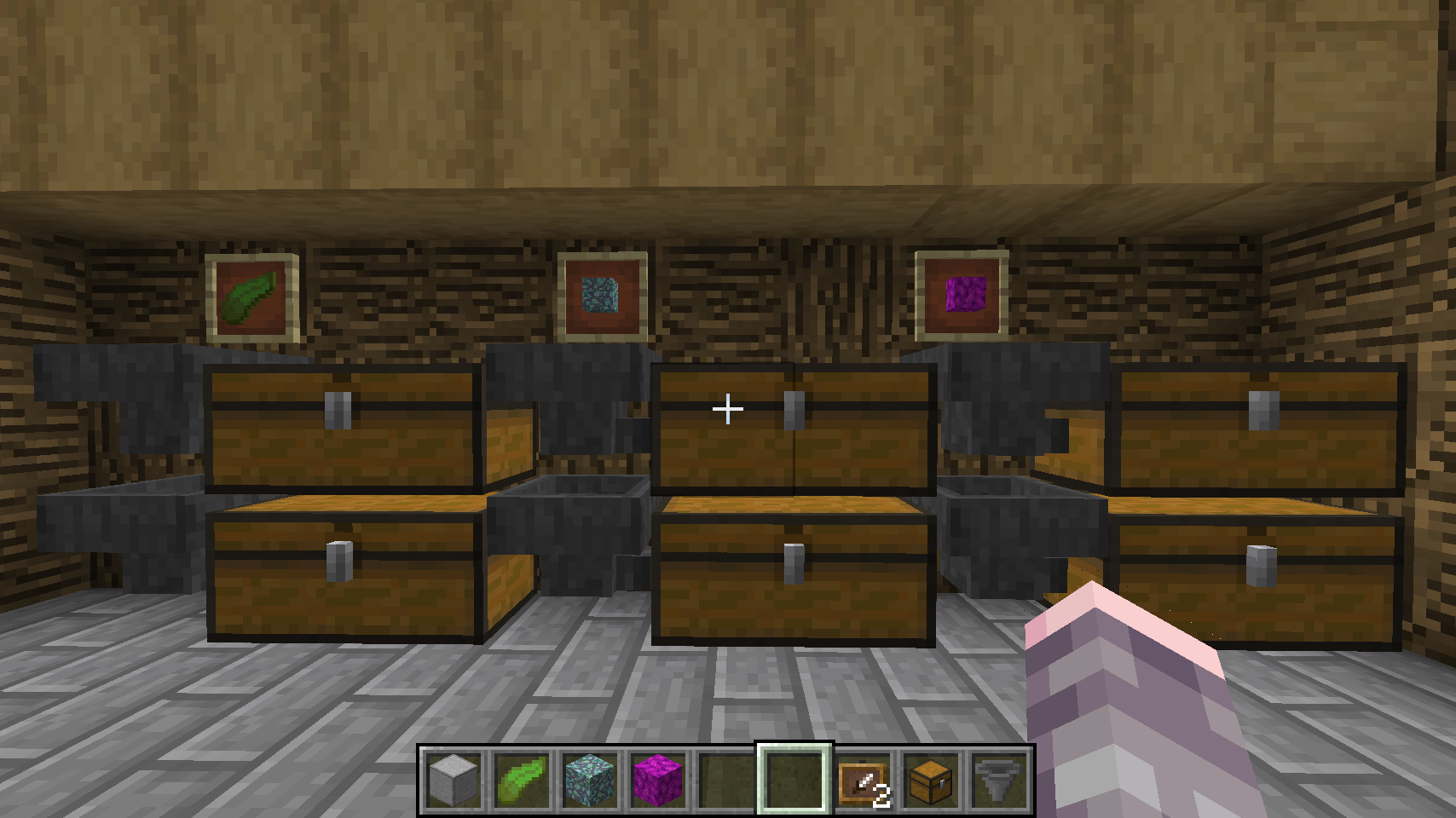
So in this case, all prismarine related items would teleport to the item frame with the [prismarine](https://minecraft.gamepedia.com/Prismarine) block, all coral items would teleport to the item frame with the [bubble coral](https://minecraft.gamepedia.com/Coral_Block) block, and all the *other* non-prismarine non-coral ocean items would teleport to the item frame with the [Kelp](https://minecraft.gamepedia.com/Kelp) leaf. The magic sorting system automatically detects which item frames are on display, and sorts accordingly.
See the [Groups](#groups) section below for a list of all 39 groups and to see how the sub-group hierarchy works.
### Misc Catch-All Group
All item groups ultimately fall back to a special [Misc](#misc) group, which is the universal "catch-all". That is, if no suitable item frame can be found for an item, it will teleport to the miscellaneous group, which uses the [carrot on a stick](https://minecraft.gamepedia.com/Carrot_on_a_Stick) display item:
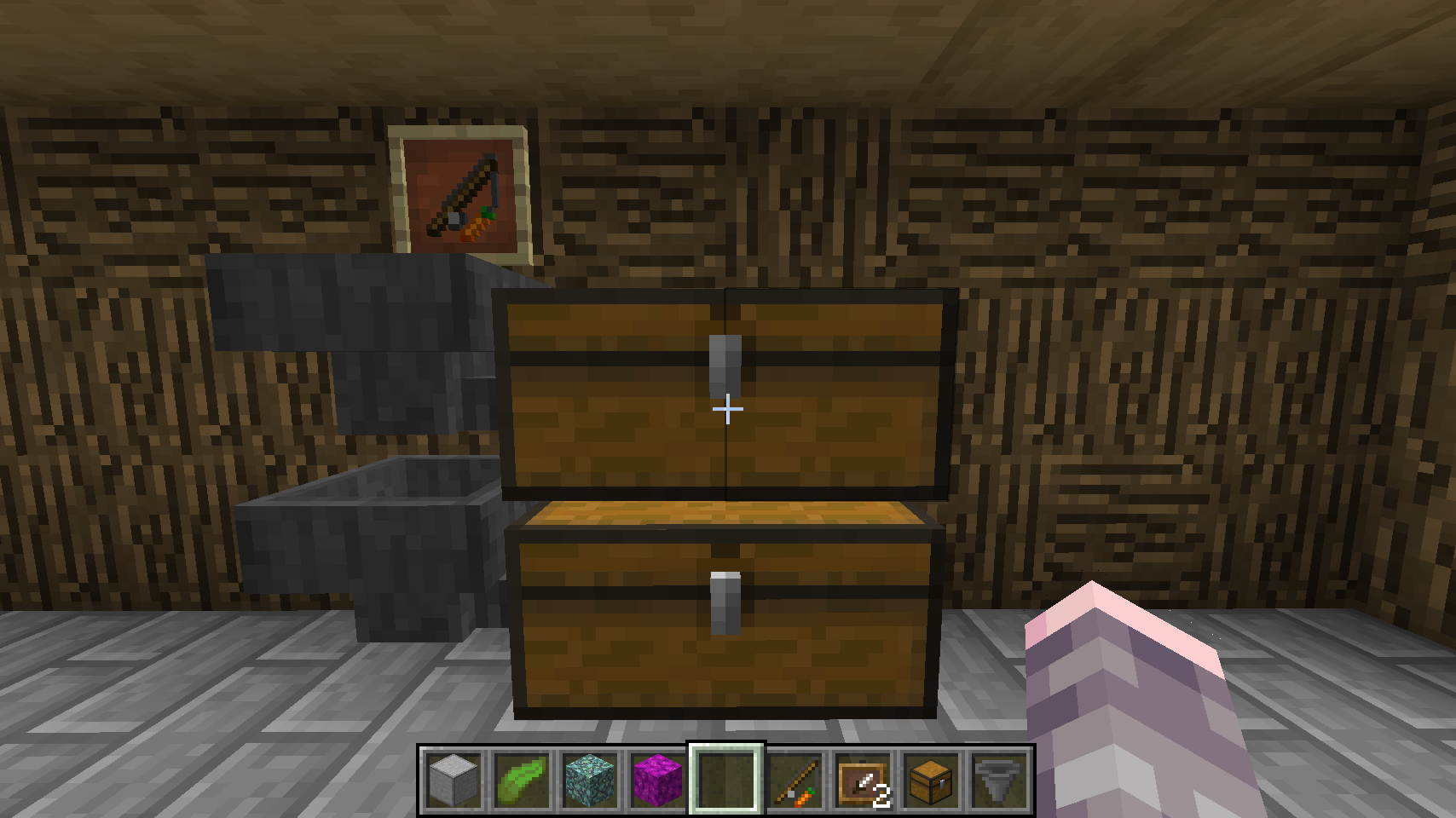
This is a great way to start out your storage system, so you don't have to build everything at once. Just build the main groups you need (dirt, sand, stone, ores, tools, etc.), and everything else will route to the misc group, until you have the time and resources to build all the specific groups.
Note that if the misc group item frame itself cannot be found, items will teleport back to the player.
## Controller for Farms
You can have as many controllers as you want in a Minecraft world. All you need is another [lapis block](https://minecraft.gamepedia.com/Lapis_Lazuli_Block) on top of a [gold block](https://minecraft.gamepedia.com/Block_of_Gold). One neat trick is to use one of these for a water-harvested plant farms or a nearby [dungeon](https://minecraft.gamepedia.com/Dungeon). Any loose items detected on top of the lapis block will be sorted and teleported just like the drop-off chest. For example, consider a simple mob dungeon like this:
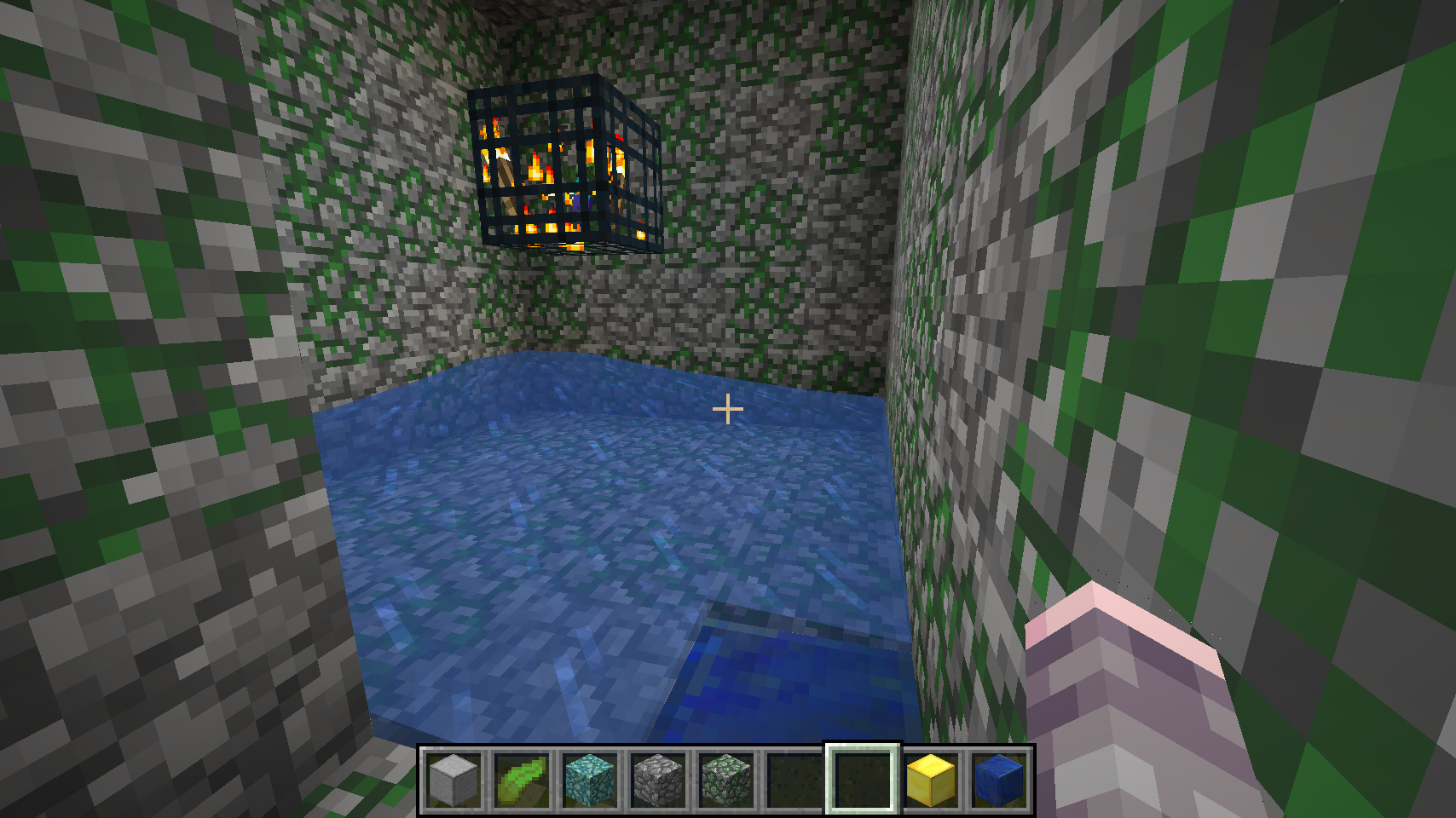
That's a lapis block in the bottom right corner there, just outside of the water range, with a gold block under it. If you were to setup a mob kill system here, either by trapping the mobs and killing them for XP, or devising a long fall for them, their item drops would fall onto the lapis and be instantly teleported into the sorting system.
This same kind of thing can work for an automated food farm as well, assuming you have a water-flush-harvest system in place. If all the ripe food gets flushed into a canal and routed to a single block, have it be a lapis block, with gold underneath, and you have an automated harvest sorting system!
## Advanced
One of the features of the Magic Sorting System is that no redstone is required. That is true, however with a simple redstone clock you can build a drop-off chest that automatically sorts all items placed inside it. It is much easier to dump your entire inventory into a chest versus tossing it out onto the floor. Also, this has another nice side effect in that it "throttles" item sorting so your hoppers do not overload. Here is how to build it:
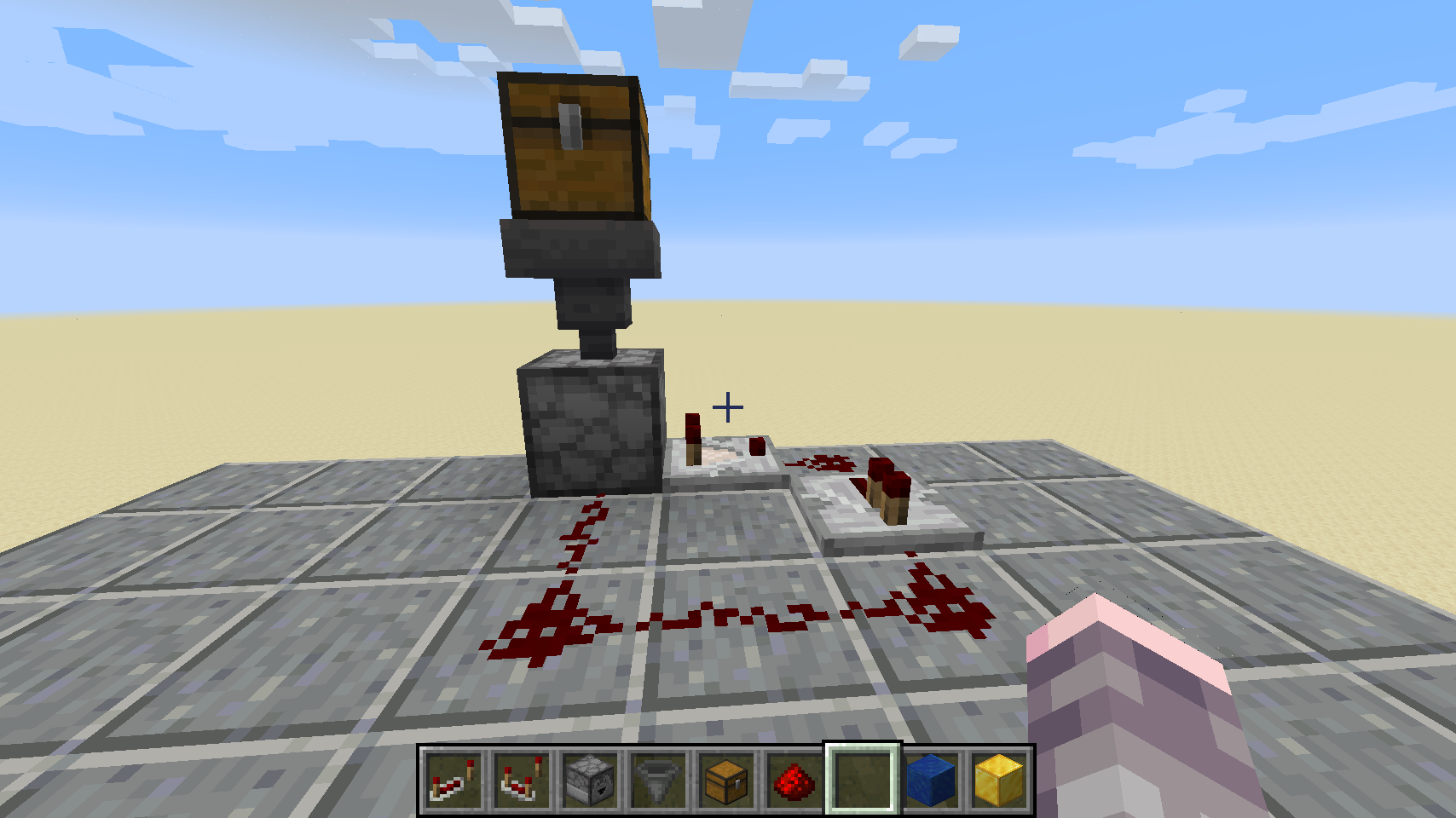
This requires a one [chest](https://minecraft.gamepedia.com/Chest), one [hopper](https://minecraft.gamepedia.com/Hopper), one [dropper](https://minecraft.gamepedia.com/Dropper) facing downward, one [comparator](https://minecraft.gamepedia.com/Redstone_Comparator), one [repeater](https://minecraft.gamepedia.com/Redstone_Repeater) and 5 [redstone dust](https://minecraft.gamepedia.com/Redstone_Dust). The redstone circuit is copied verbatim from [this video tutorial](https://www.youtube.com/watch?v=-oUSS5jTHps), so please watch that to see how to orient the blocks. In particular, the comparator must be facing *away* from the dropper. Here is a view from above:
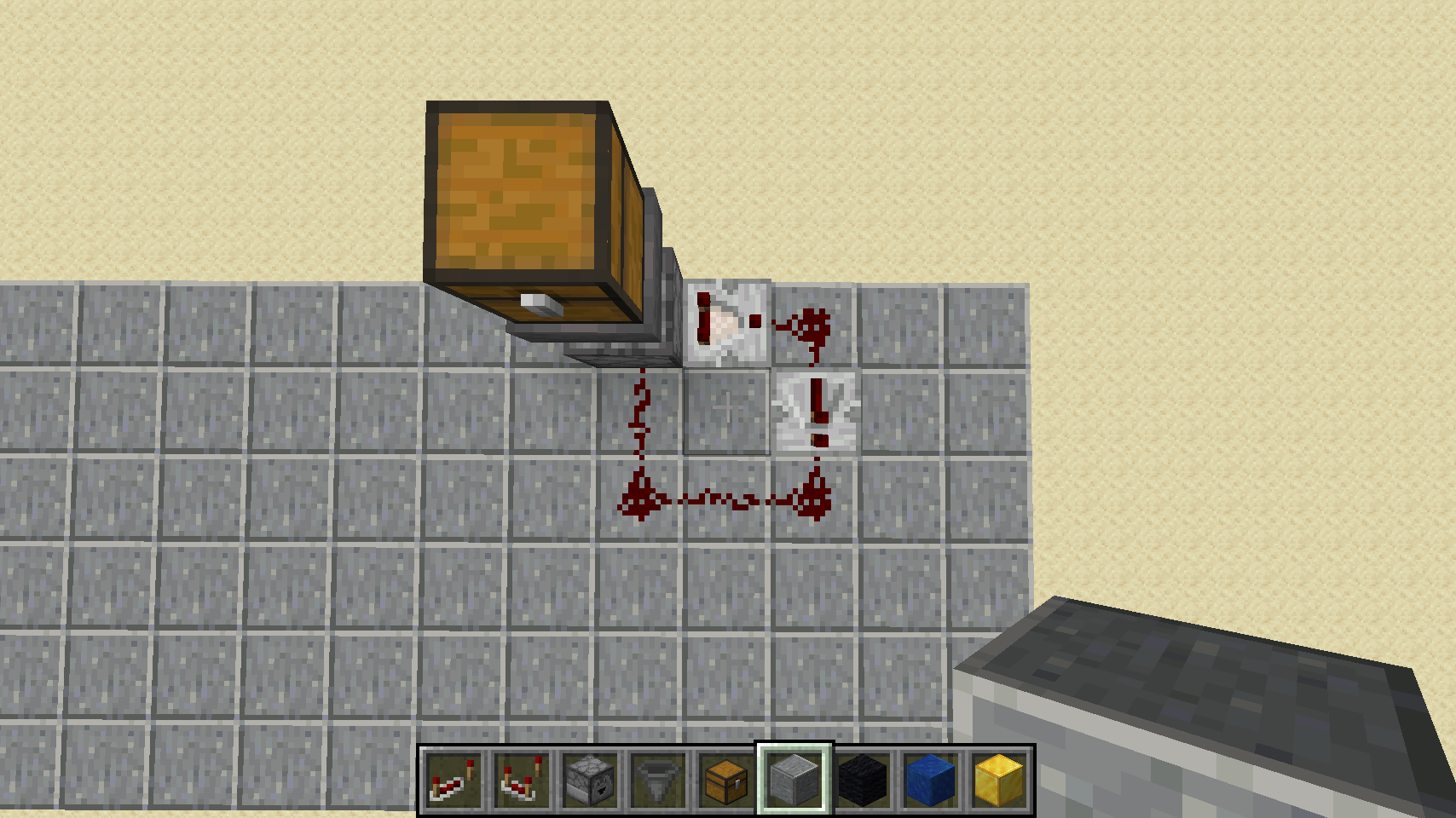
The key here is to face the dropper downward, leave one block of empty space below it, and then place your [lapis block](https://minecraft.gamepedia.com/Lapis_Lazuli_Block) on top of a [gold block](https://minecraft.gamepedia.com/Block_of_Gold) underneath all that. Here is a cross section view:
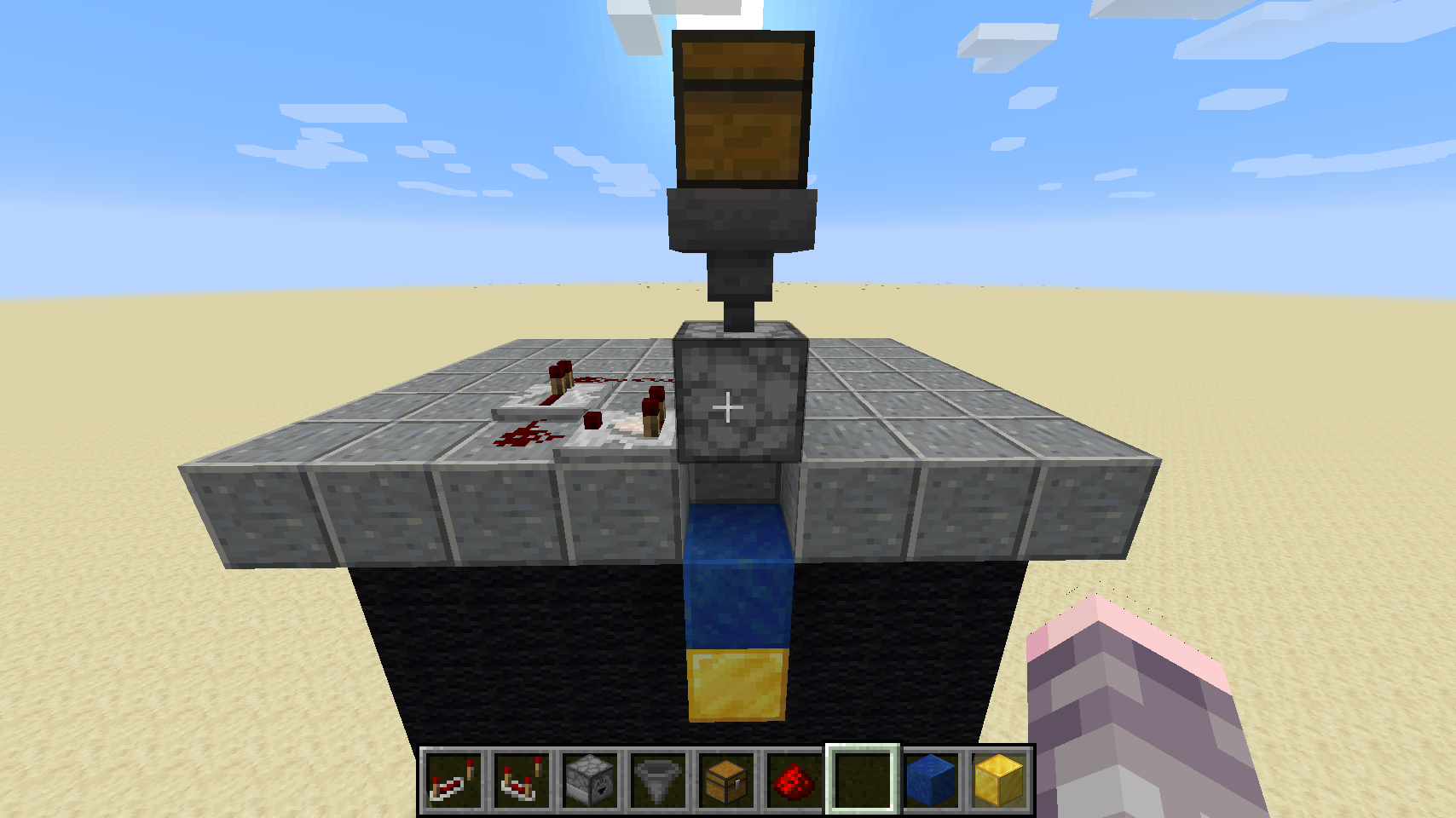
Then, simply place items or entire stacks into the chest and they'll automatically start sorting themselves. This redstone clock only ticks if there are items in the chest, so it makes no noise unless items are dropped into it.
**Tip:** If the dropper ticking noise bothers you, consider using a resource pack. Check out [Vanilla Tweaks](https://vanillatweaks.net/picker/resource-packs/), click to expand the "**Peace and Quiet**" group and then download the "**Quieter Dispensers and Droppers**" pack.
**Tip:** If you use a [trapped chest](https://minecraft.gamepedia.com/Trapped_Chest) instead of a normal one, the system will not start sorting items until you close the chest lid. This is a nice safeguard in case you shift-click on the wrong item in your inventory.
### Double Speed Auto-Drop Chest
If the auto-drop chest is too slow for your taste, you can build a much faster one with some more materials. For this you will need two [chests](https://minecraft.gamepedia.com/Chest), two [hoppers](https://minecraft.gamepedia.com/Hopper), two [droppers](https://minecraft.gamepedia.com/Dropper) facing downward, two [comparators](https://minecraft.gamepedia.com/Redstone_Comparator), two [repeaters](https://minecraft.gamepedia.com/Redstone_Repeater) and 10 [redstone dust](https://minecraft.gamepedia.com/Redstone_Dust). The double-speed redstone circuit is copied verbatim from [this video tutorial](https://www.youtube.com/watch?v=w5tiFl74cSI), so please watch that to see how to orient the blocks. Here is how it should look:
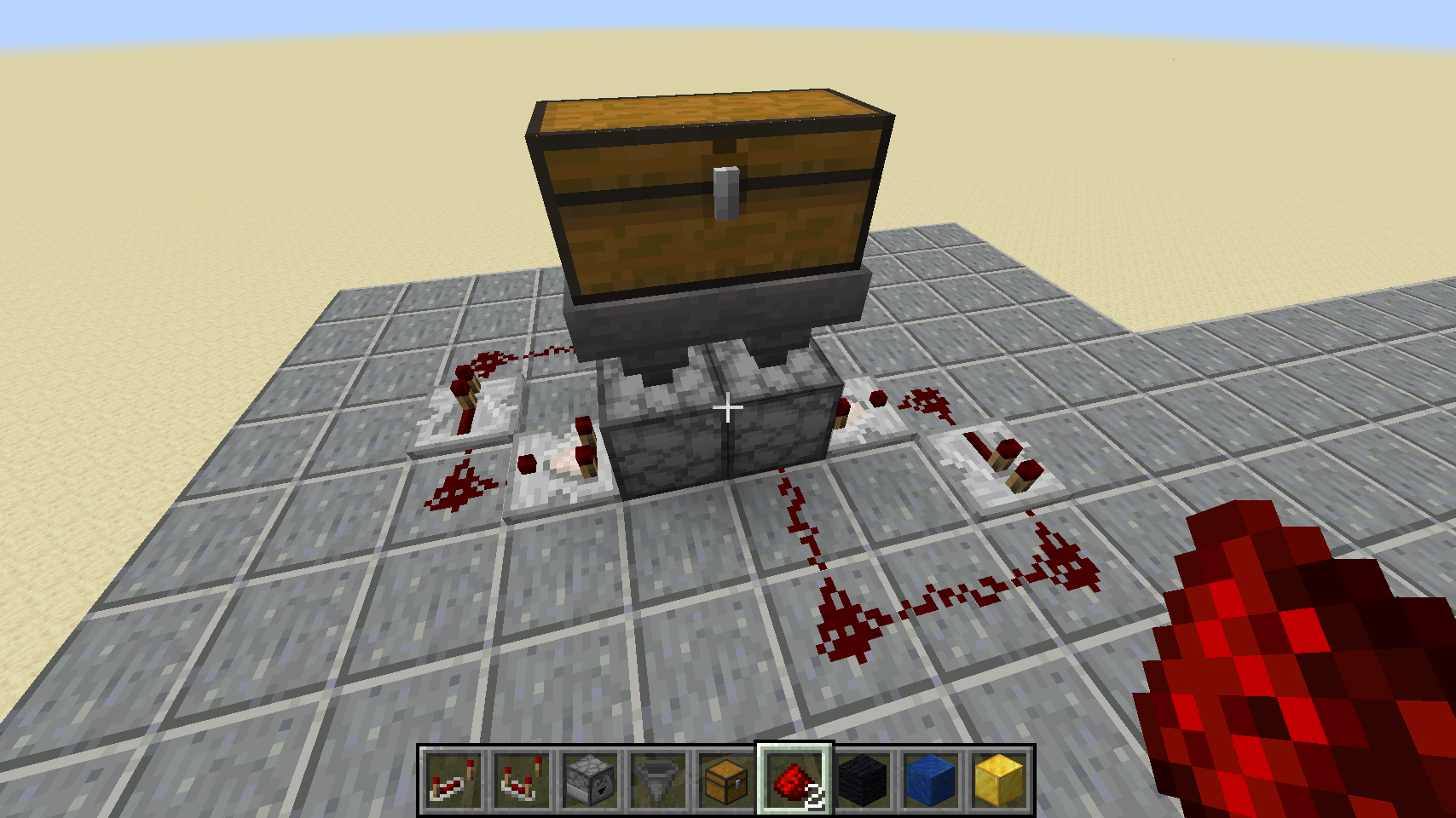
Note that each comparator faces away from the droppers, but the redstone is mirrored on each side. The [video](https://www.youtube.com/watch?v=w5tiFl74cSI) does a much better job of explaining this, but here is a view from above:
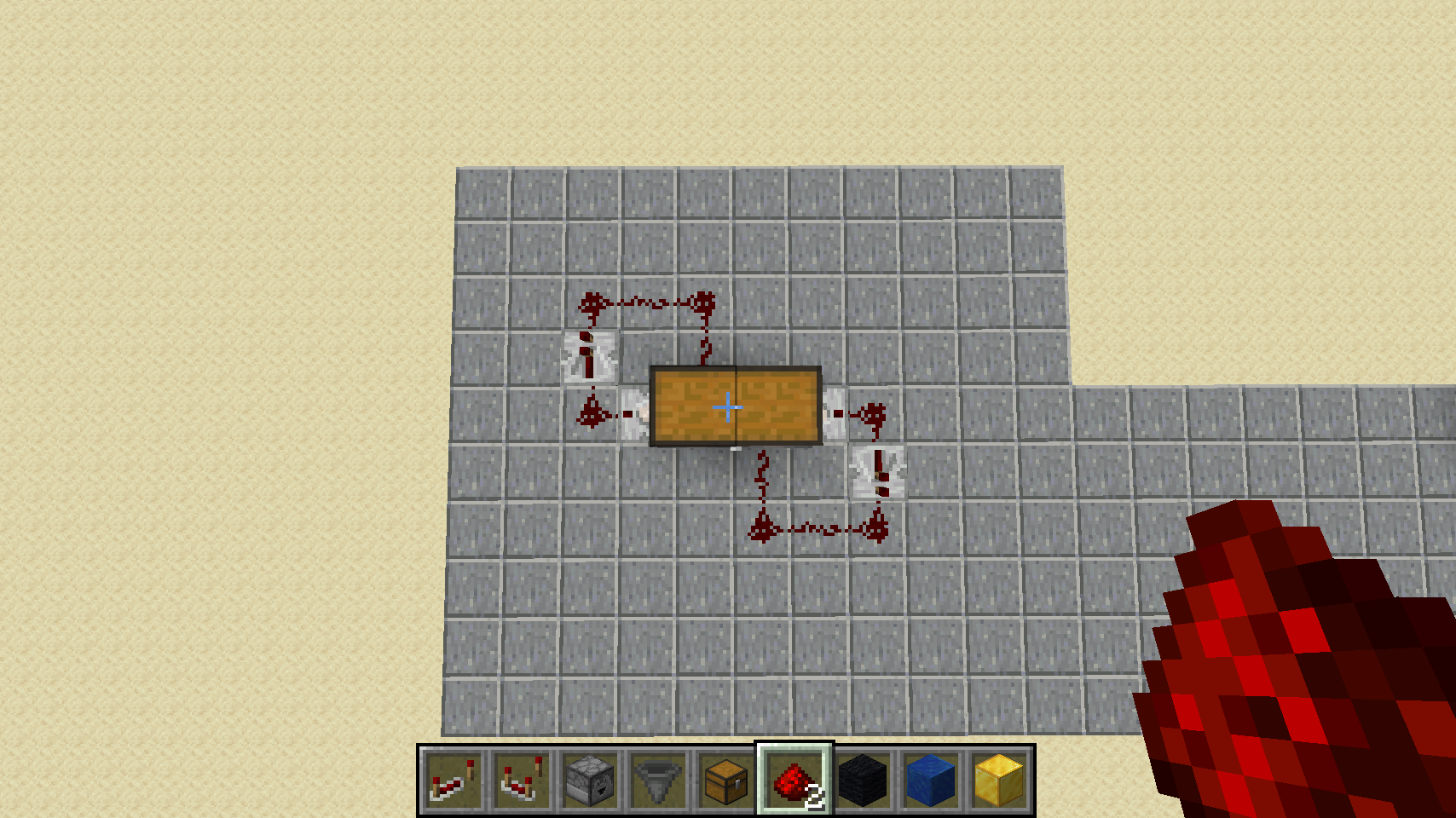
Just like the single drop chest, you should face both droppers downward, leave one block of empty space below them, and then place your [lapis blocks](https://minecraft.gamepedia.com/Lapis_Lazuli_Block) on top of [gold blocks](https://minecraft.gamepedia.com/Block_of_Gold) underneath all that. Here is a cross section view:
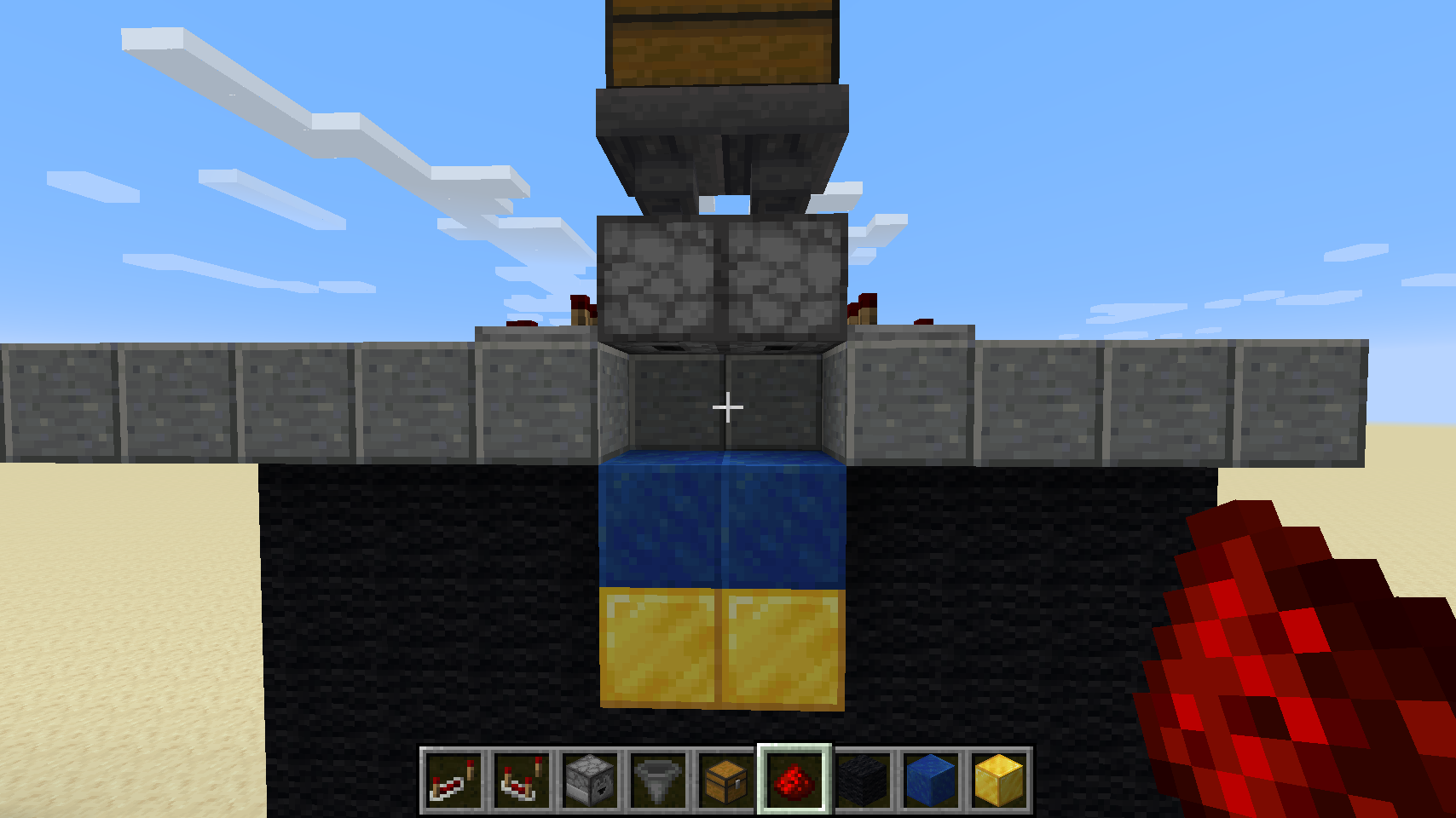
Feel free to bury the entire thing (leave some air for the redstone to breathe), and just have the drop chest sticking up above ground.
## Groups
Here is a list of all 39 groups in the magic sorting system, how some fallback to others, and all the items they contain.
### Dirt
| Group ID | Items | Fallback Group | Item Frame | Image |
|----------|-------|----------------|------------|-------|
| `dirt` | 9 | Misc | `minecraft:dirt` |  |
|
The Dirt group contains all forms of dirt blocks, including regular, coarse, farmland, grass blocks (silk touched), grass path, mycelium and podzol.
Click to Show Dirt Items
| Item ID | Image |
|---------|-------|
| `minecraft:coarse_dirt` |  |
|
| `minecraft:dirt` | |
| `minecraft:farmland` |  |
|
| `minecraft:grass_block` |  |
|
| `minecraft:grass_path` |  |
|
| `minecraft:mycelium` |  |
|
| `minecraft:podzol` |  |
|
| `minecraft:crimson_nylium` |  |
|
| `minecraft:warped_nylium` |  |
|
#### Gravel
| Group ID | Items | Fallback Group | Item Frame | Image |
|----------|-------|----------------|------------|-------|
| `gravel` | 1 | Dirt | `minecraft:gravel` |  |
|
The Gravel group contains only gravel blocks. It is deliberately sorted into its own group, but this is optional. If you omit the gravel target item frame, it will fallback to the Dirt group.
Click to Show Gravel Items
| Item ID | Image |
|---------|-------|
| `minecraft:gravel` | |
### Sand
| Group ID | Items | Fallback Group | Item Frame | Image |
|----------|-------|----------------|------------|-------|
| `sand` | 1 | Misc | `minecraft:sand` |  |
|
The Sand group contains only sand blocks. However, see [Sandstone](#sandstone) below. If you omit the sandstone group, all sandstone blocks fallback to the Sand group.
Click to Show Sand Items
| Item ID | Image |
|---------|-------|
| `minecraft:sand` | |
#### Sandstone
| Group ID | Items | Fallback Group | Item Frame | Image |
|----------|-------|----------------|------------|-------|
| `sandstone` | 21 | Sand | `minecraft:sandstone` |  |
|
The Sandstone group contains all the various forms of sandstone, including regular, smooth, chiseled, cut, red, and slabs and stairs. If you would prefer sandstone to get sorted with sand, simply omit the sandstone item frame. All sandstone falls back to sand.
Click to Show Sandstone Items
| Item ID | Image |
|---------|-------|
| `minecraft:chiseled_red_sandstone` |  |
|
| `minecraft:chiseled_sandstone` |  |
|
| `minecraft:cut_red_sandstone` |  |
|
| `minecraft:cut_sandstone` |  |
|
| `minecraft:red_sand` |  |
|
| `minecraft:red_sandstone` |  |
|
| `minecraft:red_sandstone_slab` |  |
|
| `minecraft:red_sandstone_stairs` |  |
|
| `minecraft:sandstone` | |
| `minecraft:sandstone_slab` |  |
|
| `minecraft:sandstone_stairs` |  |
|
| `minecraft:smooth_red_sandstone` |  |
|
| `minecraft:smooth_sandstone` |  |
|
| `minecraft:cut_red_sandstone_slab` |  |
|
| `minecraft:cut_sandstone_slab` |  |
|
| `minecraft:red_sandstone_wall` |  |
|
| `minecraft:sandstone_wall` |  |
|
| `minecraft:smooth_red_sandstone_slab` |  |
|
| `minecraft:smooth_red_sandstone_stairs` |  |
|
| `minecraft:smooth_sandstone_slab` |  |
|
| `minecraft:smooth_sandstone_stairs` |  |
|
### Wood
| Group ID | Items | Fallback Group | Item Frame | Image |
|----------|-------|----------------|------------|-------|
| `wood` | 41 | Misc | `minecraft:oak_log` |  |
|
The Wood group contains primarily raw wood blocks, but also includes stripped logs, and simple planks and sticks. All other wood products are sorted into the [Woodwork](#woodwork) group.
Click to Show Wood Items
| Item ID | Image |
|---------|-------|
| `minecraft:acacia_log` |  |
|
| `minecraft:acacia_planks` |  |
|
| `minecraft:acacia_wood` |  |
|
| `minecraft:birch_log` |  |
|
| `minecraft:birch_planks` |  |
|
| `minecraft:birch_wood` |  |
|
| `minecraft:dark_oak_log` |  |
|
| `minecraft:dark_oak_planks` |  |
|
| `minecraft:dark_oak_wood` |  |
|
| `minecraft:jungle_log` |  |
|
| `minecraft:jungle_planks` |  |
|
| `minecraft:jungle_wood` |  |
|
| `minecraft:oak_log` | |
| `minecraft:oak_planks` |  |
|
| `minecraft:oak_wood` |  |
|
| `minecraft:spruce_log` |  |
|
| `minecraft:spruce_planks` |  |
|
| `minecraft:spruce_wood` |  |
|
| `minecraft:stick` |  |
|
| `minecraft:stripped_acacia_log` |  |
|
| `minecraft:stripped_acacia_wood` |  |
|
| `minecraft:stripped_birch_log` |  |
|
| `minecraft:stripped_birch_wood` |  |
|
| `minecraft:stripped_dark_oak_log` |  |
|
| `minecraft:stripped_dark_oak_wood` |  |
|
| `minecraft:stripped_jungle_log` |  |
|
| `minecraft:stripped_jungle_wood` |  |
|
| `minecraft:stripped_oak_log` |  |
|
| `minecraft:stripped_oak_wood` |  |
|
| `minecraft:stripped_spruce_log` |  |
|
| `minecraft:stripped_spruce_wood` |  |
|
| `minecraft:crimson_planks` |  |
|
| `minecraft:warped_planks` |  |
|
| `minecraft:crimson_stem` |  |
|
| `minecraft:warped_stem` |  |
|
| `minecraft:stripped_crimson_stem` |  |
|
| `minecraft:stripped_warped_stem` |  |
|
| `minecraft:stripped_crimson_hyphae` |  |
|
| `minecraft:stripped_warped_hyphae` |  |
|
| `minecraft:crimson_hyphae` |  |
|
| `minecraft:warped_hyphae` |  |
|
#### Woodwork
| Group ID | Items | Fallback Group | Item Frame | Image |
|----------|-------|----------------|------------|-------|
| `woodwork` | 112 | Wood | `minecraft:oak_stairs` |  |
|
The Woodwork group contains all products made out of wood, including slabs, stairs, boats, doors, beds, buttons, fences, gates, pressure plates, trap doors, chests, bowls, item frames, signs and ladders. If you would prefer all wood to be sorted into a single combined group, omit the item frame for this group, and all woodwork products will fallback to the [Wood](#wood) group.
Click to Show Woodwork Items
| Item ID | Image |
|---------|-------|
| `minecraft:acacia_boat` |  |
|
| `minecraft:acacia_button` |  |
|
| `minecraft:acacia_door` |  |
|
| `minecraft:acacia_fence` |  |
|
| `minecraft:acacia_fence_gate` |  |
|
| `minecraft:acacia_pressure_plate` |  |
|
| `minecraft:acacia_slab` |  |
|
| `minecraft:acacia_stairs` |  |
|
| `minecraft:acacia_trapdoor` |  |
|
| `minecraft:birch_boat` |  |
|
| `minecraft:birch_button` |  |
|
| `minecraft:birch_door` |  |
|
| `minecraft:birch_fence` |  |
|
| `minecraft:birch_fence_gate` |  |
|
| `minecraft:birch_pressure_plate` |  |
|
| `minecraft:birch_slab` |  |
|
| `minecraft:birch_stairs` |  |
|
| `minecraft:birch_trapdoor` |  |
|
| `minecraft:black_bed` |  |
|
| `minecraft:blue_bed` |  |
|
| `minecraft:bowl` |  |
|
| `minecraft:brown_bed` |  |
|
| `minecraft:crafting_table` |  |
|
| `minecraft:cyan_bed` |  |
|
| `minecraft:dark_oak_boat` |  |
|
| `minecraft:dark_oak_button` |  |
|
| `minecraft:dark_oak_door` |  |
|
| `minecraft:dark_oak_fence` |  |
|
| `minecraft:dark_oak_fence_gate` |  |
|
| `minecraft:dark_oak_pressure_plate` |  |
|
| `minecraft:dark_oak_slab` |  |
|
| `minecraft:dark_oak_stairs` |  |
|
| `minecraft:dark_oak_trapdoor` |  |
|
| `minecraft:gray_bed` |  |
|
| `minecraft:green_bed` |  |
|
| `minecraft:item_frame` |  |
|
| `minecraft:jungle_boat` |  |
|
| `minecraft:jungle_button` |  |
|
| `minecraft:jungle_door` |  |
|
| `minecraft:jungle_fence` |  |
|
| `minecraft:jungle_fence_gate` |  |
|
| `minecraft:jungle_pressure_plate` |  |
|
| `minecraft:jungle_slab` |  |
|
| `minecraft:jungle_stairs` |  |
|
| `minecraft:jungle_trapdoor` |  |
|
| `minecraft:ladder` |  |
|
| `minecraft:light_blue_bed` |  |
|
| `minecraft:light_gray_bed` |  |
|
| `minecraft:lime_bed` |  |
|
| `minecraft:magenta_bed` |  |
|
| `minecraft:oak_boat` |  |
|
| `minecraft:oak_button` |  |
|
| `minecraft:oak_door` |  |
|
| `minecraft:oak_fence` |  |
|
| `minecraft:oak_fence_gate` |  |
|
| `minecraft:oak_pressure_plate` |  |
|
| `minecraft:oak_slab` |  |
|
| `minecraft:oak_stairs` | |
| `minecraft:oak_trapdoor` |  |
|
| `minecraft:orange_bed` |  |
|
| `minecraft:painting` |  |
|
| `minecraft:petrified_oak_slab` |  |
|
| `minecraft:pink_bed` |  |
|
| `minecraft:purple_bed` |  |
|
| `minecraft:red_bed` |  |
|
| `minecraft:sign` |  |
|
| `minecraft:spruce_boat` |  |
|
| `minecraft:spruce_button` |  |
|
| `minecraft:spruce_door` |  |
|
| `minecraft:spruce_fence` |  |
|
| `minecraft:spruce_fence_gate` |  |
|
| `minecraft:spruce_pressure_plate` |  |
|
| `minecraft:spruce_slab` |  |
|
| `minecraft:spruce_stairs` |  |
|
| `minecraft:spruce_trapdoor` |  |
|
| `minecraft:white_bed` |  |
|
| `minecraft:yellow_bed` |  |
|
| `minecraft:acacia_sign` |  |
|
| `minecraft:acacia_wall_sign` |  |
|
| `minecraft:birch_sign` |  |
|
| `minecraft:birch_wall_sign` |  |
|
| `minecraft:dark_oak_sign` |  |
|
| `minecraft:dark_oak_wall_sign` |  |
|
| `minecraft:jungle_sign` |  |
|
| `minecraft:jungle_wall_sign` |  |
|
| `minecraft:oak_sign` |  |
|
| `minecraft:oak_wall_sign` |  |
|
| `minecraft:spruce_sign` |  |
|
| `minecraft:spruce_wall_sign` |  |
|
| `minecraft:scaffolding` |  |
|
| `minecraft:cartography_table` |  |
|
| `minecraft:composter` |  |
|
| `minecraft:lectern` |  |
|
| `minecraft:beehive` |  |
|
| `minecraft:crimson_slab` |  |
|
| `minecraft:warped_slab` |  |
|
| `minecraft:crimson_pressure_plate` |  |
|
| `minecraft:warped_pressure_plate` |  |
|
| `minecraft:crimson_fence` |  |
|
| `minecraft:warped_fence` |  |
|
| `minecraft:crimson_trapdoor` |  |
|
| `minecraft:warped_trapdoor` |  |
|
| `minecraft:crimson_fence_gate` |  |
|
| `minecraft:warped_fence_gate` |  |
|
| `minecraft:crimson_stairs` |  |
|
| `minecraft:warped_stairs` |  |
|
| `minecraft:crimson_button` |  |
|
| `minecraft:warped_button` |  |
|
| `minecraft:crimson_door` |  |
|
| `minecraft:warped_door` |  |
|
| `minecraft:crimson_sign` |  |
|
| `minecraft:warped_sign` |  |
|
##### Office
| Group ID | Items | Fallback Group | Item Frame | Image |
|----------|-------|----------------|------------|-------|
| `office` | 6 | Woodwork | `minecraft:paper` |  |
|
The Office group is basically an offshoot of the [Woodwork](#woodwork) group, which contains items specifcially suitable for an office. This includes books, bookshelves, maps (empty and filled), paper, writable and written books. This group is optional, and if the item frame is omitted, all these items will sort into the [Woodwork](#woodwork) group instead.
Click to Show Office Items
| Item ID | Image |
|---------|-------|
| `minecraft:bookshelf` |  |
|
| `minecraft:writable_book` |  |
|
| `minecraft:written_book` |  |
|
| `minecraft:filled_map` |  |
|
| `minecraft:map` |  |
|
| `minecraft:paper` | |
### Stone
| Group ID | Items | Fallback Group | Item Frame | Image |
|----------|-------|----------------|------------|-------|
| `stone` | 10 | Misc | `minecraft:cobblestone` |  |
|
The Stone group contains primarily raw stone blocks, including regular stone, cobblestone, mossy cobblestone, granite, diorite, andesite, and clay.
Click to Show Stone Items
| Item ID | Image |
|---------|-------|
| `minecraft:andesite` |  |
|
| `minecraft:clay` |  |
|
| `minecraft:clay_ball` |  |
|
| `minecraft:cobblestone` | |
| `minecraft:diorite` |  |
|
| `minecraft:granite` |  |
|
| `minecraft:mossy_cobblestone` |  |
|
| `minecraft:stone` |  |
|
| `minecraft:basalt` |  |
|
| `minecraft:blackstone` |  |
|
#### Stonework
| Group ID | Items | Fallback Group | Item Frame | Image |
|----------|-------|----------------|------------|-------|
| `stonework` | 64 | Stone | `minecraft:cobblestone_stairs` |  |
|
The Stonework group contains all products made out of stone, including slabs, stairs, bricks, walls, buttons, pressure plates, and flower pots. This also includes variants of stone like cracked, chiseled, smooth and polished. If you would prefer all stone to be sorted into a single combined group, omit the item frame for this group, and all stone products will fallback to the [Stone](#stone) group.
Click to Show Stonework Items
| Item ID | Image |
|---------|-------|
| `minecraft:brick` |  |
|
| `minecraft:brick_slab` |  |
|
| `minecraft:brick_stairs` |  |
|
| `minecraft:brick_wall` |  |
|
| `minecraft:bricks` |  |
|
| `minecraft:chiseled_stone_bricks` |  |
|
| `minecraft:cobblestone_slab` |  |
|
| `minecraft:cobblestone_wall` |  |
|
| `minecraft:cracked_stone_bricks` |  |
|
| `minecraft:flower_pot` |  |
|
| `minecraft:mossy_cobblestone_wall` |  |
|
| `minecraft:mossy_stone_bricks` |  |
|
| `minecraft:polished_andesite` |  |
|
| `minecraft:polished_diorite` |  |
|
| `minecraft:polished_granite` |  |
|
| `minecraft:smooth_stone` |  |
|
| `minecraft:stone_brick_slab` |  |
|
| `minecraft:stone_brick_stairs` |  |
|
| `minecraft:stone_bricks` |  |
|
| `minecraft:stone_button` |  |
|
| `minecraft:stone_pressure_plate` |  |
|
| `minecraft:stone_slab` |  |
|
| `minecraft:cobblestone_stairs` | |
| `minecraft:andesite_slab` |  |
|
| `minecraft:andesite_stairs` |  |
|
| `minecraft:andesite_wall` |  |
|
| `minecraft:bell` |  |
|
| `minecraft:diorite_slab` |  |
|
| `minecraft:diorite_stairs` |  |
|
| `minecraft:diorite_wall` |  |
|
| `minecraft:granite_slab` |  |
|
| `minecraft:granite_stairs` |  |
|
| `minecraft:granite_wall` |  |
|
| `minecraft:mossy_cobblestone_slab` |  |
|
| `minecraft:mossy_cobblestone_stairs` |  |
|
| `minecraft:mossy_stone_brick_slab` |  |
|
| `minecraft:mossy_stone_brick_stairs` |  |
|
| `minecraft:mossy_stone_brick_wall` |  |
|
| `minecraft:polished_andesite_slab` |  |
|
| `minecraft:polished_andesite_stairs` |  |
|
| `minecraft:polished_diorite_slab` |  |
|
| `minecraft:polished_diorite_stairs` |  |
|
| `minecraft:polished_granite_slab` |  |
|
| `minecraft:polished_granite_stairs` |  |
|
| `minecraft:smooth_stone_slab` |  |
|
| `minecraft:stone_brick_wall` |  |
|
| `minecraft:stone_stairs` |  |
|
| `minecraft:polished_blackstone_pressure_plate` |  |
|
| `minecraft:polished_basalt` |  |
|
| `minecraft:blackstone_wall` |  |
|
| `minecraft:polished_blackstone_wall` |  |
|
| `minecraft:polished_blackstone_brick_wall` |  |
|
| `minecraft:polished_blackstone_button` |  |
|
| `minecraft:blackstone_slab` |  |
|
| `minecraft:blackstone_stairs` |  |
|
| `minecraft:gilded_blackstone` |  |
|
| `minecraft:polished_blackstone` |  |
|
| `minecraft:polished_blackstone_slab` |  |
|
| `minecraft:polished_blackstone_stairs` |  |
|
| `minecraft:chiseled_polished_blackstone` |  |
|
| `minecraft:polished_blackstone_bricks` |  |
|
| `minecraft:polished_blackstone_brick_slab` |  |
|
| `minecraft:polished_blackstone_brick_stairs` |  |
|
| `minecraft:cracked_polished_blackstone_bricks` |  |
|
### Coal
| Group ID | Items | Fallback Group | Item Frame | Image |
|----------|-------|----------------|------------|-------|
| `coal` | 3 | Misc | `minecraft:coal` |  |
|
The Coal group contains only coal, charcoal and coal blocks. These three items have been sorted into their own group because they can fuel furnaces. You can even automate this if you like.
Click to Show Coal Items
| Item ID | Image |
|---------|-------|
| `minecraft:charcoal` |  |
|
| `minecraft:coal` | |
| `minecraft:coal_block` |  |
|
### Tools
| Group ID | Items | Fallback Group | Item Frame | Image |
|----------|-------|----------------|------------|-------|
| `tools` | 83 | Misc | `minecraft:wooden_pickaxe` |  |
|
The Tools group contains a large amount of items, but all of them can be categorized as either tools or weapons. The short list includes pickaxes, swords, axes, bows, shovels, hoes, shears, fishing rods, furnaces, shulker boxes, ender chests, fireworks, buckets, anvils, clocks, compasses, flint, name tags, leads, TNT and torches. The Tools group excludes [Armor](#armor), [Rails](#rails) and [Redstone](#redstone) items, which have their own respective groups.
Click to Show Tools Items
| Item ID | Image |
|---------|-------|
| `minecraft:anvil` |  |
|
| `minecraft:arrow` |  |
|
| `minecraft:bow` |  |
|
| `minecraft:bucket` |  |
|
| `minecraft:chipped_anvil` |  |
|
| `minecraft:clock` |  |
|
| `minecraft:clownfish_bucket` |  |
|
| `minecraft:cod_bucket` |  |
|
| `minecraft:tropical_fish_bucket` |  |
|
| `minecraft:compass` |  |
|
| `minecraft:damaged_anvil` |  |
|
| `minecraft:diamond_axe` |  |
|
| `minecraft:diamond_hoe` |  |
|
| `minecraft:diamond_pickaxe` |  |
|
| `minecraft:diamond_shovel` |  |
|
| `minecraft:diamond_sword` |  |
|
| `minecraft:fire_charge` |  |
|
| `minecraft:firework_rocket` |  |
|
| `minecraft:firework_star` |  |
|
| `minecraft:fishing_rod` |  |
|
| `minecraft:warped_fungus_on_a_stick` |  |
|
| `minecraft:flint` |  |
|
| `minecraft:flint_and_steel` |  |
|
| `minecraft:furnace` |  |
|
| `minecraft:golden_axe` |  |
|
| `minecraft:golden_hoe` |  |
|
| `minecraft:golden_pickaxe` |  |
|
| `minecraft:golden_shovel` |  |
|
| `minecraft:golden_sword` |  |
|
| `minecraft:gunpowder` |  |
|
| `minecraft:iron_axe` |  |
|
| `minecraft:iron_bars` |  |
|
| `minecraft:iron_block` |  |
|
| `minecraft:iron_door` |  |
|
| `minecraft:iron_hoe` |  |
|
| `minecraft:iron_pickaxe` |  |
|
| `minecraft:iron_shovel` |  |
|
| `minecraft:iron_sword` |  |
|
| `minecraft:iron_trapdoor` |  |
|
| `minecraft:lava_bucket` |  |
|
| `minecraft:lead` |  |
|
| `minecraft:milk_bucket` |  |
|
| `minecraft:name_tag` |  |
|
| `minecraft:pufferfish_bucket` |  |
|
| `minecraft:salmon_bucket` |  |
|
| `minecraft:shears` |  |
|
| `minecraft:spectral_arrow` |  |
|
| `minecraft:stone_axe` |  |
|
| `minecraft:stone_hoe` |  |
|
| `minecraft:stone_pickaxe` |  |
|
| `minecraft:stone_shovel` |  |
|
| `minecraft:stone_sword` |  |
|
| `minecraft:tipped_arrow` |  |
|
| `minecraft:tnt` |  |
|
| `minecraft:torch` |  |
|
| `minecraft:soul_torch` |  |
|
| `minecraft:water_bucket` |  |
|
| `minecraft:wooden_axe` |  |
|
| `minecraft:wooden_hoe` |  |
|
| `minecraft:wooden_pickaxe` | |
| `minecraft:wooden_shovel` |  |
|
| `minecraft:wooden_sword` |  |
|
| `minecraft:crossbow` |  |
|
| `minecraft:blast_furnace` |  |
|
| `minecraft:campfire` |  |
|
| `minecraft:lantern` |  |
|
| `minecraft:soul_lantern` |  |
|
| `minecraft:soul_campfire` |  |
|
| `minecraft:fletching_table` |  |
|
| `minecraft:grindstone` |  |
|
| `minecraft:loom` |  |
|
| `minecraft:smithing_table` |  |
|
| `minecraft:smoker` |  |
|
| `minecraft:stonecutter` |  |
|
| `minecraft:chain` |  |
|
| `minecraft:lodestone` |  |
|
| `minecraft:target` |  |
|
| `minecraft:respawn_anchor` |  |
|
| `minecraft:netherite_sword` |  |
|
| `minecraft:netherite_shovel` |  |
|
| `minecraft:netherite_pickaxe` |  |
|
| `minecraft:netherite_axe` |  |
|
| `minecraft:netherite_hoe` |  |
|
#### Storage
| Group ID | Items | Fallback Group | Item Frame | Image |
|----------|-------|----------------|------------|-------|
| `storage` | 21 | Tools | `minecraft:chest` |  |
|
The Storage group contains all forms of storage, including chests, trapped chests, ender chests and shulker boxes (all colors). This group is optional, so if you omit the item frame all the items will fall back to sorting into the [Tools](#tools) group.
Click to Show Storage Items
| Item ID | Image |
|---------|-------|
| `minecraft:chest` | |
| `minecraft:trapped_chest` |  |
|
| `minecraft:ender_chest` |  |
|
| `minecraft:black_shulker_box` |  |
|
| `minecraft:blue_shulker_box` |  |
|
| `minecraft:brown_shulker_box` |  |
|
| `minecraft:cyan_shulker_box` |  |
|
| `minecraft:gray_shulker_box` |  |
|
| `minecraft:green_shulker_box` |  |
|
| `minecraft:light_blue_shulker_box` |  |
|
| `minecraft:lime_shulker_box` |  |
|
| `minecraft:magenta_shulker_box` |  |
|
| `minecraft:orange_shulker_box` |  |
|
| `minecraft:pink_shulker_box` |  |
|
| `minecraft:purple_shulker_box` |  |
|
| `minecraft:red_shulker_box` |  |
|
| `minecraft:shulker_box` |  |
|
| `minecraft:light_gray_shulker_box` |  |
|
| `minecraft:white_shulker_box` |  |
|
| `minecraft:yellow_shulker_box` |  |
|
| `minecraft:barrel` |  |
|
#### Armor
| Group ID | Items | Fallback Group | Item Frame | Image |
|----------|-------|----------------|------------|-------|
| `armor` | 32 | Tools | `minecraft:leather_chestplate` |  |
|
The Armor group contains all forms of armor in the game, including boots, chestplates, leggings and helmets of all types, horse armor, saddles, shields and armor stands.
Click to Show Armor Items
| Item ID | Image |
|---------|-------|
| `minecraft:armor_stand` |  |
|
| `minecraft:chainmail_boots` |  |
|
| `minecraft:chainmail_chestplate` |  |
|
| `minecraft:chainmail_helmet` |  |
|
| `minecraft:chainmail_leggings` |  |
|
| `minecraft:diamond_boots` |  |
|
| `minecraft:diamond_chestplate` |  |
|
| `minecraft:diamond_helmet` |  |
|
| `minecraft:diamond_horse_armor` |  |
|
| `minecraft:diamond_leggings` |  |
|
| `minecraft:golden_boots` |  |
|
| `minecraft:golden_chestplate` |  |
|
| `minecraft:golden_helmet` |  |
|
| `minecraft:golden_horse_armor` |  |
|
| `minecraft:golden_leggings` |  |
|
| `minecraft:iron_boots` |  |
|
| `minecraft:iron_chestplate` |  |
|
| `minecraft:iron_helmet` |  |
|
| `minecraft:iron_horse_armor` |  |
|
| `minecraft:iron_leggings` |  |
|
| `minecraft:leather_boots` |  |
|
| `minecraft:leather_chestplate` | |
| `minecraft:leather_helmet` |  |
|
| `minecraft:leather_leggings` |  |
|
| `minecraft:saddle` |  |
|
| `minecraft:shield` |  |
|
| `minecraft:turtle_helmet` |  |
|
| `minecraft:leather_horse_armor` |  |
|
| `minecraft:netherite_helmet` |  |
|
| `minecraft:netherite_chestplate` |  |
|
| `minecraft:netherite_leggings` |  |
|
| `minecraft:netherite_boots` |  |
|
#### Rails
| Group ID | Items | Fallback Group | Item Frame | Image |
|----------|-------|----------------|------------|-------|
| `rails` | 10 | Tools | `minecraft:rail` |  |
|
The Rails group contains all items relating to rails, including rails themselves, activator rails, detector rails, powered rails, as well as all forms of minecarts (regular minecarts, chest minecarts, command block minecarts, furnace minecarts, hopper minecarts, and TNT minecarts).
Click to Show Rails Items
| Item ID | Image |
|---------|-------|
| `minecraft:activator_rail` |  |
|
| `minecraft:chest_minecart` |  |
|
| `minecraft:command_block_minecart` |  |
|
| `minecraft:detector_rail` |  |
|
| `minecraft:furnace_minecart` |  |
|
| `minecraft:hopper_minecart` |  |
|
| `minecraft:minecart` |  |
|
| `minecraft:powered_rail` |  |
|
| `minecraft:rail` | |
| `minecraft:tnt_minecart` |  |
|
### Plants
| Group ID | Items | Fallback Group | Item Frame | Image |
|----------|-------|----------------|------------|-------|
| `plants` | 62 | Misc | `minecraft:oak_sapling` |  |
|
The Plants group basically contains all the organic items in the game, if they are or came from plants. This includes leaves, saplings, seeds, beans, mushrooms, cactus, pumpkins, chorus fruit, bushes, ferns, grass, hay, lily pads, melons, nether wart, sugar cane and wheat. The group specifically excludes [Flowers](#flowers) which have their own dedicated group.
Click to Show Plants Items
| Item ID | Image |
|---------|-------|
| `minecraft:acacia_leaves` |  |
|
| `minecraft:acacia_sapling` |  |
|
| `minecraft:beetroot` |  |
|
| `minecraft:beetroot_seeds` |  |
|
| `minecraft:birch_leaves` |  |
|
| `minecraft:birch_sapling` |  |
|
| `minecraft:brown_mushroom` |  |
|
| `minecraft:brown_mushroom_block` |  |
|
| `minecraft:cactus` |  |
|
| `minecraft:carved_pumpkin` |  |
|
| `minecraft:chorus_fruit` |  |
|
| `minecraft:popped_chorus_fruit` |  |
|
| `minecraft:chorus_plant` |  |
|
| `minecraft:cocoa_beans` |  |
|
| `minecraft:dark_oak_leaves` |  |
|
| `minecraft:dark_oak_sapling` |  |
|
| `minecraft:dead_bush` |  |
|
| `minecraft:fern` |  |
|
| `minecraft:grass` |  |
|
| `minecraft:hay_block` |  |
|
| `minecraft:jack_o_lantern` |  |
|
| `minecraft:jungle_leaves` |  |
|
| `minecraft:jungle_sapling` |  |
|
| `minecraft:large_fern` |  |
|
| `minecraft:lily_pad` |  |
|
| `minecraft:melon` |  |
|
| `minecraft:melon_seeds` |  |
|
| `minecraft:mushroom_stem` |  |
|
| `minecraft:nether_wart` |  |
|
| `minecraft:oak_leaves` |  |
|
| `minecraft:oak_sapling` | |
| `minecraft:poisonous_potato` |  |
|
| `minecraft:pumpkin` |  |
|
| `minecraft:pumpkin_seeds` |  |
|
| `minecraft:red_mushroom` |  |
|
| `minecraft:red_mushroom_block` |  |
|
| `minecraft:spruce_leaves` |  |
|
| `minecraft:spruce_sapling` |  |
|
| `minecraft:sugar_cane` |  |
|
| `minecraft:tall_grass` |  |
|
| `minecraft:vine` |  |
|
| `minecraft:wheat` |  |
|
| `minecraft:wheat_seeds` |  |
|
| `minecraft:bamboo_sapling` |  |
|
| `minecraft:cornflower` |  |
|
| `minecraft:lily_of_the_valley` |  |
|
| `minecraft:potted_bamboo` |  |
|
| `minecraft:potted_cornflower` |  |
|
| `minecraft:potted_lily_of_the_valley` |  |
|
| `minecraft:potted_wither_rose` |  |
|
| `minecraft:sweet_berry_bush` |  |
|
| `minecraft:wither_rose` |  |
|
| `minecraft:sweet_berries` |  |
|
| `minecraft:bamboo` |  |
|
| `minecraft:crimson_fungus` |  |
|
| `minecraft:warped_fungus` |  |
|
| `minecraft:crimson_roots` |  |
|
| `minecraft:warped_roots` |  |
|
| `minecraft:nether_sprouts` |  |
|
| `minecraft:weeping_vines` |  |
|
| `minecraft:twisting_vines` |  |
|
| `minecraft:warped_wart_block` |  |
|
#### Flowers
| Group ID | Items | Fallback Group | Item Frame | Image |
|----------|-------|----------------|------------|-------|
| `flowers` | 15 | Plants | `minecraft:poppy` |  |
|
The Flowers group contains all the flowers in the game. These are sorted separately from [Plants](#plants) because there are so many varieties: allium, azure bluet, blue orchid, chorus flower, dandelion, lilac, tulip, daisy, just to name a few. This group is optional, so if you omit the item frame all flowers will fall back to sorting into the [Plants](#plants) group.
Click to Show Flowers Items
| Item ID | Image |
|---------|-------|
| `minecraft:allium` |  |
|
| `minecraft:azure_bluet` |  |
|
| `minecraft:blue_orchid` |  |
|
| `minecraft:chorus_flower` |  |
|
| `minecraft:dandelion` |  |
|
| `minecraft:lilac` |  |
|
| `minecraft:orange_tulip` |  |
|
| `minecraft:oxeye_daisy` |  |
|
| `minecraft:peony` |  |
|
| `minecraft:pink_tulip` |  |
|
| `minecraft:poppy` | |
| `minecraft:red_tulip` |  |
|
| `minecraft:rose_bush` |  |
|
| `minecraft:sunflower` |  |
|
| `minecraft:white_tulip` |  |
|
### Food
| Group ID | Items | Fallback Group | Item Frame | Image |
|----------|-------|----------------|------------|-------|
| `food` | 20 | Misc | `minecraft:cooked_beef` |