https://github.com/jingjing2222/react-native-nitro-geolocation
A React Native Geolocation module Using Nitro
https://github.com/jingjing2222/react-native-nitro-geolocation
android fused-location geocoding geolocation gps ios jsi location new-architecture nitro nitro-modules react react-native
Last synced: 26 days ago
JSON representation
A React Native Geolocation module Using Nitro
- Host: GitHub
- URL: https://github.com/jingjing2222/react-native-nitro-geolocation
- Owner: jingjing2222
- License: mit
- Created: 2025-09-30T02:37:49.000Z (9 months ago)
- Default Branch: main
- Last Pushed: 2026-06-13T17:17:29.000Z (26 days ago)
- Last Synced: 2026-06-13T19:12:03.613Z (26 days ago)
- Topics: android, fused-location, geocoding, geolocation, gps, ios, jsi, location, new-architecture, nitro, nitro-modules, react, react-native
- Language: Kotlin
- Homepage: https://react-native-nitro-geolocation.pages.dev/
- Size: 34.3 MB
- Stars: 101
- Watchers: 0
- Forks: 5
- Open Issues: 3
-
Metadata Files:
- Readme: README.md
- Contributing: CONTRIBUTING.md
- License: LICENSE
- Agents: AGENTS.md
Awesome Lists containing this project
README
# react-native-nitro-geolocation
[](https://www.npmjs.com/package/react-native-nitro-geolocation)
**Nitro-powered geolocation for modern React Native apps**
A native iOS/Android geolocation module for React Native 0.75+ apps using the
New Architecture and Nitro Modules. Start by replacing
[`@react-native-community/geolocation`](https://github.com/michalchudziak/react-native-geolocation)
with `/compat`, then move to a typed Modern API when you are ready.
The current release line adds web support for Modern and `/compat` foreground
geolocation plus a native Background Location API for tracking, geofencing,
storage recovery, Headless JS, and HTTP sync.
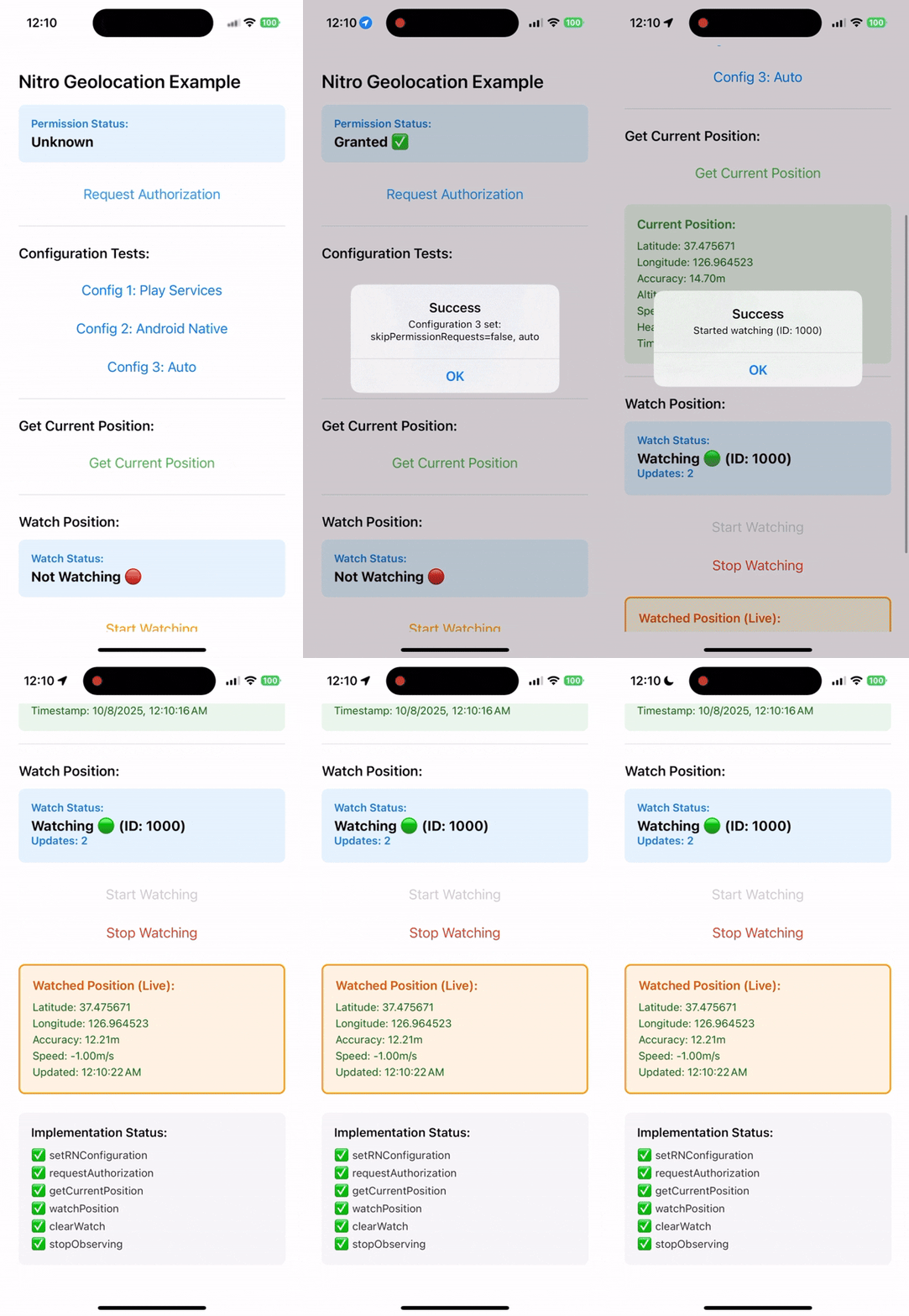
- 🎯 **Simple functional API** — Direct function calls, no complex abstractions
- ⚡ **JSI-powered performance** — Direct native calls without Bridge overhead
- 🔁 **Compat API** — Drop-in compatible with the core native community API
- 🧹 **Automatic cleanup** — No manual subscription management
- 📱 **Consistent behavior** across iOS and Android
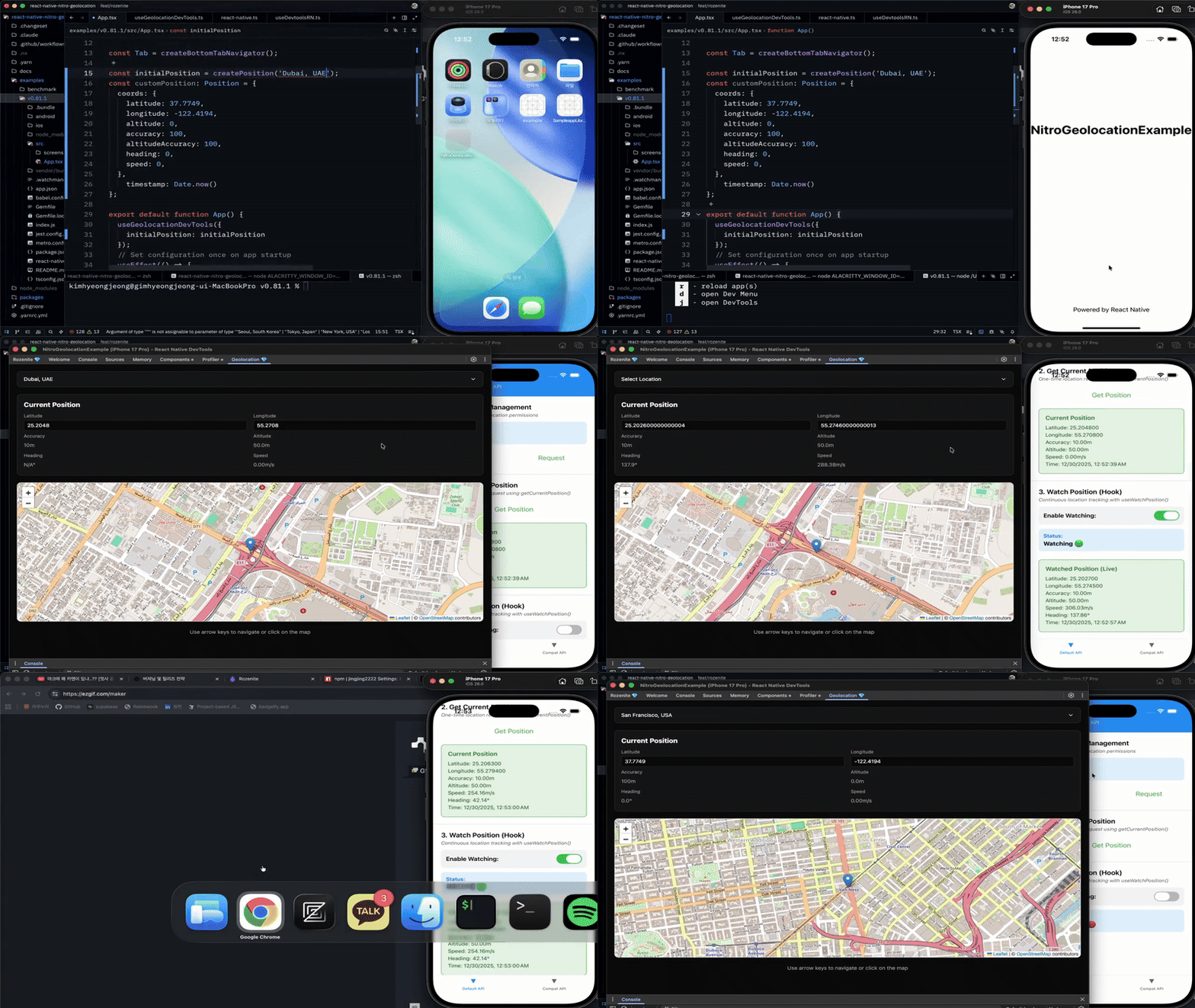
- 🛠️ **DevTools Plugin** — Mock locations with interactive map (Rozenite)
---
## 📘 Documentation
Full documentation available at:
👉 [https://react-native-nitro-geolocation.pages.dev](https://react-native-nitro-geolocation.pages.dev)
---
## When should I use this?
| Use case | Recommendation |
|---|---|
| Bare React Native 0.75+ app with New Architecture/Nitro enabled | Use Nitro Geolocation |
| Migrating from `@react-native-community/geolocation` | Start with `/compat` |
| New Architecture / Nitro-based app | Recommended |
| Expo development build or custom native build | Supported with native setup |
| Expo managed app without native rebuild | Use `expo-location` |
| Web support required | Use the Modern API root import or `/compat` callback API |
| Full background tracking / geofencing | Use `react-native-nitro-geolocation/background` |
Web support is available for the Modern API root import and the `/compat`
subpath. Browser builds resolve both entries to implementations backed by
`navigator.geolocation` and do not load Nitro native bindings. Background
location remains native-only.
---
## 🧭 Introduction
React Native Nitro Geolocation provides **three public API surfaces** to fit
your needs:
### 1. Modern API (Recommended)
**Simple functional API** with direct calls and a single hook for tracking:
```tsx
import {
setConfiguration,
requestPermission,
getCurrentPosition,
} from "react-native-nitro-geolocation";
setConfiguration({
authorizationLevel: "whenInUse",
locationProvider: "auto",
});
const status = await requestPermission();
if (status === "granted") {
const position = await getCurrentPosition({
accuracy: { android: "high", ios: "best" },
timeout: 15_000,
});
}
```
See the [Modern API guide](https://react-native-nitro-geolocation.pages.dev/guide/modern-api)
for watches, geocoding, heading, cached reads, Android settings, and iOS
accuracy authorization.
### 2. Compat API (Compatibility)
Drop-in compatible with the core native
`@react-native-community/geolocation` API:
```tsx
import Geolocation from "react-native-nitro-geolocation/compat";
Geolocation.getCurrentPosition(
(position) => console.log(position),
(error) => console.error(error),
{ enableHighAccuracy: true }
);
const watchId = Geolocation.watchPosition((position) => console.log(position));
Geolocation.clearWatch(watchId);
```
The `/compat` subpath covers the core native community API, including
`setRNConfiguration`, `requestAuthorization`, `getCurrentPosition`,
`watchPosition`, `clearWatch`, and `stopObserving`. It also has a browser entry
for callback-style foreground geolocation. See the
[Compat API guide](https://react-native-nitro-geolocation.pages.dev/guide/compat-api)
for the full compatibility matrix and option notes.
### 3. Background API
Native background tracking, geofencing, activity events, Android Headless JS,
HTTP sync, stored event recovery, and silent-delivery diagnosis should use the
explicit background subpath.
Background location is native-only. Browser builds expose unsupported stubs so
web bundles can still import shared code safely. Start with the
[Background Location guide](https://react-native-nitro-geolocation.pages.dev/background/overview)
for permissions, start/stop, geofencing, storage recovery, and native sync.
Use `diagnoseBackgroundLocation()` from the same subpath to turn the raw
background status into actionable issues when delivery is silent.
---
## ⚡ Quick Start
### 1. Installation
```bash
# Install Nitro core and Geolocation module
yarn add react-native-nitro-modules react-native-nitro-geolocation
# or using npm
npm install react-native-nitro-modules react-native-nitro-geolocation
```
Rebuild your native app:
```bash
cd ios && pod install
```
---
### 2. iOS Setup
Add permissions to your **Info.plist**:
```xml
NSLocationWhenInUseUsageDescription
This app requires access to your location while it's in use.
NSLocationAlwaysAndWhenInUseUsageDescription
This app requires access to your location at all times.
```
For background tracking, also enable the `location` background mode in
`UIBackgroundModes`.
---
### 3. Android Setup
Add permissions to **AndroidManifest.xml**:
```xml
```
Optional (for background):
```xml
```
Full background tracking uses a foreground service on Android. Add the full
permission set from the Android background setup guide when using
`react-native-nitro-geolocation/background`, including Android 13+
`POST_NOTIFICATIONS` for the tracking notification.
---
### 4. DevTools Plugin
Use the Rozenite DevTools plugin to mock locations during development with an
interactive map. It works with the Modern API root import.
```bash
yarn add @react-native-nitro-geolocation/rozenite-plugin
```
```tsx
import {
createPosition,
useGeolocationDevTools,
} from "@react-native-nitro-geolocation/rozenite-plugin";
function App() {
useGeolocationDevTools({
initialPosition: createPosition("Seoul, South Korea"),
});
return ;
}
```
The plugin requires Rozenite DevTools in your app. See the
[DevTools Plugin guide](https://react-native-nitro-geolocation.pages.dev/guide/devtools)
for setup, presets, troubleshooting, and the demo.
---
### 5. Continue In The Docs
Use the docs site for the detailed flows:
- [Quick Start](https://react-native-nitro-geolocation.pages.dev/guide/quick-start) - install, set native permissions, and read your first location.
- [Modern API](https://react-native-nitro-geolocation.pages.dev/guide/modern-api) - accuracy presets, watches, Android settings, cached reads, geocoding, heading, and iOS accuracy authorization.
- [Compat API](https://react-native-nitro-geolocation.pages.dev/guide/compat-api) - callback compatibility and web behavior.
- [Background Location](https://react-native-nitro-geolocation.pages.dev/background/overview) - native background tracking, geofencing, storage recovery, Headless JS, HTTP sync, and delivery diagnosis.
- [Migration Assistance](https://react-native-nitro-geolocation.pages.dev/guide/migration-assistance) - choose the community or service migration path.
- [Expo Development Builds](https://react-native-nitro-geolocation.pages.dev/guide/expo-development-build) - use the package in Expo custom native builds.
- [DevTools Plugin](https://react-native-nitro-geolocation.pages.dev/guide/devtools) - mock locations during development.
## 📖 Learn More
- [Introduction](https://react-native-nitro-geolocation.pages.dev/guide/)
- [Quick Start Guide](https://react-native-nitro-geolocation.pages.dev/guide/quick-start)
- [Modern API Reference](https://react-native-nitro-geolocation.pages.dev/guide/modern-api)
- [Compat API Reference](https://react-native-nitro-geolocation.pages.dev/guide/compat-api)
- [Migration Skills](https://react-native-nitro-geolocation.pages.dev/guide/migration-assistance)
- [Community Migration](https://react-native-nitro-geolocation.pages.dev/guide/community-migration)
- [Service Migration](https://react-native-nitro-geolocation.pages.dev/guide/service-migration)
- [Expo Development Build Guide](https://react-native-nitro-geolocation.pages.dev/guide/expo-development-build)
- [DevTools Plugin Guide](https://react-native-nitro-geolocation.pages.dev/guide/devtools)
- [Why Nitro Module?](https://react-native-nitro-geolocation.pages.dev/guide/why-nitro-module)
- [Benchmark Results](https://react-native-nitro-geolocation.pages.dev/guide/benchmark)
---
## License
MIT License.