https://github.com/jjang-ai/vmlx
vMLX - JANGTQ Uber Compressed MLX Models - L2 Disk Cache (survives restart) + L1 Paged (super fast ttft) + Hybrid SSM Scheduler + Cont Batching + etc!
https://github.com/jjang-ai/vmlx
anthropic-api kvcache-compression kvcache-optimization kvcache-reuse llm lmstudio macbook mcp-server mlx mlxllm mlxstudio omlx omlx-alternative openai-api openclaw openclaw-agent persistent-memory prefix-cache vmlx
Last synced: 28 days ago
JSON representation
vMLX - JANGTQ Uber Compressed MLX Models - L2 Disk Cache (survives restart) + L1 Paged (super fast ttft) + Hybrid SSM Scheduler + Cont Batching + etc!
- Host: GitHub
- URL: https://github.com/jjang-ai/vmlx
- Owner: jjang-ai
- License: apache-2.0
- Created: 2026-02-18T06:11:55.000Z (5 months ago)
- Default Branch: main
- Last Pushed: 2026-06-16T00:25:44.000Z (about 1 month ago)
- Last Synced: 2026-06-16T02:15:30.307Z (about 1 month ago)
- Topics: anthropic-api, kvcache-compression, kvcache-optimization, kvcache-reuse, llm, lmstudio, macbook, mcp-server, mlx, mlxllm, mlxstudio, omlx, omlx-alternative, openai-api, openclaw, openclaw-agent, persistent-memory, prefix-cache, vmlx
- Language: Python
- Homepage: https://vmlx.net
- Size: 86.1 MB
- Stars: 671
- Watchers: 4
- Forks: 70
- Open Issues: 36
-
Metadata Files:
- Readme: README.md
- Changelog: CHANGELOG.md
- License: LICENSE
- Agents: AGENTS.md
Awesome Lists containing this project
- awesome-mlx - vmlx - Home of JANG_Q - Cont Batch, Prefix, Paged, KV Cache Quant, VL - Powers MLX Studio. Image gen/edit, OpenAI/Anth (Rising projects)
README

MLX Inference Server for Apple Silicon
Self-hosted inference server for LLMs, VLMs, and image generation on Apple Silicon.
OpenAI + Anthropic + Ollama compatible HTTP API. Self-hosted; no third-party API keys required.
Native MTP artifact detection and family-specific cache policy gates keep speculative/cache settings explicit and model-safe.
Looking for a native Swift macOS app or Swift inference engine? See osaurus.ai.







Quickstart •
Models •
Features •
Image Gen •
API •
Desktop App •
JANG •
CLI •
Config •
Contributing •
한국어
---
> **JANG 2-bit destroys MLX 4-bit on [MiniMax M2.5](https://huggingface.co/JANGQ-AI/MiniMax-M2.5-JANG_2L):**
>
> | Quantization | MMLU (200q) | Size |
> |---|---|---|
> | **JANG\_2L (2-bit)** | **74%** | **89 GB** |
> | MLX 4-bit | 26.5% | 120 GB |
> | MLX 3-bit | 24.5% | 93 GB |
> | MLX 2-bit | 25% | 68 GB |
>
> Adaptive mixed-precision keeps critical layers at higher precision. Scores at [jangq.ai](https://jangq.ai). Models at [JANGQ-AI](https://huggingface.co/JANGQ-AI).
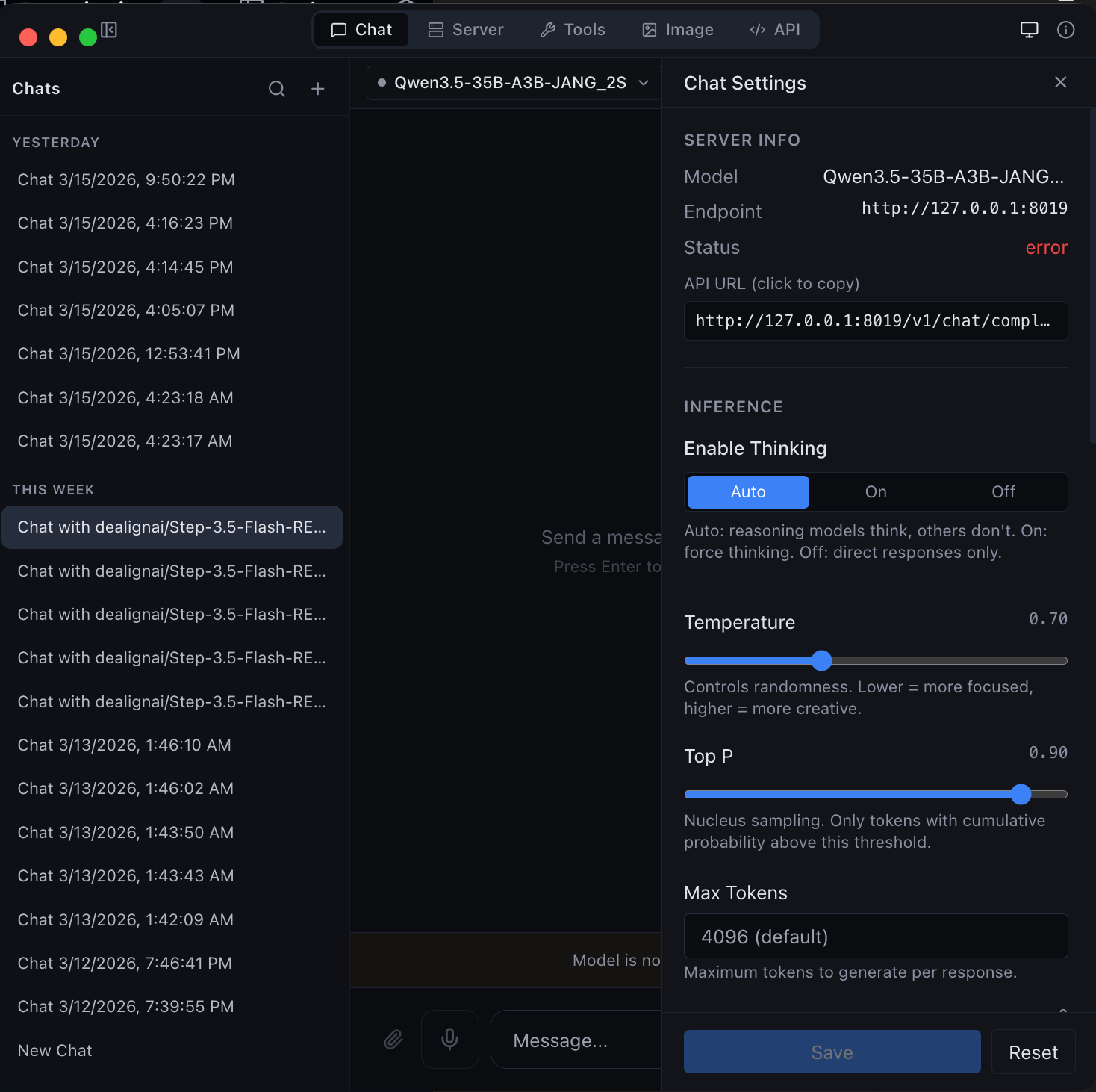
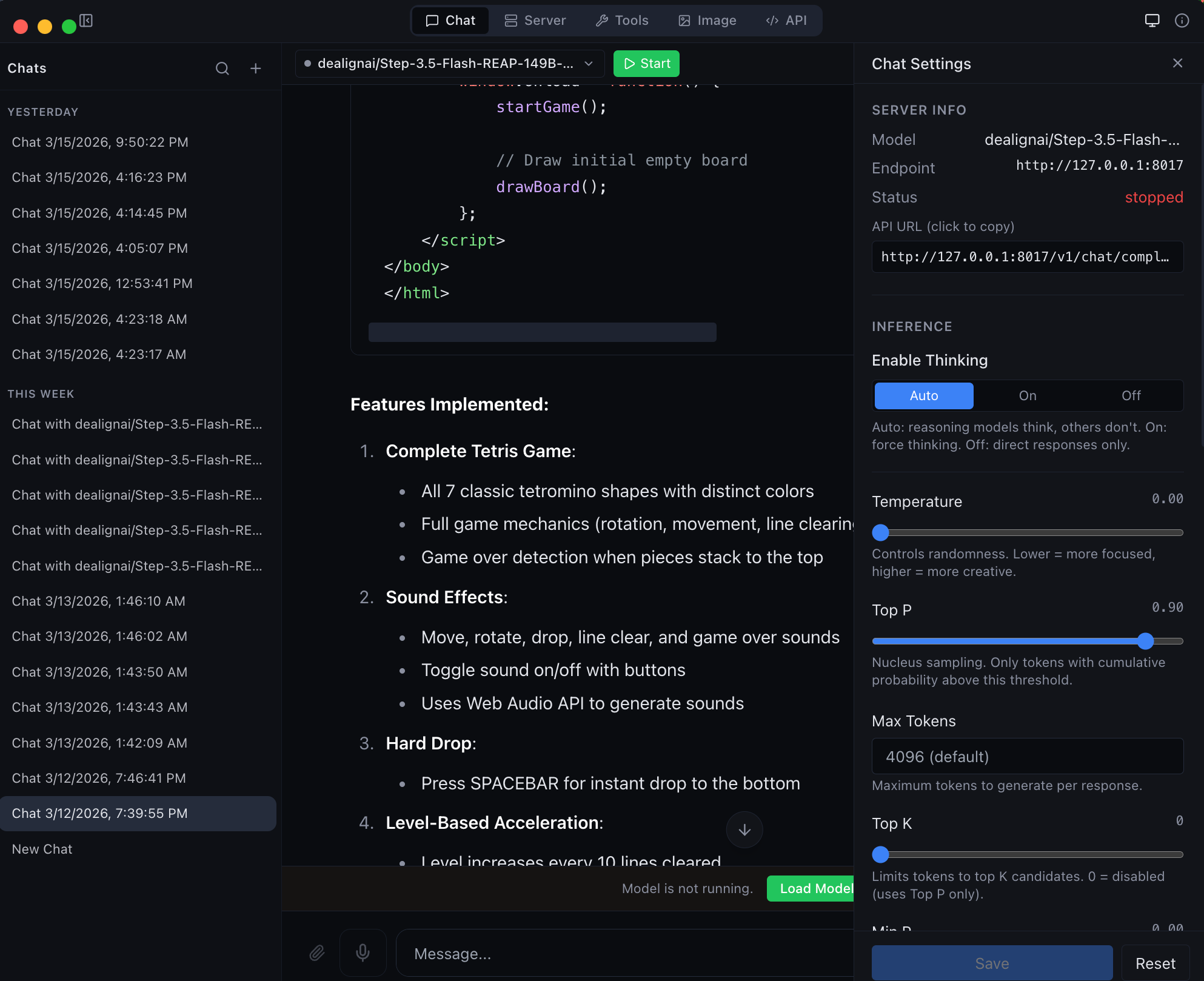
Chat with any MLX model -- thinking mode, streaming, and syntax highlighting
Agentic chat with full coding capabilities -- tool use and structured output
---
## Quickstart
### Install from PyPI
Published on [PyPI as `vmlx`](https://pypi.org/project/vmlx/) -- install and run in one command:
```bash
# Recommended: uv (fast, no venv hassle)
brew install uv
uv tool install vmlx
vmlx serve mlx-community/Qwen3-8B-4bit
# Or: pipx (isolates from system Python)
brew install pipx
pipx install vmlx
vmlx serve mlx-community/Qwen3-8B-4bit
# Or: pip in a virtual environment
python3 -m venv ~/.vmlx-env && source ~/.vmlx-env/bin/activate
pip install vmlx
vmlx serve mlx-community/Qwen3-8B-4bit
```
> **Note:** On macOS 14+, bare `pip install` fails with "externally-managed-environment". Use `uv`, `pipx`, or a venv.
The vMLX inference server is now running at `http://0.0.0.0:8000` with an OpenAI + Anthropic compatible API. Works with any model from [mlx-community](https://huggingface.co/mlx-community) -- thousands of models ready to go.
### Or download the desktop app
Get [MLX Studio](https://github.com/jjang-ai/mlxstudio/releases/latest) -- a native macOS app with chat UI, model management, image generation, and developer tools. No terminal required. Just download the DMG and drag to Applications.
### Use with OpenAI SDK
```python
from openai import OpenAI
client = OpenAI(base_url="http://localhost:8000/v1", api_key="not-needed")
response = client.chat.completions.create(
model="local",
messages=[{"role": "user", "content": "Hello!"}],
stream=True,
)
for chunk in response:
print(chunk.choices[0].delta.content or "", end="", flush=True)
```
### Use with Anthropic SDK
```python
import anthropic
client = anthropic.Anthropic(base_url="http://localhost:8000/v1", api_key="not-needed")
message = client.messages.create(
model="local",
max_tokens=1024,
messages=[{"role": "user", "content": "Hello!"}],
)
print(message.content[0].text)
```
### Use with curl
```bash
curl http://localhost:8000/v1/chat/completions \
-H "Content-Type: application/json" \
-d '{
"model": "local",
"messages": [{"role": "user", "content": "Hello!"}],
"stream": true
}'
```
---
## Model Support
vMLX runs any MLX model. Point it at a HuggingFace repo or local path and go.
| Type | Models |
|------|--------|
| **Text LLMs** | Qwen 2/2.5/3/3.5/3.6, Llama 3/3.1/3.2/3.3/4, Mistral/Mixtral, **Mistral-Medium-3.5** (ministral3), Mistral-Small-4, Gemma 3/4, Phi-4, DeepSeek V2/V3/V4, GLM-4/5, MiniMax M2.5/M2.7, Nemotron, **Laguna** (poolside), **ZAYA** (CCA + MoE), Kimi K2.5/K2.6, StepFun, and any mlx-lm model |
| **Vision LLMs** | Qwen-VL, Qwen3.5-VL / Qwen3.6-VL, Pixtral, InternVL, LLaVA, Gemma 3n / 4-VL, Mistral-Medium-3.5 (PIXTRAL) |
| **Multimodal Omni** | **Nemotron-3-Nano-Omni** (text + image + audio + video) — Parakeet audio encoder + RADIO ViT vision tower; routed via OmniMultimodalDispatcher across `/v1/chat/completions`, `/v1/messages`, `/v1/responses`, `/api/chat` |
| **MoE Models** | Qwen 3.5/3.6 MoE (A3B/A10B), Mixtral, DeepSeek V2/V3/V4, MiniMax M2.5/M2.7, Llama 4, Laguna (256 routed experts top-8) |
| **Hybrid SSM** | Nemotron-H, Jamba, GatedDeltaNet (Mamba + Attention), Qwen3.5-A3B hybrid, Granite MoE Hybrid, LFM2 |
| **Image Gen** | Flux Schnell/Dev, Z-Image Turbo (via mflux) |
| **Image Edit** | Qwen Image Edit (via mflux) |
| **Embeddings** | Any mlx-lm compatible embedding model |
| **Reranking** | Cross-encoder reranking models |
| **Audio** | Kokoro TTS, Whisper STT (via mlx-audio) |
---
## Features
### Inference Engine
| Feature | Description |
|---------|-------------|
| **Continuous Batching** | Handle multiple concurrent requests efficiently |
| **Prefix Cache** | Reuse KV states for repeated prompts -- makes follow-up messages instant |
| **Paged KV Cache** | Block-based caching with content-addressable deduplication |
| **KV Cache Quantization** | Compress cached states to q4/q8 for 2-4x memory savings |
| **Disk Cache (L2)** | Persist prompt caches to SSD -- survives server restarts |
| **Block Disk Cache** | Per-block persistent cache paired with paged KV cache |
| **Speculative Decoding** | Small draft model proposes tokens for 20-90% speedup |
| **Prompt Lookup Decoding** | No draft model needed — reuses n-gram matches from the prompt/context. Best for structured or repetitive output (code, JSON, schemas). Enable with `--enable-pld`. |
| **JIT Compilation** | `mx.compile` Metal kernel fusion (experimental) |
| **Hybrid SSM Support** | Mamba/GatedDeltaNet layers handled correctly alongside attention |
| **Distributed Compute** | Pipeline parallelism across multiple Macs via Thunderbolt 5 / Ethernet / WiFi |
### Distributed Inference (Multi-Mac)
Run models too large for a single Mac across 2+ machines. Each Mac loads a subset of transformer layers and they communicate hidden states over the network.
```bash
# On worker Macs:
pip install vmlx
vmlx-worker --secret mysecret
# On coordinator Mac (runs the server):
vmlx serve JANGQ-AI/Qwen3.5-Coder-Rerank-397B-A27B-JANG_2L --distributed --cluster-secret mysecret
```
| Feature | Description |
|---------|-------------|
| **Pipeline Parallelism** | Split layers across nodes -- hidden state (~8KB/step) flows sequentially |
| **Auto-Discovery** | Bonjour mDNS, UDP broadcast, HTTP probes, Tailscale, cached peers, manual IP |
| **Capability-Scored Election** | Most powerful Mac becomes coordinator automatically |
| **Any Network Works** | TB5 (120 Gbps), 10GbE, 1GbE, WiFi, Tailscale -- PP is not bandwidth-bound |
| **JANG Support** | Each worker loads its layer range from JANG safetensors (mmap) |
| **Live Node List** | Desktop app shows discovered nodes, link type, latency, layer assignments |
| **Cluster API** | `/v1/cluster/status`, `/v1/cluster/nodes`, `/v1/cluster/scan` REST endpoints |
### 5-Layer Cache Architecture
```
Request -> Tokens
|
L1: Memory-Aware Prefix Cache (or Paged Cache)
| miss
L2: Disk Cache (or Block Disk Store)
| miss
Inference -> float16 KV states
|
KV Quantization -> q4/q8 for storage
|
Store back into L1 + L2
```
### Tool Calling
Auto-detected parsers for every major model family:
`qwen` - `llama` - `mistral` - `hermes` - `deepseek` - `glm47` - `minimax` - `nemotron` - `granite` - `functionary` - `xlam` - `kimi` - `step3p5`
### Reasoning / Thinking Mode
Auto-detected reasoning parsers that extract `` blocks:
`qwen3` (Qwen3, QwQ, StepFun) - `minimax_m2` (MiniMax M2/M2.5/M2.7) - `deepseek_r1` (DeepSeek R1, Gemma 3, GLM, Phi-4) - `openai_gptoss` (GLM Flash, GPT-OSS)
### Audio
| Feature | Description |
|---------|-------------|
| **Text-to-Speech** | Kokoro TTS via mlx-audio -- multiple voices, streaming output |
| **Speech-to-Text** | Whisper STT via mlx-audio -- transcription and translation |
---
## Image Generation & Editing
Generate and edit images locally with Flux models via [mflux](https://github.com/filipstrand/mflux).
```bash
pip install vmlx[image]
# Image generation
vmlx serve schnell # or dev, z-image-turbo
vmlx serve ~/.mlxstudio/models/image/flux1-schnell-4bit
# Image editing
vmlx serve qwen-image-edit # instruction-based editing
```
### Generation API
```bash
curl http://localhost:8000/v1/images/generations \
-H "Content-Type: application/json" \
-d '{
"model": "schnell",
"prompt": "A cat astronaut floating in space with Earth in the background",
"size": "1024x1024",
"n": 1
}'
```
```python
# Python (OpenAI SDK)
response = client.images.generate(
model="schnell",
prompt="A cat astronaut floating in space",
size="1024x1024",
n=1,
)
```
### Editing API
```bash
# Edit an image with a text prompt (Flux Kontext / Qwen Image Edit)
curl http://localhost:8000/v1/images/edits \
-H "Content-Type: application/json" \
-d '{
"model": "flux-kontext",
"prompt": "Change the background to a sunset",
"image": "",
"size": "1024x1024",
"strength": 0.8
}'
```
```python
# Python
import base64
with open("source.png", "rb") as f:
image_b64 = base64.b64encode(f.read()).decode()
response = requests.post("http://localhost:8000/v1/images/edits", json={
"model": "flux-kontext",
"prompt": "Make the sky purple",
"image": image_b64,
"size": "1024x1024",
"strength": 0.8,
})
```
### Supported Image Models
**Generation Models:**
| Model | Steps | Speed | Memory |
|-------|-------|-------|--------|
| **Flux Schnell** | 4 | Fastest | ~6-24 GB |
| **Z-Image Turbo** | 4 | Fast | ~6-24 GB |
| **Flux Dev** | 20 | Slow | ~6-24 GB |
**Editing Models:**
| Model | Steps | Type | Memory |
|-------|-------|------|--------|
| **Qwen Image Edit** | 28 | Instruction-based editing | ~54 GB |
---
## API Reference
### API Gateway
The desktop app runs an **API Gateway** on a single port (default `8080`) that routes requests to all loaded models by name. Run multiple models simultaneously and access them all through one URL.
```bash
# All models accessible through the gateway
curl http://localhost:8080/v1/chat/completions \
-d '{"model": "Qwen3.5-122B", "messages": [{"role": "user", "content": "Hi"}]}'
# Works with Ollama CLI too
OLLAMA_HOST=http://localhost:8080 ollama run Qwen3.5-122B
```
The gateway supports **OpenAI**, **Anthropic**, and **Ollama** wire formats. Configure the port in the API tab.
### Endpoints
**OpenAI / Anthropic**
| Method | Path | Description |
|--------|------|-------------|
| `POST` | `/v1/chat/completions` | OpenAI Chat Completions API (streaming + non-streaming) |
| `POST` | `/v1/messages` | Anthropic Messages API |
| `POST` | `/v1/responses` | OpenAI Responses API |
| `POST` | `/v1/completions` | Text completions |
| `POST` | `/v1/images/generations` | Image generation |
| `POST` | `/v1/images/edits` | Image editing (Qwen Image Edit) |
| `POST` | `/v1/embeddings` | Text embeddings |
| `POST` | `/v1/rerank` | Document reranking |
| `POST` | `/v1/audio/transcriptions` | Speech-to-text (Whisper) |
| `POST` | `/v1/audio/speech` | Text-to-speech (Kokoro) |
| `GET` | `/v1/models` | List loaded models |
| `GET` | `/v1/cache/stats` | Cache statistics |
| `GET` | `/health` | Server health check |
**Ollama**
| Method | Path | Description |
|--------|------|-------------|
| `POST` | `/api/chat` | Chat completion (NDJSON streaming) |
| `POST` | `/api/generate` | Text generation (NDJSON streaming) |
| `GET` | `/api/tags` | List loaded models |
| `POST` | `/api/show` | Model details |
| `POST` | `/api/embeddings` | Generate embeddings |
### curl Examples
**Chat completion (streaming)**
```bash
curl http://localhost:8000/v1/chat/completions \
-H "Content-Type: application/json" \
-d '{
"model": "local",
"messages": [{"role": "user", "content": "Explain quantum computing in 3 sentences."}],
"stream": true,
"temperature": 0.7
}'
```
**Chat completion with thinking mode**
```bash
curl http://localhost:8000/v1/chat/completions \
-H "Content-Type: application/json" \
-d '{
"model": "local",
"messages": [{"role": "user", "content": "Solve: what is 23 * 47?"}],
"enable_thinking": true,
"stream": true
}'
```
**Tool calling**
```bash
curl http://localhost:8000/v1/chat/completions \
-H "Content-Type: application/json" \
-d '{
"model": "local",
"messages": [{"role": "user", "content": "What is the weather in Tokyo?"}],
"tools": [{
"type": "function",
"function": {
"name": "get_weather",
"description": "Get current weather for a location",
"parameters": {
"type": "object",
"properties": {
"location": {"type": "string", "description": "City name"}
},
"required": ["location"]
}
}
}]
}'
```
**Anthropic Messages API**
```bash
curl http://localhost:8000/v1/messages \
-H "Content-Type: application/json" \
-H "x-api-key: not-needed" \
-H "anthropic-version: 2023-06-01" \
-d '{
"model": "local",
"max_tokens": 1024,
"messages": [{"role": "user", "content": "Hello!"}]
}'
```
**Embeddings**
```bash
curl http://localhost:8000/v1/embeddings \
-H "Content-Type: application/json" \
-d '{
"model": "local",
"input": "The quick brown fox jumps over the lazy dog"
}'
```
**Text-to-speech**
```bash
curl http://localhost:8000/v1/audio/speech \
-H "Content-Type: application/json" \
-d '{
"model": "kokoro",
"input": "Hello, welcome to vMLX!",
"voice": "af_heart"
}' --output speech.wav
```
**Speech-to-text**
```bash
curl http://localhost:8000/v1/audio/transcriptions \
-F file=@audio.wav \
-F model=whisper
```
**Image generation**
```bash
curl http://localhost:8000/v1/images/generations \
-H "Content-Type: application/json" \
-d '{
"model": "schnell",
"prompt": "A mountain landscape at sunset",
"size": "1024x1024"
}'
```
**Reranking**
```bash
curl http://localhost:8000/v1/rerank \
-H "Content-Type: application/json" \
-d '{
"model": "local",
"query": "What is machine learning?",
"documents": [
"ML is a subset of AI",
"The weather is sunny today",
"Neural networks learn from data"
]
}'
```
**Cache stats**
```bash
curl http://localhost:8000/v1/cache/stats
```
**Health check**
```bash
curl http://localhost:8000/health
```
---
## Desktop App
vMLX includes a native macOS desktop app (MLX Studio) with 5 modes:
| Mode | Description |
|------|-------------|
| **Chat** | Conversation interface with chat history, thinking mode, tool calling, agentic coding |
| **Server** | Manage model sessions -- start, stop, configure, monitor |
| **Image** | Text-to-image generation and image editing with Flux, Kontext, Qwen, and Fill models |
| **Tools** | Model converter, GGUF-to-MLX, inspector, diagnostics |
| **API** | Live endpoint reference with copy-pasteable code snippets |
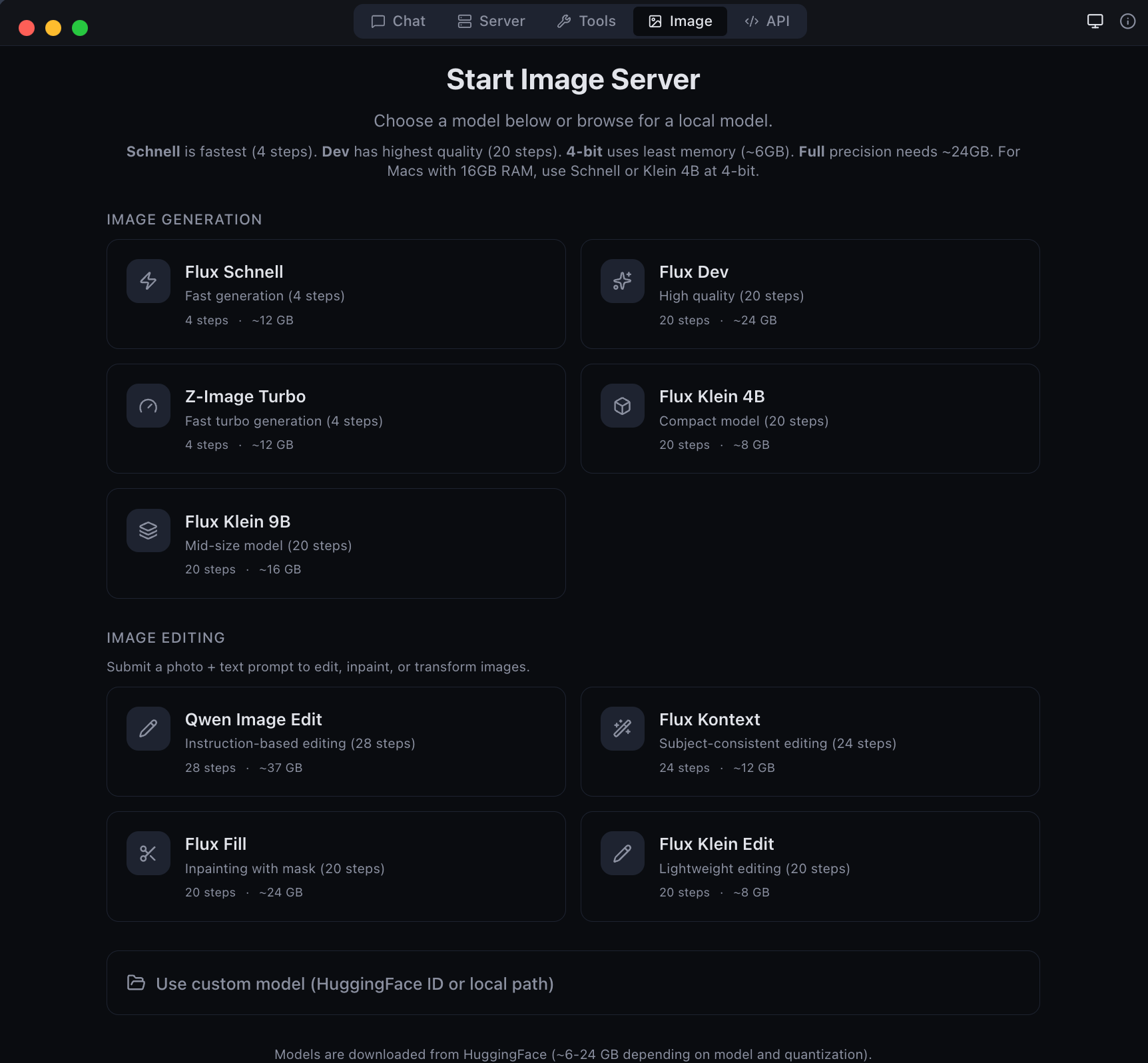
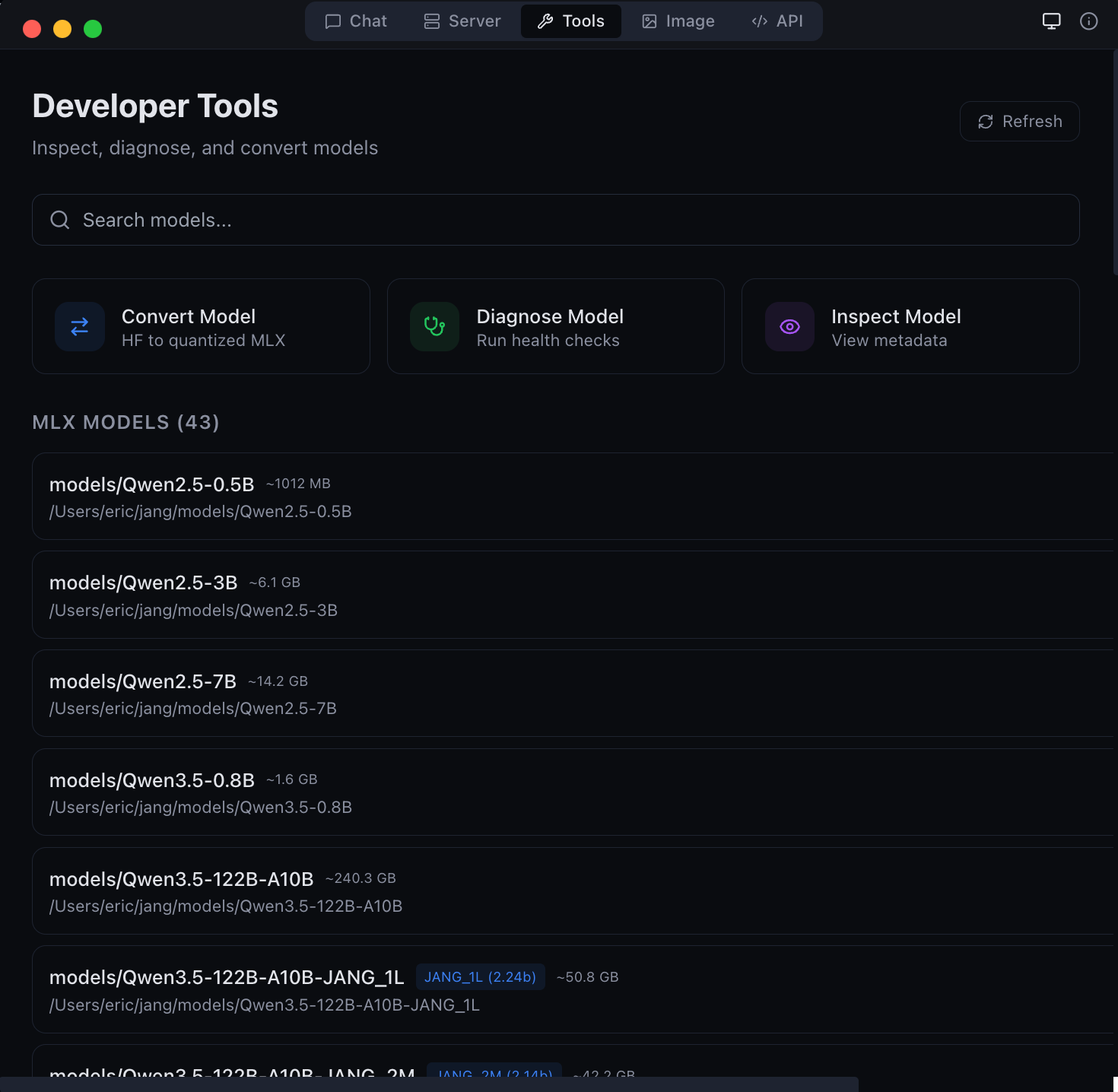
Image generation and editing with Flux models
Developer tools -- model conversion and diagnostics
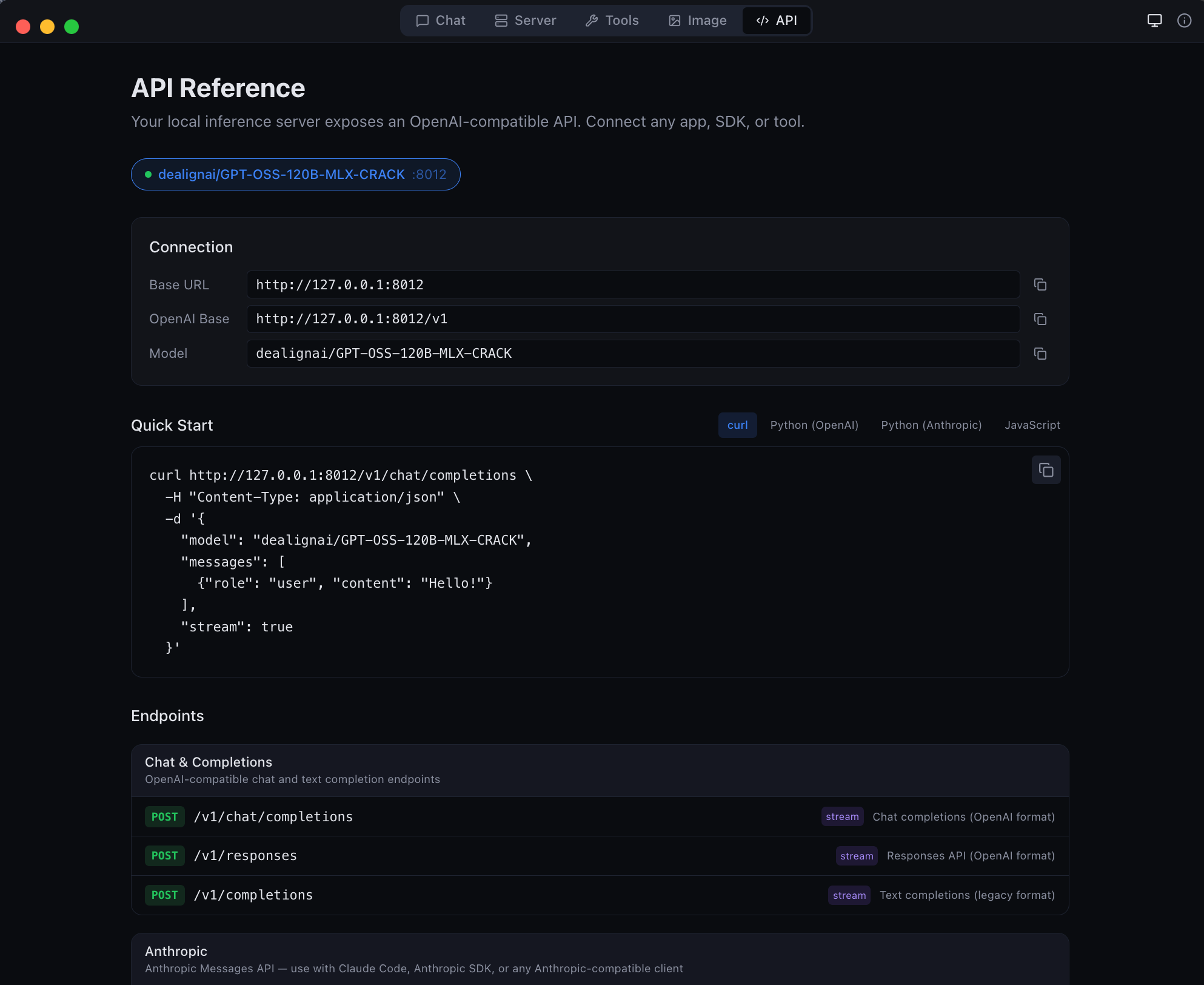
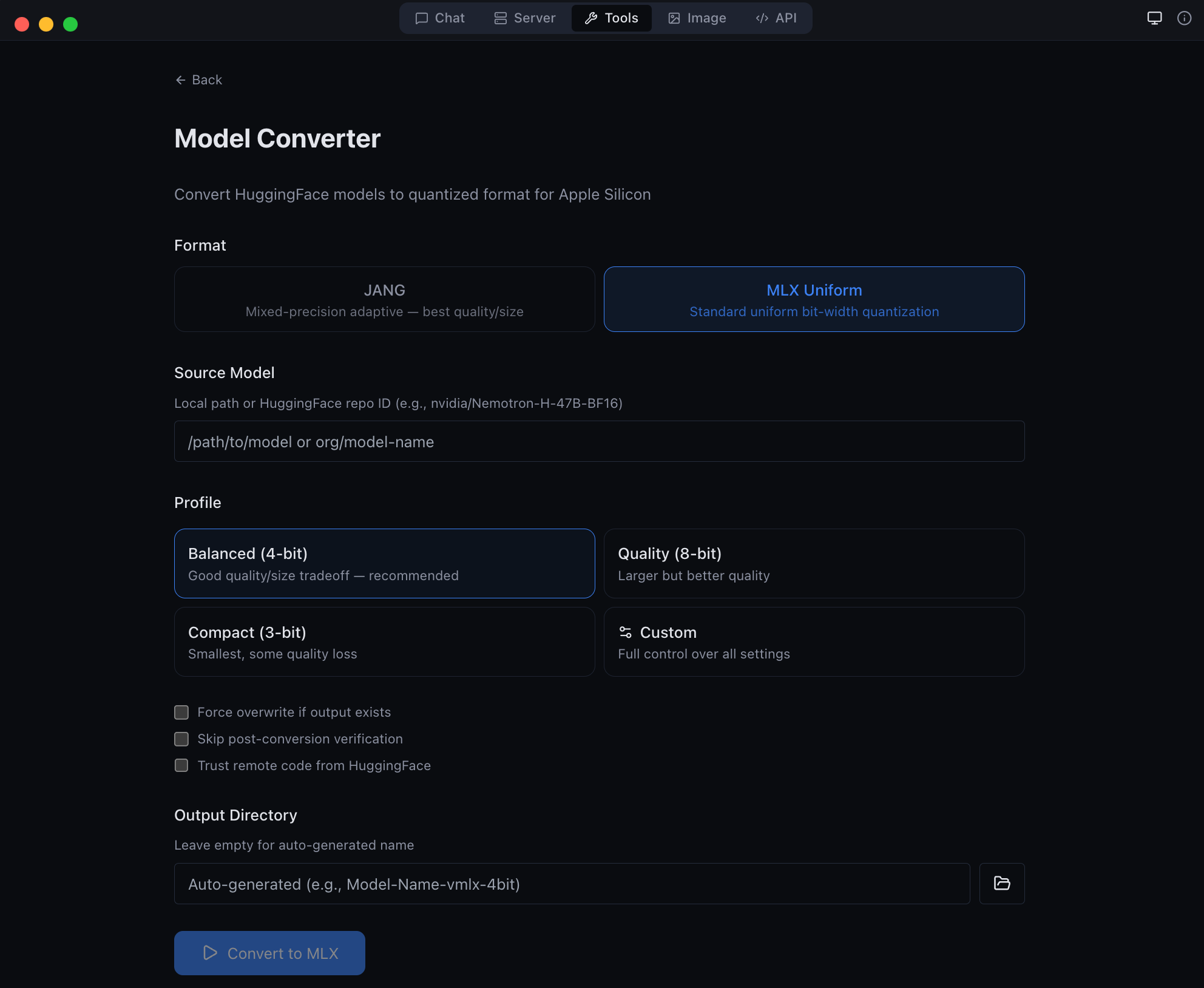
Anthropic Messages API endpoint -- full compatibility
GGUF to MLX conversion -- bring your own models
### Download
Get the latest DMG from [MLX Studio Releases](https://github.com/jjang-ai/mlxstudio/releases/latest), or build from source:
```bash
git clone https://github.com/jjang-ai/vmlx.git
cd vmlx/panel
npm install && npm run build
npx electron-builder --mac dmg
```
### Menu Bar
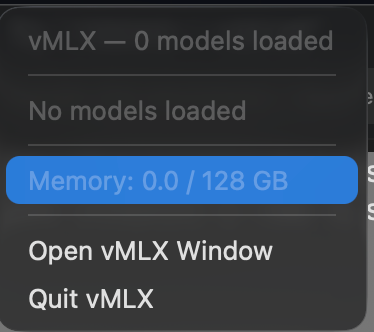
vMLX lives in your menu bar showing all running models, GPU memory usage, and quick controls.
---
## Advanced Quantization
vMLX supports standard MLX quantization (4-bit, 8-bit uniform) out of the box. For users who want to push further, **JANG adaptive mixed-precision** assigns different bit widths to different layer types -- attention gets more bits, MLP layers get fewer -- achieving better quality at the same model size.
### JANG Profiles
| Profile | Attention | Embeddings | MLP | Avg Bits | Use Case |
|---------|-----------|------------|-----|----------|----------|
| `JANG_2M` | 8-bit | 4-bit | 2-bit | ~2.5 | Balanced compression |
| `JANG_2L` | 8-bit | 6-bit | 2-bit | ~2.7 | Quality 2-bit |
| `JANG_3M` | 8-bit | 3-bit | 3-bit | ~3.2 | **Recommended** |
| `JANG_4M` | 8-bit | 4-bit | 4-bit | ~4.2 | Standard quality |
| `JANG_6M` | 8-bit | 6-bit | 6-bit | ~6.2 | Near lossless |
### Convert
```bash
pip install vmlx[jang]
# Standard MLX quantization
vmlx convert my-model --bits 4
# JANG adaptive quantization
vmlx convert my-model --jang-profile JANG_3M
# Activation-aware calibration (better at 2-3 bit)
vmlx convert my-model --jang-profile JANG_2L --calibration-method activations
# Serve the converted model
vmlx serve ./my-model-JANG_3M --continuous-batching --use-paged-cache
```
Pre-quantized JANG models are available at [JANGQ-AI on HuggingFace](https://huggingface.co/JANGQ-AI).
### Smelt Mode (Partial Expert Loading)
For MoE models that don't fit in RAM, **Smelt** loads only a subset of experts per layer from SSD and keeps the backbone resident. Routing is biased toward the resident experts, so response quality stays coherent while RAM usage drops. Trade-off: throughput scales inversely with expert % loaded, because expert swaps hit SSD on the hot path.
```bash
# Load 50% of experts per layer (default when --smelt alone)
vmlx serve ./MyMoE-JANG_4M --smelt --smelt-experts 50
# Aggressive: load 25% — smallest RAM, slowest
vmlx serve ./MyMoE-JANG_4M --smelt --smelt-experts 25
```
**Benchmarks on `Nemotron-Cascade-2-30B-A3B-JANG_4M`** (23 MoE layers × 128 experts, Apple M3 Ultra / 128 GB, dedicated machine, no parallel models):
| `--smelt-experts` | Active RAM | Decode tok/s | RAM saving | Coherent |
|---|---:|---:|---|---|
| _off (baseline)_ | **17,408 MB** | **89.9** | — | ✓ |
| `50` | 9,529 MB | **66.5** | **−45%** | ✓ |
| `25` | 5,590 MB | * | **−68%** | ✓ |
\* Responses too short (2-5 tokens) for reliable steady-state tok/s measurement at 25 %. Subjectively responsive.
All three configurations produced coherent, non-looping output. No quality degradation observed — routing bias keeps the model on-topic.
> **Credit**: Smelt mode is inspired by [Anemll's **flash-moe**](https://github.com/Anemll/flash-moe) — a pure C / Objective‑C / Metal inference engine that showed huge MoE models (Qwen3.5-397B) can run on modest Apple Silicon hardware by streaming expert weights from SSD with `pread()` on demand. vMLX Smelt takes a different implementation path: Python/MLX, tied to the JANG quantization format, and loading a fixed subset of experts per layer at startup (backbone resident, routing biased toward the loaded subset) rather than on-demand per-token. It plugs into the full vMLX server with continuous batching, paged cache, and OpenAI-compatible API. Different engine, same core insight — thanks to the flash-moe team for validating the approach.
**Smelt is mutually exclusive with VLM mode.** vMLX detects smelt and automatically disables `--is-mllm` (with a warning) because the vision tower is not wired through the partial-expert loader — image input on a smelt-loaded VLM would produce garbage logits. Use a text-only model when running smelt, or disable smelt when running a VLM.
Smelt requires an MoE model in JANG format. Not compatible with dense models (no experts to partial-load) or with non-JANG formats.
---
## CLI Commands
```bash
vmlx serve # Start inference server
vmlx convert --bits 4 # MLX uniform quantization
vmlx convert -j JANG_3M # JANG adaptive quantization
vmlx info # Model metadata and config
vmlx doctor # Run diagnostics
vmlx bench # Performance benchmarks
vmlx-worker --secret # Start distributed worker node
```
---
## Configuration
### Server Options
```bash
vmlx serve \
--host 0.0.0.0 \ # Bind address (default: 0.0.0.0)
--port 8000 \ # Port (default: 8000)
--api-key sk-your-key \ # Optional API key authentication
--continuous-batching \ # Enable concurrent request handling
--enable-prefix-cache \ # Reuse KV states for repeated prompts
--use-paged-cache \ # Block-based KV cache with dedup
--kv-cache-quantization q8 \ # Quantize cache: q4 or q8
--enable-disk-cache \ # Persist cache to SSD
--enable-jit \ # JIT Metal kernel compilation
--tool-call-parser auto \ # Auto-detect tool call format
--reasoning-parser auto \ # Auto-detect thinking format
--log-level INFO \ # Logging: DEBUG, INFO, WARNING, ERROR
--max-model-len 8192 \ # Max context length
--speculative-model \ # Draft model for speculative decoding
--enable-pld \ # Prompt Lookup Decoding — no draft model, best for code/JSON/schemas
--distributed \ # Enable multi-Mac pipeline parallelism
--cluster-secret \ # Shared auth secret for workers
--distributed-mode pipeline \ # pipeline (default) or tensor (coming soon)
--worker-nodes ip:port,... \ # Manual worker IPs (overrides auto-discovery)
--cors-origins "*" # CORS allowed origins
```
### Quantization Options
```bash
vmlx convert \
--bits 4 \ # Uniform quantization bits: 2, 3, 4, 6, 8
--group-size 64 \ # Quantization group size (default: 64)
--output ./output-dir \ # Output directory
--jang-profile JANG_3M \ # JANG mixed-precision profile
--calibration-method activations # Activation-aware calibration
```
### Image Generation & Editing Options
```bash
pip install vmlx[image]
# Generation models
vmlx serve schnell \ # or dev, z-image-turbo
--image-quantize 4 \ # Quantization: 4, 8 (omit for full precision)
--port 8001
# Editing models
vmlx serve qwen-image-edit \ # Instruction-based editing (full precision only)
--port 8001
# Local model directory
vmlx serve ~/.mlxstudio/models/image/FLUX.1-schnell-mflux-4bit
```
### Audio Options
TTS and STT require the `mlx-audio` package:
```bash
pip install mlx-audio
# TTS: serve Kokoro model
vmlx serve kokoro --port 8002
# STT: serve Whisper model
vmlx serve whisper --port 8003
```
### Optional Dependencies
```bash
pip install vmlx # Core: text LLMs, VLMs, embeddings, reranking
pip install vmlx[image] # + Image generation (mflux)
pip install vmlx[jang] # + JANG quantization tools
pip install vmlx[dev] # + Development/testing tools
pip install vmlx[image,jang] # Multiple extras
```
---
## Architecture
```
+--------------------------------------------+
| Desktop App (Electron) |
| Chat | Server | Image | Tools | API |
+--------------------------------------------+
| Session Manager (TypeScript) |
| Process spawn | Health monitor | Tray |
+--------------------------------------------+
| vMLX Engine (Python / FastAPI) |
| +--------+ +---------+ +-----------+ |
| |Simple | | Batched | | ImageGen | |
| |Engine | | Engine | | Engine | |
| +---+----+ +----+----+ +-----+-----+ |
| | | | |
| +---+------------+--+ +-----+-----+ |
| | mlx-lm / mlx-vlm | | mflux | |
| +--------+-----------+ +-----------+ |
| | |
| +--------+----------------------------+ |
| | MLX Metal GPU Backend | |
| | quantized_matmul | KV cache | SDPA | |
| +--------------------------------------+ |
+--------------------------------------------+
| L1: Prefix Cache (Memory-Aware / Paged) |
| L2: Disk Cache (Persistent / Block Store) |
| KV Quant: q4/q8 at storage boundary |
+--------------------------------------------+
```
---
## Contributing
Contributions are welcome. Here is how to set up a development environment:
```bash
git clone https://github.com/jjang-ai/vmlx.git
cd vmlx
# Python engine
python -m venv .venv && source .venv/bin/activate
pip install -e ".[dev,jang,image]"
pytest tests/ -k "not Async" # 2000+ tests
# Electron desktop app
cd panel && npm install
npm run dev # Development mode with hot reload
npx vitest run # 1545+ tests
```
### Project Structure
```
vmlx/
vmlx_engine/ # Python inference engine (FastAPI server)
panel/ # Electron desktop app (React + TypeScript)
src/main/ # Electron main process
src/renderer/ # React frontend
src/preload/ # IPC bridge
tests/ # Python test suite
assets/ # Screenshots and logos
```
### Guidelines
- Run the full test suite before submitting PRs
- Follow existing code style and patterns
- Include tests for new features
- Update documentation for user-facing changes
---
## License
Apache License 2.0 -- see [LICENSE](LICENSE).
---
Built by Jinho Jang (eric@jangq.ai)
JANGQ AI • PyPI • GitHub • Downloads
---
## 한국어 (Korean)
### vMLX — Apple Silicon을 위한 로컬 AI 엔진
Mac에서 LLM, VLM, 이미지 생성 및 편집 모델을 완전히 로컬로 실행하세요.
OpenAI + Anthropic 호환 API. 클라우드 없음. API 키 불필요. 데이터가 기기를 떠나지 않습니다.
### 빠른 시작
```bash
pip install vmlx
vmlx serve mlx-community/Llama-3.2-3B-Instruct-4bit
```
### 주요 기능
| 기능 | 설명 |
|------|------|
| **텍스트 생성** | MLX 및 JANG 형식의 LLM 추론 |
| **비전-언어 모델** | 이미지 + 텍스트 멀티모달 추론 |
| **이미지 생성** | Flux Schnell/Dev, Z-Image Turbo (mflux 기반) |
| **이미지 편집** | Qwen Image Edit (텍스트 지시 기반 이미지 편집) |
| **5단계 캐싱** | 프리픽스, 페이지드, KV 양자화, 디스크, 메모리 인식 캐시 |
| **연속 배칭** | 다중 동시 요청 처리 |
| **에이전트 도구** | 30개 내장 도구 (파일, 웹 검색, Git, 터미널) |
| **OpenAI API** | /v1/chat/completions, /v1/images/generations, /v1/images/edits |
| **Anthropic API** | /v1/messages (스트리밍, 도구 호출, 시스템 프롬프트) |
### 이미지 생성
```bash
pip install vmlx[image]
vmlx serve schnell # 빠른 생성 (4 단계)
vmlx serve dev # 고품질 생성 (20 단계)
```
### 이미지 편집
```bash
vmlx serve qwen-image-edit # 텍스트 지시 기반 이미지 편집
```
```bash
# 이미지 편집 API
curl http://localhost:8000/v1/images/edits \
-H "Content-Type: application/json" \
-d '{
"model": "qwen-image-edit",
"prompt": "배경을 해질녘으로 변경",
"image": "",
"size": "1024x1024",
"strength": 0.8
}'
```
### 데스크톱 앱 (MLX Studio)
macOS 네이티브 데스크톱 앱으로 5가지 모드를 제공합니다:
| 모드 | 설명 |
|------|------|
| **채팅** | 대화 인터페이스, 채팅 기록, 도구 호출, 에이전트 코딩 |
| **서버** | 모델 세션 관리 — 시작, 정지, 설정, 모니터링 |
| **이미지** | 텍스트-이미지 생성 및 이미지 편집 (Flux, Qwen 모델) |
| **도구** | 모델 변환기, GGUF-MLX 변환, 진단 |
| **API** | 실시간 엔드포인트 참조 및 코드 스니펫 |
### 설치
```bash
pip install vmlx # 기본: 텍스트 LLM, VLM, 임베딩
pip install vmlx[image] # + 이미지 생성/편집 (mflux)
pip install vmlx[jang] # + JANG 양자화 도구
pip install vmlx[audio] # + TTS/STT (mlx-audio)
```
### 라이선스
Apache License 2.0 — [LICENSE](LICENSE) 참조.
---
개발자: 장진호 (eric@jangq.ai)
JANGQ AI •
Ko-fi로 후원하기