https://github.com/jjcosgrove/frank
A minimalist Markdown notes app
https://github.com/jjcosgrove/frank
backbone electron markdown nedb notes simplemde
Last synced: about 2 months ago
JSON representation
A minimalist Markdown notes app
- Host: GitHub
- URL: https://github.com/jjcosgrove/frank
- Owner: jjcosgrove
- License: mit
- Created: 2017-03-12T20:43:29.000Z (over 9 years ago)
- Default Branch: master
- Last Pushed: 2017-03-15T11:44:40.000Z (over 9 years ago)
- Last Synced: 2025-03-02T06:27:41.453Z (over 1 year ago)
- Topics: backbone, electron, markdown, nedb, notes, simplemde
- Language: JavaScript
- Size: 544 KB
- Stars: 1
- Watchers: 1
- Forks: 1
- Open Issues: 0
-
Metadata Files:
- Readme: README.md
- License: LICENSE
Awesome Lists containing this project
README
\*Devid app icon taken from [Turbomilk](http://www.turbomilk.com)
# Features
* Minimalist interface
* Shortcut driven
* Markdown support ([SimpleMDE](https://simplemde.com/))
* Syntax highlighting ([highlight.js](https://highlightjs.org/))
* Text-based search (RegEx)
* Export (JSON)
* Local data storage ([NeDB](https://github.com/louischatriot/nedb))
# Shortcuts
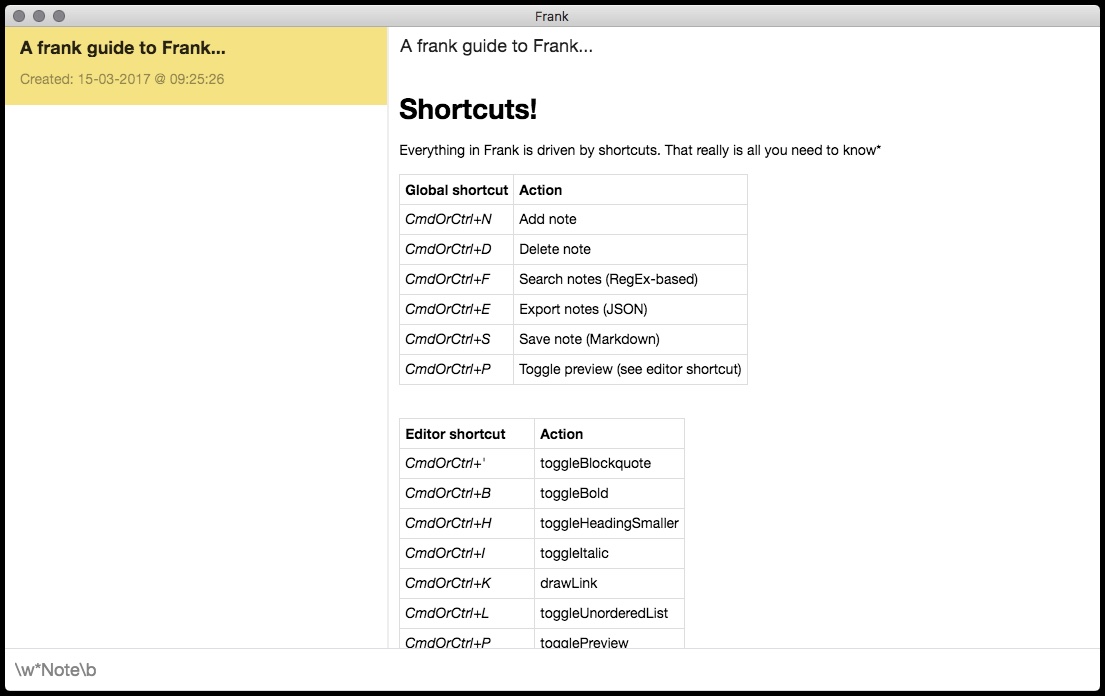
Everything in Frank is driven by shortcuts. That really is all you need to know*
Global shortcut | Action
:------- | :-----
*CmdOrCtrl+N* | Add note
*CmdOrCtrl+D* | Delete note
*CmdOrCtrl+F* | Search notes (RegEx-based)
*CmdOrCtrl+E* | Export notes (JSON)
*CmdOrCtrl+S* | Save note (Markdown)
*CmdOrCtrl+P* | Toggle preview (see editor shortcut)
*CmdOrCtrl+Q* | Quit
Editor shortcut | Action
:------- | :-----
*CmdOrCtrl+'* | toggleBlockquote
*CmdOrCtrl+B* | toggleBold
*CmdOrCtrl+H* | toggleHeadingSmaller
*CmdOrCtrl+I* | toggleItalic
*CmdOrCtrl+K* | drawLink
*CmdOrCtrl+L* | toggleUnorderedList
*CmdOrCtrl+P* | togglePreview
*CmdOrCtrl+Alt+C* | toggleCodeBlock
*CmdOrCtrl+Alt+I* | drawImage
*CmdOrCtrl+Alt+L* | toggleOrderedList
*Shift+CmdOrCtrl+H* | toggleHeadingBigger
\*I did say it was frank...
# Releases
You can find 64-bit ready-to-use .dmg (macOS), .deb (Linux) and .exe/nsis (Windows) files here: [https://github.com/jjcosgrove/frank/releases](https://github.com/jjcosgrove/frank/releases)
# Building from source
## Requirements
* [Node/NPM](https://nodejs.org/en/download/current/)
* [Electron](https://electron.atom.io/)
* [electron-builder](https://github.com/electron-userland/electron-builder)*
\* Only required if you wish to package the source code into an 'app' yourself using this repo's source files.
## Installing build tools
### Node/NPM
You can find the install binaries for your platform via the link above. This will install Node/NPM (the package manager for Node) and is available for most common platforms and CPU architectures.
### Electron
```
npm install -g electron
```
I.e. install Electron/electron globally, for easier usage. If you want more information and/or control over which variation of Electron gets installed, see: [https://www.npmjs.com/package/electron](https://www.npmjs.com/package/electron)
## Building
Assuming you have created a local folder called 'frank' and have entered into it from a shell/command line:
### 1. Clone
```
git clone https://github.com/jjcosgrove/frank.git .
```
### 2. Install
```
npm install
```
### 3. Run
```
npm start
```
# Packaging
Should you wish to build your own binary/app, check out the package.json for the dist* scripts as a starting point; along with the build entry further down. You should already have electron-builder installed, via:
```
npm install -g electron-builder
```
To simply build a package, use the corresponding entry for the desired platform:
## macOS
```
npm run dist-mac
```
## Linux
```
npm run dist-linux
```
## Windows
```
npm run dist-win
```
## All
```
npm run dist-all
```
If you want to customise the build process, then type:
```
build --help
```
And you should get some more information. Alternatively, check out the electron-builder repo.
**NOTE** Depending on your host OS, there may be further requirements when building for another platform/architecture. The electron-builder repo pages have further information, for e.g: [Multi-Platform-Build](https://github.com/electron-userland/electron-builder/wiki/Multi-Platform-Build)
# Contribute
Bugs or feature requests/contributions can be done via:
[https://github.com/jjcosgrove/frank/issues](https://github.com/jjcosgrove/frank/issues)
# Authors
* Just me for now